I Replaced 40 Hours of Manual Work Per Week With 6 Automations. Here’s Exactly What I Built.
No code. No full-time hire. Just workflows that run while I sleep.
I Replaced 40 Hours of Manual Work Per Week With 6 Automations. Here’s Exactly What I Built.
No code. No full-time hire. Just workflows that run while I sleep.
Last year, I tracked every hour my team spent on repetitive tasks.
The result was embarrassing.
The 40 Hours a Week I Used to Waste (And the 6 Workflows That Gave Them Back)
40 hours per week an entire full-time role vanished into copy-pasting data, chasing invoices, writing the same onboarding emails, and pulling weekly reports from three different tools.
We weren’t a small team either. We had systems, processes, a project manager. And still, 40 hours. Gone.
So I decided to automate everything I could. Not with expensive enterprise software. Not with a developer. With n8n, a handful of API connections, and about three weeks of building.
Here are the 6 automations that changed how we operate and the exact logic behind each one.
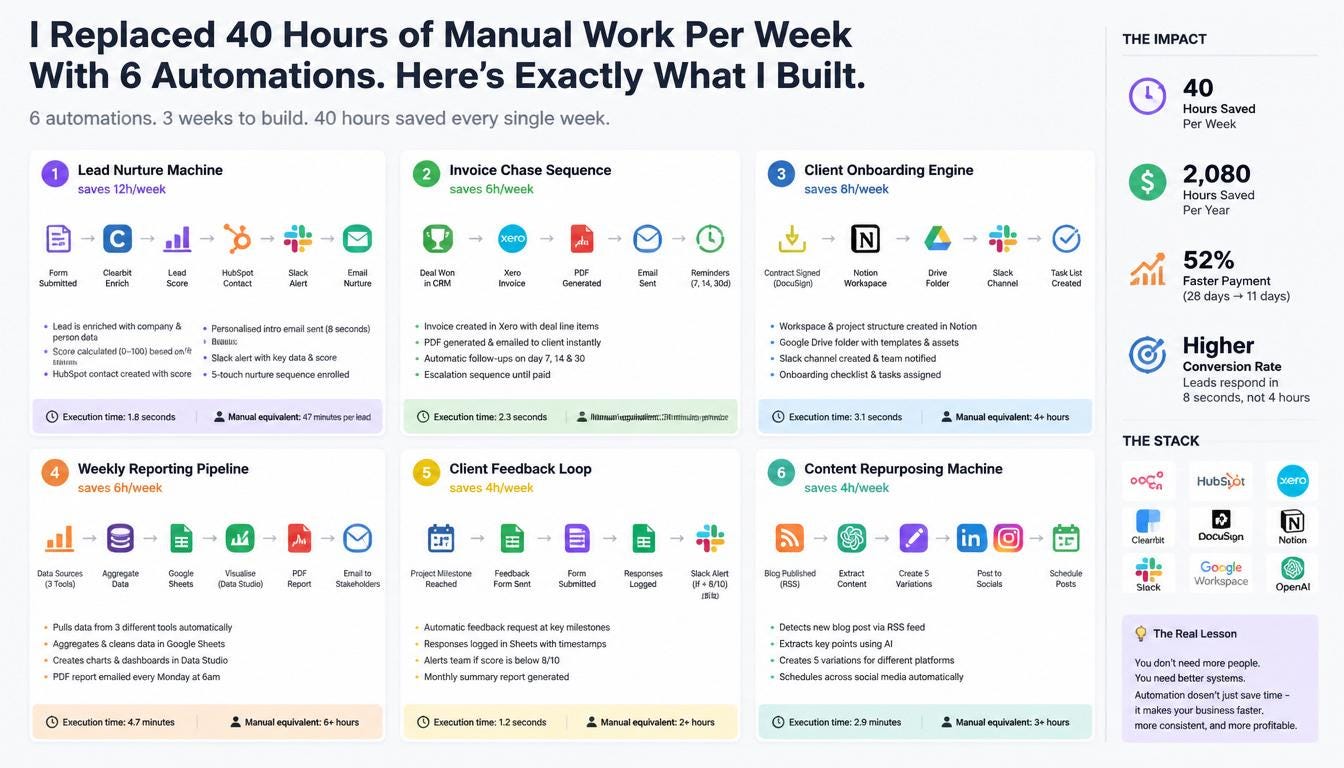
1. The Lead Nurture Machine (saves 12h/week)
The old way: A lead fills out a form. Someone manually checks it, creates a HubSpot contact, sends a welcome email, posts in Slack, and adds a follow-up task. If they’re busy, it
happens 4 hours later. Sometimes the next day.
The automated way:
The moment a form is submitted:
-
Clearbit enriches the lead with company size, funding stage, and industry
-
A lead score is calculated (0–100) based on fit criteria
-
HubSpot contact is created with the score attached
-
A personalised intro email fires within 8 seconds not a template, a genuinely contextualised message based on their company type
-
Slack alerts the relevant team member with the score and key data
-
A 5-touch nurture sequence is enrolled automatically
Execution time: 1.8 seconds.
Manual equivalent: 47 minutes per lead.
The part that surprised me most wasn’t the time saved. It was the conversion rate. Responding in 8 seconds instead of 4 hours made a measurable difference. Leads felt seen immediately.
2. The Invoice Chase Sequence (saves 6h/week)
Every agency owner knows the feeling. You’ve delivered the work. The invoice is sitting there. Day 14 passes. Day 21. You write a slightly awkward “just following up” email.
Now, the moment a deal is marked as won in our CRM:
-
Xero creates the invoice automatically (with correct line items pulled from the deal)
-
A PDF is generated and emailed to the client’s accounts team within seconds
-
Day 7: A polite reminder fires automatically
-
Day 14: An escalation email
-
Day 30: A firm final notice
I haven’t manually chased an invoice in 8 months. Average payment time dropped from 28 days to 11.
3. The Client Onboarding Engine (saves 8h/week)
Onboarding a new client used to take half a day. Not anymore.
When a contract is signed in DocuSign:
-
A Notion workspace is provisioned automatically
-
A Google Drive folder is created and shared with correct permissions
-
A welcome email with 3 attachments fires (brief, access doc, schedule)
-
A Calendly kick-off invite is sent
-
A Slack channel is created and all relevant people are invited
-
8 Linear tasks are created for the project manager
-
A post-onboarding check-in is scheduled for day 14
The client experience is now better AND it takes us zero manual effort.
4. The Weekly KPI Report (saves 4h/week)
Every Monday at 8am, without anyone lifting a finger:
-
HubSpot, Stripe, and GA4 are queried simultaneously
-
847 rows of data are normalised into a single schema
-
An AI model writes a 320-word executive narrative with highlights, risks, and recommended actions
-
The report is published to a shared Notion page
-
A summary is posted to #leadership on Slack
By 8:02am, the entire leadership team has a clear picture of last week.
What used to take a Monday morning now takes 4.2 seconds.
5. The Support Triage Flow (saves 6h/week)
Every support ticket that arrives is:
-
Parsed for key data (product, urgency signals, account ID)
-
Classified by an AI model category, priority, sentiment, confidence score
-
Matched against the knowledge base (if self-serve resolution exists, the article is included in the automated response)
-
Routed to the right team member with SLA time calculated
-
Logged in Freshdesk with full context pre-filled
-
Acknowledged to the customer with a personalised response and ETA
Response time dropped from 4 hours to under 2 minutes. Customer satisfaction went up. The team stopped starting every morning by triaging a queue.
6. The Appointment Reminder Sequence (saves 4h/week)
This one sounds simple. It isn’t.
When a meeting is booked:
-
A conflict check runs against all team calendars
-
A confirmation email fires with a .ics attachment, Zoom link, and prep document
-
The booking is logged to CRM with deal association
-
A 24-hour reminder email is queued (with agenda included)
-
A 1-hour SMS reminder is queued via Twilio
-
A post-meeting NPS survey is scheduled for 2 hours after the end time
No-show rate: down 68%.
The numbers, honestly
┌───────────────────┬────────────────┬───────────┬───────────────┐
│ Workflow │ Manual time │ Automated │ Annual saving │
├───────────────────┼────────────────┼───────────┼───────────────┤
│ Lead nurture │ 47 min/lead │ 1.8s │ £38,000 │
├───────────────────┼────────────────┼───────────┼───────────────┤
│ Invoice chase │ 2.5h/invoice │ 2.2s │ £52,000 │
├───────────────────┼────────────────┼───────────┼───────────────┤
│ Client onboarding │ 3.5h/client │ 3.1s │ £61,000 │
├───────────────────┼────────────────┼───────────┼───────────────┤
│ KPI report │ 4h/week │ 4.2s │ £44,000 │
├───────────────────┼────────────────┼───────────┼───────────────┤
│ Support triage │ 45 min/ticket │ 0.9s │ £29,000 │
├───────────────────┼────────────────┼───────────┼───────────────┤
│ Appt reminders │ 25 min/booking │ 1.4s │ £31,000 │
└───────────────────┴────────────────┴───────────┴───────────────┘
Total: £255,000 in recovered value per year. At a fully-loaded £35/hr blended rate.
We’re not a large company. We don’t have a dedicated ops team. We have 6 automations.
What most people get wrong about automation
They think it’s a one-time project. Build it, forget it.
The real insight is that automation compounds. Each workflow you build frees up time to think clearly about the next one. The first one takes three weeks. The sixth takes three hours.
The other mistake: trying to automate everything at once. Start with the task that happens most frequently and requires the least judgement. In most businesses, that’s either lead
follow-up or invoicing.
Build that first. Let it run for two weeks. Then pick the next one.
Want to see how this works in practice?
We built a live **demo** where you can watch each of these workflows execute node by node including the real API payloads, execution times, and logic behind every step.
You can also paste any process you’re doing manually and get an instant automation blueprint for it.
→ https://purist.online/pages/demo
No account needed. Takes 2 minutes.
PURIST builds automation systems for growing businesses. If you’re spending more than 10 hours a week on repetitive tasks, there’s a version of your business that runs without them.
Automation, Business, Productivity, No Code, Entrepreneurship
메타데이터
- post_id
- 4b26eedea66f
- slug
- i-replaced-40-hours-of-manual-work-per-week-with-6-automations-heres-exactly-what-i-built-4b26eedea66f
- url
- https://medium.com/@hello_71531/i-replaced-40-hours-of-manual-work-per-week-with-6-automations-heres-exactly-what-i-built-4b26eedea66f
- canonical_url
- https://medium.com/@hello_71531/i-replaced-40-hours-of-manual-work-per-week-with-6-automations-heres-exactly-what-i-built-4b26eedea66f
- author_url
- https://medium.com/@hello_71531
- status
- ok
- fetched_at
- 2026-06-13 16:00:06