BEYOND CORP, GOOGLE’s Zero Trust Journey — Part1
BeyondCorp: Google’s Zero Trust Journey (Part 1 of 7)
BEYOND CORP, GOOGLE’s Zero Trust Journey — Part1
BeyondCorp: Google’s Zero Trust Journey (Part 1 of 7)
Today I want to talk about Google’s own Zero Trust journey. Over the years, Google has published a series of short whitepapers on this topic, each about a 10–20 minute read. You can find them all here: https://cloud.google.com/beyondcorp
Over the next few weeks, I’ll publish a post for each of those whitepapers, starting with the first one: “A New Approach to Enterprise Security” (available here).
I’ll try to keep things simple and not as technical as the original documents. They are fairly quick reads, but can still be overwhelming for less technical people.
The Old Way: Perimeter Security
When Google started this project, they like many other enterprises used a Perimeter Security model.
- A firewall at the edge protecting internal resources.
- Remote users connecting via VPN.
- Users working from the office are considered “trusted” by default, with access to internal systems even though still subject to some internal firewalls, like east-west firewalls.
This is the classic castle and moat approach. So Google decided to onboard on their own Zero Trust journey.
What Is BeyondCorp?
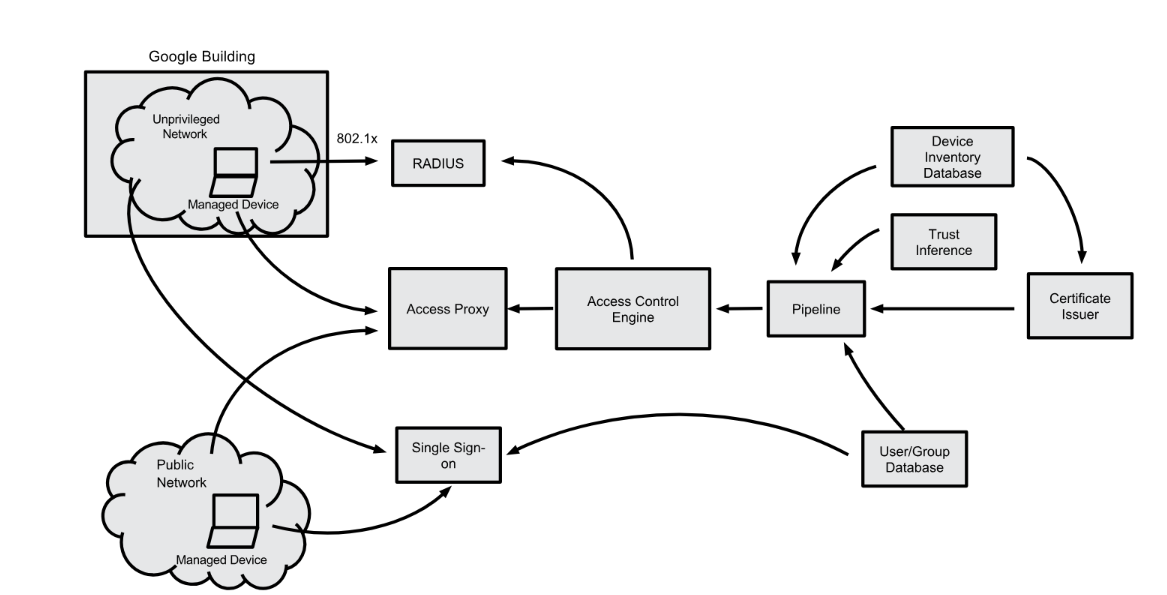
BeyondCorp is the the model employed by Google to achieve Zero Trust, its essentially several systems that work together to form the Zero Trust Access, such as a Device Inventory Database, Device Identity, a Single Sign-on System (SSO), Access Control Engine, the Access Proxy, a Trust Inference Model and other modules.
Google publishes its internal applications to the internet via a central access layer (The Access Proxy). However, unlike public services, access is not freely given. Users must authenticate, and their devices must be authorized and compliant.
Here’s a simple way to think about it:
You already use something similar with Gmail. You can access it from anywhere in the world, all you need is your username, password, and MFA token. Now imagine applying that same experience to every application at your workplace. Whether you’re in the office or at Starbucks, the connection flow is identical. But there’s an extra layer, not only do you need valid credentials and MFA, but your device must also be company issued, compliant with security policies, and trusted.
So, it’s like an internet published application (just like Gmail), but accessible only to specific users (Google employees) using specific, compliant devices.
(Refer to the diagram below from the original paper for an overview of the authentication and authorization flow.)
Why Do It This Way?
Because it eliminates multiple access paths and inconsistent security enforcement. In a traditional model:
- Working from home → VPN
- Working from the office → direct access
That gives you different security postures, different monitoring points, and more complexity. You might argue that a centralized model creates a single point of failure or control. But in practice, these systems are built to be resilient and distributed. Having fewer, well controlled entry points is much easier to secure, monitor, and manage than many different paths especially when those paths create inconsistencies that attackers can exploit.
How Did Google Do It?
Google started by rethinking their own office networks. They began treating their office networks as unprivileged networks essentially no different from a coffee shop or airport Wi-Fi.
In the old model, office networks had direct connections (MPLS, dark fiber, VPN) back to the datacenters, secured by ACLs. Google changed this by placing users on a separate VLAN that only provided basic services (NTP, DNS, DHCP). Users could no longer access applications directly. Instead, even while sitting in the office, they used the office’s internet connection to reach applications through the access proxy.
From a user experience perspective, being in the office now felt just like being at Starbucks or home.
How Did They Migrate Without Breaking Everything?
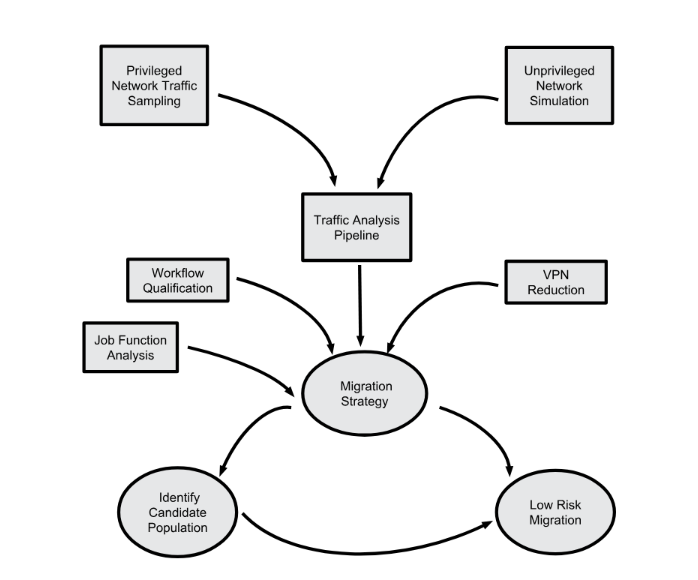
Google didn’t flip a switch overnight. They used a careful, phased migration strategy:
- They logged all traffic from their network switches.
- They compared that traffic against the ACL that existed between the office and the datacenter.
- Any traffic that did not match the ACL was identified as user traffic that needed to go through the proxy.
Migration was phased by department and over a long period of time, ensuring business continuity.
(Refer to the migration diagram below from the original paper for a visual overview.)
What’s Next?
This was just a high-level summary of the first whitepaper: “A New Approach to Enterprise Security.” In the next posts, I’ll dive into the subsequent papers, which cover:
- How Google went from design to deployment
- The access proxy architecture
- Maintaining productivity during migration
- User experience
- Building a healthy device fleet
- And tackling the hardest use cases
메타데이터
- post_id
- 65e2ea45f7c8
- slug
- beyond-corp-googles-zero-trust-journey-part1-65e2ea45f7c8
- url
- https://medium.com/@gualter.guizado_88608/beyond-corp-googles-zero-trust-journey-part1-65e2ea45f7c8
- canonical_url
- https://medium.com/@gualter.guizado_88608/beyond-corp-googles-zero-trust-journey-part1-65e2ea45f7c8
- author_url
- https://medium.com/@gualter.guizado_88608
- status
- ok
- fetched_at
- 2026-06-22 05:41:33


