“This PDF hates OCR” — DeepSeek OCR 2 Reads Documents Like A Human
Your customer forwards an invoice PDF with the subject line: “why is this invoice scrambled?”
“This PDF hates OCR” — DeepSeek OCR 2 Reads Documents Like A Human
Your customer forwards an invoice PDF with the subject line: “why is this invoice scrambled?”
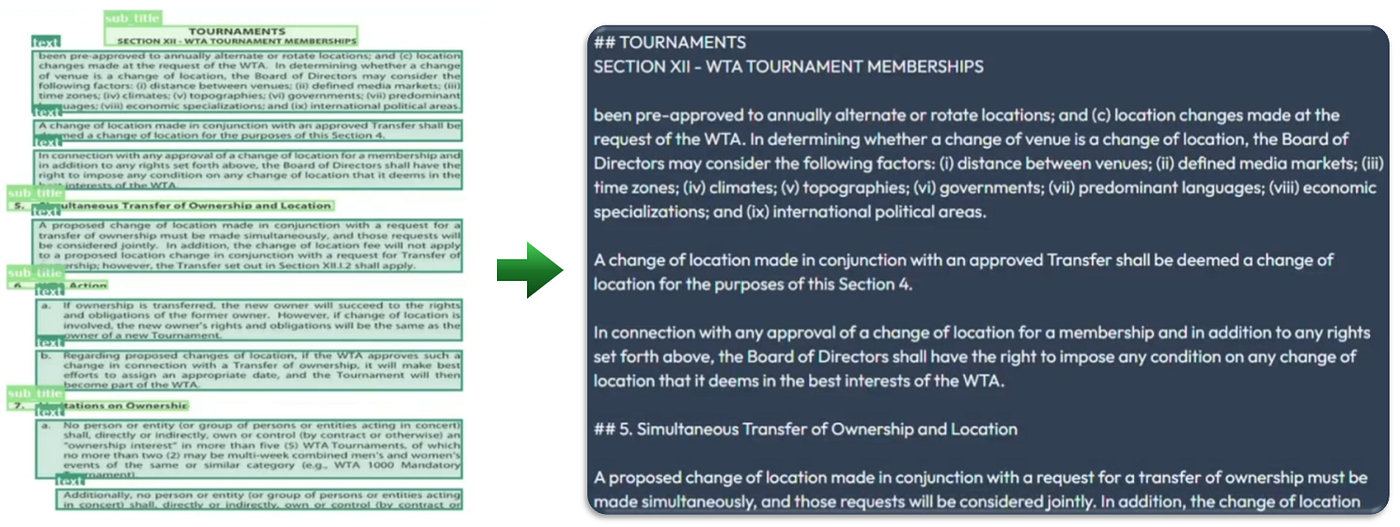
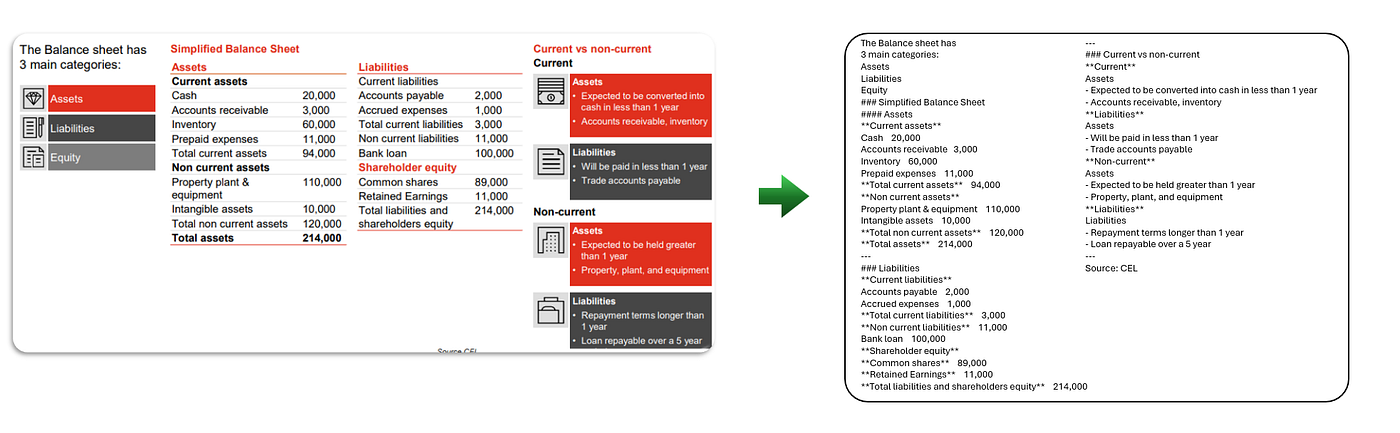
The painful part is the text is usually there. The model just can’t keep the structure together.
It reads a table like random paragraphs. It merges columns. It separates labels from values. And no amount of regex duct tape really fixes it.
OCR pipelines have nasty long tails in production: PDFs with tables, multi-column layouts, mixed fonts, screenshots, mobile photos, math, stamps, weird spacing, skew, poor lighting, tiny footnotes..
That’s why I pay attention when a model claims it can read documents like humans do.
DeepSeek-OCR 2 is one of those releases that’s worth a real evaluation, mostly because its core idea maps onto the failure modes I see in production:
- layout breaks (wrong reading order)
- tables flatten incorrectly
- labels get separated from values
- multi-column flows collapse into nonsense
DeepSeek OCR 2 is trying to fix that at the encoder level.
Thanks for reading this article. I’m writing a deep-dive ebook on Agentic SaaS, the emerging design patterns that are quietly powering the most innovative startups of 2026.
Bookmark it here: A*gentic SaaS Patterns Winning in 2026*, packed with real-world examples, architectures, and workflows you won’t find anywhere else.
What DeepSeek OCR 2 actually is
At a high level, DeepSeek OCR 2 is an open-source, Apache-2.0 licensed, image-to-text model that targets document understanding (not just transcription).
It’s published with weights + code and runs via standard Hugging Face Transformers (with trust_remote_code=True).
A few concrete facts that matter immediately if you build products:
- 3B params, released in BF16.
- The main checkpoint (
model-00001-of-000001.safetensors) is ~6.78GB. - Official docs emphasize NVIDIA CUDA setups (e.g., CUDA 11.8 + Torch 2.6.0).
- It includes a production-ish path using vLLM with scripts for streaming image OCR, concurrent PDF OCR, and batch eval.
So the “it’s real” box is checked: license, weights, code, and an inference story beyond a single notebook cell.
What “Visual Causal Flow” Really Means
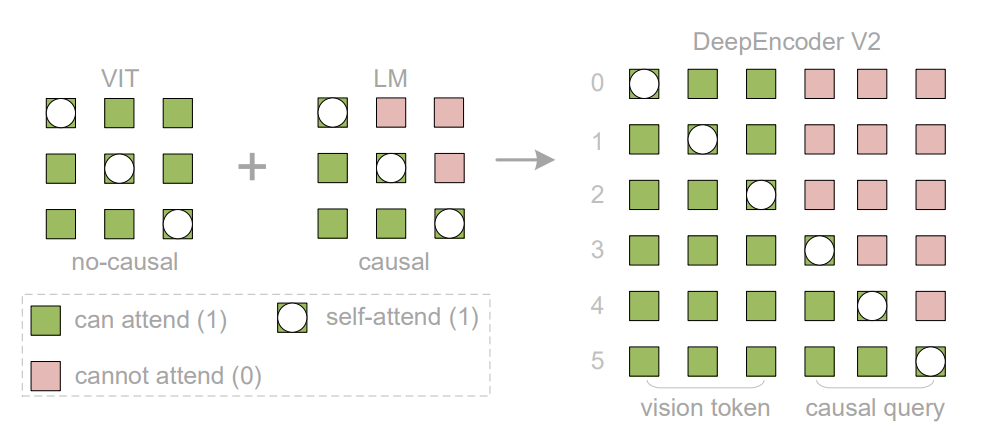
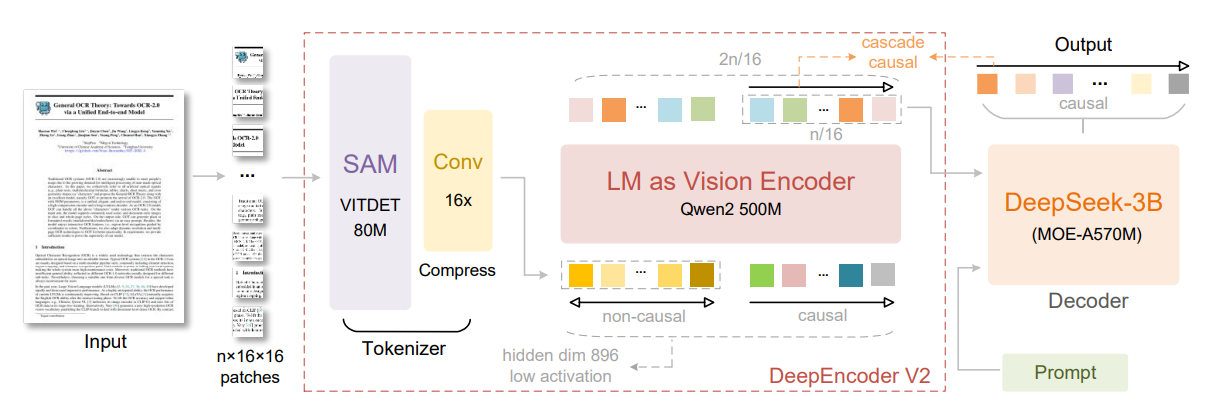
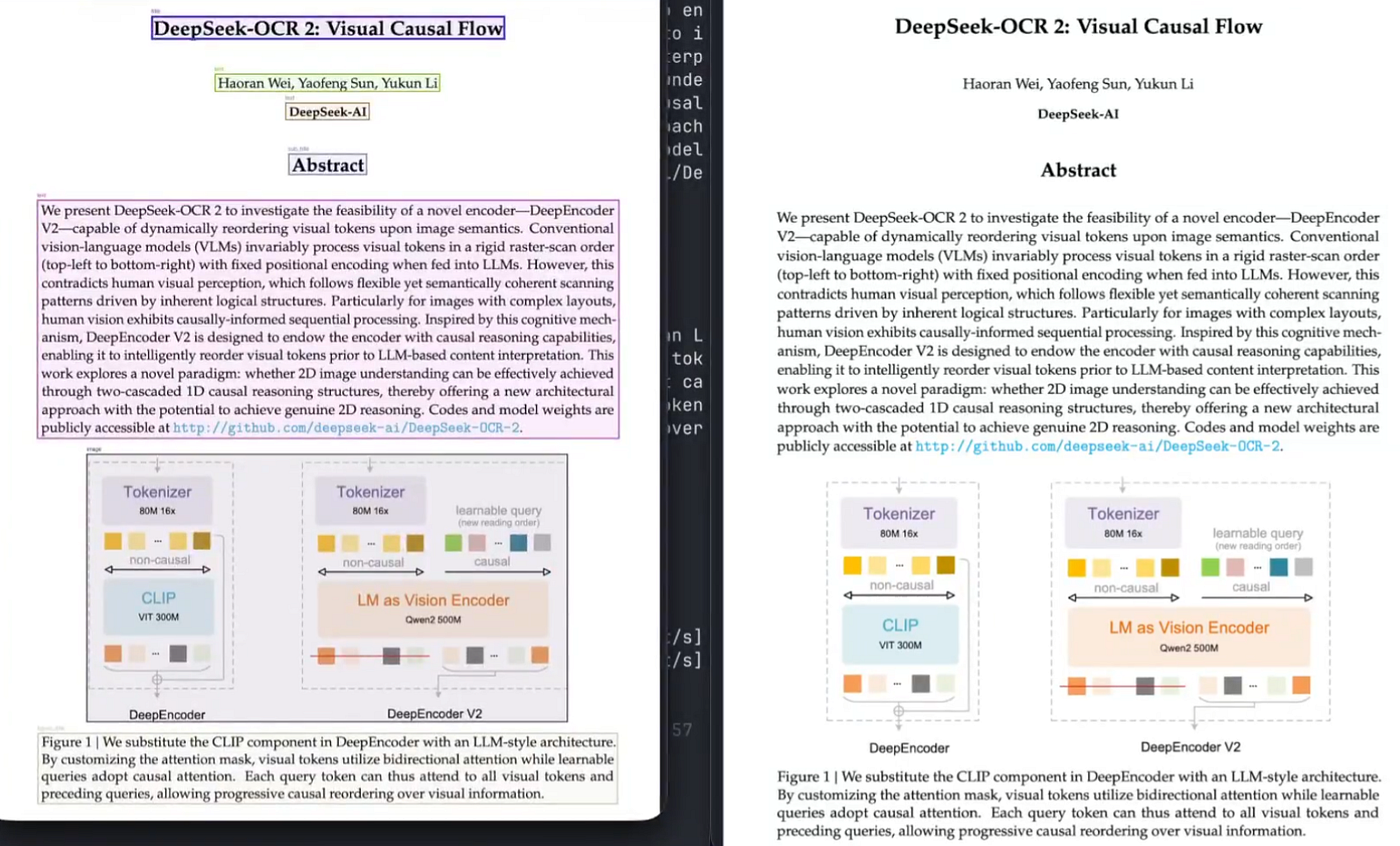
DeepEncoder V2 is replacing the CLIP component used previously with a compact LLM-style encoder, it’s using learnable “causal flow” queries and applying a customized attention mask where visual tokens keep bidirectional attention, but query tokens operate causally, feeding only the query outputs (the “reordered” side) into the decoder.
There’s also some concrete implementation detail that gives this credibility.
The vision tokenizer uses an 80M-parameter SAM-base component + conv layers (following their earlier approach), primarily to achieve large token compression while keeping compute manageable.
I like seeing this level of detail because it helps me reason about:
- what’s likely to break (edge-case layouts),
- what’s likely to generalize (reading flow),
- where fine-tuning might help (domain layouts).
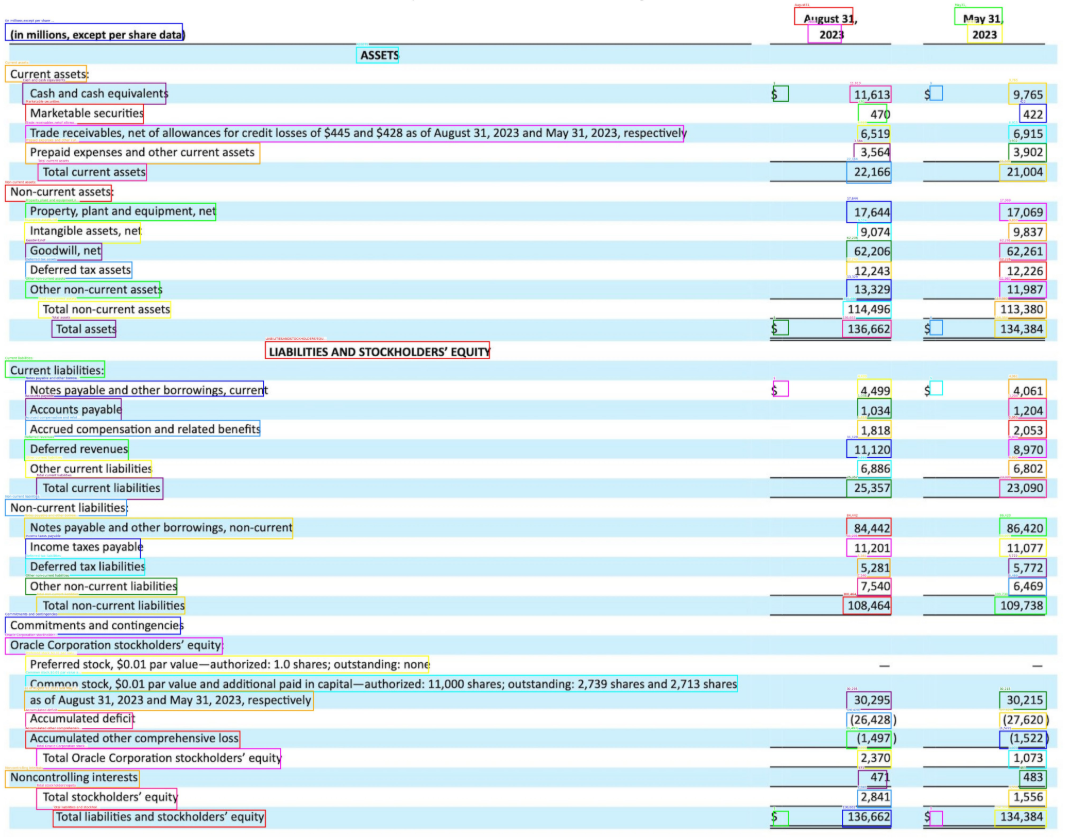
The most interesting part: OCR 2 learns a reading path
Most VLM-ish OCR pipelines effectively treat a page like a fixed 1D sequence: chunk into patches, then serialize left-to-right, top-to-bottom.
DeepSeek’s paper calls this a rigid raster-scan order and points out it contradicts how humans visually process complex layouts.
That raster assumption is fine for “one column of text on a clean background.”
It’s conceptually broken for real documents:
- a table in the bottom-left gets “sliced” across the token sequence
- form fields get interleaved with surrounding text
- multi-column reading order becomes a guessing game
- diagrams + captions lose locality
DeepSeek OCR 2’s approach is closer to encode everything globally, then learn how to traverse it.
Step 1: bidirectional “what’s on the page” tokens The encoder builds a representation of the whole image. The model’s motivation is to avoid forcing a hard-coded scan order when semantics live in 2D.
Step 2: learnable “query” tokens that decide what to read next Instead of committing to a fixed traversal, DeepSeek OCR 2 introduces what the paper frames as causal flow — a mechanism to dynamically reorder visual tokens based on image semantics before decoding.
The intuition:
- The bidirectional tokens represent the page.
- The causal/query side represents a learned reading plan.
If the bottom-left is a table, the model can learn to “camp there” and output it as a contiguous block, rather than scattering it across the output because the raster order forced it.
It’s basically saying reading order is a model capability, not a heuristic.
And if you’ve ever tried to patch reading order downstream with brittle rules… you immediately understand why this matters.
Token budgets and “reading order” are the whole game
A lot of OCR model comparisons obsess over accuracy without talking about economics. In production OCR, token budget translates to:
- latency
- cost
- throughput
- max page complexity you can support
DeepSeek OCR 2’s benchmark framing is unusually crisp because they talk in visual tokens per page.
It constrains visual tokens fed into the LLM decoder in the 256-1120 range, and the paper explicitly compares Gemini-3 Pro at 1120 visual tokens in OmniDocBench v1.5 edit distance results.
Also, the default “dynamic resolution” scheme is documented as:
- (0–6) x 768 x 768 local views + 1 x 1024 x 1024 global view
- mapped to visual tokens: (0–6)×144 + 256
So your “quality vs speed” knob is basically how many local crops are you willing to pay for?
What changed from DeepSeek-OCR (V1) to V2
DeepSeek OCR (v1) was already notable for pushing the idea of optical compression, i.e. keep vision tokens low, decode long text outputs anyway.
Their v1 paper reports:
- at <10x compression ratio, OCR precision can hit 97%
- at 20x, accuracy still around 60%
- and a production claim of 200k+ pages/day on a single A100–40GB for training data generation
OCR 2 keeps the “compression + decode” framing, but the benchmark gains are attributed to the new encoder design.
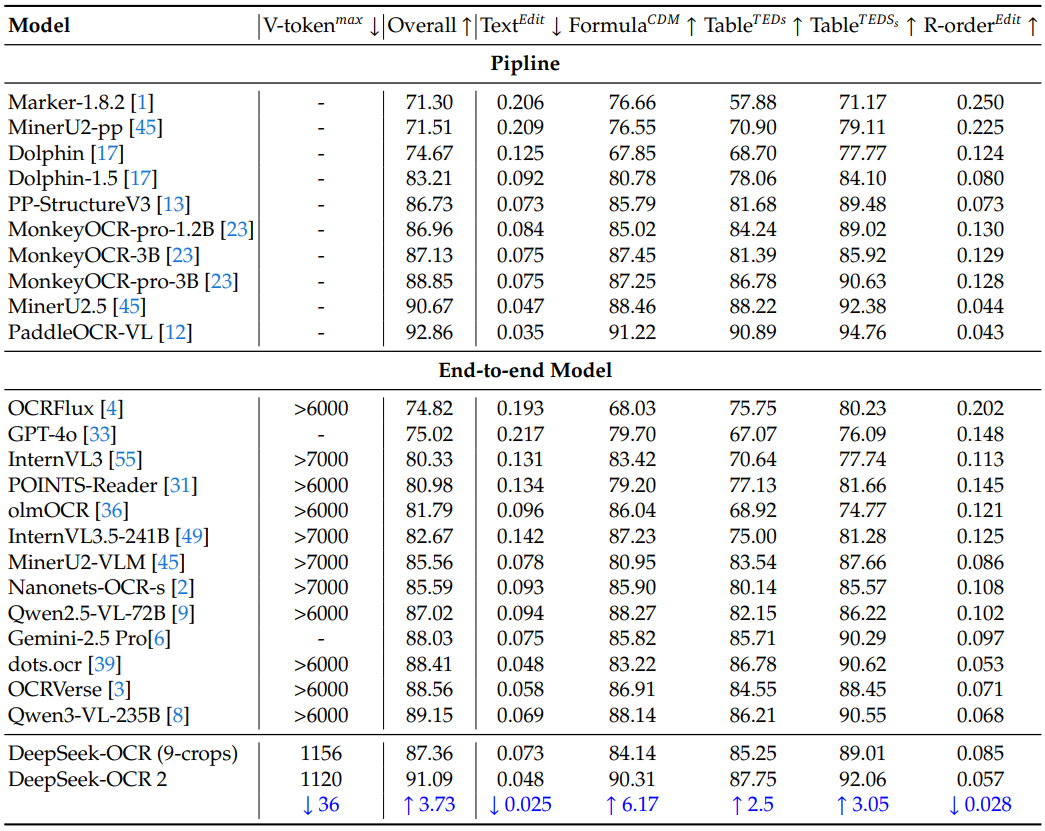
On OmniDocBench v1.5, the OCR 2 paper reports:
- 91.09% overall at V-tokenmax = 1120
- +3.73% improvement vs DeepSeek OCR baseline under similar data sources
- reading-order edit distance improvement: 0.085 to 0.057
That last line is the one I care about, because reading order is exactly where “OCR is solved” dies in real products.
The benchmark comparison that will drive half the discourse
DeepSeek OCR 2 includes a direct OmniDocBench v1.5 edit distance table that compares it to Gemini-3 Pro under the same max visual token budget:
- Gemini-3 Pro @ 1120: OverallEdit = 0.115
- DeepSeek OCR 2 @ 1120: OverallEdit = 0.100
DeepSeek-OCR 2 reports +3.73% performance gains on OmniDocBench v1.5 vs the DeepSeek-OCR baseline.
On the Google DeepMind side, OmniDocBench 1.5 is reported as Overall Edit Distance (lower is better). Gemini 3 Pro is shown at 0.115 in their published benchmark table, and their methodology PDF explicitly describes how OmniDocBench 1.5 results are averaged.
In DeepSeek’s paper,

Edit Distances for different categories of document-elements in OmniDocBench v1.5
DeepSeek-OCR 2 (0.100) achieves lower ED in document parsing compared to Gemini-3 Pro (0.115) under a similar visual token budget (1120), further demonstrating that our new model maintains high compression rates of visual tokens while ensuring superior performance, with exceptionally high potential.
Also interesting: OCR 2’s breakdown in that same table is explicit for text/formula/table/reading order edit components (with OCR 2 improving reading order and tables relative to OCR 1).
The right way to read this is not “model X beats model Y forever.” It’s:
at a sane-ish visual token budget, OCR 2 is competitive with top-tier systems on document parsing metrics.
And that’s a big deal for an open-weight model.
How to Run DeepSeek-OCR 2 locally
I’ll show you the most direct path first (Transformers), then the “I’m shipping this” path (vLLM batch + PDF).
Prereqs:
- python 3.12.9
- CUDA 11.8
- torch 2.6.0
- transformers 4.46.3
- flash-attn 2.7.3 (installed with
--no-build-isolation)
Please note that the weight file is large (single shard model-00001-of-000001.safetensors ~6.78GB), so your first pull won’t be subtle.
Transformers inference
from transformers import AutoModel, AutoTokenizer
import torch, os

os.environ["CUDA_VISIBLE_DEVICES"] = "0"
model_name = "deepseek-ai/DeepSeek-OCR-2"

tokenizer = AutoTokenizer.from_pretrained(model_name, trust_remote_code=True)
model = AutoModel.from_pretrained(
    model_name,
    _attn_implementation="flash_attention_2",
    trust_remote_code=True,
    use_safetensors=True,
)
model = model.eval().cuda().to(torch.bfloat16)

# prompt = "<image>\nFree OCR. "
prompt = "<image>\n<|grounding|>Convert the document to markdown. "
res = model.infer(
    tokenizer,
    prompt=prompt,
    image_file="your_image.jpg",
    output_path="your/output/dir",
    base_size=1024,
    image_size=768,
    crop_mode=True,
    save_results=True,
)
The key parameters you should watch immediately:
base_size=1024(global normalization)image_size=768(crop size)crop_mode=True(multi-crop / local views)promptmode (markdown conversion vs plain OCR)
Supported prompt modes
DeepSeek’s own “main prompts” are the two canonical modes:
- Document → markdown (layout-aware):
<image>\n<|grounding|>Convert the document to markdown. - Free OCR (no layout preservation):
<image>\nFree OCR.
You actually expand this into a more product-friendly list:
- document → markdown
- “OCR this image” (grounding)
- free OCR
- figure parsing
- general description
- locating a referenced snippet via
<|ref|>...
I’d explicitly treat these as separate tasks with separate eval sets:
- transcription accuracy (Free OCR)
- structure correctness (document → markdown)
- region grounding (Locate
<|ref|>...)
This is how you avoid shipping a single “OCR” endpoint that behaves unpredictably.
Running OCR2 on PDFs with Concurrency
If you’re doing anything beyond a demo, you don’t want “one Python call per page” with no throughput story.
Have a look at the vLLM setup and scripts for:
- streaming output for images:
run_dpsk_ocr2_image.py - concurrent PDF processing:
run_dpsk_ocr2_pdf.py - batch eval for benchmarks:
run_dpsk_ocr2_eval_batch.py
They pin an environment approach that installs a specific vLLM wheel (vllm-0.8.5+cu118) plus FlashAttention 2, and they explicitly note you may hit version mismatches between vLLM and Transformers unless you manage the environment carefully.
Easy take here:
- Transformers path is for correctness and integration.
- vLLM path is for throughput and batching.
- what’s likely to generalize (reading flow),
- where fine-tuning might help (domain layouts).
DeepSeek-OCR 2 vs PaddleOCR-VL (and PaddleOCR-VL-1.5)
This is the comparison I’d take most seriously for open-source deployments.
PaddleOCR-VL positions itself as:
- resource-efficient
- tailored for document parsing
- integrating a NaViT-style dynamic resolution visual encoder with an ERNIE-4.5–0.3B language model
- supporting 109 languages,
- and handling complex elements like tables/formulas/charts.
The model card shows OmniDocBench v1.5 performance plots and explicitly calls out SOTA performance across multiple sub-dimensions (text/formula/table/reading order), with metrics sourced from multiple benchmarks.
Then PaddleOCR-VL-1.5 (an updated release) claims 94.5% accuracy on OmniDocBench v1.5 and introduces Real5-OmniDocBench for robustness under physical distortions (warping, skew, screen photography, illumination).
- If I care most about layout reading flow in complex documents, DeepSeek-OCR 2’s “causal token reordering” is a uniquely targeted bet.
- If I care most about multilingual coverage + efficiency in a pipeline (and potentially robustness under real-world capture distortions), PaddleOCR-VL / 1.5 is extremely compelling on paper.
In reality I’d run both on a 200–500 page sample of my docs and score them on task-specific metrics.
Bonus Articles
메타데이터
- post_id
- 6df7731153f6
- slug
- this-pdf-hates-ocr-deepseek-ocr-2-reads-documents-like-a-human-6df7731153f6
- url
- https://medium.com/@agentnativedev/this-pdf-hates-ocr-deepseek-ocr-2-reads-documents-like-a-human-6df7731153f6
- canonical_url
- https://medium.com/@agentnativedev/this-pdf-hates-ocr-deepseek-ocr-2-reads-documents-like-a-human-6df7731153f6
- author_url
- https://medium.com/@agentnativedev
- status
- ok
- fetched_at
- 2026-06-09 15:37:30