Implicit and Explicit Input Layers in Keras Sequential Models
Neural Networks and Deep Learning Course: Part 10
Implicit and Explicit Input Layers in Keras Sequential Models
Neural Networks and Deep Learning Course: Part 10

Photo by Geio Tischler on Unsplash
With this article, we officially begin the programming part of neural networks. We’ll start with Keras which is one of the most popular deep learning libraries available today.
Before building our first neural network model with Keras, I want to discuss two ways of defining the input layer in Keras sequential models.
What is a sequential model?
In sequential models, the input, hidden and output layers are stacked in the model sequentially (hence the name). The information propagates from the input to the output through hidden layers. The feedback happens only at the output layer through the backpropagation and there is no feedback between intermediate hidden layers. Sequential models are also called Feed-Forward Neural Networks (FFNN) models.
In Keras, the sequential models can be built using the Sequential() class.
from tensorflow.keras import Sequential
model = Sequential()
Types of layers in Keras
There are many possible options available for Keras layers. Today, we discuss two of them.
- InputLayer
- Dense
InputLayer
We can use the InputLayer() class to explicitly define the input layer of a Keras sequential model. It has the following arguments.
- input_shape: This is a required argument.
- name: This is an optional argument.
The hidden layers and the output layer can be added to the model using the Dense() class (more on this shortly).
Now, we define a Keras sequential model with two hidden layers.
[embed]
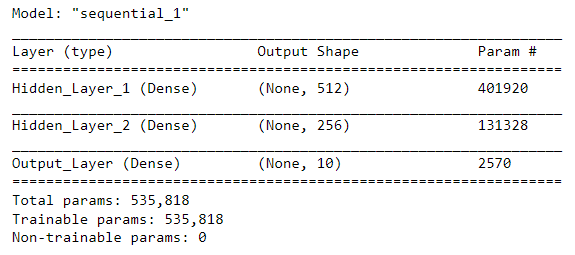
(Image by author)
We can visualize the model architecture as follows.
from tensorflow.keras.utils import plot_modelplot_model(model, to_file='model.png',
show_shapes=True, dpi=100,
show_layer_names=True)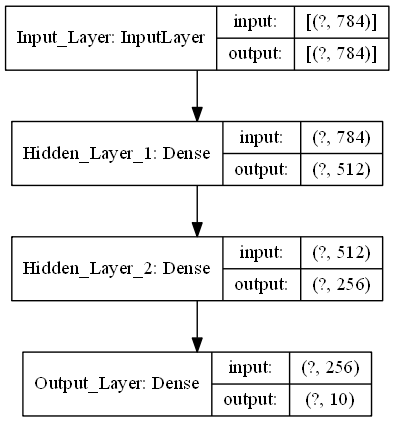
(Image by author)
Dense
The dense layers are fully (densely) connected layers. They can be added to the model using the Dense() class which has the following arguments.
- units: This is a required argument. This denotes the number of nodes (units) in the layer. This takes a positive integer.
- input_shape: This is not required for hidden layers and the output layer. However, this is required for the first layer if you don’t explicitly define the input layer using the
InputLayer()class. - activation: The type of activation function to use in the layer.
Nonemeans no activation. - name: This is an optional argument.
You already know that the hidden layers and the output layer can be added to the model using the Dense() class. The input layer can also be defined as a dense layer. Here is how:
When the
input_shapeis passed to the first dense layer, Keras adds an input layer for the model behind the scene. This is exactly the same as defining the input layer using theInputLayer()class.
Let’s see an example.
[embed]
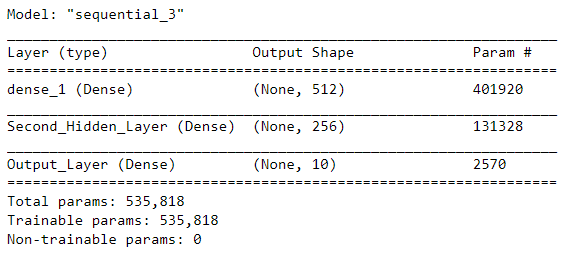
(Image by author)
We can visualize the model architecture as follows.
from tensorflow.keras.utils import plot_modelplot_model(model, to_file='model.png',
show_shapes=True, dpi=100,
show_layer_names=True)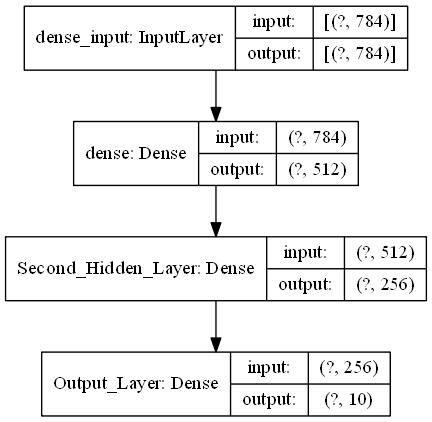
(Image by author)
We can see the input layer even if we didn’t explicitly define it! Keras has added the input layer behind the scene.
Summary
In Keras, sequential models can be built using the Sequential() class. We can easily add layers to the model using the add() method. All layers can be defined as dense layers. However, there are two options to define the input layer. We can use the InputLayer() class to explicitly define the input layer of a Keras sequential model or we can use the Dense() class with the input_shape argument that will add the input layer behind the scene.
This is what I want to say by writing this short article.
See you in the next article!
As always, happy learning to everyone!
Never miss a great story again by subscribing to my **email list**. You’ll receive every story in your inbox as soon as I hit the publish button.
If you’d like, you can **sign up for a membership** to get full access to every story I write and I will receive a portion of your membership fee.
Rukshan Pramoditha 2022–02–24
메타데이터
- post_id
- 733049f83a32
- slug
- implicit-and-explicit-input-layers-in-keras-sequential-models-733049f83a32
- url
- https://medium.com/data-science-365/implicit-and-explicit-input-layers-in-keras-sequential-models-733049f83a32
- canonical_url
- https://medium.com/data-science-365/implicit-and-explicit-input-layers-in-keras-sequential-models-733049f83a32
- author_url
- https://medium.com/@rukshanpramoditha
- status
- ok
- fetched_at
- 2026-07-28 22:47:02