The AI Engineering Stack I Use for Every New Project
After building AI agents, RAG systems, evaluation pipelines, and developer tools, this is the stack I keep coming back to.
The AI Engineering Stack I Use for Every New Project
After building AI agents, RAG systems, evaluation pipelines, and developer tools, this is the stack I keep coming back to.
Not a Medium member? Read for free here
I built tools and resources for AI engineers, including the **Complete AI Engineering Workspace Collection (AI Agents, RAG, MCP, Multi-Agent Systems, AI SaaS, Chatbots, and AI Evaluation), and the [Claude Code Mastery Guide](https://gumroad.com/products/hxrsgw?utm_source=medium_top_cta) **(check the end of this article for detailed contents)

image by author
I get asked this question often: “What stack do you actually use?”
The answer isn’t just Claude Code but it’s a stack.
Best productivity comes from choosing tools that work well together with a stack, removing as much friction as possible!
So here’s the AI engineering stack I currently use for almost every project: (I tried to be as generic as I can, tools can differ again)
1. Claude Code
Claude Code is where almost every project begins. It makes it all easy because we don’t start new anymore, it understands projects like pro, acts like a senior team member at:
- Planning
- Architecture
- Documentation
- Refactoring
- Debugging
- Code reviews
Once the project has enough context and if you use it properly with pro techniques, it feels like another pro engineer on the team.
2. A Good Project Memory
This is probably the most overlooked part of AI engineering. Before asking Claude to build anything, I define:
- Project goals
- Architecture
- Engineering rules
- Coding conventions
- Important decisions
The better the project memory, the better every future conversation becomes. I’ve found this has a much bigger impact than constantly rewriting prompts!
3. GitHub
Every project lives in Git (nothing unusual there)
But what changed is how I use Claude Code alongside Git.
I regularly use it to explain pull requests, review changes, summarize commits, and understand unfamiliar code.
Large repositories become much easier to navigate.
4. APIs, MCPs
Photo by Y M on Unsplash
Modern AI engineering is really about connecting systems together. Almost every AI application depends on APIs.
- LLMs
- Vector databases
- Payment providers
- GitHub
- Databases.
- Internal services
- Of course, MCP plugins!
The more AI projects I built, the more I realized that understanding APIs is one of the most valuable engineering skills you can have.
Once you understand how systems communicate, you can connect almost anything!
5. Automation
One question changed how I work is: Can this run without me?
Whenever I find myself repeating a task, I try to automate it.
Documentation, Testing, Notifications, Data pipelines, Reporting etc..,
Small automations quickly become habits, and habits eventually become systems!
The less time I spend moving information between tools, the more time I spend solving real engineering problems.
6. AI Evaluation
Building an AI system is only half the work(harsh truth). The other half is knowing whether it’s actually working.
I try to evaluate prompts, retrieval quality, hallucinations, latency, and overall system behavior before shipping.
Good evaluation turns AI development from guesswork into engineering.
It also makes future improvements much easier because you have something measurable to compare against.
7. Vector Databases / Retrieval
Whether you’re building a simple RAG application or a production-grade Agentic RAG system, choosing the right retrieval pipeline matters just as much as choosing the right model.
For prototypes and proof-of-concepts, I’ve found FAISS and ChromaDB to be fast, lightweight, and easy to work with.
As projects grow, I prefer Qdrant because it offers better scalability, filtering, and production-ready capabilities.
Of course, a vector database alone won’t fix retrieval. Embedding models, chunking strategies, indexing, and retrieval pipelines all play equally important roles.
In my experience, the right combination of a good embedding model and a well-designed vector database can dramatically improve the quality of RAG systems.
8. Documentation
One thing AI has taught me is that good documentation isn’t optional anymore! Claude Code can only work with the context you give it.
That’s why I document almost everything before building:
- Architecture
- Engineering decisions
- Coding conventions
- Project goals
- Constraints
- Feature specifications
Good documentation doesn’t just help teammates but it also becomes reusable context that Claude Code can understand and build upon1
The better your documentation, the less time you spend re-explaining your project and the more consistent your AI-generated code becomes.
I’ve found that investing a little more time in documentation at the beginning saves hours of debugging, clarification, and rework later.
9. Markdown
Photo by Ilya Pavlov on Unsplash
Almost everything starts as Markdown(a standing ovation to md🫡)
- Architecture
- Planning
- Documentation
- Project memory
- Prompts
Keeping everything as plain text makes it easier for both humans and Claude Code to understand the project.
10. Continuous Learning
The tools change, and the workflows change.
Even Claude Code changes! Who knows, there might be another platform tomorrow!
The best investment has been documenting what works, experimenting with new workflows, and continuously improving my engineering process.
That’s probably the most valuable tool in the entire stack.
Final Thoughts
People often ask which AI tool is the best. I don’t think that’s the right question anymore.
The better question is: What workflow helps you build consistently?
For me, it’s a combination of good documentation, reusable project memory, clear engineering standards, and tools that work well together.
That’s the stack I keep coming back to.
What stack do you use? Let me know!
Want to Accelerate your Workflows?
If this article helped you, I think you’ll enjoy these resources:
1. The Complete AI Engineering Workspace Collection for Claude Code
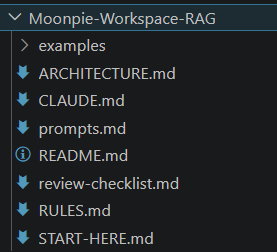
sample for RAG workspace in The Complete AI Engineering Workspace Collection for Claude Code
7 Production Workspaces • 210+ Claude Code Prompts • AI Agents • RAG • MCP • Architecture Guides • Engineering Standards • Review Checklists • Examples • Lifetime Updates
So you can spend less time setting up projects and more time building them! Tailored for all (I covered most teams, let me know if you want it specialised for your team!)
2. The Complete Field Manual: Claude Code Mastery Guide
If you’re ready to move beyond CLAUDE.md, the guide dives deep into Context Engineering, Hooks, MCP, Subagents, custom commands, GitHub Actions, SDKs, Loop Engineering, cost optimization, autonomous workflows, and production-ready AI engineering patterns.
Preview: Table of Contents
29 Chapters • Real-World Recipes • Power Moves • Loop Engineering Supplement • Lifetime Updates
Whether you’re just getting started or already using Claude Code every day, they help you spend less time explaining your projects to AI and more time building things that matter.
Need Help Building AI Systems?
I offer AI engineering and technical consulting for startups, founders, and engineering teams.
Learn more: **https://moonpiecreates.vercel.app/services | [LinkedIn](https://www.linkedin.com/in/chandana-j-13b56520a/)**
Happy building! 💻
More articles you’ll love ❤
메타데이터
- post_id
- 7706cab5aa07
- slug
- the-ai-engineering-stack-i-use-for-every-new-project-7706cab5aa07
- url
- https://medium.com/the-tech-trek-by-tech-chick/the-ai-engineering-stack-i-use-for-every-new-project-7706cab5aa07
- canonical_url
- https://medium.com/the-tech-trek-by-tech-chick/the-ai-engineering-stack-i-use-for-every-new-project-7706cab5aa07
- author_url
- https://medium.com/@theipocmwanderer
- status
- ok
- fetched_at
- 2026-07-10 06:45:42