Human-in-the-Loop Agents: Steering AI with LangGraph’s Streaming, Breakpoints (Part 3)
Turning Static Reasoning Graphs Into Dynamic Systems Where Humans Can Pause, Inspect, and Redirect an Agent
Human-in-the-Loop Agents: Steering AI with LangGraph’s Streaming, Breakpoints (Part 3)
Turning Static Reasoning Graphs Into Dynamic Systems Where Humans Can Pause, Inspect, and Redirect an Agent

This article is also available as a podcast! If you’re on the go or just want to absorb the content in audio format, you can listen to the full episode below 👇 The podcast is also available on Spotify and Apple Podcasts.
As AI agents become more autonomous, chaining tool calls, making decisions, and executing multi-step workflows, the question of how to maintain meaningful human control without sacrificing automation becomes increasingly urgent.
Traditional patterns often force a false choice between fully unsupervised agents, which risk errors and unsafe behavior, and fully supervised workflows, which defeat the purpose of automation.
This tension is especially significant in high-stakes domains such as medical analysis, financial reporting, or content moderation, where an autonomous agent may commit a critical mistake before anyone intervenes, while excessive oversight eliminates efficiency gains.
What is needed is temporal control: the ability to observe reasoning as it happens, pause execution at key moments, inject corrective guidance, and even rewind to earlier states to explore alternative trajectories.
Objective
This article demonstrates how to transform agents from opaque black boxes into steerable, inspectable systems through three complementary mechanisms: streaming for real-time visibility, breakpoints for surgical intervention, and time travel for historical navigation. It relies on LangGraph framework.
These aren’t just debugging features but fundamental primitives for building production-grade agents that balance autonomy with accountability.
After reading this article, you will understand:
- Streaming: How to expose an agent’s reasoning process in real time, surfacing intermediate thoughts, tool calls, and state transitions as they happen, not after the fact
- Human-in-the-Loop: How to strategically insert breakpoints that pause execution at critical decision points, allowing humans to inspect context, approve/reject actions, or inject corrective guidance before the agent proceeds
- Time Travel: How to rewind an agent’s execution to any prior state, fork alternative reasoning paths, and replay modified trajectories, enabling “what-if” exploration and recovery from mistakes without restarting from scratch
Context: This article is the third part of the series on building production-ready AI agents with LangGraph. Part 1 covered the foundational architecture of stateful agents and graph-based workflows, while Part 2 examined persistence mechanisms for checkpoint management and recovery. This new article addresses the most challenging aspect: maintaining human oversight at scale.
***Prerequisites:
- Basic knowledge of Python, LLMs, and prompt engineering is recommended. - Readers should either be familiar with LangChain concepts (chains, models, prompts) or have read Part 1 of this series (or listen the podcast edition) to understand the foundations of LangGraph’s graph, node, and state model. - *Readers should have read Part 2 (or listen the podcast edition) on checkpoint management, state serialization, and recovery mechanisms as these concepts are essential for streaming and time travel.
Tools & libraries: LangGraph, LangChain, LangSmith, OpenAI, arXiv API
You can find the code here on GitHub.
This article is from The AI Practitioner, AI that works in practice, not just in papers. Real experiments. Working code. Zero fluff. Subscribe for free: https://aipractitioner.substack.com
1. Streaming: Real-Time Visibility into Agent Reasoning
Imagine launching your scientific paper explorer agent with a complex query, then staring at a blank screen for 30 seconds. Is it stuck? Is it searching? Did it crash? Without visibility into what’s happening, you’re forced to trust blindly or worse, kill the process and start over.
This is where streaming transforms your agent from an opaque black box into a transparent, observable system.
1.1 Why Does Streaming Matter for Human-in-the-Loop Systems?
Streaming isn’t just about user experience, though watching tokens appear is certainly more engaging than staring at a loading spinner. For production AI agents, streaming serves three critical functions for human oversight:
- Trust through transparency: When users see the agent’s reasoning unfold in real-time (the clarified query being formulated, relevance scores being calculated), they can build confidence in the system’s logic or catch problems early.
- Early intervention signals: If a user watches the agent starting to generate an off-topic query or score irrelevant papers highly, he can interrupt and correct it before wasting compute on the downstream summarization step.
- Debuggability: When things go wrong, streaming logs capture exactly what the agent was doing at each millisecond. Instead of “the agent failed at minute 2,” you know “it failed while scoring the 8th paper, right after processing a malformed ArXiv result.”
1.2 How to Stream Agent Execution in LangGraph?
LangGraph offers three distinct streaming modes, each revealing different aspects of agent execution:
- Token-Level Streaming: Streams tokens in real time as the LLM generates text.
- Node-Level Streaming: Emits state updates whenever a node finishes running.
- Custom Streaming: Sends progress signals from long-running steps (e.g., API calls, file processing, search loops).
Let’s implement all three in our research assistant to create complete observability.
1. Token-Level Streaming
Key idea: Individual tokens appear as the LLM generates responses, creating a “typewriter effect.” This is useful when you want users to see the summary being written in real-time, or to verify that the LLM is actively generating (not stuck).
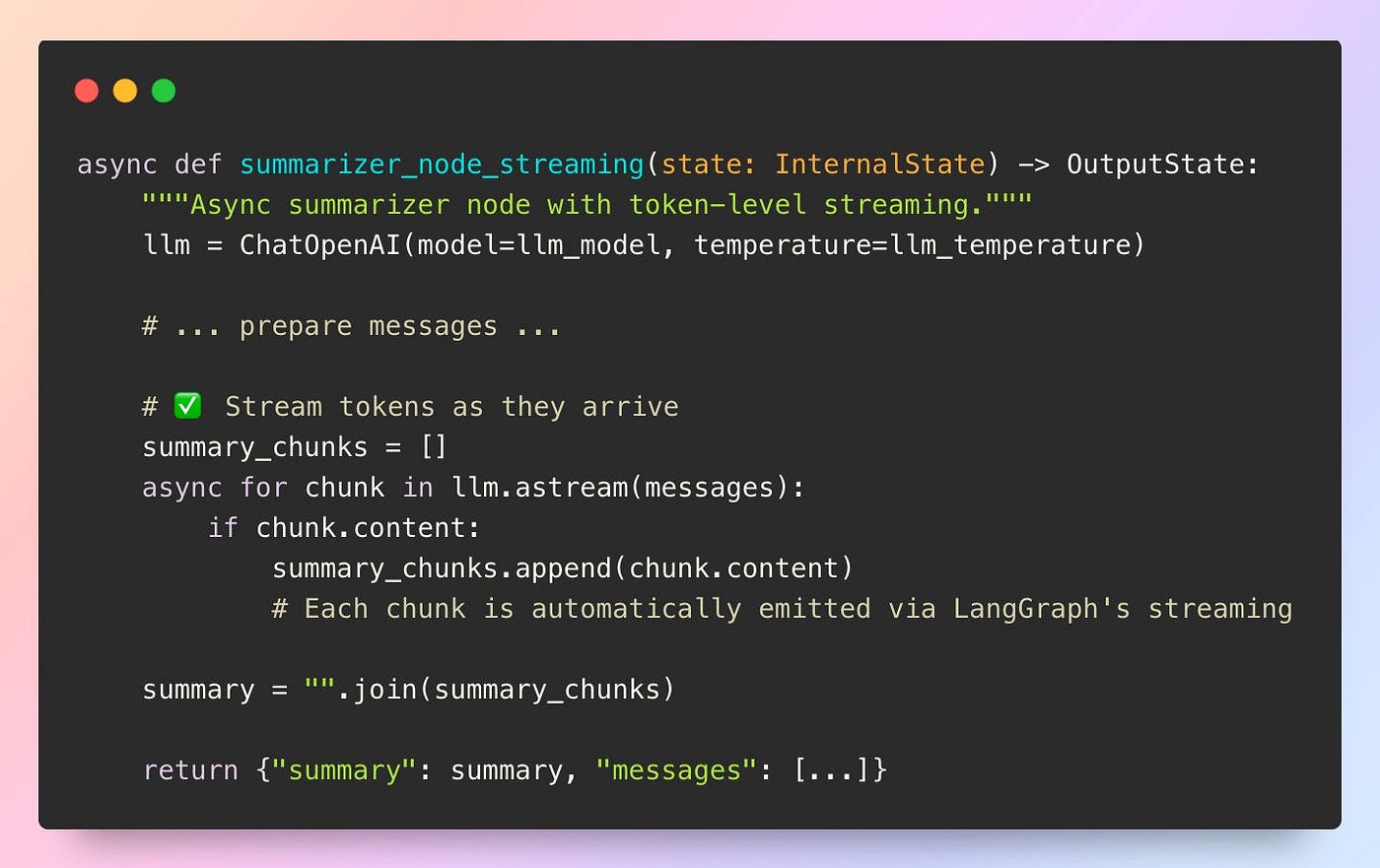
Implementation: In the original synchronous summarizer_node, the LLM returns the full summary only once the entire generation is complete. Users see no intermediate output and must wait 10–30 seconds with no feedback while the model works.

Source: Github repo
The streaming version uses astream() to yield tokens as they’re generated:
Source: Github repo
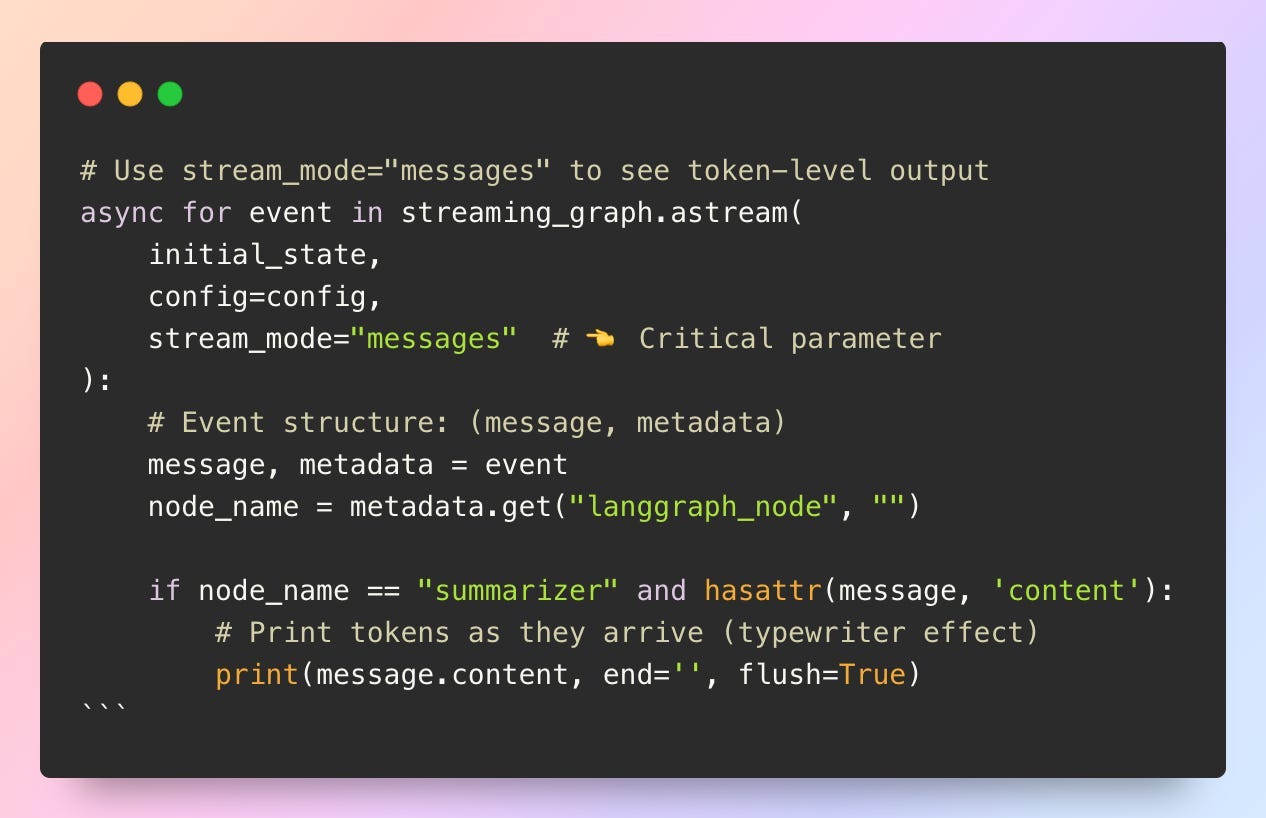
The user can progressively see the LLM output with this code:
Source: Github repo
Output example:
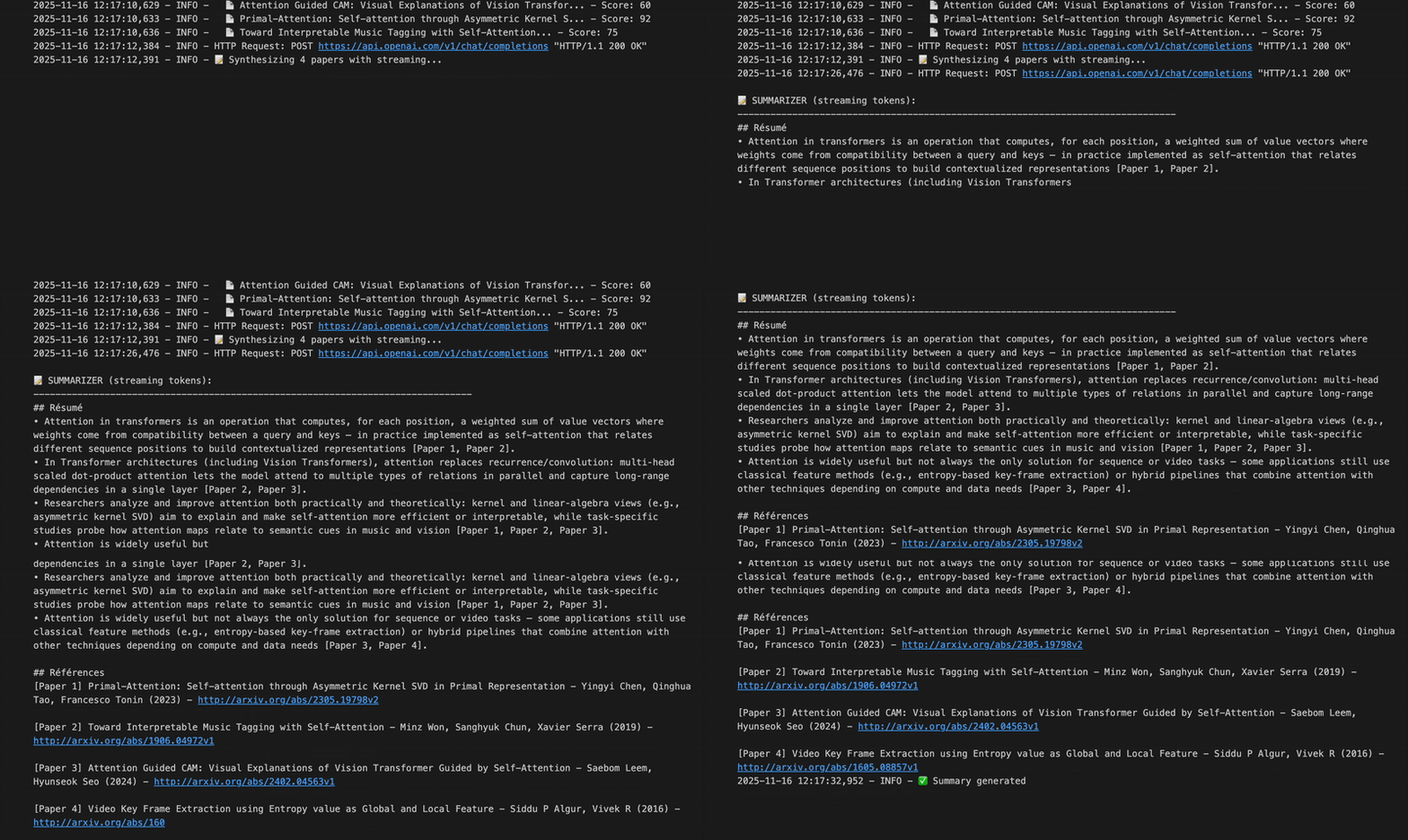
Demo — Real-Time Token Streaming Output
2. Node-Level Streaming
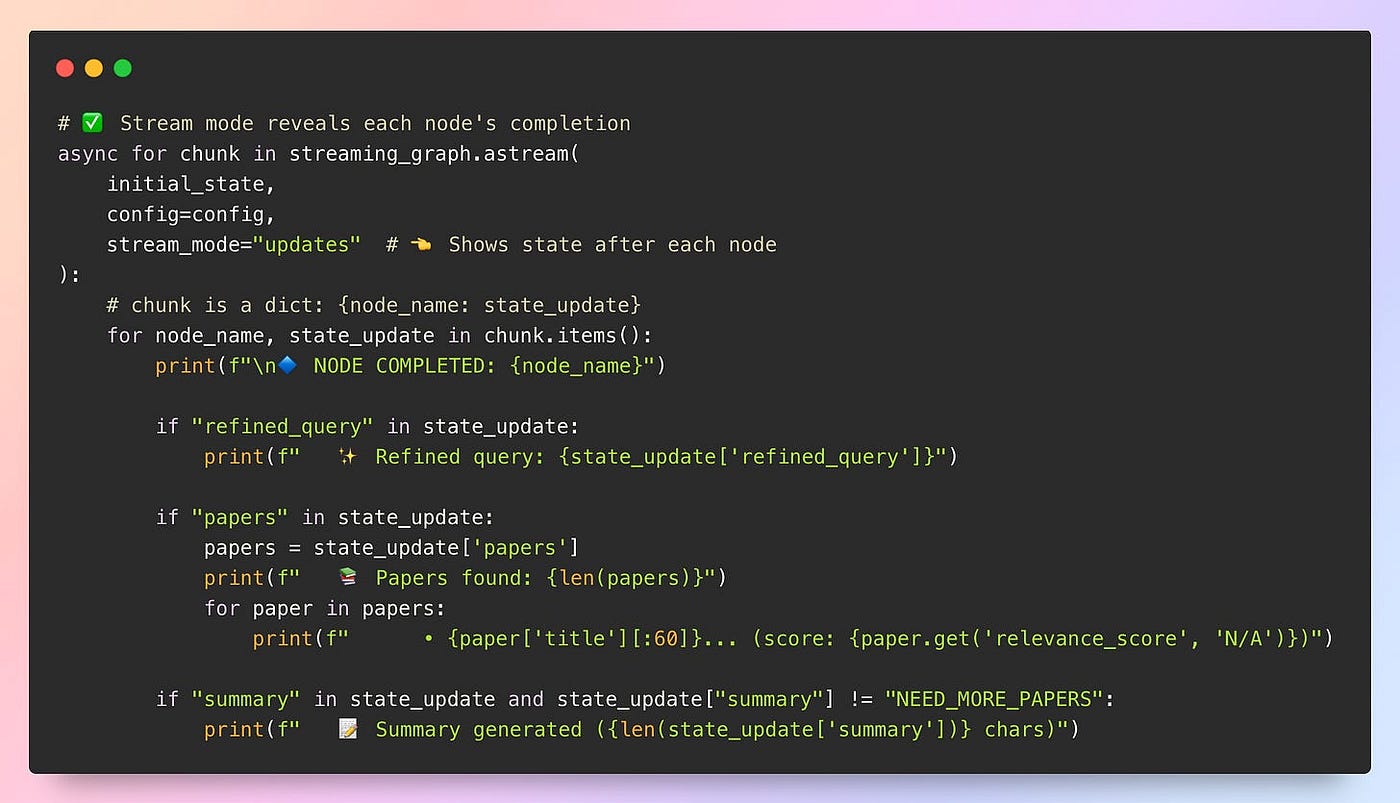
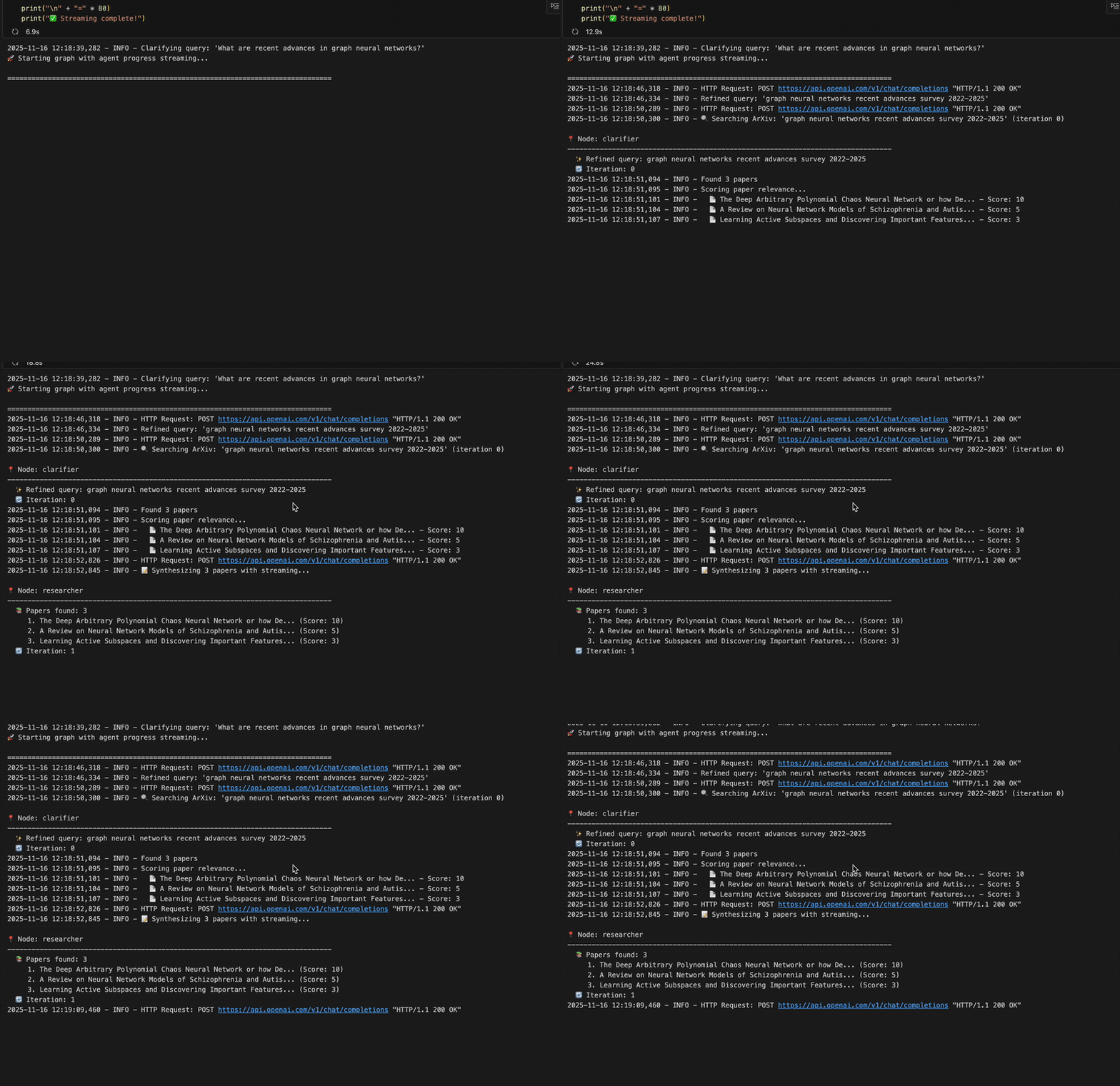
Key idea: It allows users to visualize state updates after each node completes, such as “Clarifier finished” or “Found 5 papers.” This is useful to show high-level progress through the agent pipeline and display intermediate results.
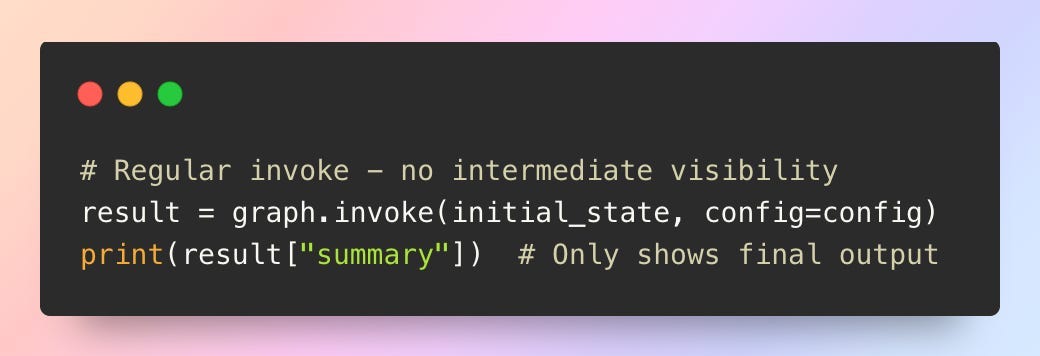
Implementation: Without streaming, only final results are visible.
Source: Github repo
There are no major code changes needed in the nodes themselves, as LangGraph automatically emits state updates when using stream_mode=”updates”:
Source: Github repo
Output example:
Demo — Node-Level Streaming Execution
3. Custom Streaming
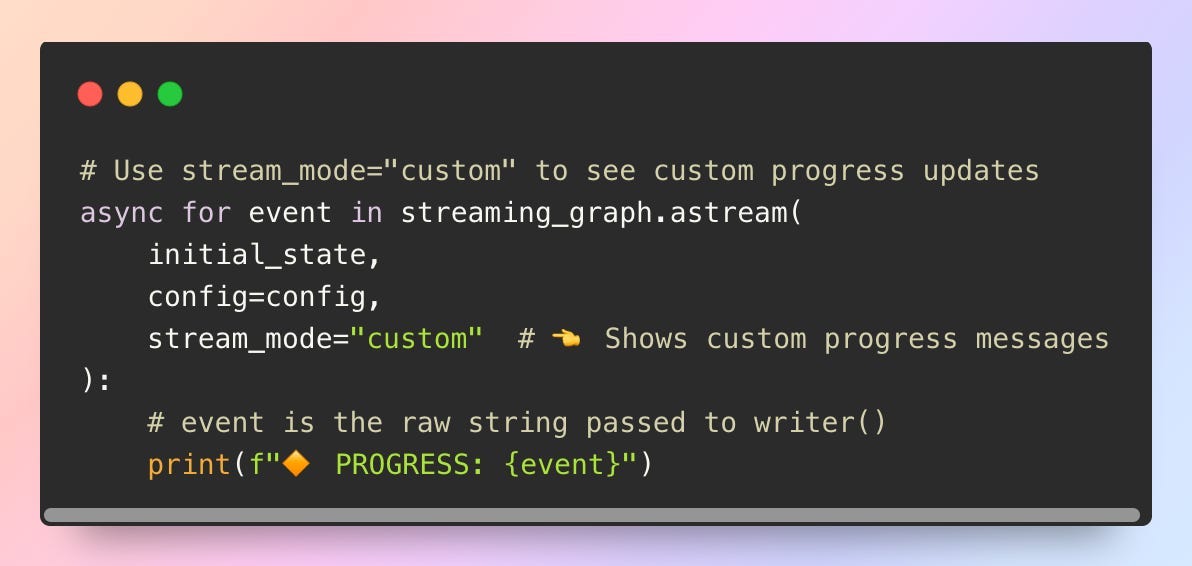
Key idea: It displays custom progress messages during slow operations such as API calls (e.g., “Searching ArXiv…”, “Found paper 3/5”). This is particularly useful when a single node performs multiple steps or long-running API requests, allowing for more granular progress updates.
Implementation: The original ArXiv search is a blocking step that provides no intermediate feedback while the query is being executed.

Source: Github repo
By adding get_stream_writer(), the agent can emit custom progress updates during execution.

Source: Github repo
This code allows users to see the custom progress updates implemented above.
Source: Github repo
Combining All Streaming Modes
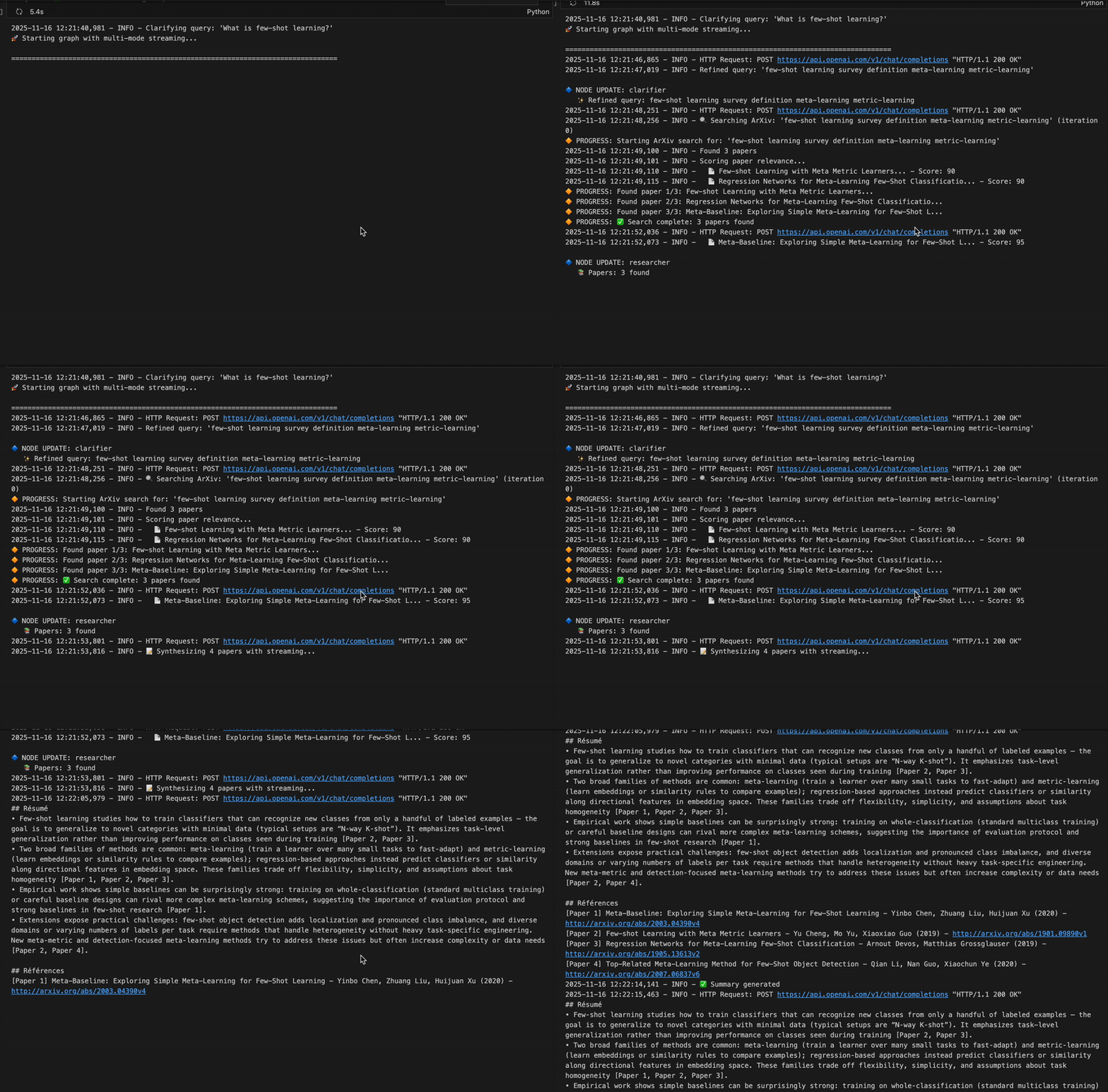
LangGraph allows multiple streaming modes to be combined simultaneously for complete observability.

Source: Github repo
Output example:
Demo — Multi-Mode Streaming Execution
LangGraph Streaming Modes: Quick Recap
LangGraph provides four streaming modes for different levels of visibility into your agent’s execution:
“values”streams the complete state after each node. It’s comprehensive but verbose as it shows everything, including unchanged fields.“updates”streams only what changed, returned as{node_name: state_updates}It’s the most efficient way to track pipeline progress without noise.“messages”streams individual LLM tokens as they’re generated for that typewriter effect. It requiresllm.astream()in your nodes and returns(message_chunk, metadata)tuples.“custom”lets you emit your own progress signals viaget_stream_writer(). It’s perfect for long-running operations like API calls where you want to show “Found paper 3/5” or similar updates.
Combining modes with stream_mode=[”updates”, “messages”, “custom”] is the best way to get multi-level observability. Events then arrive as (mode_name, data) tuples.
2. Human-in-the-Loop: Intercepting and Modifying Agent Execution
Streaming shows users what the agent is doing, but what if you want to let them actually intervene? What if the clarifier misinterprets the query, the researcher ranks irrelevant papers too highly, or you want users to manually approve expensive API calls before they run?
This is where LangGraph’s interrupt system turns agents from autonomous black boxes into collaborative tools that can pause mid-execution, wait for human input, and incorporate corrections before continuing.
Interrupts enable three essential capabilities:
- Approval workflows: Pause before expensive or sensitive operations (like sending emails, making purchases, or calling paid APIs) and require explicit human confirmation to proceed.
- Edits and corrections: Stop execution when the agent generates intermediate results (refined queries, paper rankings, draft messages), let the user modify the state, then resume with the corrected inputs.
- Debugging and inspection: Freeze execution at specific nodes to inspect state, inject test data, or verify that complex logic behaves as intended before continuing.
2.1 How Does LangGraph Interrupt System Work?
LangGraph provides two complementary ways to introduce controlled pauses during execution:
- Graph-level interrupts: These let you designate specific nodes as pause points when building your workflow. Whenever execution reaches one of these points, the graph stops automatically. You can then review the intermediate state, make adjustments, and resume the workflow from the exact same spot.
- Node-level interrupts: These allow a node itself to request input mid-execution. The node temporarily hands control back to the user, waits for the missing information or correction, and then continues once the needed value is provided.
In both cases, LangGraph relies on its checkpointer to capture the full execution state. This ensures the pause and the subsequent resume feel seamless and reliable.
In our scientific paper explorer, interrupts eliminate a classic frustration: watching the agent spend 30 seconds summarizing papers you already know are irrelevant just from reading their titles. Let’s implement human-in-the-loop controls at three strategic points in our pipeline.
1. Graph-Level Interrupts
Key idea: This approach introduces explicit pause points directly in the graph definition. Execution automatically stops at these points, and interaction happens externally through get_state() and update_state(). It enables reviewing intermediate outputs, adjusting state based on observations, or inserting approval steps, all without modifying node logic.
Implementation: The pattern looks like this:

Source: Github repo
In the scientific paper explorer, cost awareness matters. Before the researcher begins querying the ArXiv API and generating expensive summaries, it can be useful to inspect the clarifier’s refined query. With breakpoints, the workflow pauses at that moment, allowing review or adjustment of the query before the agent continues.

Source: Github repo
This example highlights how breakpoints work in practice:
- The graph is compiled with
interrupt_before=[”researcher”]andinterrupt_after=[”clarifier”], causing execution to pause right after the clarifier and before any expensive API calls. - A
thread_idin theconfiglets LangGraph store and retrieve the execution state via the checkpointer. - The first
graph.stream(...)runs until an interrupt is reached, then stops. graph.get_state(config)retrieves the paused state (including the refined query).- You can modify this state with
graph.update_state(...)or leave it unchanged. - Calling
graph.stream(None, config, ...)resumes execution from the checkpoint using the updated state.
This creates a tight approval loop that gives you control before costly steps execute.
2. Node-Level Interrupts
Key idea: Graph-level interrupts are great when you can define fixed pause points ahead of time, but what if you want a more user-friendly way to request and handle user input directly within a node’s logic? What if a node needs to ask for input dynamically based on what it discovers at runtime? That’s where node-level interrupts shine.
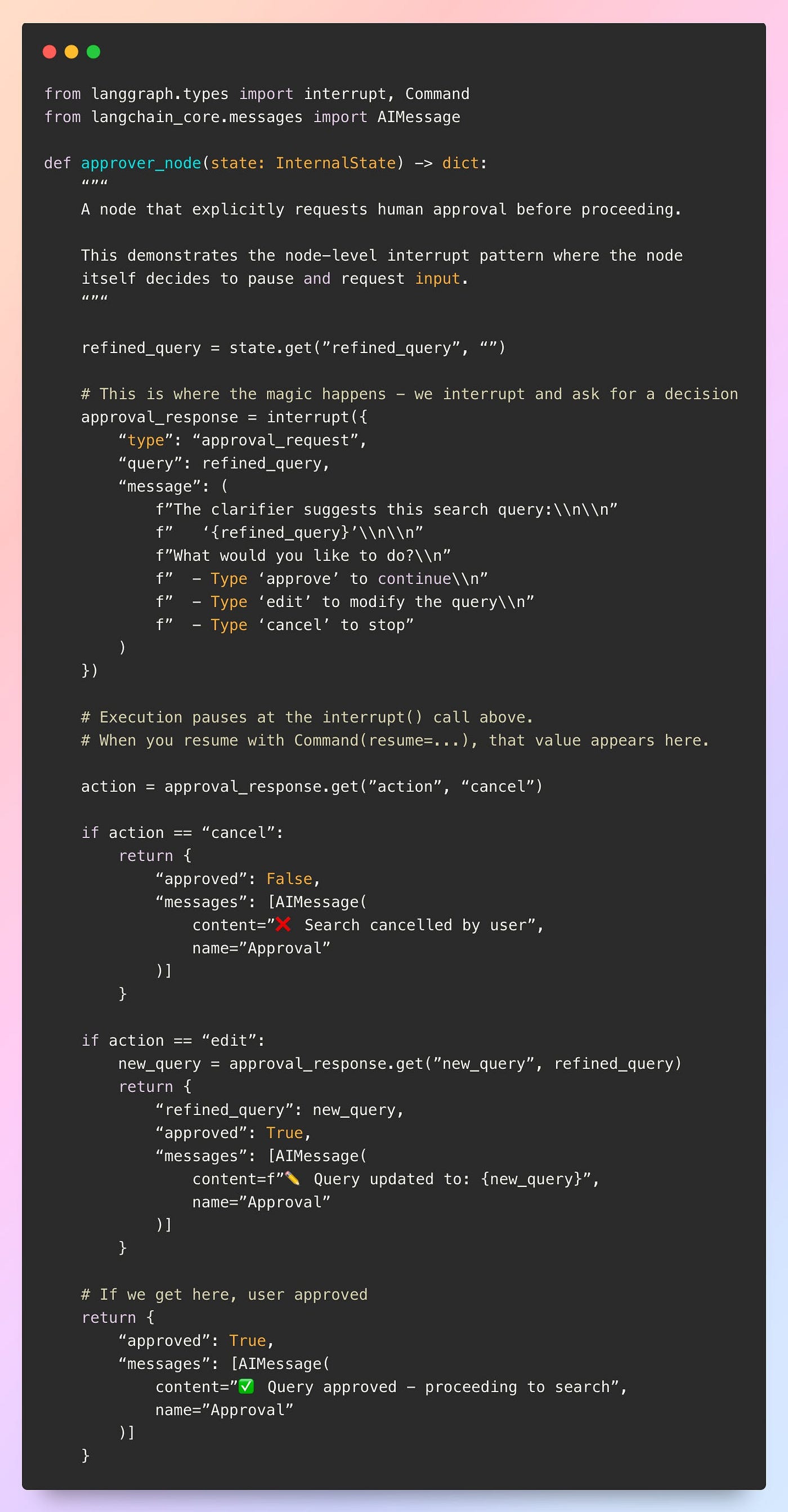
Implementation: Let’s create a dedicated approval node that pauses execution and requests a human decision:
Source: Github repo
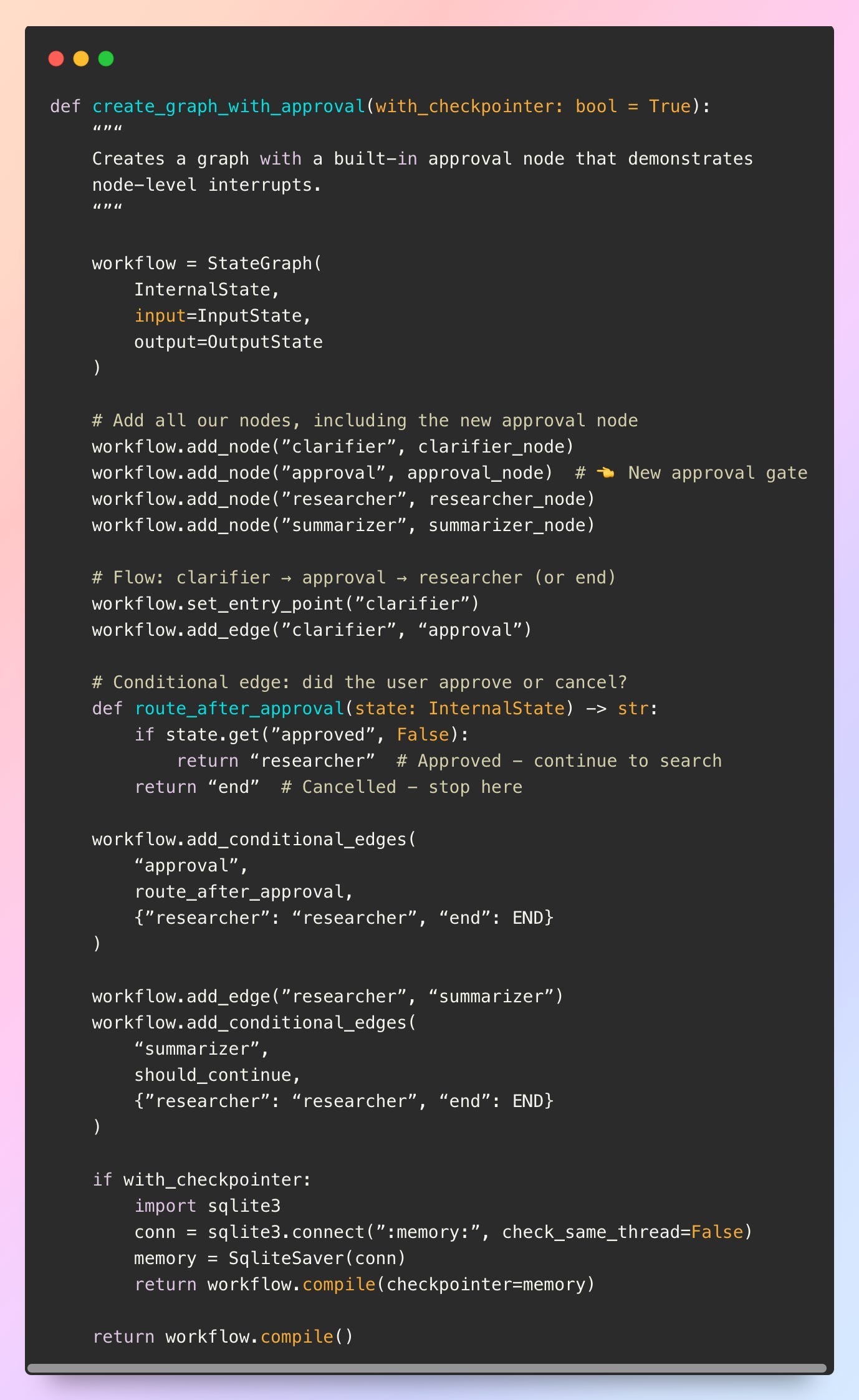
Once the approver node is in place, you still need a conditional edge so that if approval is denied, the workflow routes directly to END instead of continuing through the remaining nodes.
Source: Github repo
This modifies the structure of the agent graph: after adding the approver node, the workflow now branches based on the approval result, as shown below.
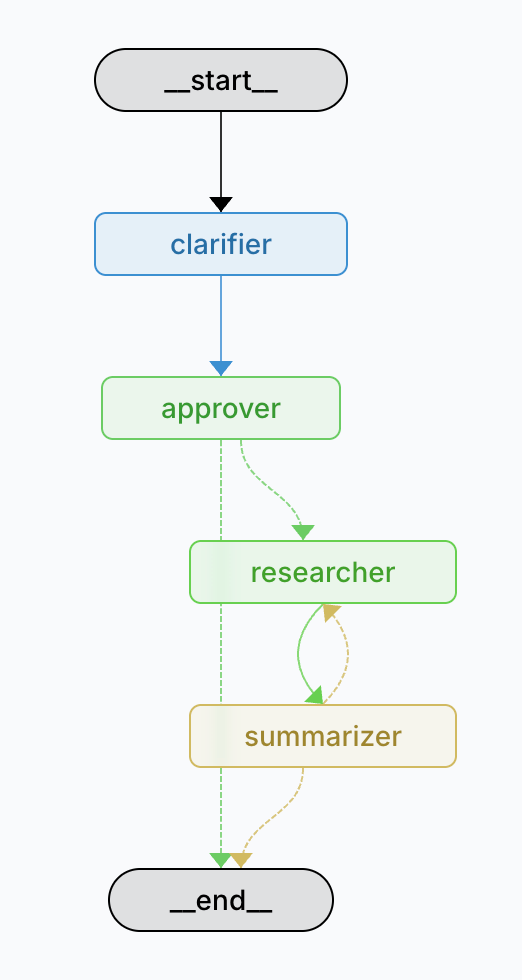
Figure — Updated Agent Graph with Approval Gate: Conditional Routing Based on User Decision

Source: Github repo
The example above shows how a node can pause itself, request user input, and continue with that input. Technically, this works as follows:
- The
interrupt()call inside the approval node pauses execution at that exact line and stores the interrupt request in the checkpointer under the giventhread_id. - The paused interrupt payload appears in
state.tasks, which is why the code retrieves it to display the message to the user. - When the user responds, the value is passed back into the graph via
Command(resume=...), which feeds the response directly into the waiting node. - Execution then resumes right after the interrupt, and the node updates the state based on the user’s decision.
- A conditional edge reads the
approvedflag to route the workflow either forward to the researcher or directly toEND.
This creates a fully interactive pause-and-resume node driven by user input.
3. Time Travel: Rewinding and Replaying Agent Execution
Interrupts let you pause and modify your agent’s future, but what if you need to change its past? What if you realize three nodes later that the clarifier’s query refinement was wrong, or you want to A/B test different researcher parameters without starting from scratch?
This is where LangGraph’s time-traveling features excel. Building on the same checkpointing system that enables memory and interrupts, time travel lets you rewind execution to any previous state, modify it, and create alternate execution branches, essentially giving you “undo” and “what-if” superpowers for your agent workflows.
Time travel serves three powerful use cases:
- Rewinding mistakes: When you discover an error several steps deep (like a misunderstood query leading to irrelevant papers), jump back to that decision point, fix it, and re-run from there without losing subsequent work.
- A/B testing and experimentation: Fork execution at a checkpoint to try different parameters (e.g., “what if I used 10 papers instead of 5?”) and compare outcomes without re-running the entire pipeline.
- Debugging and root cause analysis: Step backward through execution history to pinpoint exactly where things went wrong, examining state at each checkpoint like a debugger’s stack trace.
3.1 How Does Time Travel Work in LangGraph?
LangGraph’s time travel relies on the checkpointer, which doesn’t just store the latest state, but maintains a complete history of every state transition. Each checkpoint is identified by a unique ID, forming a branching tree of execution states. You can navigate this tree like Git commits: inspect any historical state, rewind to it, and optionally fork a new branch from that point.
The key methods are:
graph.get_state_history(config): Retrieve all checkpoints for a thread, from newest to oldestgraph.get_state(config, checkpoint_id=id): Jump to a specific checkpointgraph.update_state(config, values, as_node=”node_name”): Rewind to before a specific node and replay with modified state
Rewinding to Fix Mistakes
Imagine you’ve run clarification, paper search, and scoring, only to realize during summarization that the query refinement missed the mark. Instead of starting over, rewind to the clarifier, fix it, and fast-forward:

Source: Github repo
Time travel is possible because of three core mechanisms:
- State is saved after every node: Each node execution produces a new state snapshot stored in the checkpointer with a unique identifier.
- Checkpoints form a branching tree: Editing a past checkpoint and resuming execution creates a new branch, leaving the original path untouched.
- The
as_nodeparameter is crucial: It instructs LangGraph to treat the checkpoint as if a specific node just executed, effectively rewinding the graph to that point.
Initial run:
  start → clarifier → researcher → summarizer ✓

After rewind with as_node="clarifier":
  start → clarifier ─┬→ researcher (old) → summarizer (old)
                     └→ researcher (new) → summarizer (new) ✓
The original branch remains intact in the history; modifying a checkpoint simply creates an alternate timeline.
Creating Parallel Branches for A/B Testing
Time travel goes far beyond simple corrections, it enables creating multiple branches from the same checkpoint, allowing different approaches to be compared without repeating costly steps.
For example, suppose you want to test whether fetching 5 papers or 10 papers yields better summaries. Instead of running the clarifier twice (an expensive LLM call), run it once, then fork two branches from that checkpoint with different max_papers values. Both branches reuse the clarifier’s output and diverge only at the researcher node, enabling an efficient A/B test while paying the clarification cost only once.
By assigning different thread_id values to each branch, you maintain fully independent execution paths that can be evaluated side by side.
Initial run (thread: base):
  start → clarifier → researcher(5) → summarizer ✓

After creating branches:
  start → clarifier ─┬→ [thread: base]     researcher(5)  → summarizer
                     ├→ [thread: branch-a] researcher(5)  → summarizer
                     └→ [thread: branch-b] researcher(10) → summarizer
All three branches share the clarifier checkpoint but diverge afterward.
With time travel, your agent becomes fully explorable and correctable. You can undo mistakes without re-running expensive operations, compare alternative execution paths side-by-side, and debug complex workflows by stepping through history like a version control system. It’s the ultimate safety net for production AI agents — and the foundation for letting humans collaborate with agents iteratively rather than hoping they get it right on the first try.
Key Takeaways
✓ Streaming provides three complementary layers of agent observability: Token-level streaming reveals LLM generation as it happens, node-level streaming exposes state transitions between workflow steps, and custom streaming surfaces progress during long-running operations. Together, they transform opaque agents into transparent, debuggable systems.
✓ Human-in-the-loop patterns balance automation with control through strategic pause points: Graph-level interrupts halt execution at predefined nodes for review and approval, while node-level interrupts allow dynamic requests for human input mid-execution. Both maintain full context through checkpointing, enabling seamless resume without data loss.
✓ Time travel enables non-destructive experimentation and error recovery: Checkpointers create a complete execution history where any prior state can be inspected, modified, and replayed. Mistakes become fixable through rewinding rather than restarting, and parallel branches allow A/B testing without duplicating expensive operations.
References
[1] LangChain Documentation. (2025). LangGraph: Streaming modes for real-time agent observability.
[2] LangChain Documentation. (2025). LangGraph: Human-in-the-loop with interrupts and breakpoints.
[3] LangChain Documentation. (2025). LangGraph: Persistence and checkpointers for stateful agents.
[4] LangChain Documentation. (2025). LangGraph: Time travel and state history navigation.
[5] OpenAI Documentation. (2025). Streaming completions with Server-Sent Events.
[6] arXiv Documentation. (2025). arXiv API User’s Manual: Query interface and metadata retrieval.
[7] LangSmith Documentation. (2025). LangSmith: Tracing and debugging LangGraph workflows.
메타데이터
- post_id
- 80a174e81caf
- slug
- human-in-the-loop-agents-steering-ai-with-langgraphs-streaming-breakpoints-part-3-80a174e81caf
- url
- https://medium.com/@linafaik/human-in-the-loop-agents-steering-ai-with-langgraphs-streaming-breakpoints-part-3-80a174e81caf
- canonical_url
- https://medium.com/@linafaik/human-in-the-loop-agents-steering-ai-with-langgraphs-streaming-breakpoints-part-3-80a174e81caf
- author_url
- https://medium.com/@linafaik
- status
- ok
- fetched_at
- 2026-06-23 17:05:31





