Google Gemini Omni Flash Released
How to use Google Gemini Omni Flash for free?
Google Gemini Omni Flash Released
How to use Google Gemini Omni Flash for free?
Photo by Jakob Owens on Unsplash
AI video generation has improved rapidly over the past year, but editing videos has remained surprisingly complicated.
Most AI video models can generate clips from text prompts, but making changes usually means starting over. Want to replace a character? Rewrite the prompt. Want to change the background? Generate another video. Need to modify a single scene? Repeat the entire process.
Google wants to change that.
With Gemini Omni Flash, Google combines Gemini’s multimodal reasoning with native video generation and conversational editing.
Instead of treating video creation as a one-shot process, Omni Flash lets developers continuously refine videos using natural language, almost like chatting with an AI video editor.
Even more interesting, Google has priced it aggressively enough to compete directly with today’s leading video models. Let’s dive into what makes Gemini Omni Flash one of Google’s most important AI releases this year.
What is Gemini Omni Flash?
Gemini Omni Flash is Google’s newest multimodal video model that understands and generates content using:
- Text
- Images
- Videos
Unlike traditional text-to-video models, Omni Flash can use all three inputs simultaneously while preserving context throughout multiple editing rounds. This makes it suitable for building interactive AI video applications instead of simple prompt-based generators.
Google has made the model available through:
- Gemini API
- Google AI Studio
with support for both video generation and conversational video editing.
More Than Just Text-to-Video
The biggest difference between Gemini Omni Flash and many competing models is that it isn’t limited to generating videos from scratch. Instead, it supports an iterative creative workflow. You can ask it to:
- Change the lighting
- Replace objects
- Modify backgrounds
- Add visual effects
- Improve animations
- Rewrite scenes
- Continue editing using follow-up prompts
Each edit happens conversationally, allowing creators to refine videos instead of regenerating them repeatedly. This dramatically shortens the creative feedback loop.
Four Features That Stand Out
1. Conversational Video Editing
This is arguably Omni Flash’s biggest innovation. Instead of manually rebuilding a video after every change, developers can simply describe what should happen next.
For example:
“Make the sky darker.”
Then,
“Now add snowfall.”
Then,
“Replace the house with a futuristic building.”
The model understands the conversation and continues editing accordingly.
2. Multimodal Referencing
Omni Flash accepts multiple input types simultaneously. You can provide:
- A reference image
- Existing video
- Text prompt
and the model combines all three to maintain scene consistency. This gives developers significantly more control than traditional prompt-only video generation.
3. Built-in World Knowledge
Because Omni Flash is built on Gemini, it inherits Gemini’s reasoning capabilities. That means it understands concepts from:
- History
- Biology
- Physics
- Storytelling
- Narrative structure
- General world knowledge
Instead of blindly generating visuals, the model can create scenes that are logically coherent and contextually accurate.
4. Better Text and Action Synchronization
Synchronizing graphics with moving objects has always been difficult in AI video generation. Omni Flash improves this by allowing text overlays and visual elements to interact naturally with actions occurring inside the scene.
Simple prompts can coordinate motion, graphics, and text together without requiring complex editing pipelines.
Benchmark Results: Google Takes the Lead
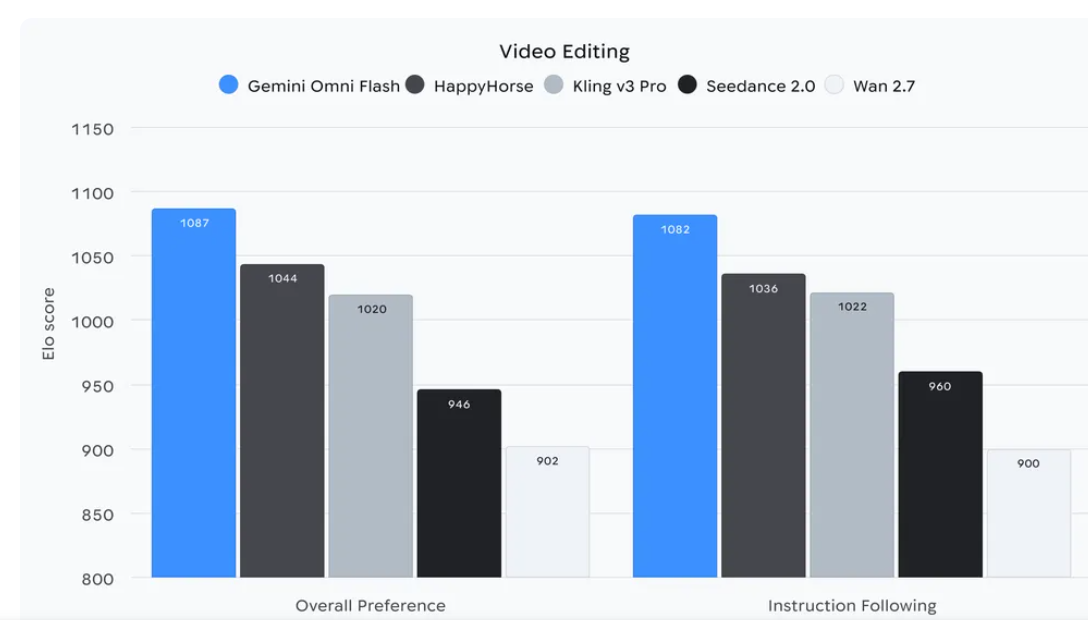
Google also released benchmarking results comparing Omni Flash against several leading video editing models.
Overall Preference (Elo Score)
Instruction Following
The results suggest that Gemini Omni Flash not only produces videos users prefer overall but also follows editing instructions more accurately than competing models, an important capability for conversational editing workflows.
Pricing
Google has priced Gemini Omni Flash at: $0.10 per second of generated video. This matches the pricing of Veo 3.1 Fast, making it one of Google’s most cost-effective video generation models.
For developers building production applications, predictable pricing is often just as important as generation quality.
Current Limitations
Although impressive, Omni Flash is still in preview and comes with a few constraints.
Currently:
- Video generation is limited to 10-second clips.
- Longer video generation is planned for future releases.
- Audio reference uploads are not yet supported.
- Scene extension is unavailable through the Gemini API.
- Video references longer than 3 seconds are accepted by the API but are not yet processed correctly.
- Character consistency can occasionally degrade during scene transitions or complex camera movements.
Most of these limitations are expected to improve as the model matures.
The Real Magic Happens with Nano Banana 2 Lite
Google’s biggest idea isn’t using Omni Flash alone. It’s combining it with Nano Banana 2 Lite. The workflow is surprisingly simple:
- Generate an image using Nano Banana 2 Lite.
- Pass that image into Gemini Omni Flash.
- Animate it into a cinematic video.
- Continue refining the result using conversational editing.
Since both models support Google’s Interactions API, users can perform multiple sequential edits while preserving context across the session. This creates an end-to-end multimedia pipeline that goes from idea to image to video with minimal friction.
Demo Applications Showcase the Workflow
To demonstrate this vision, Google released several reference applications.
Anywhere
Upload a selfie or photo, and Nano Banana 2 Lite instantly places you in iconic destinations around the world. Gemini Omni Flash then transforms those static images into animated travel videos.
Space Lift
This interior design demo lets users upload a room photo and instantly generate redesigned interiors.
Once a preferred design is selected, Omni Flash creates a cinematic walkthrough, allowing users to visualize the space before making changes in the real world.
Omni Product Studio
Designed for e-commerce, this demo converts AI-generated product images into polished promotional videos.
Instead of manually creating advertisements, businesses can move from product image to marketing video within a single AI workflow.
Built with Safety in Mind
Like Google’s other generative media models, Gemini Omni Flash uses SynthID watermarking to identify AI-generated content.
Users can verify AI-generated media through Google’s verification tools available in products such as the Gemini app, Gemini in Chrome, and Google Search. As AI-generated media becomes increasingly realistic, transparent content verification will become just as important as generation quality.
Final Thoughts
Gemini Omni Flash represents a shift in how AI video tools are evolving. Rather than treating video generation as a one-time prompt, Google is turning it into an interactive conversation where users can continuously refine scenes using natural language.
The benchmark results are promising, with Gemini Omni Flash leading competitors in both overall preference and instruction following. Combined with multimodal inputs, Gemini-powered reasoning, and competitive pricing of $0.10 per second, it offers developers a practical platform for building AI-native video applications.
When paired with Nano Banana 2 Lite, Google’s ecosystem becomes even more compelling. Developers can generate images in seconds, animate them into videos, and continue editing them conversationally, all within a unified workflow. If Google continues improving video length, character consistency, and advanced editing capabilities, Gemini Omni Flash could become one of the strongest foundations for next-generation AI creative applications.
메타데이터
- post_id
- 8261378d615e
- slug
- google-gemini-omni-flash-released-8261378d615e
- url
- https://medium.com/data-science-in-your-pocket/google-gemini-omni-flash-released-8261378d615e
- canonical_url
- https://medium.com/data-science-in-your-pocket/google-gemini-omni-flash-released-8261378d615e
- author_url
- https://medium.com/@mehulgupta_7991
- status
- ok
- fetched_at
- 2026-07-09 10:05:04