Stop Searching Jobs Manually: Use Claude AI to Find Better Naukri Jobs Faster
A practical workflow for using Claude, LinkedIn, and Naukri to filter jobs by skills, freshness, applicant count, and fit.
Stop Searching Jobs Manually: Use Claude AI to Find Better Naukri Jobs Faster
A practical workflow for using Claude, LinkedIn, and Naukri to filter jobs by skills, freshness, applicant count, and fit.
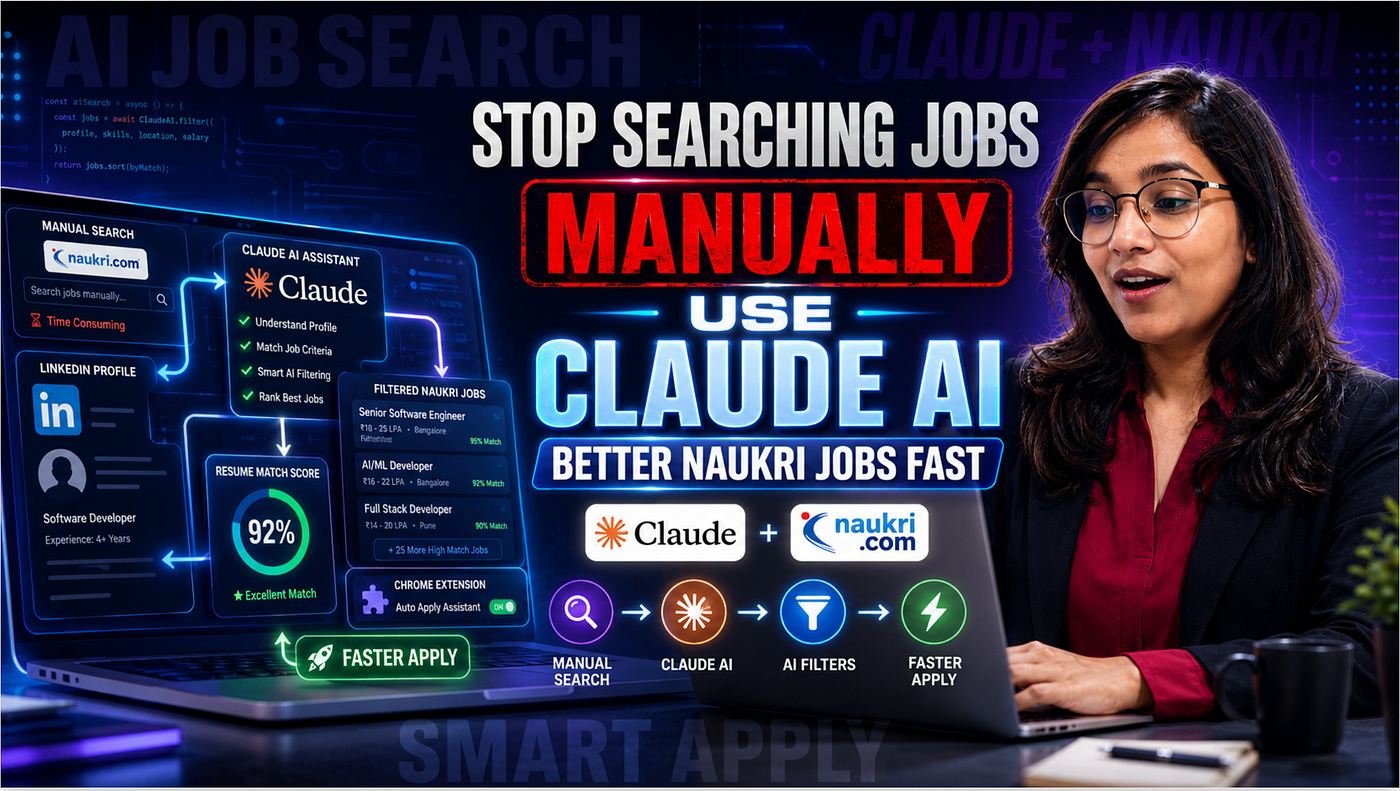
Image Thumbnail — Stop Searching Jobs Manually: Use Claude AI to Find Better Naukri Jobs Faster
Most job seekers don’t fail because they are not applying enough.
They fail because they apply randomly.
- Open LinkedIn. Search a role.
- Open Naukri. Try five keywords. Apply to 40 jobs.
- Wait. Repeat tomorrow.
I have seen this pattern too many times. The real problem is not effort. The problem is filtering.
When I first tested Claude AI for job search, I assumed it would simply search job titles. But the useful part was different: Claude could read my LinkedIn profile, understand my skills, check Naukri listings, and return jobs that looked more relevant.
That changes the workflow.
Not fully automated. Not magical. But definitely smarter.
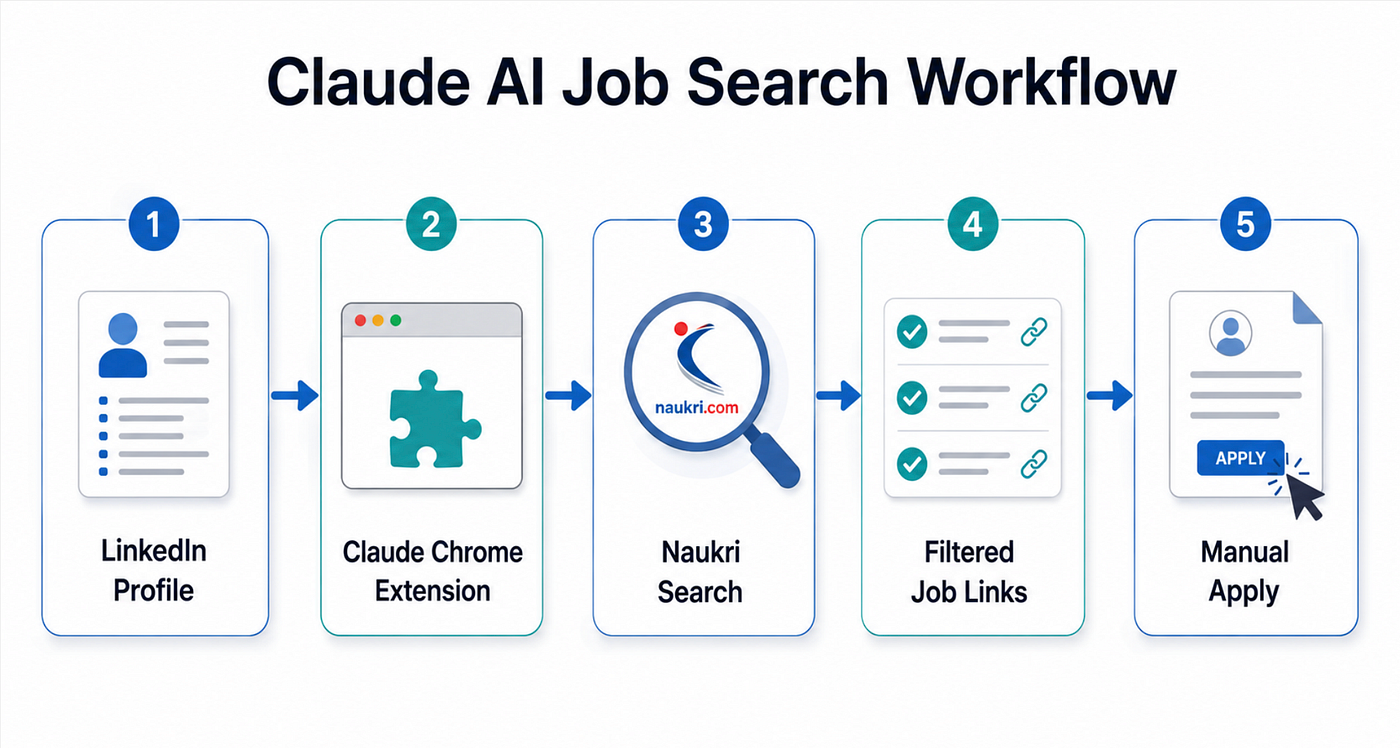
Architecture Diagram
Why Developers Should Learn This Workflow
If you are a developer, your job search should not look like blind form filling.
You already think in systems:
- Input
- Filters
- Rules
- Output
- Feedback loop
Job search can work the same way.
Instead of asking:
“Show me DevOps jobs in India”
A better question is:
“Use my LinkedIn profile, consider my skills and certifications, search Naukri, and show jobs posted in the last 24 hours with fewer than 50 applicants.”
That one prompt is more useful than scrolling for an hour.
The Old Way: Keyword Search and Hope
Most people search jobs like this:
- Open Naukri
- Type “DevOps engineer”
- Open random roles
- Apply without checking fit
- Repeat until tired
The issue is not that this method never works.
It does work sometimes.
But it wastes attention on jobs that are:
- Too old
- Already crowded
- Poorly matched
- Not aligned with your actual profile
- Listed under misleading titles
For developers, this is like querying a database without filters.
You technically get results. Just not good ones.
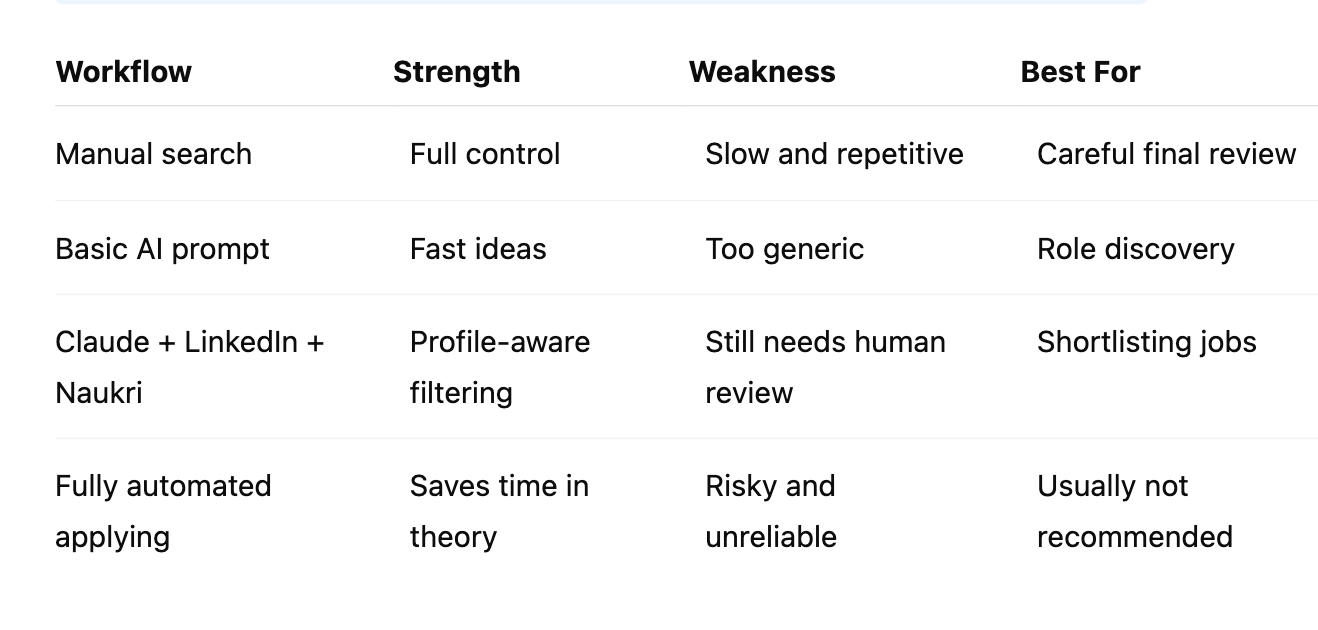
Comparison Table: Manual Job Search vs Claude-Assisted Job Search
The Better Workflow
The setup is simple.
You need:
- Logged-in LinkedIn account in Chrome
- Logged-in Naukri account in Chrome
- Claude AI account
- Claude Chrome extension enabled
- Extension permission allowed inside Claude settings
This matters because Claude needs a browser context. It can inspect your LinkedIn profile and move through Naukri because those sessions are already available in your browser.
Here is the first prompt I would start with:
Use my LinkedIn profile as a reference and search for DevOps job openings in India on Naukri.

Consider my skills, certifications, experience, and profile keywords.
Give me matching job links where I can apply manually.
This prompt works because it gives Claude three anchors:
- Your LinkedIn profile as the reference
- Naukri as the job source
- Skills and certifications as matching criteria
Common mistake: asking Claude only for “best jobs.”
That sounds clear to humans, but it is vague for an AI tool.
Better prompts define what “best” means.
Add Rules, Not Just Requests
The biggest improvement comes from adding constraints.
For example:
Search Naukri for DevOps jobs in India using my LinkedIn profile as reference.

Only show jobs that:
- Were posted in the last 24 hours
- Have fewer than 50 applicants
- Match my skills and certifications
- Are relevant to my experience level
Return the job title, company, location, applicant count, posted date, and apply link.
This is where things get interesting.
The goal is not to find more jobs.
The goal is to remove bad matches faster.
Fresh jobs matter because early applicants often get better visibility. Applicant count matters because a role with 27 applicants is very different from a role with 500+ applicants.
What Claude Can Do Well
In this workflow, Claude is good at:
- Reading your LinkedIn profile
- Identifying visible skills
- Understanding certifications
- Searching Naukri based on role intent
- Filtering by rules
- Returning job links
- Explaining why a role matches
That is useful because job portals are noisy.
A role may say “DevOps” but expect mostly Kubernetes. Another may say “Cloud Engineer” but be closer to support. Claude can help compare the job description against your public profile.
A better output format prompt:
Return the results in a table with these columns:
Job Title | Company | Location | Posted Date | Applicants | Match Reason | Apply Link
This small formatting instruction matters.
Without it, you may get a messy answer that is harder to compare.
What Claude Cannot Reliably Do
Here is the surprising part.
Claude may find the job. It may open the apply page. It may even identify the apply button.
But it cannot always complete the application.
Why?
Many Naukri jobs redirect to external company portals. Those portals may require:
- New account creation
- Email verification
- Password entry
- Resume upload
- Custom questions
- Consent checkboxes
- Captcha or multi-step forms
This is where manual review is safer.
Claude can shortlist. You should apply.
That boundary is important.
Do not give an AI tool permission to blindly submit applications, create accounts, or enter sensitive credentials.
Mistakes I Would Avoid
1. Using an outdated LinkedIn profile
Claude can only use what it sees.
If your LinkedIn profile is weak, outdated, or missing keywords, the search quality drops.
Before using this workflow, update:
- Headline
- About section
- Skills
- Certifications
- Recent projects
- Current role
- Preferred tech stack
2. Asking for too many roles at once
Bad prompt:
Find software, DevOps, cloud, backend, frontend, AI, data jobs for me.This creates noisy results.
Better prompt:
Search only for DevOps Engineer roles in India that match my LinkedIn profile.One role. One location. Clear filters.
3. Ignoring applicant count
A job posted yesterday with 30 applicants may be more practical than a perfect-looking job with 2,000 applicants.
Not always. But often enough to matter.
4. Applying without checking the company page
Claude can help you shortlist, but you still need judgment.
Check:
- Role responsibilities
- Required experience
- Location policy
- Company website
- Salary hints, if available
- Whether the job looks duplicated
A More Practical Prompt Template
Use this as your reusable version:
Act as a job search assistant.
Use my LinkedIn profile as the main reference.
Search Naukri for [ROLE] jobs in [LOCATION].
Apply these rules:
1. Jobs must be posted within the last [TIME RANGE].
2. Applicants should be fewer than [COUNT].
3. The role must match my skills, certifications, and experience.
4. Avoid jobs that are clearly unrelated to my profile.
Return:
- Job title
- Company
- Location
- Posted date
- Applicant count
- Match reason
- Apply link
- Any concern I should check before applying
Why this works:
It turns job search into a filtered workflow instead of a random browsing session.
The Tradeoff
This workflow is faster, but it is not a replacement for thinking.
Use Claude for:
- Discovery
- Filtering
- Shortlisting
- Matching
- Summarizing
Use your own judgment for:
- Final application
- Resume customization
- Salary expectations
- Company research
- Sensitive information
- External job portals
That split keeps the workflow useful without making it careless.
Reflection: What Changed After Using This
After trying this workflow, the biggest shift was not speed.
It was clarity.
I stopped thinking of job search as “apply more.”
I started thinking of it as “filter better.”
That small change matters. A developer with strong skills can still waste hours applying to the wrong jobs. But once the search is guided by profile data, freshness, applicant count, and role fit, the process becomes more intentional.
The unexpected realization was this:
Claude does not need to apply for jobs to be useful.
Even if it only reduces one hour of scrolling into ten minutes of review, that is already a meaningful improvement.
Final Takeaways
Claude AI can make job search smarter when you use it with clear rules.
The best workflow is:
- Keep LinkedIn updated
- Log in to LinkedIn and Naukri in Chrome
- Enable Claude Chrome extension
- Ask Claude to use your profile as reference
- Add filters like posted date and applicant count
- Review jobs manually
- Apply with a customized resume
Do not treat AI as a button that gets you hired.
Treat it as a filtering layer.
That is where it becomes genuinely useful.
The next time you search for jobs, try this experiment: don’t apply to more jobs. First, improve the prompt that finds them.
From Dev Simplified
- 👏 Enjoyed the article? Don’t forget to leave a clap.
- 💬 Have thoughts or questions? Share them in the comments.
- ✍️ Want to write for Dev Simplified? Drop a personal note on any Dev Simplified story with your draft link.
메타데이터
- post_id
- 83be0c15dd21
- slug
- stop-searching-jobs-manually-use-claude-ai-to-find-better-naukri-jobs-faster-83be0c15dd21
- url
- https://medium.com/dev-simplified/stop-searching-jobs-manually-use-claude-ai-to-find-better-naukri-jobs-faster-83be0c15dd21
- canonical_url
- https://medium.com/dev-simplified/stop-searching-jobs-manually-use-claude-ai-to-find-better-naukri-jobs-faster-83be0c15dd21
- author_url
- https://medium.com/@techbynehagupta
- status
- ok
- fetched_at
- 2026-06-23 06:34:20