I Cut My AI Subscription Costs by 60% — Here’s the Exact System I Use
Most developers are haemorrhaging money on AI tools. This one mindset shift changed everything.
I Cut My AI Subscription Costs by 60% — Here’s the Exact System I Use
Most developers are haemorrhaging money on AI tools. This one mindset shift changed everything.
TL;DR: Routing your prompts to the right AI model — premium for reasoning, free for execution — can cut your AI costs by 60% while keeping productivity identical. This article shows you exactly how to do it.

Photo by Fotis Fotopoulos on Unsplash
I’ve been writing software for six years. I’ve also been paying way too much for AI.
Not because the tools aren’t worth it — they are. Because I was using my most expensive model for everything. Explaining a function? Premium. Writing a unit test? Premium. Drafting a changelog? Premium.
It felt productive. It looked productive. But a few months ago, I pulled up my API billing dashboard and saw a number that stopped me cold.
Most of my monthly AI spend was going toward tasks that required zero advanced reasoning.
I was paying for a Formula 1 engine to idle in a parking lot.
Why Most Developers Overpay for AI (And Don’t Realize It)
The default behavior when you find a tool that works is to use it for everything. That’s human nature — and it’s exactly how AI subscriptions become bloated.
Premium models like Claude Opus and GPT-4 are genuinely remarkable at complex reasoning, architectural tradeoffs, and debugging gnarly cross-system issues. But they’re wildly overkill for generating a Jest test suite or writing JSDoc comments on a utility function.
The insight that changed my workflow:
Not every prompt deserves your most capable — or most expensive — model. Treat AI the same way you’d treat cloud infrastructure: right-size it.
In cloud engineering, you don’t run every workload on your most expensive instance. A background job doesn’t need the same compute as a real-time API. A static asset doesn’t need a beefy VM. The same logic applies here.
The Two-Tier AI System That Saved Me 60%
I restructured my entire workflow around one principle: separate reasoning from execution.
Tier 1 — The Senior Architect (Premium Models)
Reserved strictly for tasks where intelligence compounds the outcome:
- System architecture and design decisions — weighing tradeoffs, evaluating scalability, catching security gaps
- Breaking down ambiguous features — turning fuzzy product requirements into concrete implementation plans
- Complex cross-system debugging — issues that span multiple services, databases, and async flows
- Code and design review — catching edge cases a junior engineer might miss
- High-stakes refactoring — restructuring code that touches critical paths
Models used: Claude Sonnet/Opus, GPT-4o
Tier 2 — The Execution Team (Free & Low-Cost Models)
Handled by models like DeepSeek, GLM, Kimi, and NVIDIA NIM-hosted open-source models via free API tiers:
- Generating unit and integration tests from a clear spec
- Scaffolding boilerplate and project structure
- Writing JSDoc, docstrings, and inline comments
- Drafting SQL queries and data transformation scripts
- Refactoring clean, well-scoped functions
- Generating changelogs and release notes
- Churning through high-volume, repetitive coding tasks
Models used: DeepSeek API, GLM-4, Kimi, NVIDIA NIM (Llama, Mistral variants)
Think of it as hiring a senior architect and a capable engineering team. The senior architect defines the roadmap and makes the critical calls. The team executes — reliably, quickly, and at a fraction of the cost.
The 5-Second Routing Decision (With Flow Diagram)
Before every prompt, I run a quick mental check. It becomes second nature within a week.
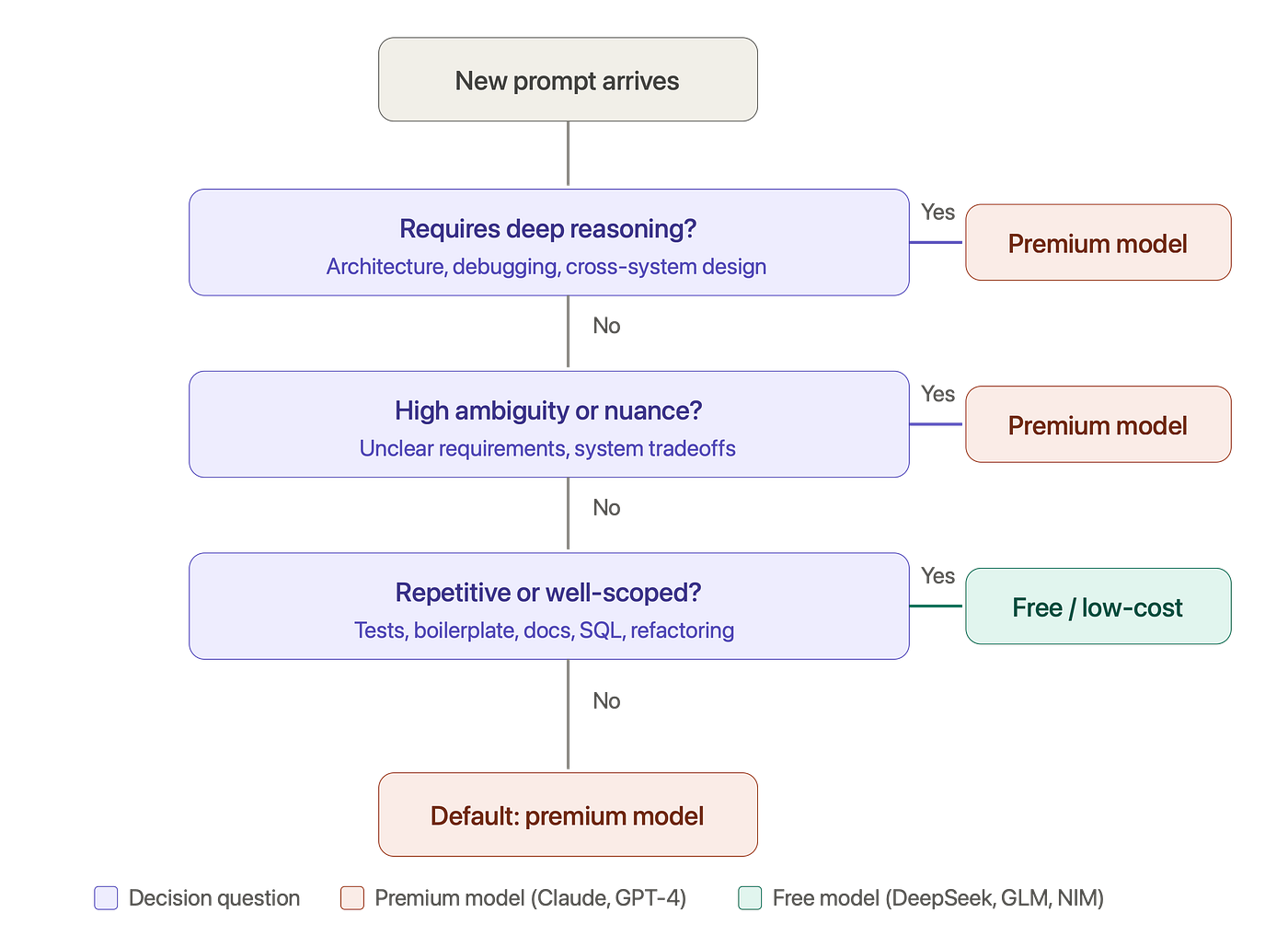
Image: My 5-second AI model routing decision — bookmark this.
Here’s the decision logic in plain English:
- Does this require deep reasoning? (Architecture, debugging, design decisions) → Premium
- Is there high ambiguity or nuance? (Unclear requirements, system tradeoffs) → Premium
- Is it repetitive or well-scoped? (Tests, boilerplate, docs, SQL) → Free
- None of the above? → Default to premium (when in doubt, pay for it)
The key question isn’t how big the task is — it’s what kind of thinking it requires.
The Free AI Tools That Actually Deliver (2024–2025)
This only works if the free-tier models are good enough to handle execution tasks. After months of testing, here’s what I actually use:
**DeepSeek API** — Strongest code generation in this tier. Exceptional at structured outputs like unit tests, SQL queries, and data pipelines. Near-free pricing makes it viable at scale.
NVIDIA NIM — Free API access to a range of hosted open-source models (Llama 3, Mistral, CodeLlama). Surprisingly capable for code generation and simple reasoning. Great for developers already in the NVIDIA ecosystem.
GLM-4 / Kimi — Solid for documentation, summarization, boilerplate, and high-volume repetitive work. Kimi handles long-context tasks especially well.
OpenRouter — A unified API gateway that lets you route between models based on context or cost without rewriting your integration code. Huge time-saver if you’re building this into a workflow or IDE extension.
Real Example: Building an Auth Feature End-to-End
Here’s exactly what this looks like on a real task — building a JWT-based authentication system.
Step 1 → Claude (Premium)
“Design the architecture for a JWT auth system. What are the tradeoffs between httpOnly cookies and localStorage? What edge cases should I plan for, especially around token rotation and CSRF?”
Claude maps out the full design: token lifecycle, refresh rotation strategy, CSRF mitigations, cookie flags, and expiry handling. This is the kind of nuanced reasoning that justifies the cost.
Step 2 → DeepSeek / GLM (Free)
Armed with Claude’s spec, I hand off execution:
- “Generate the Express middleware that validates JWT tokens — handle expiry, invalid signature, and missing token cases.”
- “Write unit tests for this middleware covering all error branches.”
- “Add JSDoc to all exported functions.”
Free models handle all of this without issue. The spec is tight, the scope is clear, and there’s no ambiguity requiring judgment.
Step 3 → Claude (Premium)
“Review this implementation against the original design. Anything I missed?”
Claude catches a missing refresh token rotation edge case that would have caused silent re-authentication failures in production.
Result: The whole feature ships with Claude used twice — architecture at the start, review at the end. Everything in between runs on free models.
The Before vs. After Results
After running this model-routing workflow for several months:
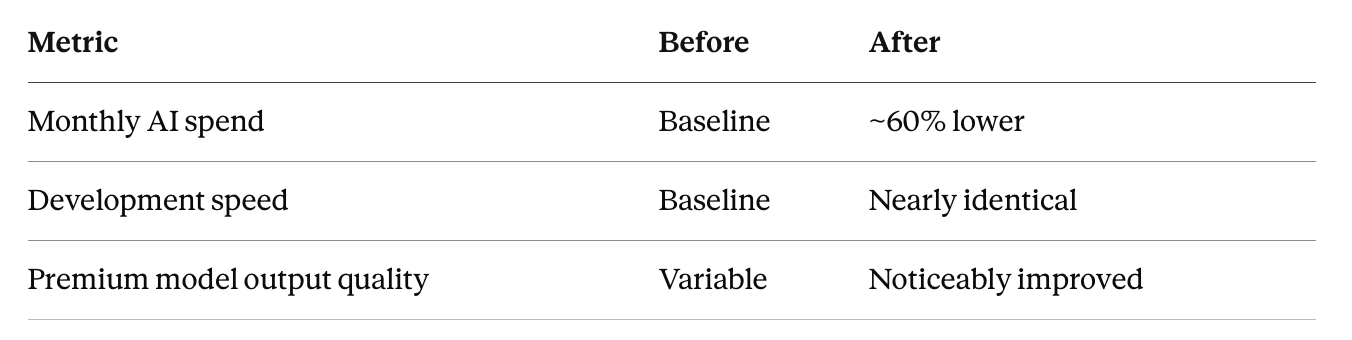
The unexpected bonus: by forcing myself to route more thoughtfully, my prompts to premium models became sharper and more focused. I stopped being lazy. Better prompts → better outputs → more value per dollar.
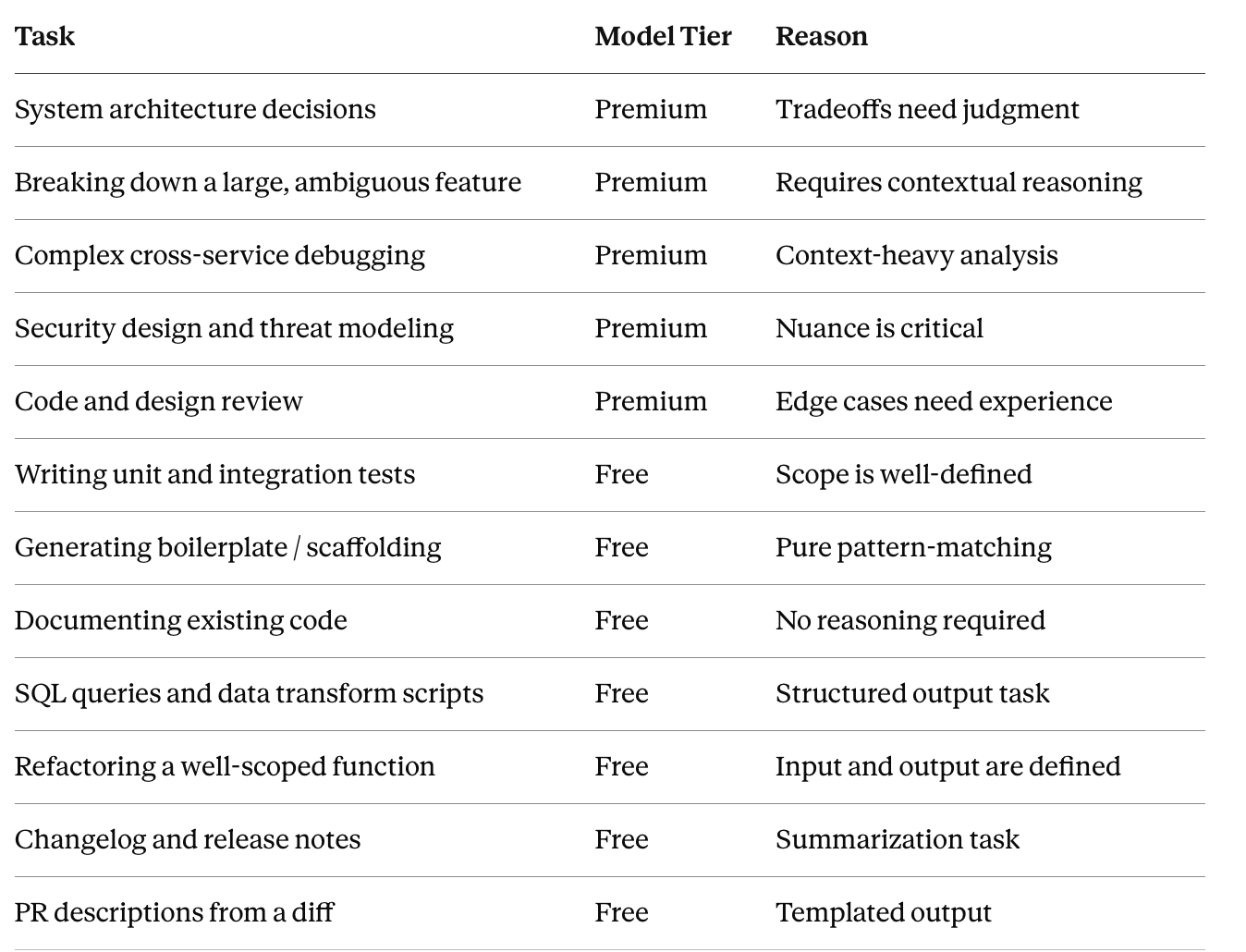
The AI Model Routing Cheat Sheet
Bookmark this. Route by the nature of the task, not the size of it.
How to Start Today (Without Changing Your Setup)
You don’t need a new tool, a new subscription, or a custom integration. Add one mental checkpoint before every prompt:
Does this task require reasoning, judgment, or nuanced understanding — or does it just need fast, accurate execution?
Week 1: Move all unit test generation to DeepSeek or GLM. Just that. See if the quality holds (it will).
Week 2: Expand to documentation — JSDoc, docstrings, README sections.
Week 3: Add boilerplate: scaffolding, SQL queries, data scripts.
Week 4: Add changelogs, PR descriptions, and release notes.
Within a month, the routing becomes automatic. You stop reaching for the premium model out of habit and start reaching for it out of intention.
Common Objections (And Why They Don’t Hold Up)
“I don’t trust free models with my codebase.” The routing system means you never trust them with anything requiring judgment. They only handle execution tasks with tight, well-defined specs. The spec itself came from a premium model.
“Switching between tools adds friction.” It did for the first week. Now it’s as automatic as choosing between a text editor and an IDE. The mental overhead is near-zero once the habit forms.
“What if a free model gets it wrong?” Step 3 of every feature cycle is a Claude review. The premium model catches anything the free model missed. You get a QA pass built into the workflow.
Frequently Asked Questions
What’s the best free AI model for code generation in 2025? DeepSeek consistently outperforms other free-tier options for structured code tasks — unit tests, SQL, API scaffolding. For longer context or documentation tasks, Kimi is worth trying.
Can I use this workflow with Cursor or GitHub Copilot? Yes. You can configure Cursor to use different model backends per task type. OpenRouter makes switching models programmatic. Most IDE integrations support model selection at the prompt level.
Does this work for non-engineers? The framework is model-agnostic. Replace “unit tests” with “first drafts” and “architecture” with “strategy” and it maps cleanly to writing, design, product, and ops workflows.
Is DeepSeek safe to use for proprietary code? Check their data usage policy before sending any sensitive IP. For proprietary codebases, NVIDIA NIM-hosted models or self-hosted open-source options (via Ollama) are safer alternatives.
The Takeaway
Most engineers I talk to are using AI on autopilot — reaching for the same model every time out of habit, not intention.
The engineers getting the most out of AI tooling aren’t necessarily using the best models. They’re using the right model for the right job — the same discipline that separates a good engineer from a great one in every other context.
You don’t need a premium racing engine to idle in traffic.
Right-size your AI usage the way you’d right-size your infrastructure — and the savings will follow.
Found this useful? Drop a comment with how you’re structuring your AI workflow — the community’s real-world experiments are more valuable than any benchmark. And if you’re building this into a team process, I’d love to hear how you’re handling model selection at the org level.
Tags: AI Tools · Software Engineering · Developer Productivity · ChatGPT Alternatives · DeepSeek · Claude AI · API Cost Optimization · Tech Career
메타데이터
- post_id
- 844cf9d0baa0
- slug
- i-cut-my-ai-subscription-costs-by-60-heres-the-exact-system-i-use-844cf9d0baa0
- url
- https://ai.plainenglish.io/i-cut-my-ai-subscription-costs-by-60-heres-the-exact-system-i-use-844cf9d0baa0
- canonical_url
- https://ai.plainenglish.io/i-cut-my-ai-subscription-costs-by-60-heres-the-exact-system-i-use-844cf9d0baa0
- author_url
- https://medium.com/@theprodsde
- status
- ok
- fetched_at
- 2026-07-14 10:04:23