I Built a Smarter Content Repurposing Workflow With AI
And here are the free prompts
I Built a Smarter Content Repurposing Workflow With AI
And here are the free prompts
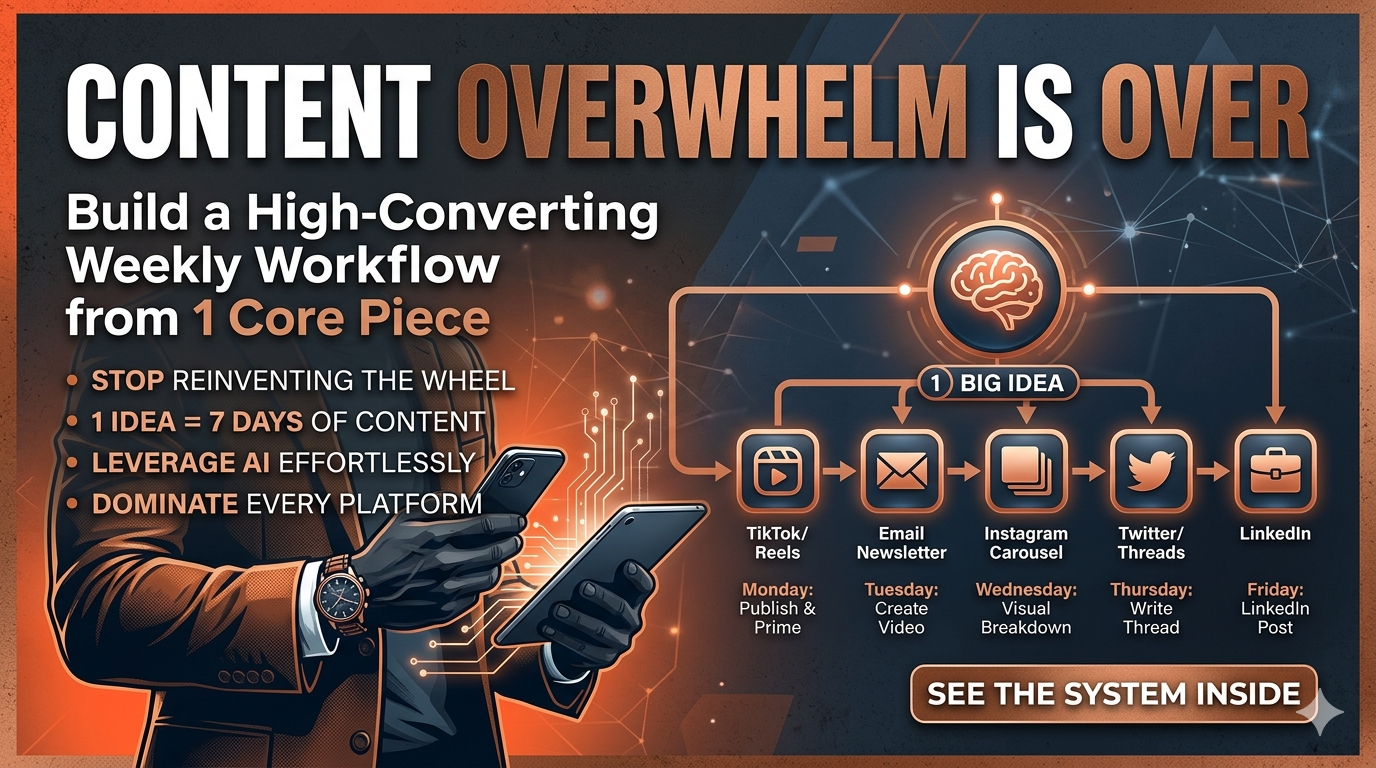
Image created by author in Nano Banana
What if the real reason your content feels heavy is not a lack of discipline, but a workflow built on constant reinvention? In this piece, you’ll learn how to turn one strong idea into a full week of strategic, platform-ready content so you can build a more intentional, empowered way of working, for men and women alike, without draining your energy or flattening your voice.
Build a Weekly Content Repurposing Workflow
Most people have been taught to treat content like a weekly performance. Show up, make something new, post it, repeat. That model looks productive from the outside, yet it quietly trains people to believe that visibility must be earned through constant output. More effort. More pressure. More starting over.
There is another way to work, and it asks you to value your ideas differently. Instead of treating each post as disposable, you treat your best thinking as something worth extending. Instead of tying consistency to exhaustion, you tie it to structure. Repurposing is not about doing less carelessly. It is about using good work more intelligently.
That difference matters if you want a business that supports your life instead of swallowing it whole.
A weekly repurposing workflow powered by AI helps you stop scrambling for something new to say every day and start building from what already has depth, clarity, and momentum.
Start With One Core Piece
Choose your Core Content of the Week. This is your anchor. It might be a blog post, a YouTube video, a podcast episode, a newsletter, or a thoughtful long-form social post. Whatever format you choose, this is where the richest part of your message lives.
Say it is a blog post. Your workflow starts the day it goes live. Use this prompt to begin repurposing:
Here’s my blog post: [paste content or summary]. Build me a full week of content from this. I want one short-form video, one email, one carousel post for Instagram, two tweets/threads, and a LinkedIn post. Match my tone: [describe your voice]. Each piece should feel like a standalone asset, not just a copy-paste.
In less than five minutes, AI can give you raw material for the week ahead. That speed is not impressive because it is fast. It is useful because it removes the friction that keeps so many people stuck in the loop of blank pages, scattered ideas, and low-level dread every time they open a content planner.
One piece can carry far more than people think.
Monday: Publish and Prime
Publish your blog post in the morning. While it is live, use ChatGPT to create a conversational summary for your email list.
Prompt:
Summarize this blog post in a conversational tone for my email list. Include a hook, one key takeaway, and a CTA to read the full post.
Now you have an email that sends readers back to your blog while also giving them a quick reason to stay connected. You are not just promoting a link. You are building continuity.
Next, prompt:
Write a 2-sentence teaser post about this blog for Facebook. Add a question that encourages discussion.
That gives you early engagement and signals that the piece deserves attention. It also solves a problem many people feel but do not always name: the frustration of creating something thoughtful, only to watch it disappear because it was never distributed well in the first place.
Tuesday: Turn Text Into Video
Pull one useful point from the same blog post and shape it into a short-form script. You are not reading the article aloud like a hostage to your own content. You are translating one idea into a format that feels direct and alive.
Prompt:
Turn this blog post into a 60-second script for TikTok or Reels. Start with a bold hook, share one tip or idea from the post, and end with a soft CTA to check the link in bio. Keep the tone [insert tone].
Record it on your phone. No elaborate setup. No waiting until you feel fully ready. Most people already have enough material. What they lack is a process that makes using it feel manageable.
If you want to batch content, ask:
Give me three short-form video scripts from this blog post. Each one should cover a different point or angle.
Now a single post is opening multiple doors into your work.
Wednesday: Build a Visual Breakdown
Shift the same core idea into a visual format for Instagram or Pinterest.
Prompt:
Turn this blog post into an Instagram carousel post. Break the content into 6–8 slides with one takeaway per slide. Use punchy, casual text and end with a CTA.
Each slide becomes a small, clear lesson. Think: “Slide 1: Stop Starting From Scratch Every Week. Slide 2: One Strong Idea Can Feed Multiple Platforms. Slide 3: Repurposing Is a Workflow, Not a Shortcut…” and so on.
If your audience responds well to visual content, this can become one of your strongest formats. The same slides can also be adapted for LinkedIn or Pinterest with light edits to the caption, which is where the system starts to feel less like a grind and more like leverage.
That is not a minor shift. It changes the relationship between effort and reach.
Thursday: Write a Thread or Micro-Breakdown
On X or Threads, clarity carries more weight than performance. You do not need to sound grand. You need to say something useful in a way that makes people stop.
Prompt:
Write a 7-tweet thread based on this blog post. The first tweet should hook. Each one after should build curiosity or value. The final tweet should link to the post or invite a reply.
Example:
Tweet 1:
I built a month of content in under 1 hour using ChatGPT. No fluff. Here’s exactly how I did it 👇
Tweet 2–6:
Each walks through a step from the blog post.
Tweet 7:
I shared all my prompts here: [link]. Or reply “content” and I’ll DM the swipe file.
A thread like that becomes its own asset. It can pull in replies, shares, saves, and fresh attention from people who would never have found the original blog post on their own. This is one of the clearest differences between reactive content and intentional content. One is created once and left to fade. The other is designed to travel.
Friday: Shape a LinkedIn Thought Post
LinkedIn usually responds best to posts that feel grounded, specific, and human. Not polished into oblivion. Not dressed up in fake authority. Just clear.
Prompt:
Turn this blog post into a casual but insightful LinkedIn post. Start with a relatable problem, explain one solution I use, and ask a question to end the post. Don’t pitch anything.
Example:
“I used to spend half a day outlining blog content. Now I spend an hour, and I’m done for the month. I stopped brainstorming and started prompting. One tool. One workflow. Less stress, more traction. Anyone else using AI like this yet, or still fighting with the blank doc?”
That works because it sounds lived-in. It does not lecture. It shows a shift and invites a response. For readers who are tired of feeling behind, this kind of post often lands harder than something more polished because it speaks to a struggle they already know.
Two sentences can do that. Sometimes that is enough.
Saturday: Save, Organize, and Recycle
Save every repurposed asset in your system at the end of the week, whether that is Notion, Trello, Airtable, Google Drive, or something else. Tag each piece by format, topic, and platform so you can actually find and reuse what you made.
Prompt:
Summarize this week’s repurposed content. List the platform, format, core message, and reuse potential for each item.
This gives you a clearer view of what you created and helps you spot evergreen pieces worth resharing in 30 or 60 days.
Ask:
Which of these pieces can I repurpose into next week’s content? Suggest tweaks or new angles to make them feel fresh.
AI might suggest turning a short-form video into a carousel, reshaping an email into a podcast outline, or using a LinkedIn post as the basis for an audio script. That is how a content system begins to compound instead of reset.
Sunday: Build the Next Core Piece
Use the week’s response to guide the next anchor piece. Look at what got replies, what earned saves, what sparked conversation, and what quietly did nothing at all. Then prompt:
Based on this week’s content, suggest 3 ideas for next week’s core blog post. Each should build on the engagement I already received or fill gaps in my strategy.
Now you are no longer relying on random inspiration or panic-posting because the calendar is empty. You are building with feedback. You are letting response shape direction.
That is a very different value system from the one most creators were handed. One says prove yourself again. The other says build on what already matters.
Your Challenge
Choose one blog post you have written, or plan to write this week. Paste it into ChatGPT and prompt: Turn this into a full week of repurposed content. I want an email, a short-form video script, a carousel post, a Twitter thread, and a LinkedIn post. Match my tone: [insert tone]. Make each format unique.
Schedule everything. Post one format per day. Review what performed best at the end of the week, then use that information to shape the next round. You do not need a bigger pile of content ideas sitting on your desk like unpaid emotional debt. You need a better system for using the ideas you already have.
Daily AI productivity ideas, no fluff, just useful. Subscribe so the next one finds you.
메타데이터
- post_id
- 8f170c53c8e0
- slug
- i-built-a-smarter-content-repurposing-workflow-with-ai-8f170c53c8e0
- url
- https://medium.com/small-wonders-daily/i-built-a-smarter-content-repurposing-workflow-with-ai-8f170c53c8e0
- canonical_url
- https://medium.com/small-wonders-daily/i-built-a-smarter-content-repurposing-workflow-with-ai-8f170c53c8e0
- author_url
- https://medium.com/@piratequeen830
- status
- ok
- fetched_at
- 2026-06-09 15:37:30