How Whisper Works: OpenAI’s Speech-to-Text Model Explained
Speech is one of the most natural ways humans communicate, but computers don’t “understand” speech directly. To bridge this gap, we use…
How Whisper Works: OpenAI’s Speech-to-Text Model Explained
Speech is one of the most natural ways humans communicate, but computers don’t “understand” speech directly. To bridge this gap, we use Speech-to-Text (STT) systems. One of the most advanced tools today is OpenAI’s Whisper, a deep learning model that can accurately transcribe speech into text.
In this blog, we’ll explore how Whisper works, why it’s so powerful, and how you can use it in Python.
🔹 What is Whisper?
Whisper is an automatic speech recognition (ASR) model that converts spoken audio into text. It’s trained on 680,000+ hours of multilingual audio, making it highly accurate and robust — even in noisy environments or when dealing with multiple languages.
Example:
- Spoken audio: “Turn on the lights in the living room”
- Whisper Output: “Turn on the lights in the living room.”

How Whisper Processes Audio
Whisper doesn’t just “listen” — it transforms audio into a format the model can understand:
Audio Capture & Preprocessing
- Converts raw audio (like a .wav file) into a mel spectrogram, which represents frequencies over time
- Normalizes volume and adjusts for noise.
Feature Extraction
- The mel spectrogram is split into frames, each capturing the audio content for a short time window.
Input to the Model
- The processed audio is fed into a Transformer-based deep learning model, which analyzes patterns in the speech.
🔹 Whisper’s Model Architecture
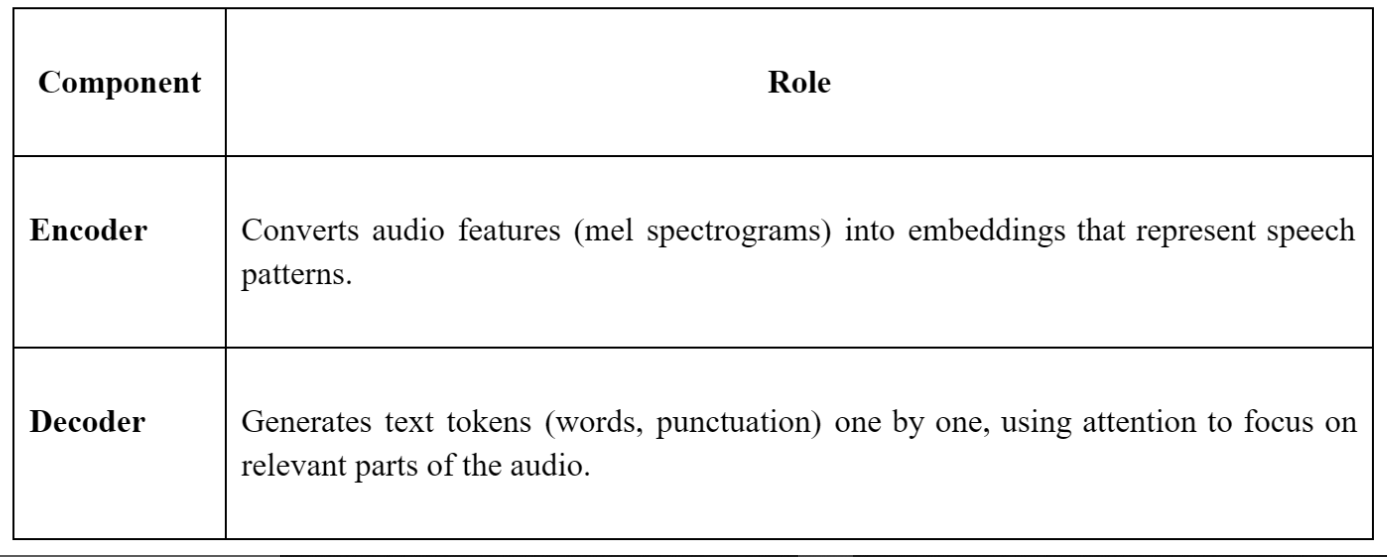
Whisper is based on a sequence-to-sequence Transformer, similar to models like GPT. It has two main parts:
Multilingual and multitask:
- Whisper can transcribe multiple languages.
- It can also detect language automatically and do translation.
Output Generation
- Whisper outputs text token by token.
- It predicts the next word based on previous words and audio features
- Includes punctuation and formatting, unlike some older ASR models.
ref:https://openai.com/index/whisper/
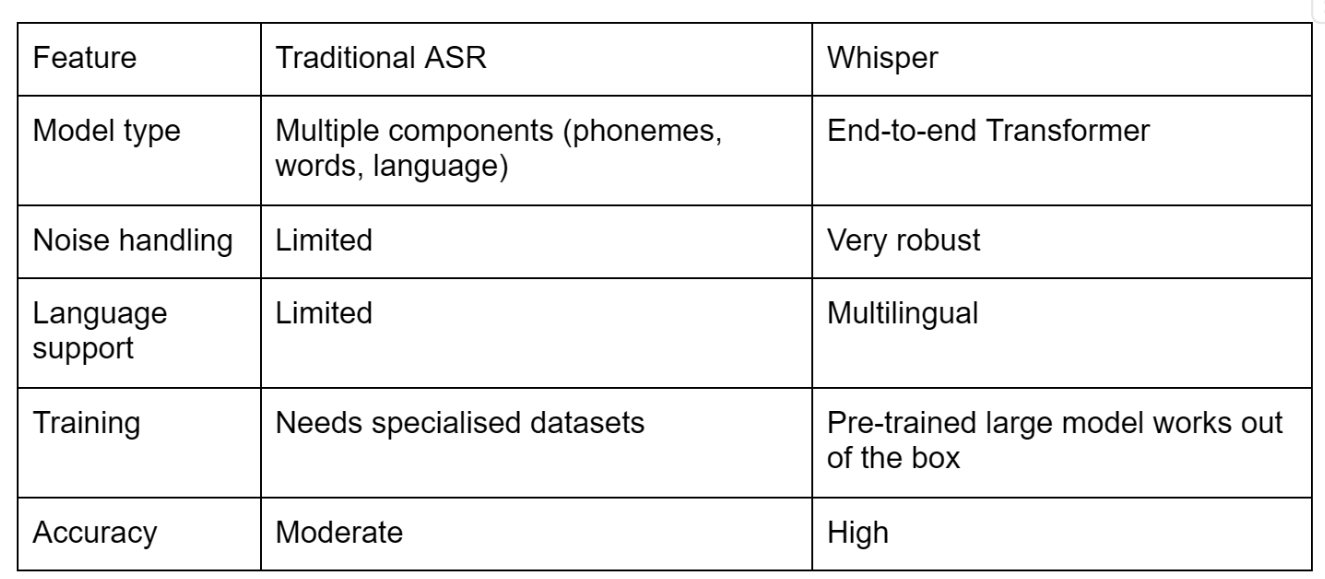
It’s end-to-end, meaning the model learns to map audio directly to text without needing separate phoneme or language models.
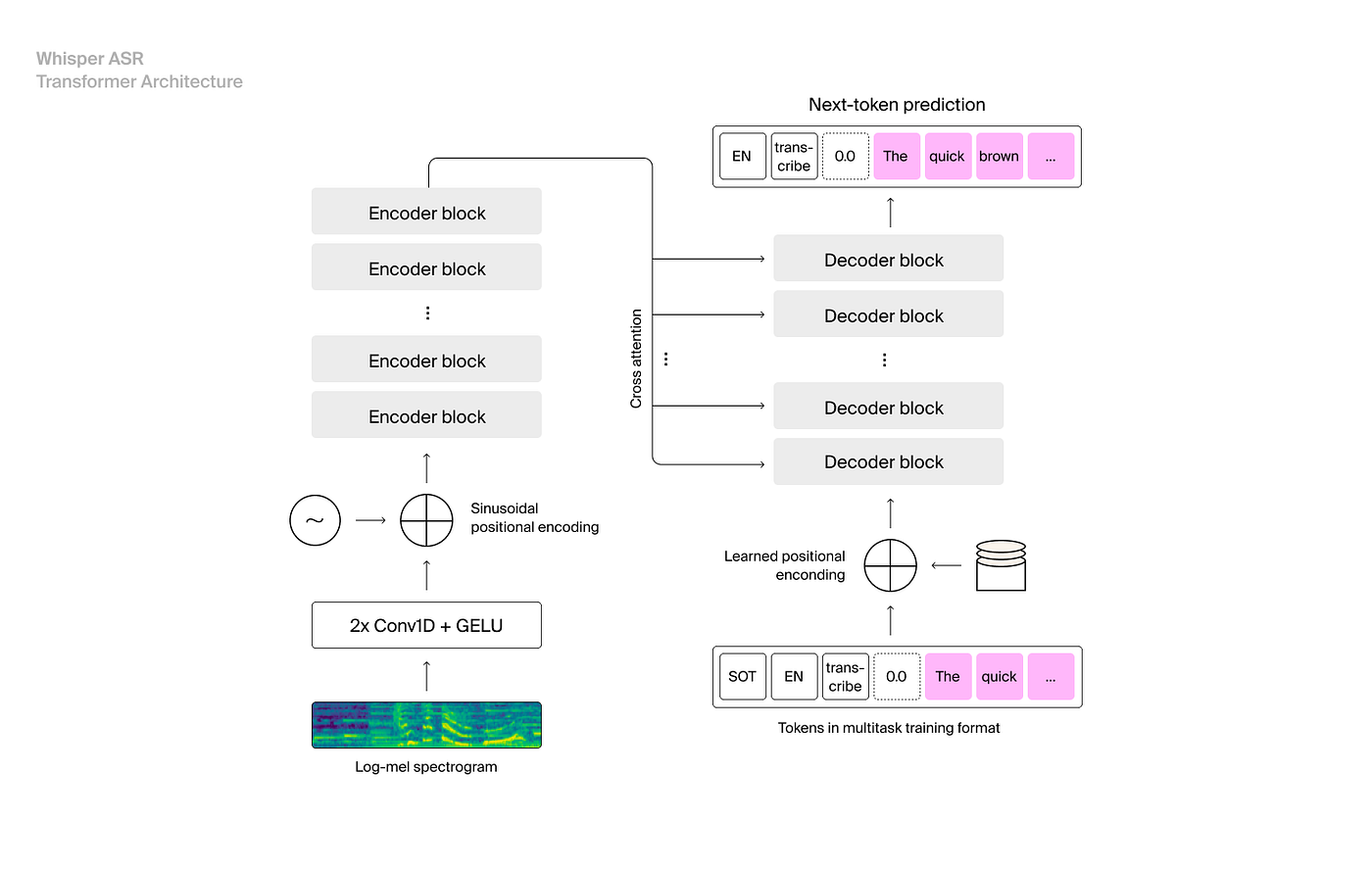
The Whisper architecture is a simple end-to-end approach, implemented as an encoder-decoder Transformer. Input audio is split into 30-second chunks, converted into a log-Mel spectrogram, and then passed into an encoder. A decoder is trained to predict the corresponding text caption, intermixed with special tokens that direct the single model to perform tasks such as language identification, phrase-level timestamps, multilingual speech transcription, and to-English speech translation.
Whisper architecture workflow , ref:https://openai.com/index/whisper/
🔹 Features That Make Whisper Powerful
- Multilingual support: Recognizes and transcribes many languages.
- Automatic language detection: No need to specify the language.
- Noise robustness: Handles background noise effectively.
- Punctuation & formatting: Includes punctuation, capitalization, and spacing in the output.
- Offline capability: Can run locally without an internet connection.
🔹 Comparing Whisper with Traditional ASR
🔹 Using Whisper in Python
Whisper makes it simple to transcribe speech with just a few lines of code:
# Install the library
!pip install git+https://github.com/openai/whisper.git
# Import and load model
import whisper
model = whisper.load_model("base")
# Transcribe audio
result = model.transcribe("example.wav")
print("Whisper Output:", result["text"])- You can choose different models: tiny, base, small, medium, large.
- Smaller models are faster but less accurate; larger models are slower but highly precise.
🔹 How Whisper Works in Simple Steps
- Audio → Mel spectrogram (frequency representation)
- Mel spectrogram → Encoder (extracts speech patterns)
- Encoder output → Decoder (generates text tokens)
- Output → Transcribed text with punctuation and spacing
🔹 Applications of Whisper
- Voice assistants: Siri, Alexa, Google Assistant
- Accessibility tools: Helping people with disabilities type by voice
- Transcription apps: Lectures, meetings, or interviews
- Language learning: Real-time pronunciation feedback
Whisper is a state-of-the-art speech-to-text model that’s powerful, robust, and easy to use. It’s end-to-end, multilingual, and capable of handling noise, making it perfect for:
- Student projects
- Accessibility solutions
- AI voice assistants
- Offline speech recognition
from google.colab import files
uploaded = files.upload()   # Select your .wav file
# 1. Uninstall the wrong whisper if already installed
!pip uninstall -y whisper
# 2. Install OpenAI Whisper from GitHub
!pip install git+https://github.com/openai/whisper.git
!pip install setuptools==65.5.0 # fix compatibility issuesimport whisper
# Load the base model (can be "tiny", "base", "small", "medium", "large")
model = whisper.load_model("base")
# Transcribe your audio file (must be .wav, .mp3, or .flac)
result = model.transcribe("16-122828-0002.wav")
print("Whisper Output:", result["text"])Upload your audio file
from google.colab import files
uploaded = files.upload() # Select your .wav file- from google.colab import files Imports the files module from Google Colab, which allows you to upload files from your local computer to the Colab environment.
- uploaded = files.upload() Opens a file selector in Colab. You can choose a .wav (or .mp3/.flac) file.
- The selected file is uploaded to the Colab virtual machine. uploaded is a dictionary where the keys are filenames and the values are the file contents in bytes.
Install OpenAI’s Whisper from GitHub
!pip install git+https://github.com/openai/whisper.git- Installs the official OpenAI Whisper package directly from GitHub.
git+https://... tells pip to fetch the code directly from the repository.
Import Whisper in Python
import whisper- This loads the Whisper module so you can use it to load models and transcribe audio.
Load a Whisper model
model = whisper.load_model("base")- Whisper has multiple model sizes:
- “tiny” → very fast, less accurat
- “base” → small, fairly fast, decent accurac
- “small” → slower, more accurate
- “medium” → slower, better accuracy
- “large” → slowest, best accuracy
- whisper.load_model(“base”) downloads (if not already downloaded) and loads the base model into memory.
Transcribe your audio file
result = model.transcribe("16–122828–0002.wav") #"16–122828–0002.wav" is the audion we look model.transcribe(file_path) processes the audio file and outputs text transcription.
- Whisper can handle .wav, .mp3, or .flac files.
- result is a dictionary containing multiple fields like:
- “text” → the actual transcription text
- “segments” → optional, timestamps and segment-level text
- “language” → detected language
Print the transcription
print(“Whisper Output:”, result[“text”])
Extracts the “text” field from result and prints the transcriptio
Using Whisper, you can build real-world applications that understand speech just like humans do — opening a world of possibilities in AI and accessibility.
메타데이터
- post_id
- 928d9729ff63
- slug
- how-whisper-works-openais-speech-to-text-model-explained-928d9729ff63
- url
- https://medium.com/@helenjoy88/how-whisper-works-openais-speech-to-text-model-explained-928d9729ff63
- canonical_url
- https://medium.com/@helenjoy88/how-whisper-works-openais-speech-to-text-model-explained-928d9729ff63
- author_url
- https://medium.com/@helenjoy88
- status
- ok
- fetched_at
- 2026-07-26 15:30:55