Apache Kafka Fundamentals: Events, Topics, Partitions, Producers, and Consumers
In the previous article, we focused on the fundamentals of Apache Kafka. We understood what events and event streams are, why event-driven…
Apache Kafka Fundamentals: Events, Topics, Partitions, Producers, and Consumers
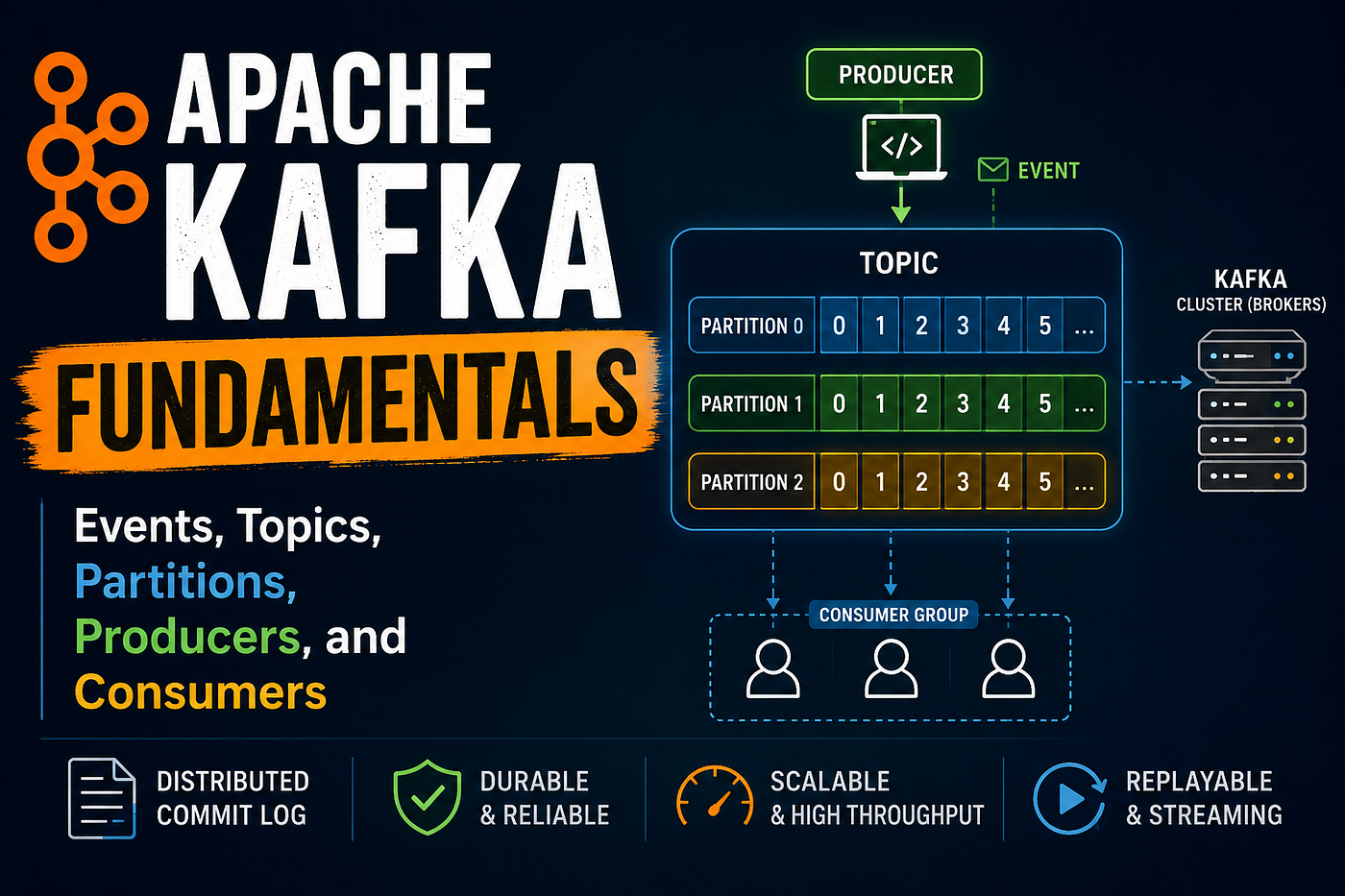
In the previous article, we focused on the fundamentals of Apache Kafka. We understood what events and event streams are, why event-driven systems are widely used, and how Kafka fits into this model as a platform for publishing, storing, and processing events.
In this article, we move one level deeper. Instead of focusing on concepts, we will look at how Kafka is built internally. We will explore its core components such as brokers, clusters, producers, and consumers, and understand how they work together to enable scalable and reliable event streaming.
Fundamentals of Apache Kafka
1. Event
In Kafka terminology, the basic unit of data is an event.
Event is nothing but represents a fact that something has occurred in the system. (For example: User Logged In, Order Created, Payment Done)It is immutable, meaning once it is written, it cannot be changed.

An event typically contains:
- Key
- Value (actual data)
- Timestamp
- Headers (optional metadata)
For example:
{
  "key": "order-101",
  "value": {
    "orderId": "101",
    "amount": 500,
    "status": "CREATED"
  },
  "timestamp": "2026-06-08T10:00:00Z"
}
Kafka treats each event as part of a continuous stream of data.
2. Topic
A topic is a logical category where events are stored.
Very simplified, a topic is similar to a folder in a filesystem, and the events are the files in that folder.
Every event published to Kafka is written into a topic. A topic acts like a named stream of related data.
For example:
orders→ all order-related eventspayments→ all payment-related eventsuser-activity→ login, click, and navigation events

A topic does not store data in a single place. Instead, Kafka distributes topic data across multiple brokers for scalability.
Topics are partitioned , meaning a topic is spread over a number of “buckets” located on different Kafka brokers.
3. Partition
A partition is the fundamental unit of parallelism in Kafka.
Each topic is split into multiple partitions, and each partition is an ordered, immutable sequence of events.
Kafka uses partitions to scale horizontally.
If a topic has three partitions, different brokers can store different partitions, allowing Kafka to distribute load.
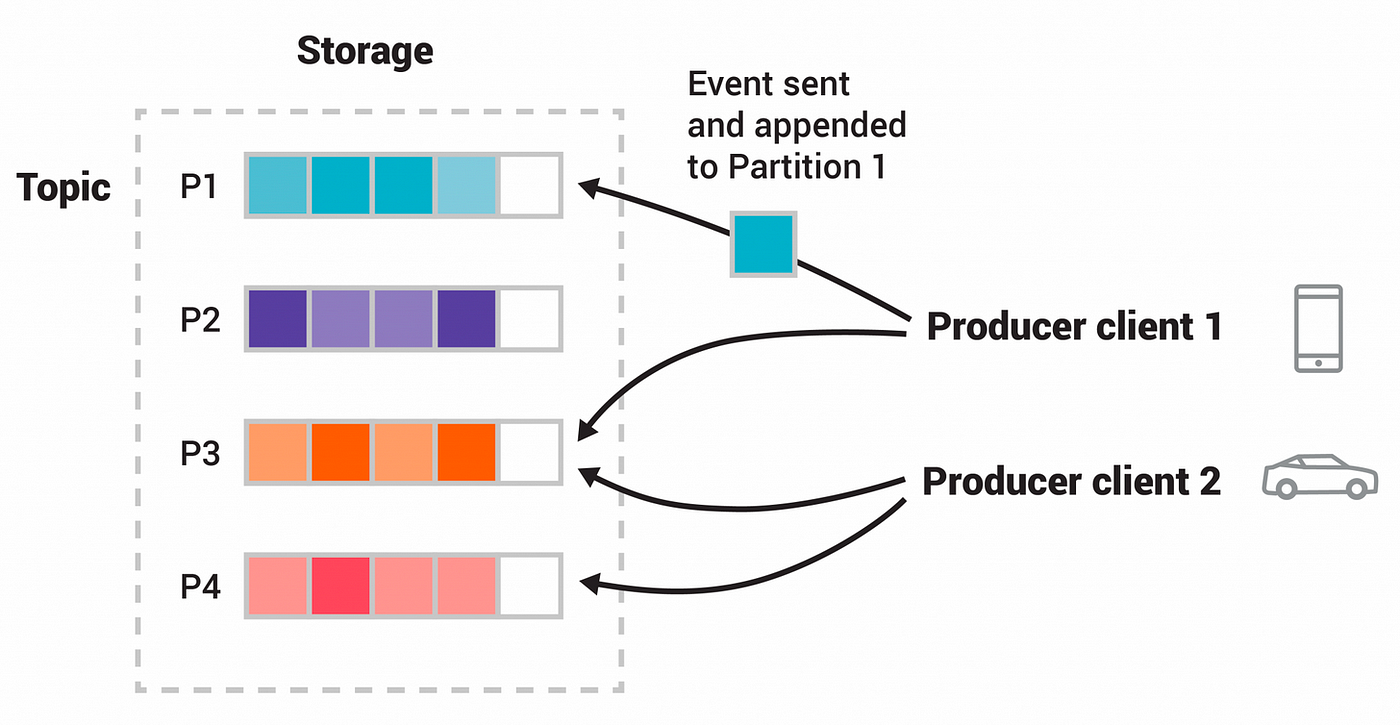
If Kafka stored all data in a single place, it would become a bottleneck. Partitions solve this by:
- Splitting data across multiple machines
- Allowing parallel reads
- Enabling high throughput
Each partition maintains strict ordering, but ordering is only guaranteed within that partition.
Kafka guarantees that events inside a partition are stored in the exact order they are received.
However, ordering is not guaranteed across partitions.
This is why system design decisions (like choosing partition keys) are important.
4. Offset
Every event inside a partition has a unique identifier called an offset. An offset represents the position of an event in the partition.
For example:
Partition 0:
0 → OrderCreated
1 → PaymentCompleted
2 → InventoryReserved
3 → ShipmentCreated
Offsets allow Kafka to track progress and enable consumers to resume reading from where they left off.
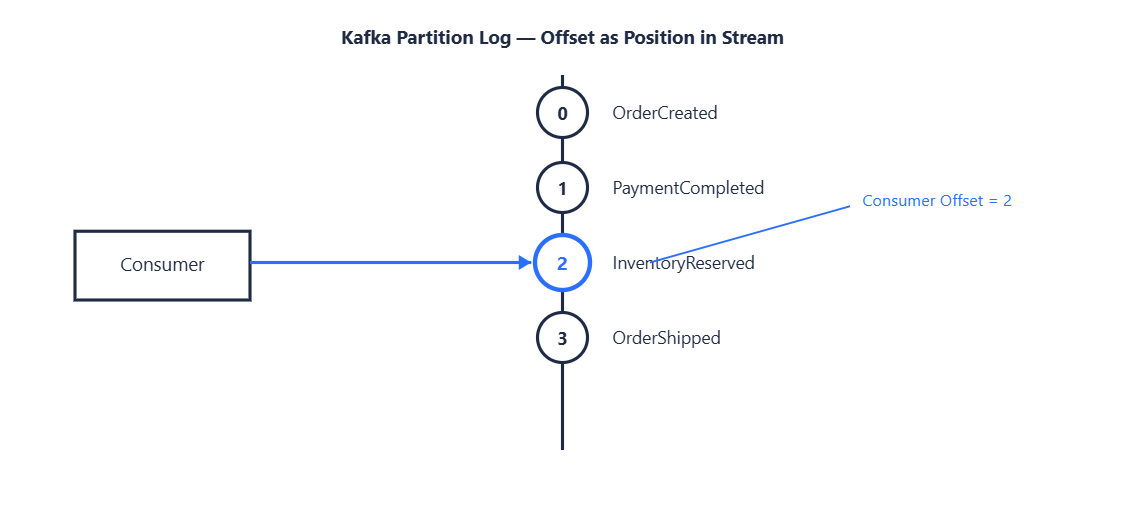
Offsets provide replay capability, fault tolerance, consumer state tracking Consumers store their last processed offset so they can continue from the correct position after a failure.

5. Kafka Broker
A Kafka Broker is a single Kafka server that stores data and serves client requests.
In simple terms, it is the worker node of Kafka.
A broker is responsible for:
- Receiving records from producers
- Storing them in topic partitions (as logs on disk)
- Serving records to consumers when they request them
Each broker manages a portion of the overall data, which allows Kafka to scale horizontally.
A Kafka system is not built on one broker. It is built on multiple brokers working together.
6. Kafka Cluster
A Kafka Cluster is a group of Kafka brokers working together as a single system.
Instead of storing all data in one machine, Kafka distributes data across multiple brokers.
This design allows Kafka to handle large volumes of data, survive server failures (fault tolerance), scale by adding more brokers and balance load across the system
If one broker fails, the cluster continues working because data is replicated across other brokers.
7. Kafka Producer
A Kafka Producer is the component that sends data into Kafka. It is the entry point of all events in a Kafka system.
In a publish-subscribe model, the producer plays the role of the publisher. It creates events and publishes them to a Kafka topic. After that, Kafka takes responsibility for storing and distributing those events to consumers.
The producer does not know who will read the data. It only knows the topic where the data should go.
How Producer Works Internally
When an application sends data using a producer, it does not directly push data to consumers or even to a single storage location.
Instead, the process looks like this:
- Application creates an event
- Producer converts it into a Kafka record
- Record is sent to a topic
- Kafka decides which partition should store it
- Broker stores it in the partition log
- Consumers read it later

Kafka uses a publish-subscribe model. Producers publish events while Kafka acts as the middle layer and consumers subscribe to topics
This means:
- One producer can send data once
- Many consumers can read the same data independently
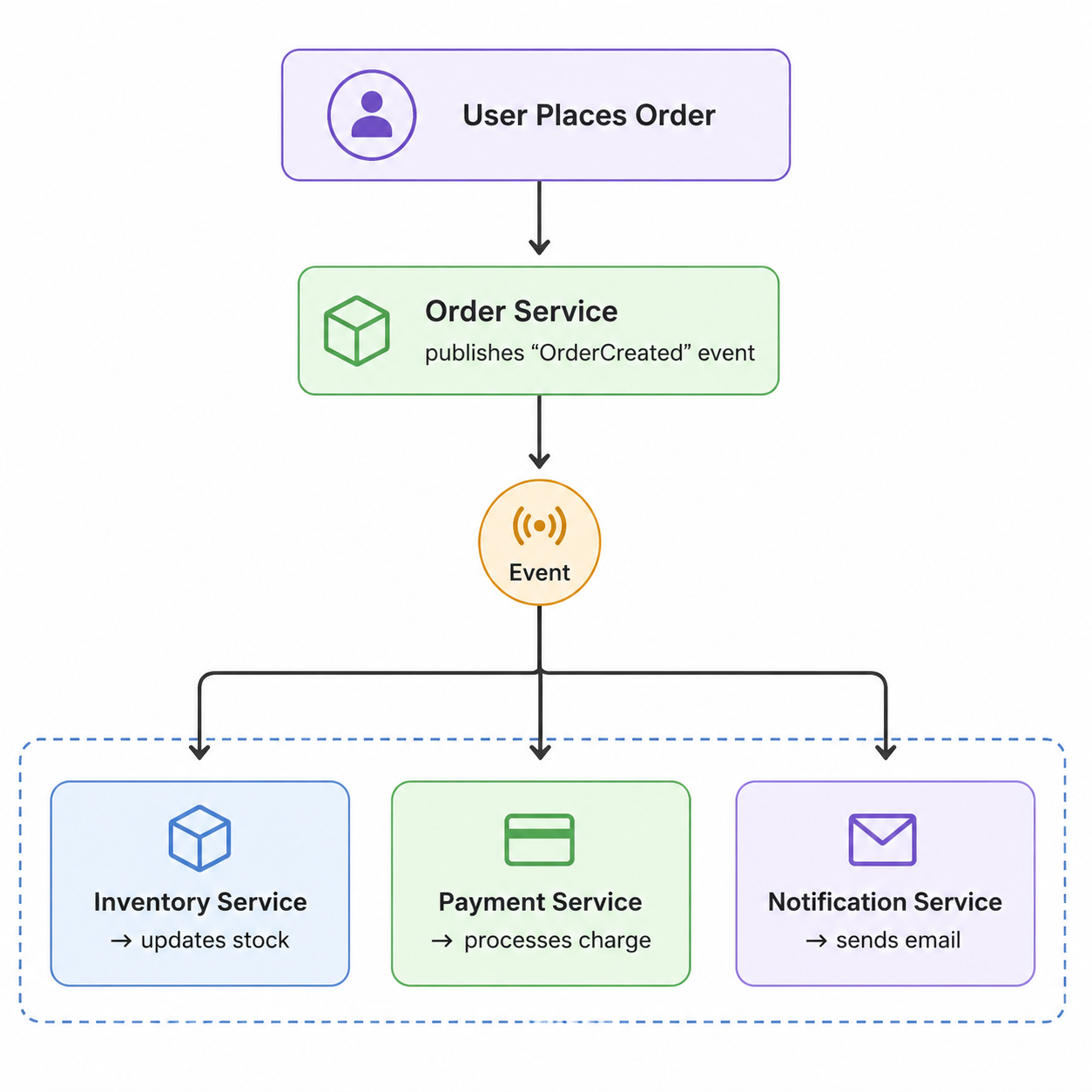
For example:
- Order Service publishes
OrderCreated - Payment, Inventory, and Notification services all consume it separately
The producer does not need to know about any of these services.

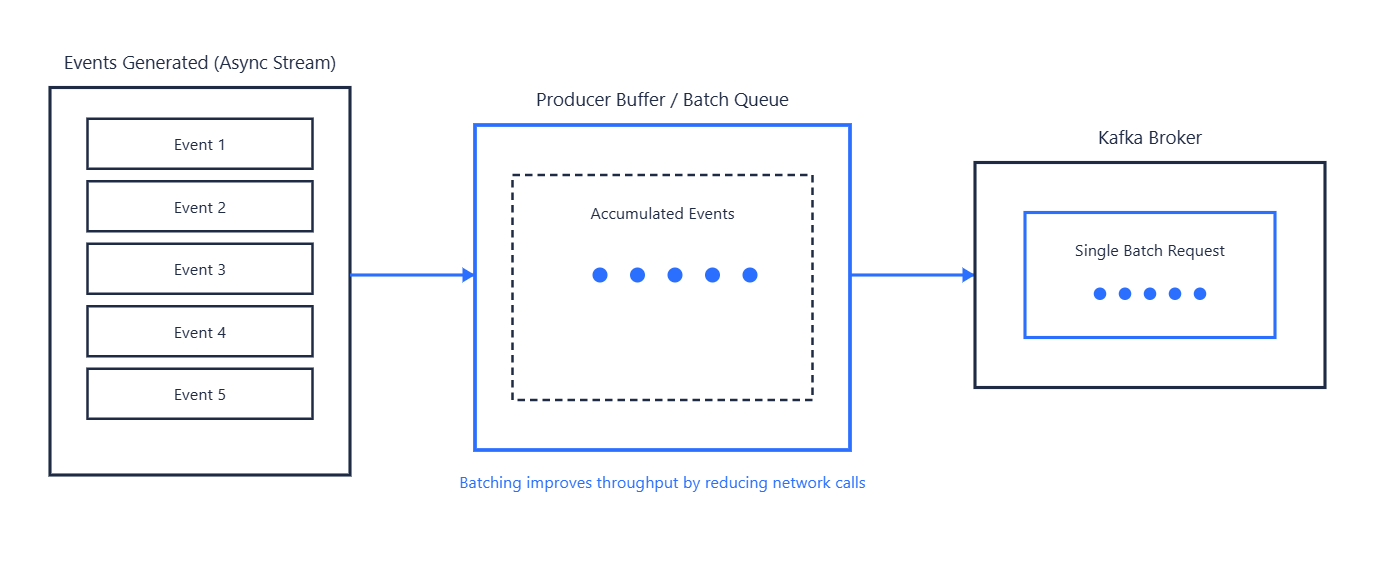
Kafka Producer works in asynchronous mode by default.
When you send a record, it is not immediately written to Kafka; instead, it is first stored in a buffer and later sent in batches.
This batching mechanism improves performance because it reduces the number of network calls, allows multiple records to be sent together, and increases overall system throughput.
If every event were sent one by one, the system would become slow due to increased network overhead, and the overall throughput would drop significantly.
Batching makes Kafka suitable for high-volume systems.
Kafka allows producers to control how safe the write operation should be using acknowledgements.
ACKs define when a producer considers a message as successfully sent.
- acks = 0
-> Producer does not wait for confirmation -> Fast but unsafe
- acks = 1
-> Leader broker confirms write -> Balanced approach
- acks = all
-> All replicas confirm write -> Safest option
How to Use ACKs Wisely
- Use
acks=allfor critical data like payments - Use
acks=1for normal business events - Avoid
acks=0unless data loss is acceptable

A Kafka Producer is designed to be:
- Fast (async processing)
- Scalable (batching + partitioning)
- Flexible (different ACK levels)
- Decoupled (no knowledge of consumers)
It is the starting point of every event stream in Kafka.
8. Kafka Consumer
A Kafka Consumer is an application that reads records from Kafka topics.
If the producer is responsible for publishing data into Kafka, the consumer is responsible for reading and processing that data.
In a publish-subscribe model, consumers subscribe to topics and receive records that producers have published.
For example, after an OrderCreated event is published to Kafka:
- Payment Service may process the payment
- Inventory Service may reserve stock
- Notification Service may send a confirmation email
All of these services act as consumers.
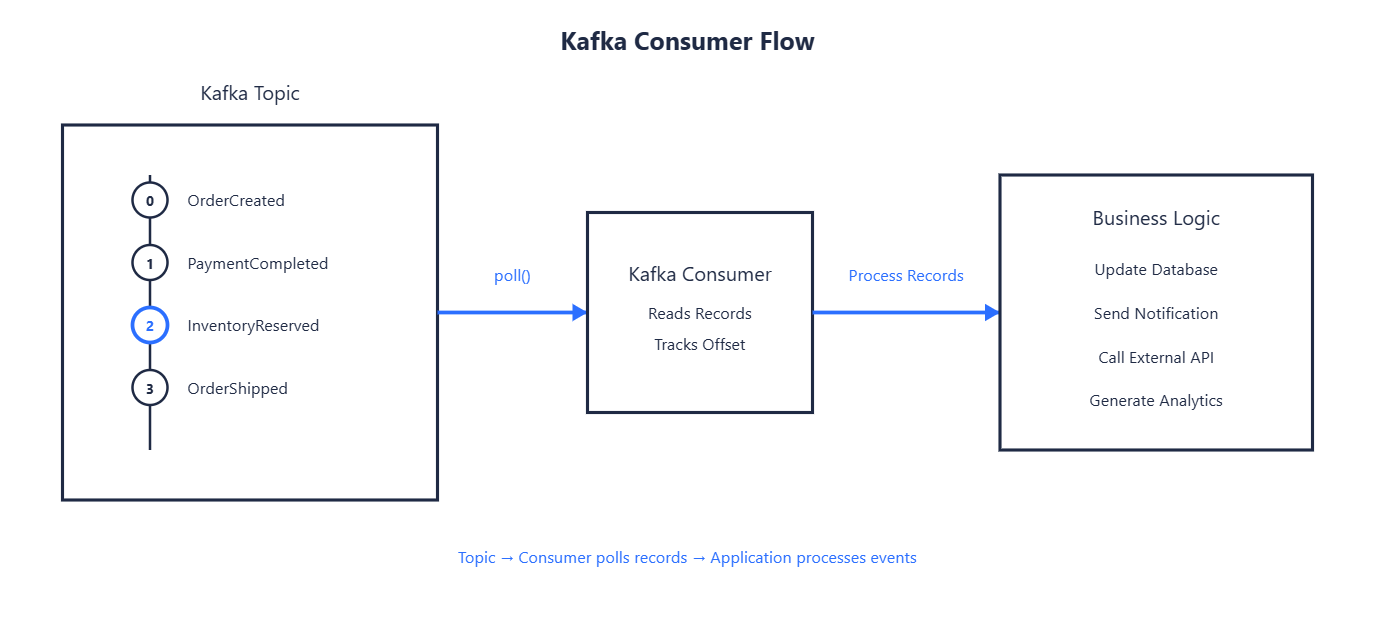
A consumer does not wait for Kafka to send data automatically. Instead, Kafka follows a pull-based model, where consumers actively request data from Kafka.
The process looks like this:
- Consumer subscribes to a topic
- Consumer requests records from Kafka
- Kafka returns available records
- Consumer processes them
- Consumer keeps track of its progress using offsets
This gives consumers full control over how quickly they process data.
Pull Model vs Push Model
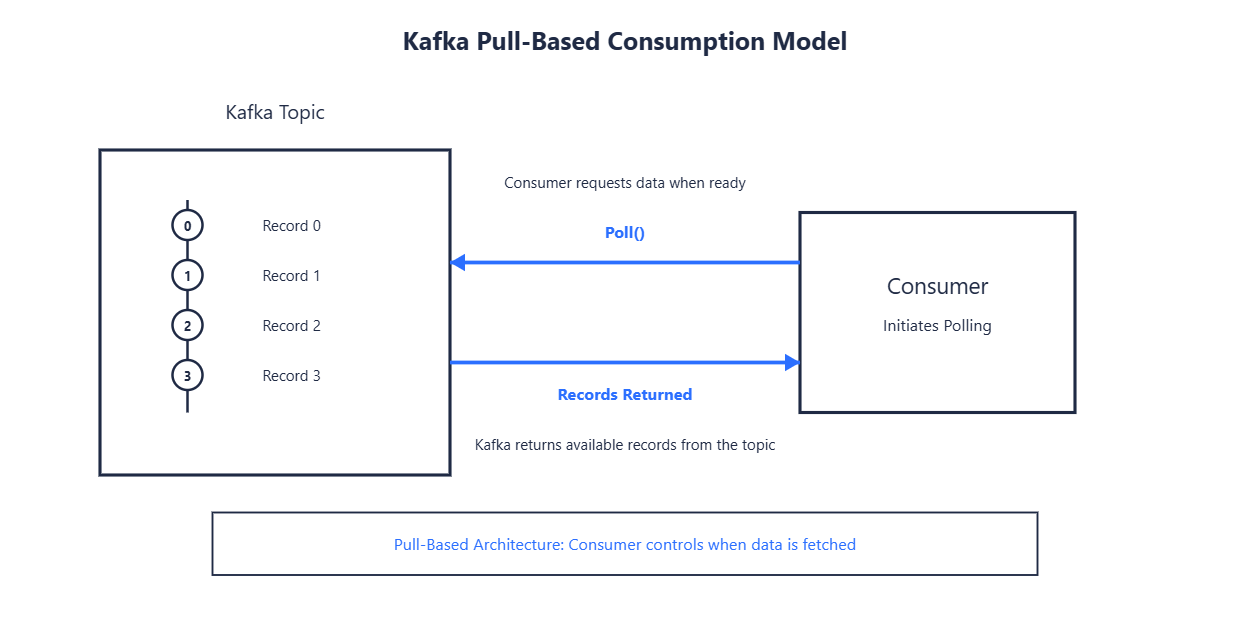
Many messaging systems use a push model where messages are sent directly to consumers.
Kafka uses a pull model.
This means consumers decide:
- When to fetch data
- How much data to fetch
- How quickly to process records
This approach prevents slow consumers from becoming overwhelmed and makes scaling easier.
Offsets and Consumer Progress
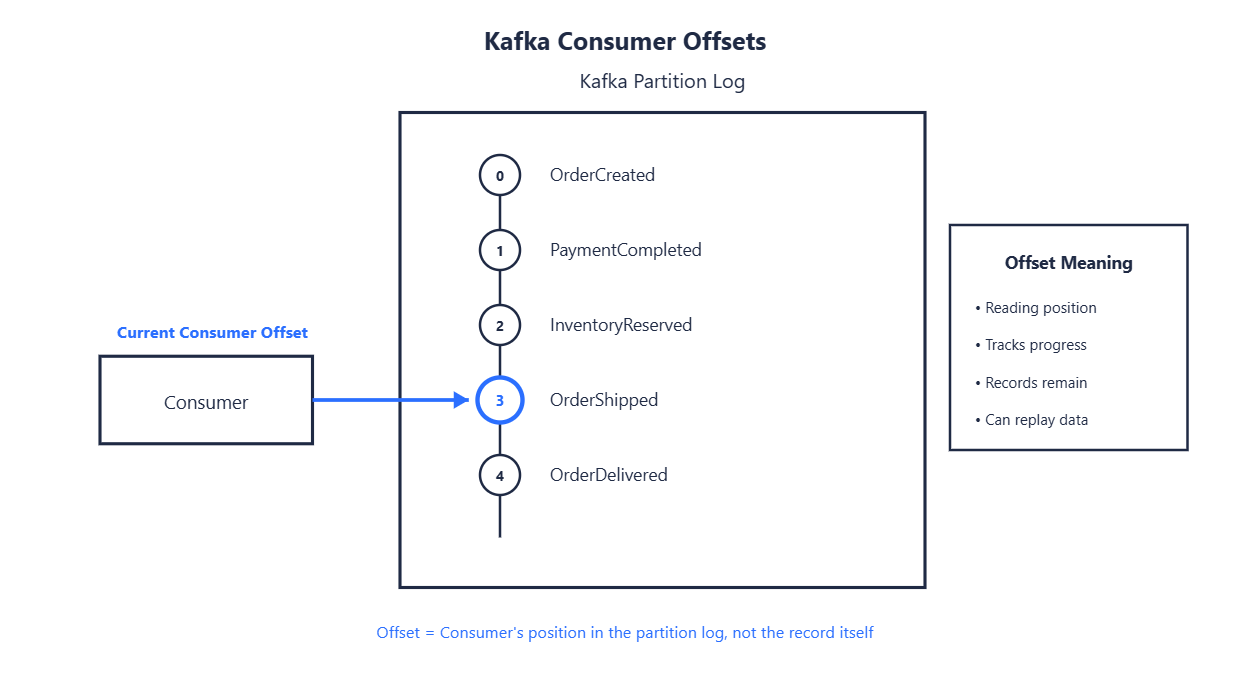
Kafka stores records in partitions, and every record has an offset. Consumers use offsets to track which records they have already processed.
Example:
Partition 0
Offset 0 → OrderCreated
Offset 1 → PaymentCompleted
Offset 2 → InventoryReserved
Offset 3 → OrderShipped
If a consumer has processed records up to offset 2, it knows the next record to read starts from offset 3.
Why Offsets Are Important
Offsets allow consumers to:
- Resume after failures
- Avoid reading the same records repeatedly
- Replay historical records when needed
Unlike traditional queues, Kafka does not delete records after consumption. The consumer simply tracks its current position.
Consumer Groups
A single consumer can read data from a topic, but real-world systems often need more processing power.
Kafka solves this using consumer groups.
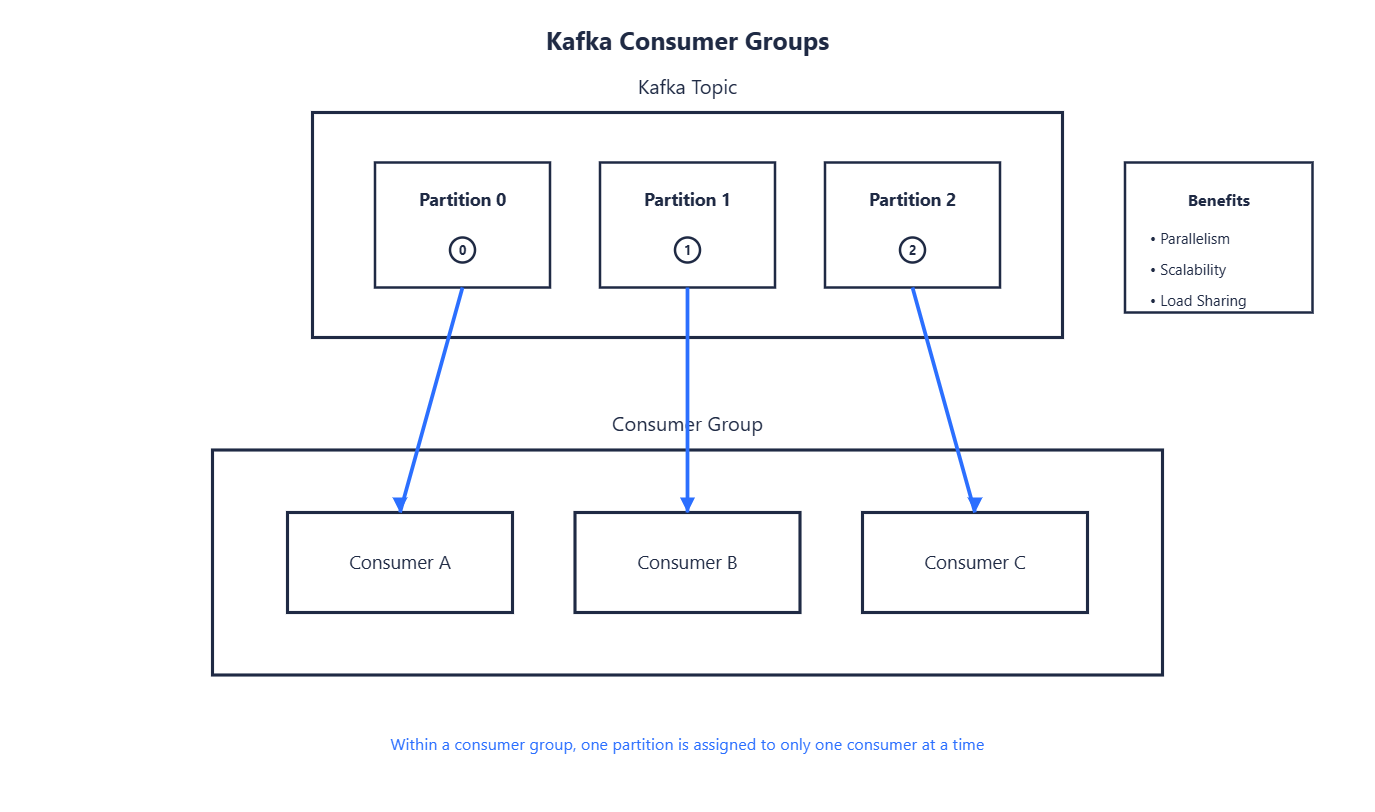
A consumer group is a collection of consumers working together to process a topic. Kafka distributes partitions among consumers in the same group.
For example:
Topic: Orders
Partitions:
Partition 0
Partition 1
Partition 2

Consumer Group:
Consumer A
Consumer B
Consumer C
Each consumer receives one partition and processes records independently.
Consumer groups provide horizontal scaling, parallel processing and fault tolerance
As data volume grows, more consumers can be added to the group.
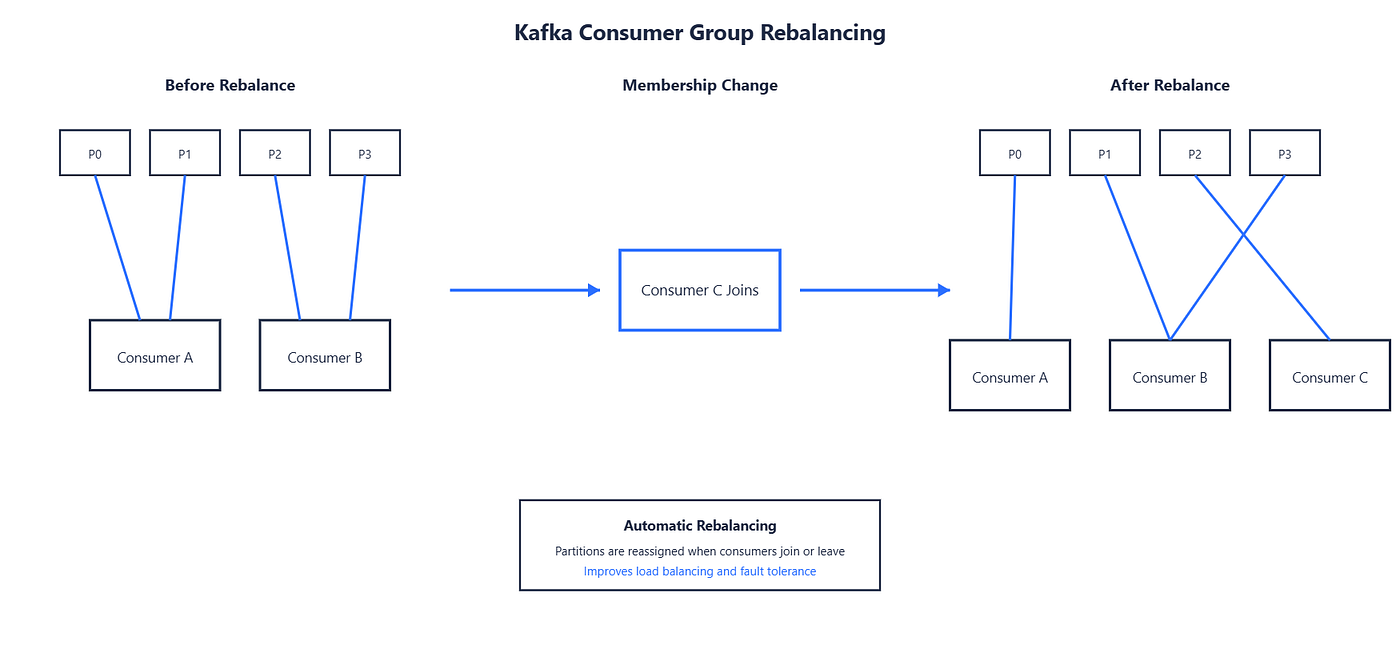
When consumers join or leave a group, Kafka automatically redistributes partitions. This process is called rebalancing.
Examples:
- New consumer joins → Kafka redistributes partitions
- Consumer crashes → Remaining consumers take over its partitions
This ensures all partitions continue to be processed.
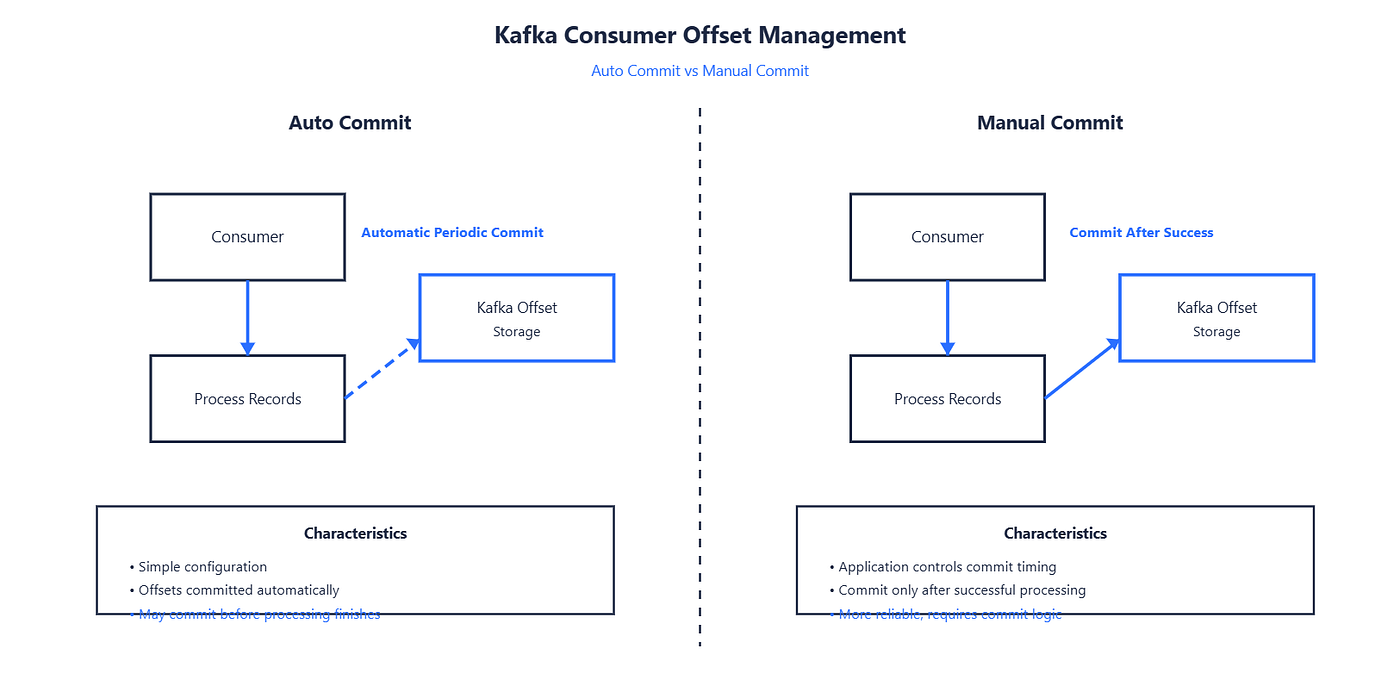
Auto Commit vs Manual Commit
Consumers can decide how offsets should be committed.
For Auto Commits, Kafka periodically saves offsets automatically.
Advantages:
- Easy to use
Disadvantages:
- Risk of losing track of processing state if records fail during processing
For Manual Commits, Application explicitly commits offsets after successful processing.
Advantages:
- Better reliability
- Greater control
Disadvantages:
- Slightly more implementation effort
For critical systems such as payments and financial transactions, manual commits are often preferred.
Conclusion
In this article, we moved beyond the basic concepts of event streaming and explored the core building blocks that make Kafka work.
We started with events, topics, partitions, and offsets — the fundamental structures used to store and organize data in Kafka. We then looked at brokers and clusters to understand how Kafka distributes data across multiple servers to achieve scalability and fault tolerance.
Finally, we explored producers and consumers, the two components responsible for publishing and processing data. Along the way, we discussed concepts such as publish-subscribe messaging, asynchronous publishing, acknowledgements, consumer groups, offset management, and rebalancing.
Together, these components form the foundation of every Kafka-based system. Understanding how they interact is essential before moving on to writing Kafka applications.
In the next article, we will explore Kafka’s APIs and learn how applications interact with Kafka programmatically. We will cover the Producer API, Consumer API, Admin API, Connect API, and Streams API, along with practical examples of when and how they are used in real-world systems.
메타데이터
- post_id
- 93c1b6c704b4
- slug
- apache-kafka-fundamentals-events-topics-partitions-producers-and-consumers-93c1b6c704b4
- url
- https://medium.com/@yashwantsaste/apache-kafka-fundamentals-events-topics-partitions-producers-and-consumers-93c1b6c704b4
- canonical_url
- https://medium.com/@yashwantsaste/apache-kafka-fundamentals-events-topics-partitions-producers-and-consumers-93c1b6c704b4
- author_url
- https://medium.com/@yashwantsaste
- status
- ok
- fetched_at
- 2026-06-11 05:11:55