What is GGUF? The Format Powering Local AI Models like LLaMA and Mistral
A few years ago, running a massive AI model like GPT or LLaMA meant you needed cloud servers the size of small buildings — humming away…
What is GGUF? The Format Powering Local AI Models like LLaMA and Mistral
A few years ago, running a massive AI model like GPT or LLaMA meant you needed cloud servers the size of small buildings — humming away somewhere in Silicon Valley. Today, people are doing the same thing on their laptops. How? With a new wave of local language models like LLaMA 3, Mistral, and Phi-3, running smoothly through tools such as LM Studio, KoboldCpp, or text-generation-webui.
But if you’ve ever downloaded one of these models, you’ve probably noticed a curious file ending in .gguf.
It sits quietly in your “models” folder, yet it’s the reason your computer can talk like ChatGPT without an internet connection.
Think of it like this:
- A regular AI model is like a full-sized Blu-ray movie — massive, high-quality, but hard to carry.
- A GGUF model is that same movie, expertly compressed and packaged to fit on your phone, without losing the plot.
In simple terms, GGUF (GPT-Generated Unified Format) is a special container format that allows these huge models to be compressed, portable, and ready to run locally — whether you’re on a gaming PC, a MacBook, or even a Raspberry Pi.
Just as MP3 made music portable and MP4 did the same for video, GGUF is doing that for large language models. It’s transforming AI from something that lives in the cloud to something you can keep in your backpack.
So, what exactly is inside this mysterious .gguf file, and why has it become the standard for local AI enthusiasts everywhere?
Let’s open it up and take a look.
Background — From GGML to GGUF: The Evolution of Local AI Formats
Before GGUF became the standard, the world of local AI models was a bit like the early days of digital music. Everyone wanted to listen offline — but every device seemed to speak a slightly different language. Some used WAV, some FLAC, some MP3. You could download a song, only to realize your player didn’t know what to do with it.
That’s exactly what was happening with AI model formats just a couple of years ago.
When llama.cpp first appeared, it introduced a simple way to run Meta’s LLaMA model locally using a format called GGML (Georgi Gerganov Machine Learning) — named after its creator. GGML worked great at first: it stored the model’s brain (the neural weights) in a lightweight binary form so your CPU or GPU could load it fast.
But as new models and versions appeared — LLaMA 2, Mistral, Falcon, Phi, and beyond — the old GGML format started to show its cracks:
- Different versions of GGML couldn’t always read each other’s files.
- Some models needed separate files for tokenizers or vocabularies.
- Metadata (like model size, architecture type, or context window) wasn’t standardized, causing confusion across tools.
It was like trying to play a modern movie on an old DVD player — sometimes it worked, sometimes it didn’t, and often you had to tweak things manually just to make it run.
To solve this growing chaos, the llama.cpp team designed a new format in mid-2023 called GGUF — the GPT-Generated Unified Format. It was built from the ground up to be universal, future-proof, and metadata-rich — a single file that could carry everything a model needs to run smoothly anywhere.
If GGML was the “CD” era of local AI, GGUF is the streaming age — unified, consistent, and optimized for every platform.
Here’s the evolution in a nutshell:
GGML → GGMLv3 → GGUFEach step brought better performance, cleaner structure, and broader compatibility. GGUF now acts as the universal language that connects model creators, developers, and everyday users who just want to run AI locally — without worrying about technical mismatches.
What Exactly Is GGUF?
Imagine you’ve just downloaded a brand-new video game. Normally, you’d have to install multiple files — textures, sound packs, controller configs, DLCs — before you could even hit “Play.” Now imagine if everything — the graphics, sounds, settings, and saved data — came neatly zipped in one smart package that your computer instantly knew how to read. That’s what GGUF is for AI models.
The Technical Definition (in plain English)
GGUF stands for GPT-Generated Unified Format. It’s a binary file format created by the llama.cpp team to store everything a large language model needs to run in one single, compact container.
Think of it as a self-contained “brain file.” When you open it with tools like llama.cpp, KoboldCpp, text-generation-webui, or LM Studio, your computer instantly understands how to think, respond, and generate text — without needing extra files or internet access.
What’s Inside a .gguf File?
A GGUF file isn’t just random 1s and 0s — it’s like a suitcase packed with all the essentials for your AI companion:
- Model Weights
- Tokenizer Vocabulary
- Metadata
Model Weights
- Real-World Analogy: The “brain cells”
- Purpose: These are the learned parameters that tell the AI how to reason, predict, and talk.
Tokenizer Vocabulary
- Real-World Analogy: The “language dictionary”
- Purpose: Converts text into tokens — the words and symbols the model understands.
Model Weights
- Real-World Analogy: The “instruction manual”
- Purpose: Stores architecture details, quantization type, and context length so any tool can interpret it correctly.
Everything is stored efficiently, so when you load a .gguf model, the system doesn’t have to look anywhere else — it’s all inside the box.
Why This Matters
Before GGUF, running a model felt like assembling IKEA furniture — you needed separate pieces: one for the model weights, one for the tokenizer, another for configs. Miss a single screw, and nothing worked.
Now, with GGUF, everything comes pre-assembled.
You just download the .gguf file, drop it into your models/ folder, and start chatting — whether you’re using llama.cpp, KoboldCpp, Ollama, or LM Studio.
It’s the universal “plug-and-play” format of the local AI world — small, smart, and self-contained.
Why GGUF Matters
If you’ve ever tried to move house, you know how frustrating it is when your belongings are scattered everywhere — one box for books, another for cables, a third for that one charger you can never find. Now imagine someone handed you one perfectly labeled box that had everything you needed, neatly packed and easy to unpack. That’s what GGUF did for AI models.
When local AI started booming, people used dozens of different tools — llama.cpp, text-generation-webui, KoboldCpp, LM Studio, and more. But each tool needed slightly different file types, different configurations, and even separate tokenizers. It was messy, time-consuming, and often intimidating for beginners.
GGUF came in and cleaned up the entire moving truck.
Here’s why it matters so much 👇
1. Unified Format — The “Universal Adapter” for AI Models
Before GGUF, running models was like dealing with a drawer full of mismatched chargers — some for iPhones, some for Androids, none that fit your laptop. GGUF became the universal adapter, a single standard that works seamlessly across most popular local AI tools. No more conversion confusion — just plug it in, and it works.
2. Fast Loading — The SSD of AI Formats
Older formats loaded model weights inefficiently, like trying to start your computer from a floppy disk. GGUF uses smart binary alignment and streamlined data structures — so your CPU or GPU can access model data at lightning speed. It’s like upgrading from a spinning hard drive to a modern SSD — faster startup, smoother inference, and less waiting.
3. Portable — The “All-in-One Travel Pack” for Your Model
A .gguf file includes the model’s weights, vocabulary, and metadata — everything it needs to think and talk.
You can drop it on a USB stick, transfer it to another computer, or even load it on a Raspberry Pi without missing a file.
It’s the carry-on luggage of AI — compact, self-contained, and ready to go anywhere.
4. Quantization Support — Making Big Brains Fit Small Devices
Large models are heavy — they need tons of memory. GGUF supports quantized versions of these models (Q4, Q5, Q8, etc.), which shrink them dramatically while keeping most of their intelligence intact. It’s like taking a 4K movie and compressing it for your phone — smaller file, same great story.
Thanks to quantization, models that once needed a data center can now run comfortably on a laptop GPU or even a high-end CPU.
5. Metadata-Rich — The “Nutrition Label” for AI Models
GGUF doesn’t just store data — it tells you what’s inside. It includes detailed metadata: model type, number of layers, context length, quantization method, and even tokenizer details. It’s like a nutrition label on food — you instantly know what you’re consuming, whether it’s a 7B Mistral or a 13B LLaMA model.
In Short:
GGUF made local AI faster, simpler, and more accessible. It’s not just a new file type — it’s a quiet revolution that turned the chaos of model management into a clean, standardized, and user-friendly experience.
The result? Anyone, anywhere, can now run cutting-edge language models without needing a supercomputer or the cloud.
Understanding Quantization (Q4, Q5, Q8)
You’re packing for a trip. You’ve got a massive wardrobe, but your airline only allows one suitcase. What do you do? You don’t throw everything away — you fold smarter, pack tighter, and maybe skip a few unnecessary items.
That’s exactly what quantization does for AI models.
What Is Quantization (in Simple Terms)?
Quantization is the process of compressing a large AI model so it can fit into smaller devices — without losing too much intelligence.
Every large language model (like LLaMA or Mistral) is made up of billions of tiny numbers called weights. These weights are usually stored in high precision (like 16-bit or 32-bit floating-point numbers). But high precision means big files and slow loading.
So, quantization comes in and says:
“Let’s represent these numbers with fewer bits — maybe 8, 5, or even 4 — while keeping the model smart enough to understand and respond properly.”
Decoding the GGUF Model Names
You’ll often see model files named like this:
llama-3-8b-instruct.Q4_K_M.ggufLet’s break that down:
- llama-3–8b-instruct: The base model — 8 billion parameters, instruction-tuned
- Q4: Quantization level: weights stored in 4 bits
- K_M: Quantization variant (optimized for a balance of CPU/GPU speed and accuracy)
- .gguf: The format — GPT-Generated Unified Format
So Q4_K_M means the model is compressed to 4-bit precision, using a K_M quantization algorithm that’s tuned for speed without a huge quality drop.
The Real-World Analogy: HD vs. Compressed Video
Think of it like watching a video:
- Full-precision model (FP16 or FP32) = watching a 4K Blu-ray movie — stunning quality, but huge file size.
- Q4 quantized model = a 1080p MP4 video — smaller, faster to stream, still great quality.
- Q8 model = closer to 2K resolution — a bit larger, a bit clearer, but needs more resources.
Quantization is that smart compression that keeps the content (knowledge) the same while making it accessible on smaller devices.
Choosing the Right Quantization Level
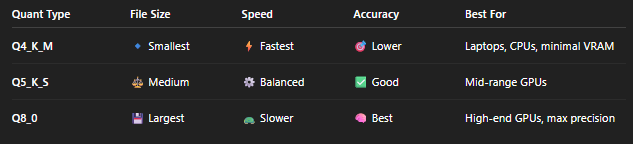
Different quantization levels offer different trade-offs between size, speed, and accuracy.
Here’s a quick comparison:
Why It Matters
Quantization is the secret sauce that makes it possible to run multi-billion-parameter models on regular hardware. Without it, even a 7B model might need tens of gigabytes of VRAM — but with quantization, you can run that same model on a gaming laptop or even a Raspberry Pi.
It’s like taking a university professor’s brain and helping it fit inside a pocket notebook — still brilliant, just more portable.
How to Use GGUF Models
So you’ve got your .gguf file — now what?
Think of it like getting a portable AI brain in a box.
The good news: you don’t need a data center or a PhD in machine learning to wake it up.
All you need is the right “player” — just like you need Spotify to play songs or VLC to play movies.
There are several “players” that know how to run GGUF models. Let’s look at the most popular ones and how to use them.
1. Running GGUF Models with llama.cpp — The Minimalist Way
If GGUF is the suitcase, llama.cpp is the lightweight travel companion that knows exactly how to unpack it.
Once you’ve downloaded a .gguf model file (say, mistral-7b.Q4_K_M.gguf), place it in your models/ folder. Then open your terminal and run:
./main -m models/mistral-7b.Q4_K_M.gguf -p "Explain quantum computing in simple terms."That’s it. In seconds, your computer starts responding like ChatGPT — no internet, no cloud servers.
💡 Tip: You can adjust how long the AI’s answers are using the -n flag (for “number of tokens”):
./main -m models/mistral-7b.Q4_K_M.gguf -p "Write a bedtime story about robots." -n 200It’s like controlling the length of a conversation with a slider.
2. Using text-generation-webui — The Friendly Dashboard
If you prefer buttons over terminals, text-generation-webui is like the Spotify of local AI models.
Just drag and drop your .gguf file into its /models/ folder.
When you launch the app in your browser:
- Click the “Model” tab.
- Choose your
.ggufmodel from the list. - Hit “Load”, then “Chat”.
Now you have a full chat interface — complete with memory, temperature sliders, and prompt templates — all running locally.
It’s a visual and beginner-friendly way to explore different GGUF models, from LLaMA 3 to Mistral and Phi-3.
3. Running GGUF Models in Ollama — The Mac-Friendly Experience
If you’re on macOS, Ollama is like having an AI app store for local models. It can pull and run GGUF-based models automatically:
ollama run mistralBehind the scenes, Ollama downloads the right .gguf file and handles setup for you — no manual folder juggling required.
You can also import your own model by creating a simple Modelfile:
FROM ./mistral-7b.Q4_K_M.ggufand then running:
ollama create my-mistral -f Modelfile
ollama run my-mistral
It’s like teaching Ollama to remember your personal AI builds.
Bonus: Portability at Its Best
Once downloaded, a .gguf model is truly plug-and-play.
Move it to another computer, load it in another tool — it will work the same way.
You could literally copy your GGUF models onto a USB stick, plug it into a friend’s laptop, and spin up an offline AI chat in minutes. That’s how portable and flexible this format is.
In short: GGUF models are like digital instruments — and these tools (llama.cpp, text-generation-webui, Ollama) are the music players that bring them to life. Whether you’re a coder who loves the command line or a creator who prefers a friendly UI, there’s a way to make your GGUF model talk — fast, local, and entirely under your control.
How to Convert Models to GGUF
So, you’ve found an amazing model on Hugging Face — maybe LLaMA 3, Mistral, or Phi-3 — and you want to run it locally using llama.cpp or text-generation-webui. But there’s a catch: most models on Hugging Face come in PyTorch or Safetensors format — perfect for training or cloud inference, but too heavy and unoptimized for your laptop.
That’s like trying to carry a fully assembled piano up a staircase when what you really need is a foldable keyboard. This is where conversion comes in — it transforms that huge model into a compact GGUF file ready to play anywhere.
Step 1: Clone the Conversion Tool
Head to the official llama.cpp GitHub repository — the workshop where all this magic happens:
https://github.com/ggerganov/llama.cppOpen your terminal and clone it:
git clone https://github.com/ggerganov/llama.cpp
cd llama.cpp
Inside this project lives a handy script called **convert-hf-to-gguf.py** — your “translator” that speaks both Hugging Face and GGUF.
Step 2: Download Your Model from Hugging Face
You can download any open-source model from
https://huggingface.co/models.Let’s say you choose Mistral-7B-Instruct. Use the Hugging Face CLI or website to download it into a folder like:
/home/user/models/mistral-7b-instructThink of this as unpacking the full-sized piano before we make it portable.
Step 3: Run the Conversion Script
Now, inside the llama.cpp folder, run:
python convert-hf-to-gguf.py /home/user/models/mistral-7b-instruct --outfile mistral-7b-fp16.ggufThis creates a full-precision GGUF version — the same model, just in the new unified format. You can already use this as-is, or go one step further to make it smaller and faster through quantization.
Step 4: Quantize the Model (Optional but Powerful)
Once you have your fp16.gguf file, run the quantization tool included with llama.cpp:
./quantize mistral-7b-fp16.gguf mistral-7b.Q4_K_M.gguf Q4_K_MThis compresses your model to 4-bit precision — cutting the size by several GB while keeping most of its reasoning ability intact. In our metaphor: it’s like turning the full piano into a foldable electric keyboard that still plays beautifully.
Step 5: Load and Run Your New GGUF Model
Now drop your shiny new .gguf file into your models/ directory and run it using:
./main -m models/mistral-7b.Q4_K_M.gguf -p "Write a haiku about AI."🎉 Boom — your local AI is alive, compact, and fast.
Why This Conversion Matters
Converting to GGUF means:
- You’re no longer dependent on the cloud.
- You can share your models easily with others.
- You get faster load times and smaller footprints.
- And you can experiment freely — running multiple models side by side on your own hardware.
It’s the digital equivalent of downloading your favorite musician’s entire studio and being able to remix tracks from your laptop, anywhere, anytime.
Performance Benchmarks — How GGUF Makes Models Fly
Let’s be honest: every tech format promises to be faster and lighter. But GGUF doesn’t just talk the talk — it actually delivers measurable speed gains.
Think of it like switching from carrying water in buckets (older model formats) to using a high-pressure hose (GGUF). The destination is the same — getting your words generated — but GGUF sends the data rushing through your CPU or GPU with less friction, less memory waste, and more flow.
The Real-World Test
To see how much difference GGUF makes, let’s look at a simple test: Running the same model, Mistral 7B Instruct, in different quantization levels on common hardware setups.
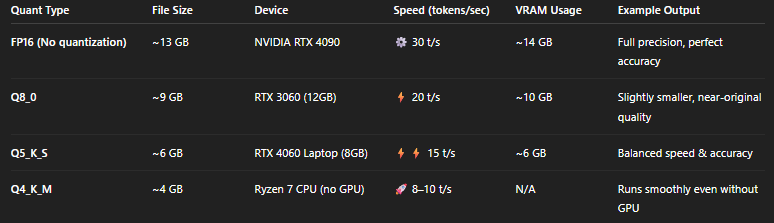
t/s (tokens per second) measures how fast your AI generates text — higher is better. So even on modest hardware, you can chat fluently with a 7-billion-parameter model without lag.
What This Means in Plain English
- Startup times are shorter: GGUF models load in seconds, not minutes.
- Memory is used efficiently: No more running out of VRAM halfway through a reply.
- Response speed is smoother: Less stutter when generating long answers or stories.
- Laptop-friendly performance: You can run 7B or even 13B models on consumer GPUs or CPUs that would’ve struggled before.
It’s like going from driving a manual truck uphill to gliding in an electric car — same destination, far less effort.
Why It Works
GGUF achieves these gains through clever binary alignment and quantized weight storage, meaning your system reads data in optimized chunks. Instead of fetching full-precision data (like reading every page of a book), it skips straight to the summaries it needs — faster and lighter, but still coherent.
A Quick Analogy
Imagine you’re cooking from a massive 1000-page cookbook (a full FP16 model). Quantization and GGUF don’t throw away the recipes — they just condense them into a beautiful cheat sheet that keeps all the flavor but saves you time flipping pages.
That’s why your GGUF model feels snappy, even on modest hardware.
The Takeaway
GGUF isn’t just a new format — it’s a performance upgrade for your AI hardware. By combining smart compression (quantization) with efficient file design, it unlocks real-world usability for everyone — from hobbyists on laptops to engineers on powerful rigs.
In short:
GGUF turns your computer into a personal AI workstation — no supercomputer required.
Conclusion — The Future of Local AI
If AI were a symphony, the cloud has been the grand concert hall — powerful, expensive, and far away. GGUF brings that same symphony into your living room. It lets anyone — student, developer, or curious tinkerer — run the music of intelligence right on their own device.
We’re entering a new era where AI isn’t locked behind corporate APIs or subscription walls. Instead, it lives on your desktop, your laptop, even your Raspberry Pi — running smoothly, offline, and completely under your control.
GGUF made this possible by doing for AI what MP3 did for music and MP4 did for video: it compressed, standardized, and democratized access to something once reserved for the elite.
No longer do you need massive GPUs or paid cloud instances — you can have an intelligent assistant, coder, or storyteller that runs right beside you.
So the next time you see a file ending in .gguf, remember:
it’s not just another model file — it’s a small piece of the AI revolution that’s moving from the cloud to your computer, from servers to the people.
Try it yourself:
Download a model, open up llama.cpp, and watch your laptop come alive with intelligence — fast, local, and entirely yours.
Because with GGUF, the future of AI isn’t somewhere far away.
It’s sitting right on your hard drive, waiting for you to press “Run.”
⚠️ Disclaimer
This blog post was created with the help of ChatGPT for my personal learning and understanding of the GGUF format. I’m sharing it here in case it helps others too — feel free to use or reference it if you find it useful😊
메타데이터
- post_id
- 9bfb23be7612
- slug
- what-is-gguf-the-format-powering-local-ai-models-like-llama-and-mistral-9bfb23be7612
- url
- https://medium.com/@imthadhahamed0205/what-is-gguf-the-format-powering-local-ai-models-like-llama-and-mistral-9bfb23be7612
- canonical_url
- https://medium.com/@imthadhahamed0205/what-is-gguf-the-format-powering-local-ai-models-like-llama-and-mistral-9bfb23be7612
- author_url
- https://medium.com/@imthadhahamed0205
- status
- ok
- fetched_at
- 2026-06-17 08:20:12




