Apple Just Turned 4,800 Hugging Face Models Into Native Mac Apps. Almost Nobody Noticed.
One free browser tool. Zero Python. Zero setup. Native Apple AI.
Apple Just Turned 4,800 Hugging Face Models Into Native Mac Apps. Almost Nobody Noticed.
One free browser tool. Zero Python. Zero setup. Native Apple AI.
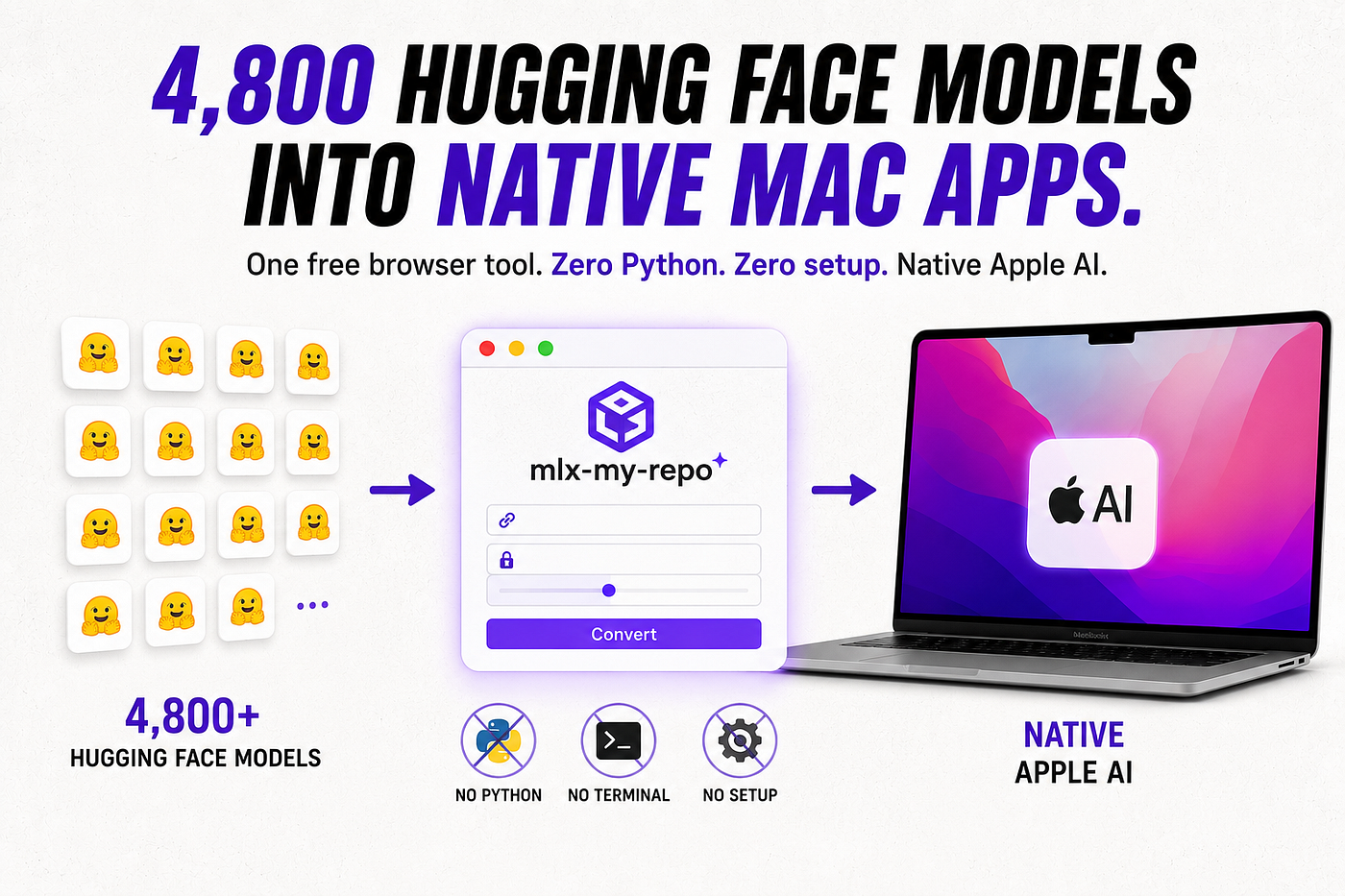
During WWDC week — June 8 to 12, 2026 — Apple shipped a Swift class called MLXLanguageModel that barely made the keynote highlight reel. Point it at almost any of the roughly 4,800 models sitting inside Hugging Face's mlx-community organization, and your app talks to that model through the exact same Foundation Models API Apple uses for its own on-device system model. Tool calling, structured output, streaming — identical code path, different brain underneath.
I went looking for the tool that actually produces those 4,800 models, expecting a command-line fight. Environment variables, a broken conda install, an afternoon lost to a dependency resolver.
What I found instead was a web page with four fields and a submit button.
Here’s the contrarian part: the format war for on-device Mac inference is already over, and nobody won it with a benchmark. A Hugging Face Space called mlx-my-repo won it by making the entry cost zero. No Python. No terminal. No local setup. You paste a model ID, you wait, you get a working MLX repo. That’s the whole workflow, and almost nobody outside the MLX community is writing about it.
This is the missing manual — what mlx-my-repo actually does, how it relates to the mlx-lm library underneath it, and why the WWDC news makes converting a model today functionally the same as shipping it inside a native Mac or iOS app tomorrow.
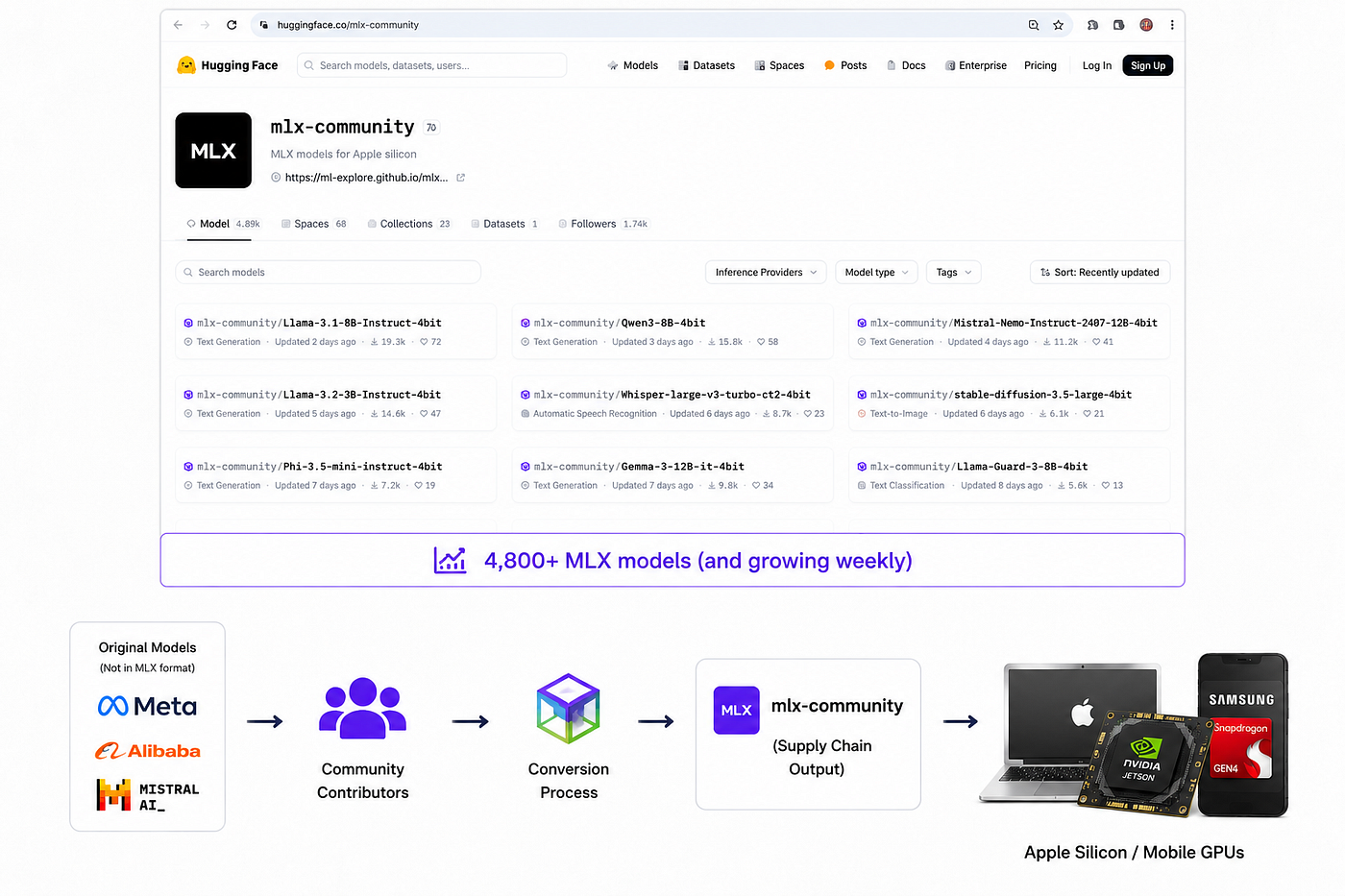
mlx-community Is Not a Model Library. It’s a Supply Chain.
Search Hugging Face for “MLX” and you land on mlx-community, an organization page with model after model after model — Llama variants, Qwen fine-tunes, Mistral checkpoints, Whisper builds, Stable Diffusion ports, all pre-converted and pre-quantized into Apple’s MLX format. The docs describe the collection in the thousands. Browse the page in July 2026 and that number keeps climbing weekly.
None of those models exist because a research lab shipped an official MLX release. Meta doesn’t publish Llama in MLX format. Alibaba doesn’t publish Qwen in MLX format. Every model in mlx-community got there because someone — usually not the original author — ran it through a converter and pushed the result.
That’s the detail that matters more than any individual model in the collection. mlx-community isn’t curated top-down. It’s the output of a supply chain, and the supply chain has exactly one no-code entry point: mlx-my-repo.
The Space That Does the Actual Work
mlx-my-repo lives at huggingface.co/spaces/mlx-community/mlx-my-repo. It shipped in late November 2024, when Vaibhav Srivastav — a Hugging Face engineer who signs his posts "VB, GPU Poor in residence" — posted it to the ml-explore GitHub with a one-line pitch that still holds up:
“I’m VB, I am a GPU Poor in residence at Hugging Face and a big fan of MLX. Recently we put together a Space that allows you to create MLX quants directly on the Hugging Face Hub without the need to download anything or setup an environment.”
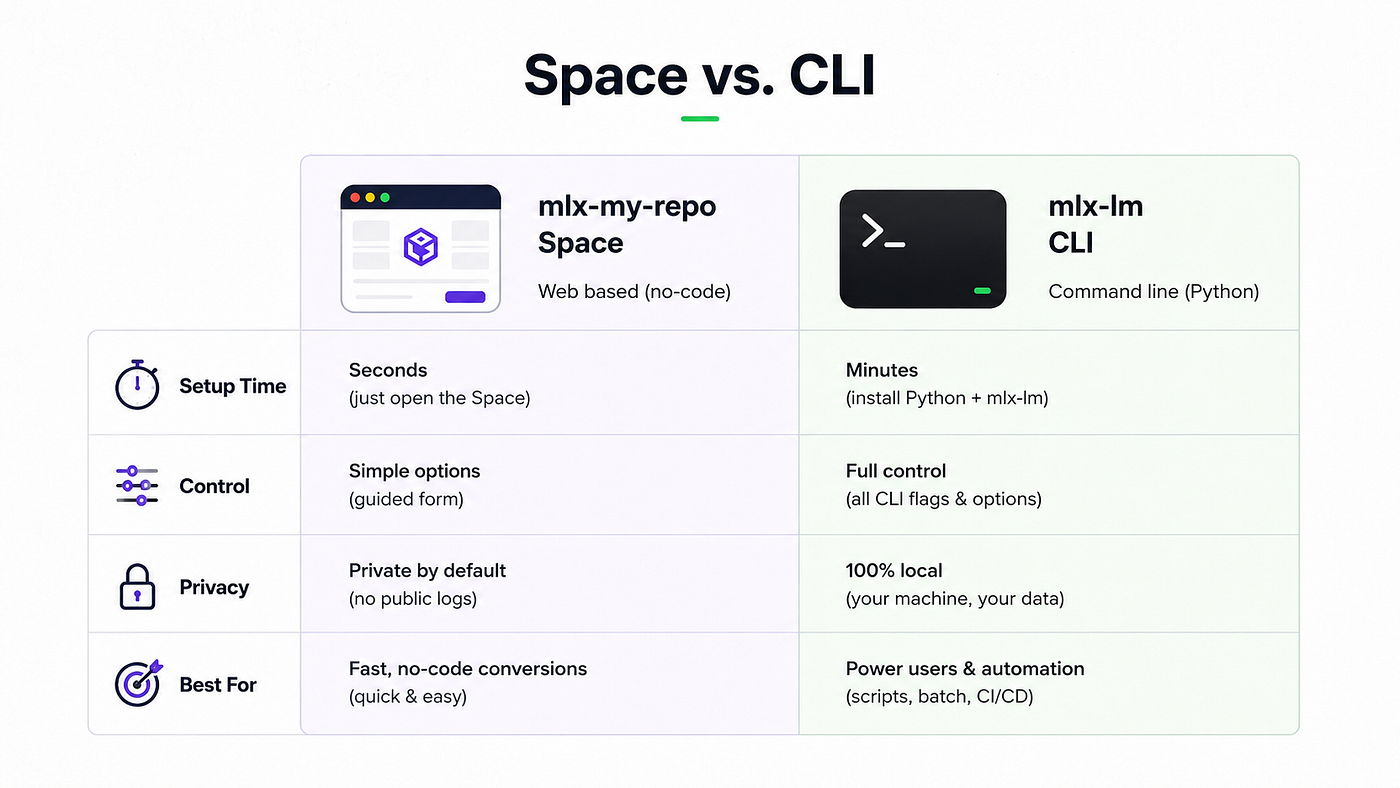
Two years and change later, that sentence is still the whole product description. The Space asks for four things: a source model ID from anywhere on the Hub, a destination repo name, a conversion method (full-precision FP16, or quantized somewhere in the Q2-to-Q8 range), and whether the result should be public or private. Submit, and the conversion runs on Hugging Face’s own infrastructure. Nothing downloads to your Mac until you decide to pull the finished MLX repo.
The Space doesn’t log who converts what. VB says as much in the same post — privacy-first by design, private checkpoints allowed. For a builder converting a fine-tune you’d rather not advertise, that’s not a footnote. That’s the reason to use this Space over some other converter.
It isn’t flawless. In February 2025, a community member flagged that the Space doesn’t follow the naming convention the rest of mlx-community uses — repos are supposed to end in something like -4bit, and mlx-my-repo's default output diverges from that — which means the folder structure that makes mlx-community searchable to itself sometimes breaks on the Space's own output. Minor. Annoying if you're building a private index of models. Worth knowing before your fifth conversion is the one you finally notice.
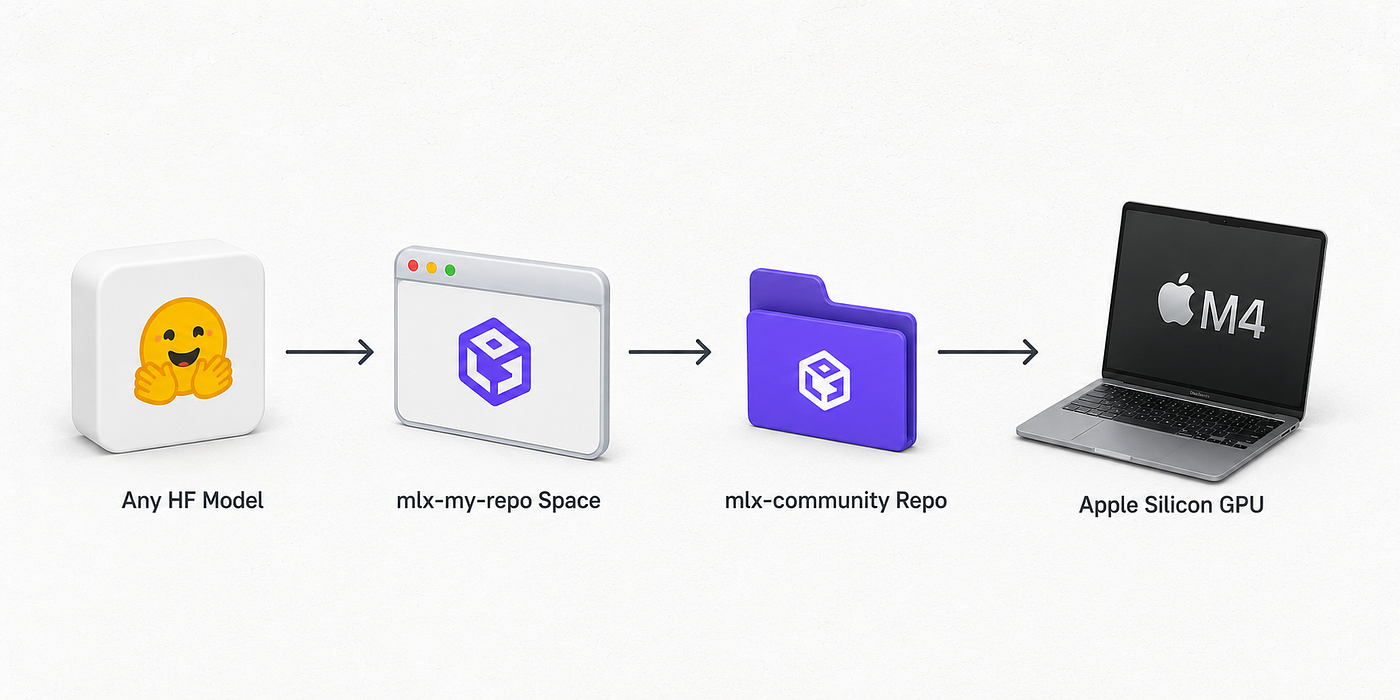
What Happens Under the Hood: mlx-lm Does the Real Work
mlx-my-repo isn’t a separate conversion engine. It’s a web front end wired to mlx-lm, the Python package the MLX team maintains for running and converting language models. The current release, mlx-lm 0.31.3, shipped April 22, 2026. Its own documentation says plainly that models "can also be converted and quantized directly in the mlx-my-repo Hugging Face Space." Same conversion path, two doors in.
If you’d rather run the conversion yourself — more control, no queue, and you keep the intermediate files — the CLI is three commands away.
pip install mlx-lm

# Convert and 4-bit quantize a model, keep it local
mlx_lm.convert --model mistralai/Mistral-7B-Instruct-v0.3 -q

# Same conversion, pushed straight to your own Hub repo
mlx_lm.convert \
    --model mistralai/Mistral-7B-Instruct-v0.3 \
    -q \
    --upload-repo mlx-community/my-4bit-mistral
The Python API does the identical job for anyone scripting a batch of conversions:
from mlx_lm import convert

repo = "mistralai/Mistral-7B-Instruct-v0.3"
upload_repo = "mlx-community/My-Mistral-7B-Instruct-v0.3-4bit"

convert(repo, quantize=True, upload_repo=upload_repo)
And once you’ve got an MLX model, on your machine or pulled straight from mlx-community, running it is one line:
mlx_lm.generate --model mlx-community/Llama-3.2-3B-Instruct-4bit --prompt "hello"That last command is also mlx-lm’s own default when you run mlx_lm.chat with no arguments — a 3-billion-parameter Llama variant, 4-bit quantized, small enough to run comfortably on a base MacBook Air.
The Space and the CLI produce the same artifact. The difference is where the compute happens and who’s watching the progress bar. mlx-my-repo trades control for zero setup. The CLI trades a five-minute pip install for a repo you can inspect, tweak, and re-run without a browser tab.
Why This Stopped Being a Nice-to-Have on June 8, 2026
Until this summer, converting a model to MLX bought you local inference and not much else. Fast on Apple Silicon, sure. But the model still lived inside whatever Python or command-line harness you built around it.
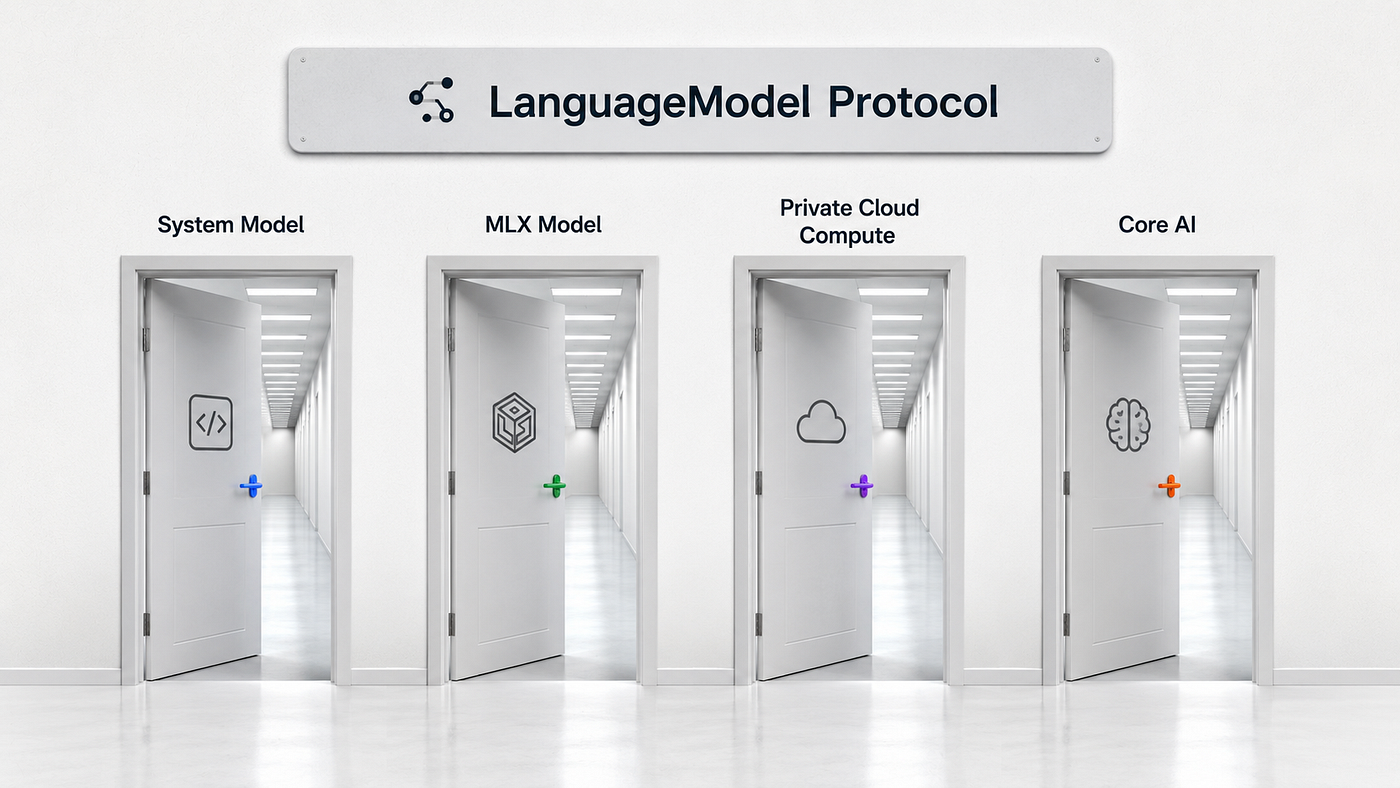
WWDC 2026 changed the ceiling. Apple opened its Foundation Models Swift framework — previously a locked box that only spoke to Apple’s own on-device model — behind a LanguageModel protocol with multiple interchangeable backends. One of them is MLXLanguageModel, shipped as part of the mlx-swift-lm package, and it does exactly what the name promises: it loads a model straight from mlx-community and runs it through the identical Swift API Apple built for Apple Intelligence.
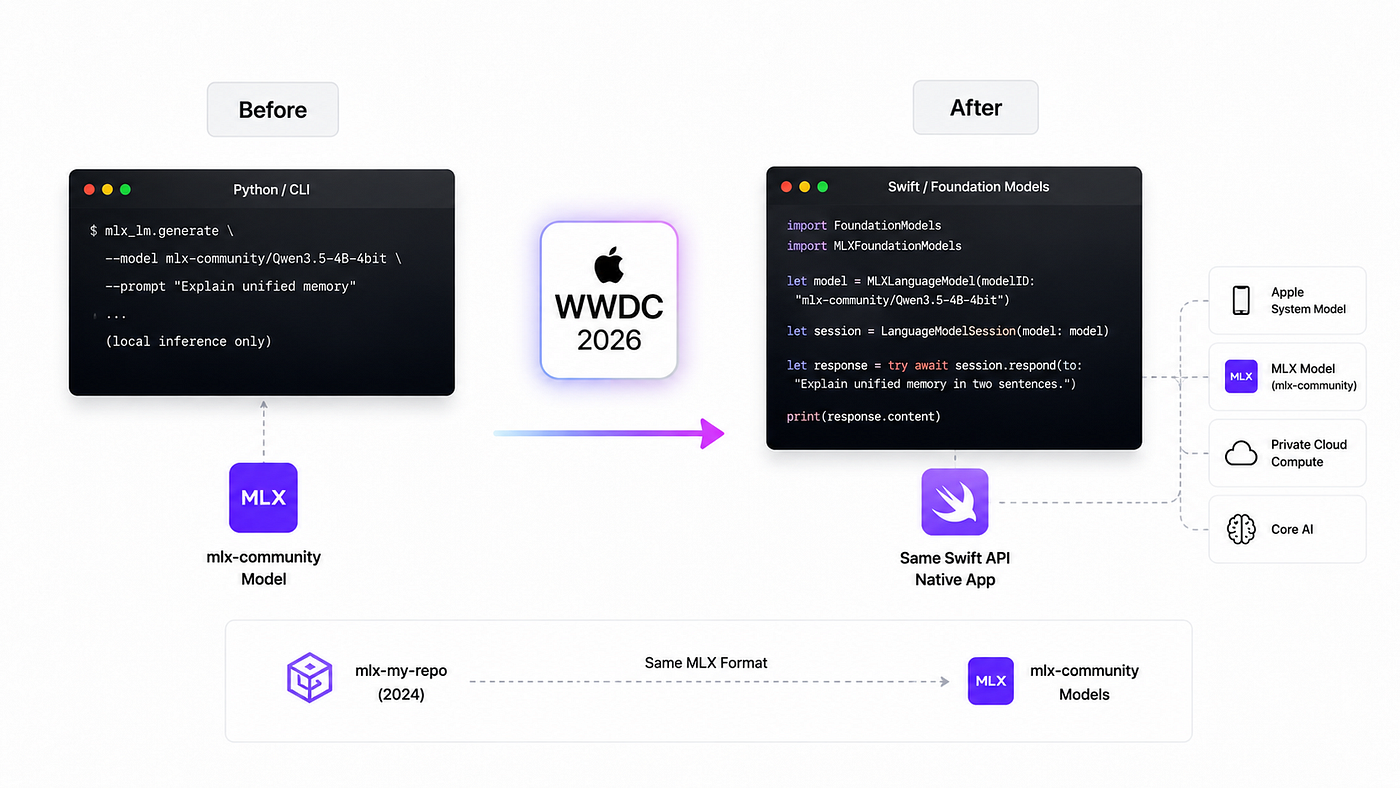
Varun Nuthalapati, who published a developer-beta walkthrough of the workflow the same week WWDC wrapped, put the mechanism plainly: point Apple’s LanguageModelSession at mlx-community/some-model, and "you use the exact same Swift code you'd use for Apple's own model." Tool calling, structured @Generable output, streaming responses — all of it works whether the backend is Apple's system model or a model you pulled off the Hub an hour ago.
The shape of it, adapted from that walkthrough:
import FoundationModels
import MLXFoundationModels

let model = MLXLanguageModel(modelID: "mlx-community/Qwen3.5-4B-4bit")
## let session = LanguageModelSession(model: model)

let response = try await session.respond(to: "Explain unified memory in two sentences.")
print(response.content)
Swap that one modelID string for anything sitting in mlx-community, and the rest of your app doesn't know the difference.
A model you convert in a browser tab this afternoon can be running inside a native Swift app tomorrow morning, through the same API Apple uses for its own model.
That’s the whole trick, and it’s also the whole caveat. This is developer-beta software as of the June 2026 SDKs, tied to Xcode 27, and Apple has already flagged that method signatures may shift before the public release this fall. Ship against it today. Don’t bolt it to production without watching the release notes.
Here’s the compounding part: mlx-my-repo doesn’t know or care that MLXLanguageModel exists. It shipped in 2024, built to solve a narrower problem — get a model onto Apple Silicon without a local dev environment. Apple built on top of that same format a year and a half later, and every model the Space has ever produced became a candidate for a native Swift app overnight. Nobody had to re-convert anything.
The Number Nobody Puts on the Model Card: How Much RAM You’ll Actually Burn
Every conversion decision comes back to one constraint: your Mac’s unified memory. Get this wrong and the Space’s success message means nothing, because the model you converted won’t run without swapping to disk and crawling.
The rough mental model, consistent across the mlx-lm and Foundation Models documentation: a 4-bit quantized model needs about half a gigabyte of memory per billion parameters, plus headroom for context. On a 16GB Mac, that keeps you comfortably in the 3B-to-8B range — a Llama 3.2 3B or a Qwen 4B-class model, both of which sit in mlx-community already quantized and ready to pull. Push past 8B on 16GB and you’ll see the warning mlx-lm prints when a model is large relative to available RAM, followed by generation that slows to a crawl instead of failing outright.
64GB opens up meaningfully larger models — 30B-to-70B territory, depending on quantization — which is the range where the difference between a toy demo and something you’d actually ship starts to show. If you’re converting for a Mac you don’t control, budget conservatively. The person running your app on a base-model MacBook Air won’t file a bug report explaining that your 34B model needed more memory than they had. It’ll just feel broken.
This is also where the quantization dropdown in mlx-my-repo stops being a formality. FP16 preserves quality and roughly doubles the memory footprint of Q8. Q4 is the default most of mlx-community converges on because it’s the best quality-to-memory trade for models in the 3B-to-14B range that most builders are actually running locally. Go below Q4 only when you’ve already confirmed the model tolerates it — which loops back to the sanity-check habit below, not a rule of thumb you can trust blind.
The Honesty Part: Conversion Isn’t Magic
None of this means every model converts cleanly. Quantization is lossy by design, and how much quality you lose depends on the source architecture, not just the bit-width you pick. A well-behaved Llama or Qwen checkpoint quantizes to 4-bit with barely perceptible drift. Something with an unusual attention mechanism, a custom tokenizer, or an architecture mlx-lm doesn’t fully support yet can come out garbled, truncated, or simply refuse to load.
I don’t trust a freshly quantized model until I’ve run it against three prompts where I already know the right answer — one factual, one formatting-sensitive, one that requires following an instruction precisely. That habit catches more silent failures than a benchmark number ever would. A model that “converts successfully” and a model that “still works” are two different claims, and mlx-my-repo can only promise you the first one.
The naming-convention friction from February 2025 is a small example of a bigger pattern: this is community infrastructure, built and maintained by people with day jobs, not a polished first-party pipeline. Q2 quantization sits right there in the dropdown and will genuinely tank quality on smaller models — nobody stops you from picking it. Sanity-check what comes out. Don’t assume the Space’s success message is a quality guarantee.
What to Ship by Friday
- Open
huggingface.co/spaces/mlx-community/mlx-my-repoand log in with your Hugging Face account. - Pick a model you actually want on your Mac — something under 8B parameters if you’re testing on 16GB of unified memory — and paste its Hub ID into the source field.
- Choose 4-bit (Q4) quantization as your default. It’s the balance point most of mlx-community ships at, and it’s the size Apple’s own MLXLanguageModel examples default to.
- Set the destination repo to private if the source model has any licensing ambiguity, public if you’re happy to contribute it back to mlx-community.
- Once it lands, pull it with
mlx_lm.generate --model <your-repo> --prompt "test"and run your three sanity-check prompts before you trust it with anything real. - If you’re on the Apple beta track, add the
mlx-swift-lmpackage to a throwaway Xcode project and pointMLXLanguageModelat the repo you just built. Confirm it responds before you build anything on top of it. - Bookmark
huggingface.co/docs/hub/en/mlx. Apple's Swift-side docs will move fast through the fall betas; the Hub-side conversion docs are the stable half of this stack.
The Bridge Only Works If You Walk Across It
The Space existed for a year and a half before Apple gave it a reason beyond local inference. That’s usually how the useful infrastructure works. Nobody builds the on-ramp because they can see the highway coming. They build it because the current problem is annoying enough.
If you want the five-minute version, open the Space today and convert one small model you’ve been meaning to try locally. Watch what fields it asks for. That’s the entire mental model you need for everything else in this article.
This week, take the model you just converted and run it against the sanity-check habit above — three prompts, known answers, no benchmark required. If it holds up, you’ve validated a workflow you can repeat for every fine-tune you care about, including private ones the Space will happily keep off the public log.
Over the next month, if you’re building anything on Apple platforms, pull down the mlx-swift-lm package and wire one MLXLanguageModel call into a throwaway project. You don't need a product idea yet. You need to feel, once, what it's like to swap Apple's system model for an open one without touching the rest of your code. That feeling is what the next year of Mac and iOS AI development is going to be built on.
The tool that matters most right now isn’t the newest model. It’s the converter nobody’s writing about.
메타데이터
- post_id
- acc1a0ae0d2f
- slug
- apple-just-turned-4-800-hugging-face-models-into-native-mac-apps-almost-nobody-noticed-acc1a0ae0d2f
- url
- https://medium.com/macoclock/apple-just-turned-4-800-hugging-face-models-into-native-mac-apps-almost-nobody-noticed-acc1a0ae0d2f
- canonical_url
- https://medium.com/macoclock/apple-just-turned-4-800-hugging-face-models-into-native-mac-apps-almost-nobody-noticed-acc1a0ae0d2f
- author_url
- https://medium.com/@anup.karanjkar08
- status
- ok
- fetched_at
- 2026-07-10 18:03:05