Beginner-Friendly Lab: Nmap Port Scanning & Web Server Interaction on Linux
By Aisha Bello
Beginner-Friendly Lab: Nmap Port Scanning & Web Server Interaction on Linux
By Aisha Bello
PROJECT SUMMARY
This project demonstrates how to analyze, understand, and interact with network services on a Linux system using Nmap, Apache/ Nginx Web Server, and essential Linux networking tools. The main goal is to provide a foundational knowledge showing how port status, service availability, and HTTP communication work together in a practical cybersecurity environment. This knowleged equips cybersecurity analyst, providing the opportunity to better protect their network and think like threat-actors in active reconnaissance stage
The project begins by preparing a Linux system with all necessary tools, including Nmap for port scanning, curl for HTTP testing, and Apache or Nginx as a target web service. A baseline port scan is performed to understand which services are active before deploying any server applications.
Next, a web server is installed and activated, and its impact on the system’s network behavior is analyzed. By rescanning the system with Nmap, the project highlights how starting the Apache service opens port 80, allowing HTTP traffic. Detailed scans reveal the server type, version, and additional system information, reinforcing how attackers and defenders use Nmap to profile systems.
The project also demonstrates how to modify and fetch web content using curl, showcasing how HTTP requests and responses behave. Stopping and starting the Apache service shows how port states change in real time, emphasizing the relationship between running services and open ports. Finally, a packet capture with tcpdump, allowing deeper inspection of HTTP requests at the packet level — an essential skill for network analysts and penetration testers.
Hands-on experience gained with this project are:
- Port scanning and service enumeration
- Web server deployment and testing
- TCP/HTTP behavior analysis
- Real-time monitoring of service and port state changes
- Basic packet capture and traffic inspection
🔨TOOLS & TECHNOLOGIES USED
- A Linux system (Ubuntu, Debian, Kali recommended)
- Nmap: Scan for open ports [port scanning tool]
- ss: Inspect running services , sockets and ports
- Apache or Nginx web server: Web Servers
- curl: Fetch HTTP webpages
- tcpdump/Wireshark: Capture and analyze HTTP traffic
- systemctl — Manage services
STEPS
🖥️ Step 1 — Preparing the System
Update your system and install the required packages:
sudo apt update
sudo apt upgrade -y
sudo apt install -y nmap curl apache2 tcpdump
If using Nginx:
sudo apt install -y nginxVerify installations:
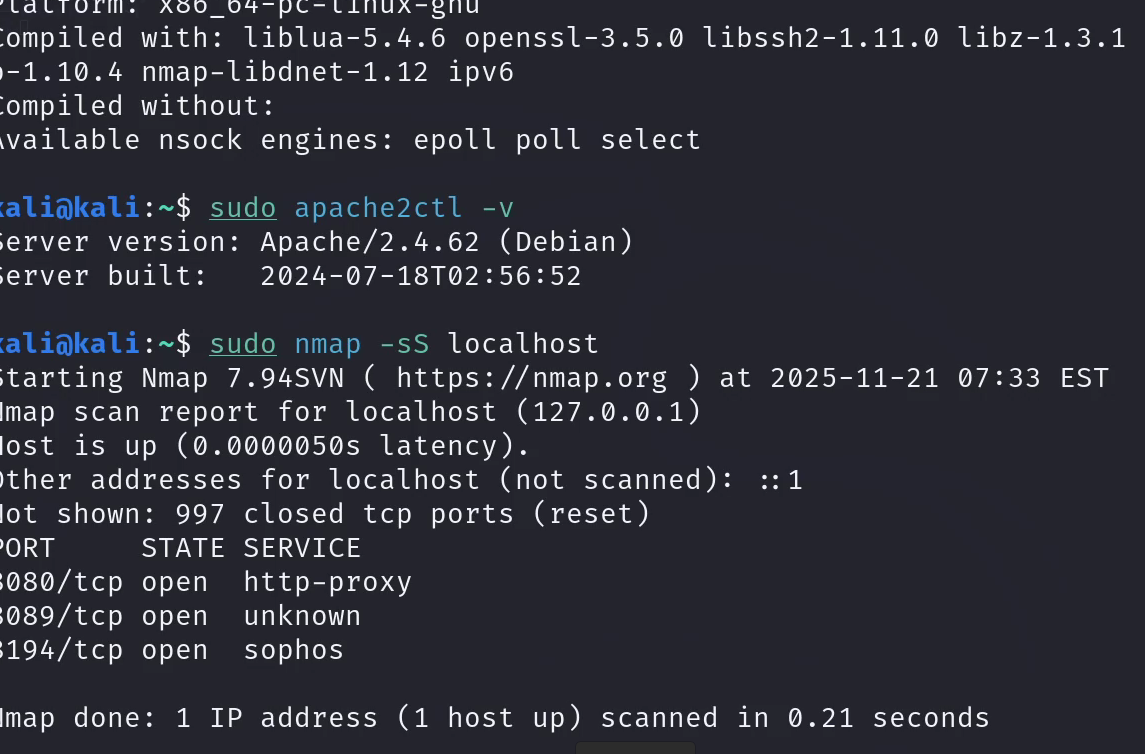
This provides information about the tools installed
nmap --version
sudo apache2ctl -v     # or nginx -v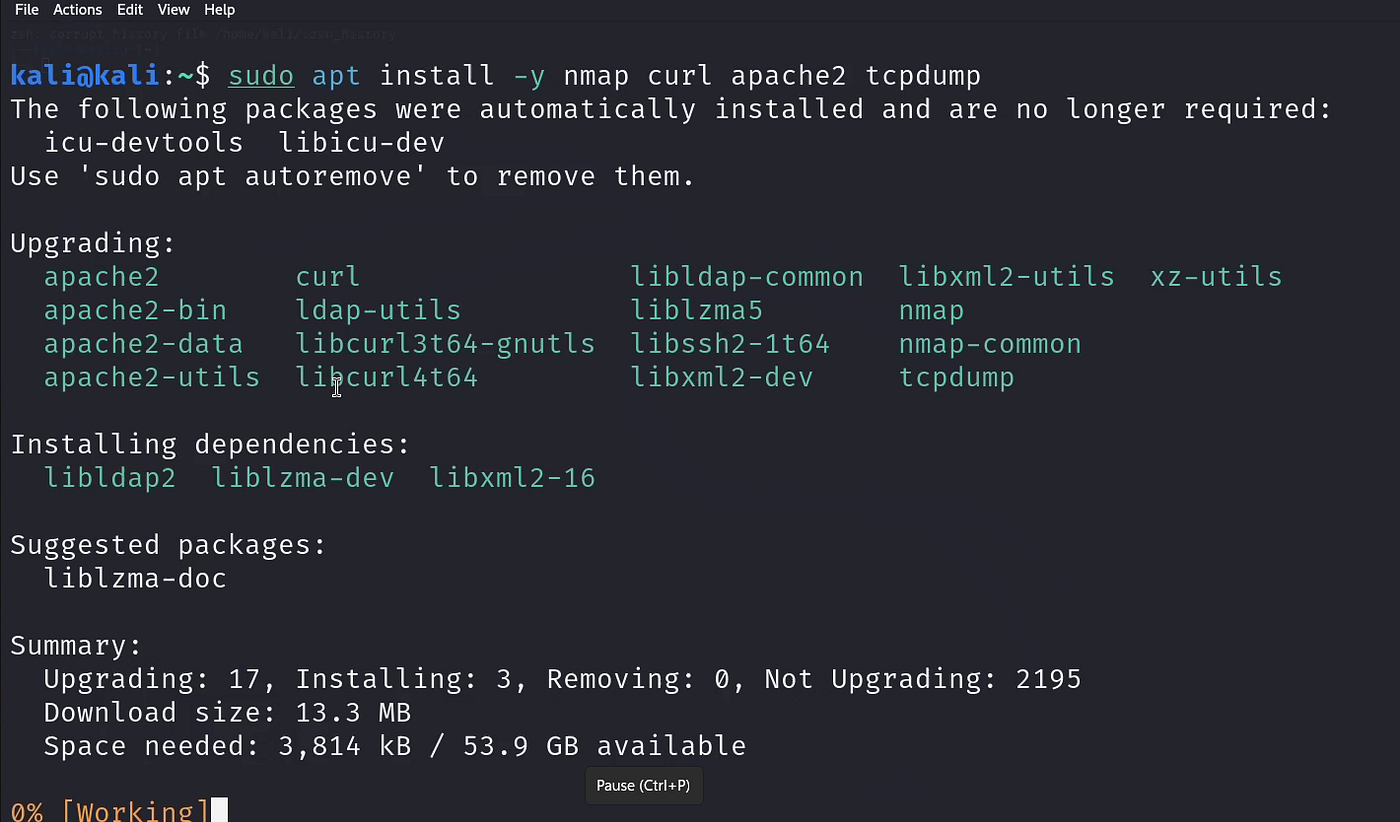
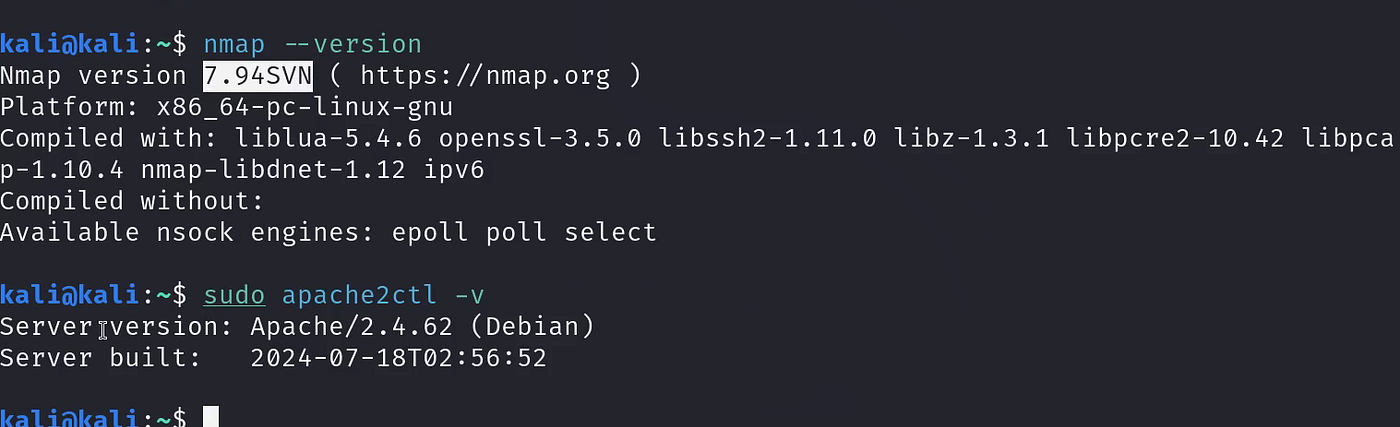
Package installation and version check.
🔍 Step 2 — Baseline Scan
This command line is used to establish a baseline to check services running before the Apache server is enabled. This confirms port 80, 443 and 22 are not running.
Run a simple TCP SYN scan:
sudo nmap -sS localhostFull port sweep:
sudo nmap -sS -p- localhostCheck listening sockets:
ss -tulnp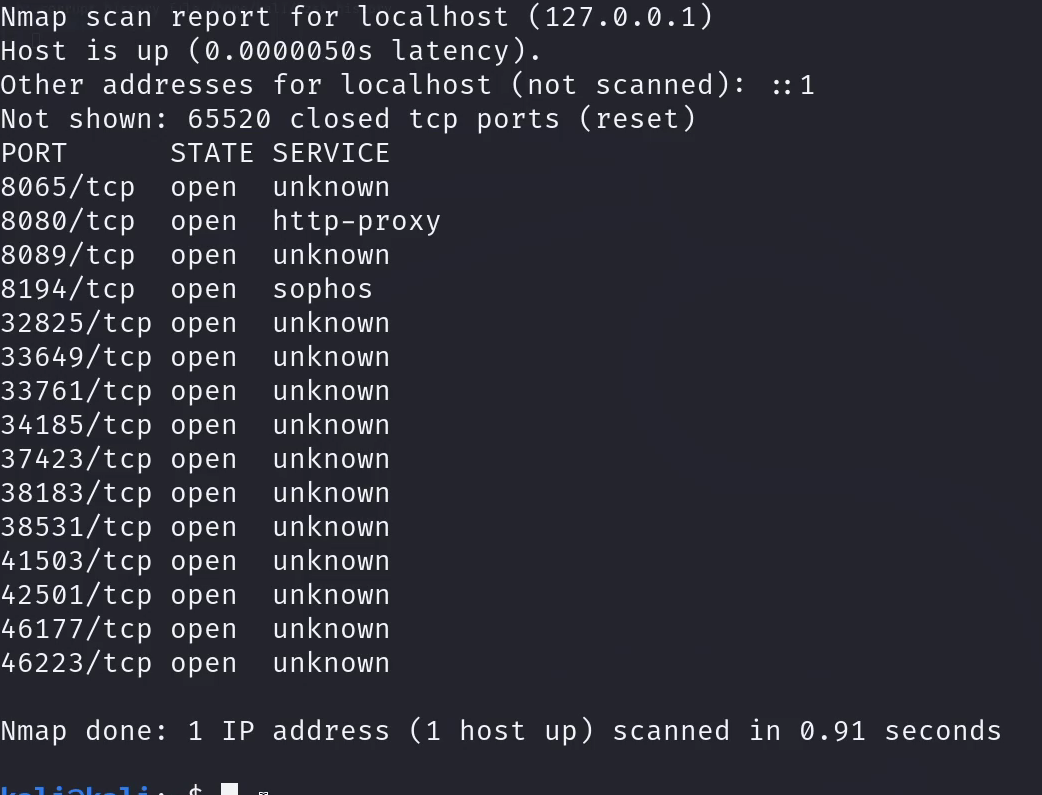
Nmap baseline scan
ss output before enabling web server
Step 3 — Start the Web Server
These command lines starts up the web server previously installed and checks it status to ensure there are no errors.
sudo systemctl enable --now apache2
sudo systemctl status apache2
Check if port 80 is listening: This searches for protocols such as TCP, UDP, listening sockets and process name. The output is also filtered to search for and limits to port 80 and 443
ss -tulnp | grep -E "80|443"Expected: Port 80 is now open.
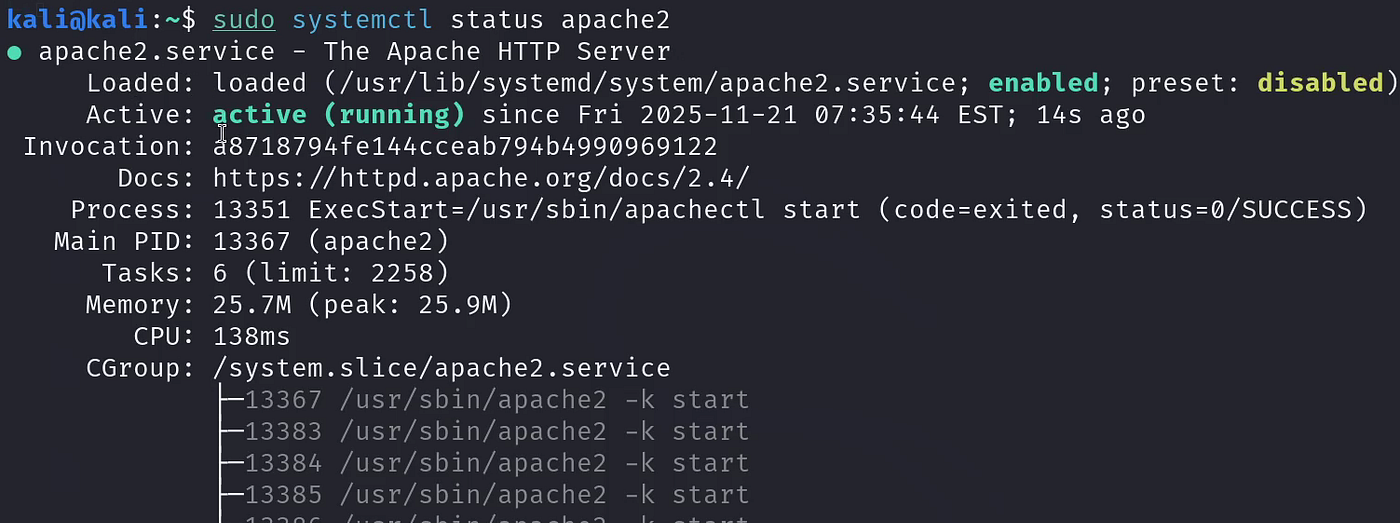
systemctl output
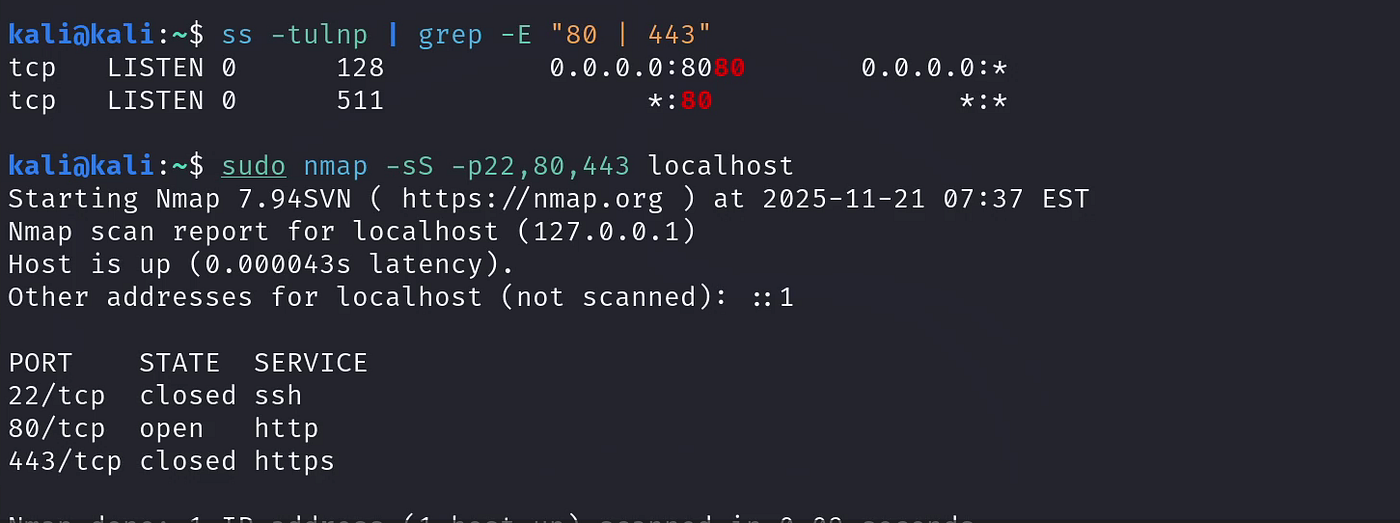
ss showing port 80 open
🔁 Step 4 — Rescan With Nmap
The goal of this is to confirm the open ports and determine on which of these ports is the web server running and comparing the -sV output with the initial baseline to spot the difference.
sudo nmap -sS -p 22,80,443 localhostService detection:
sudo nmap -sV localhost
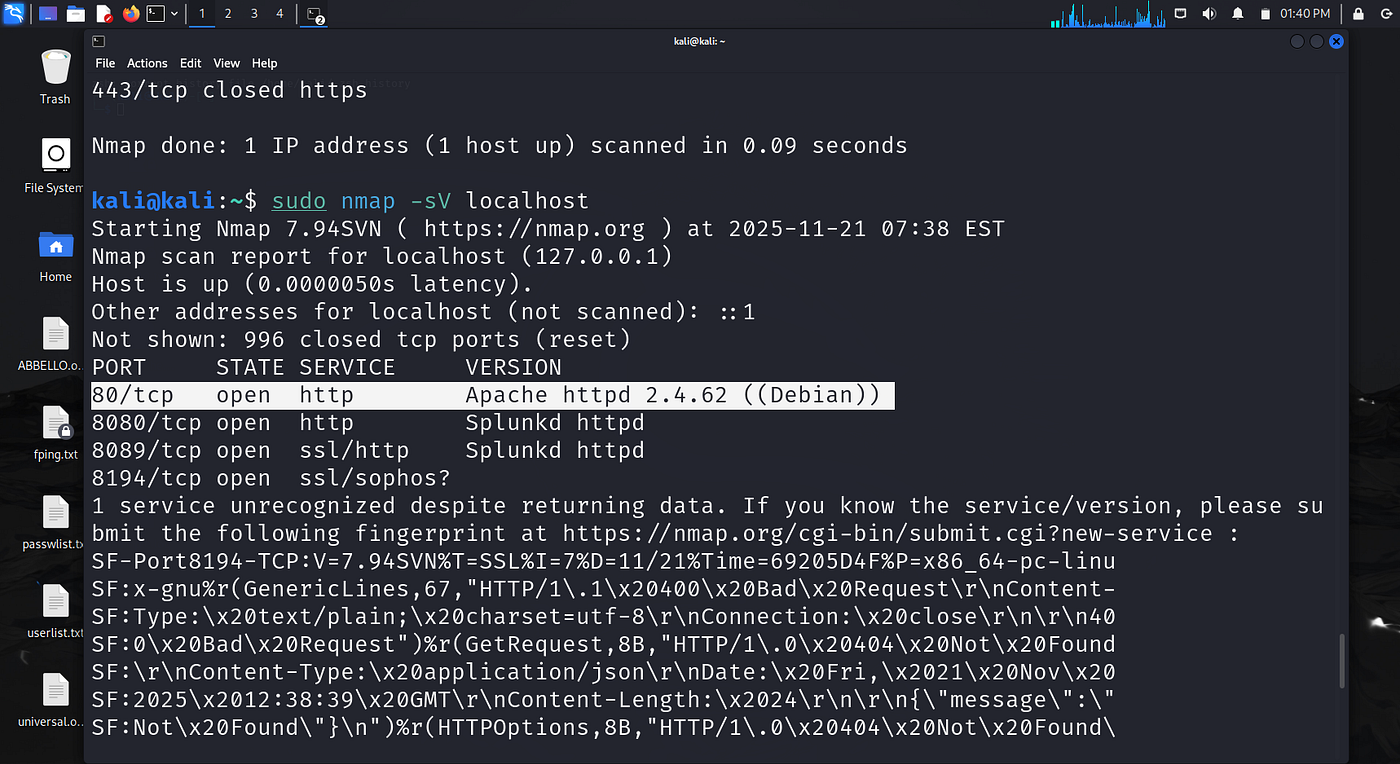
Nmap results showing web server detection
Step 5 — Fetch Web Page Using curl
This command line is used to Get HTTP headers.
curl -I http://localhostThis retrieves the html of the web page to enable modification of the HTTP server.
curl http://localhostModify the default Apache index page:
echo "<b>Lab: Nmap + Web Server</b><p>Done by: <your-name></p>" | sudo tee /var/www/html/index.htmlTest again:
curl http://localhost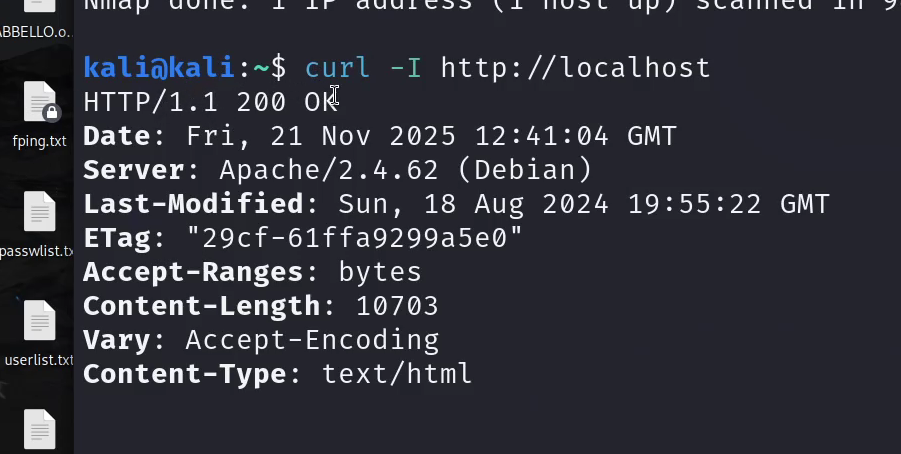
HTTP HEADER
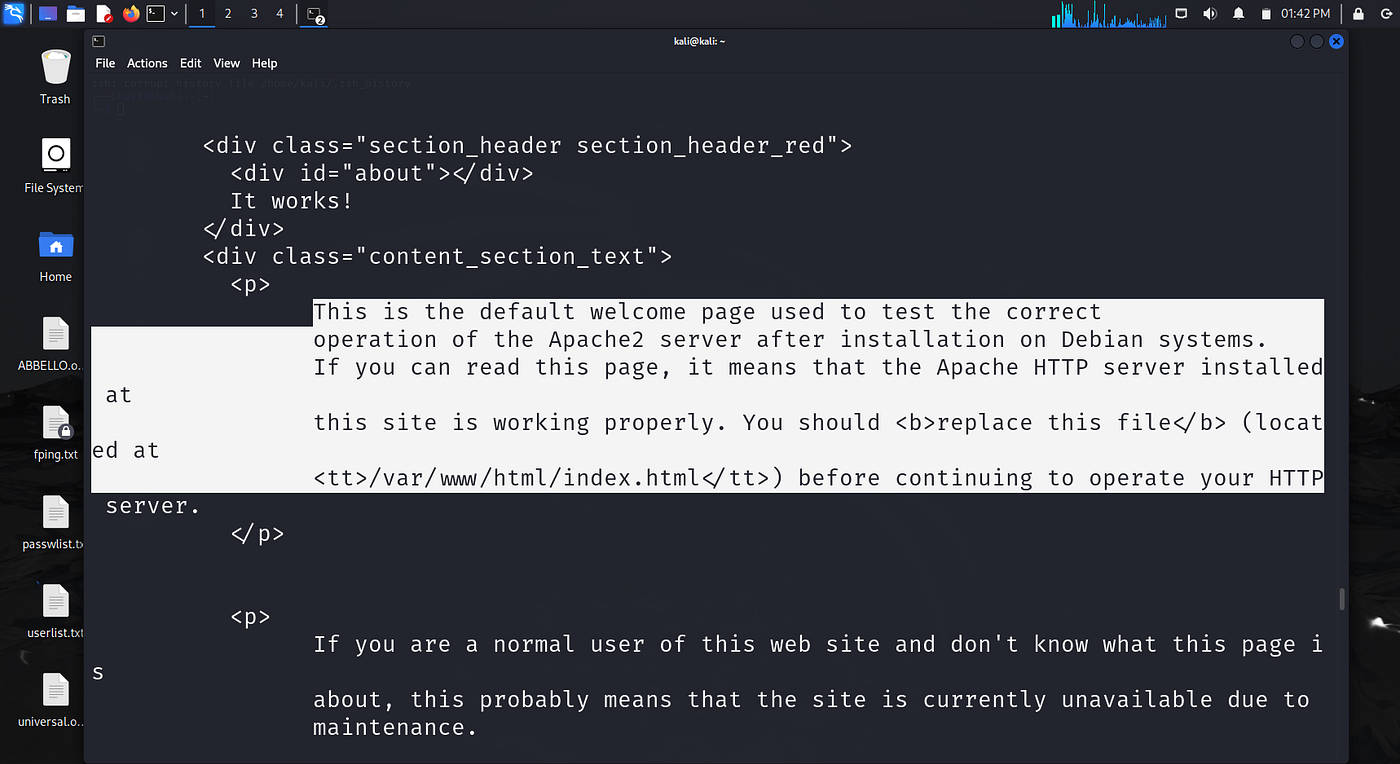
Instruction for modification
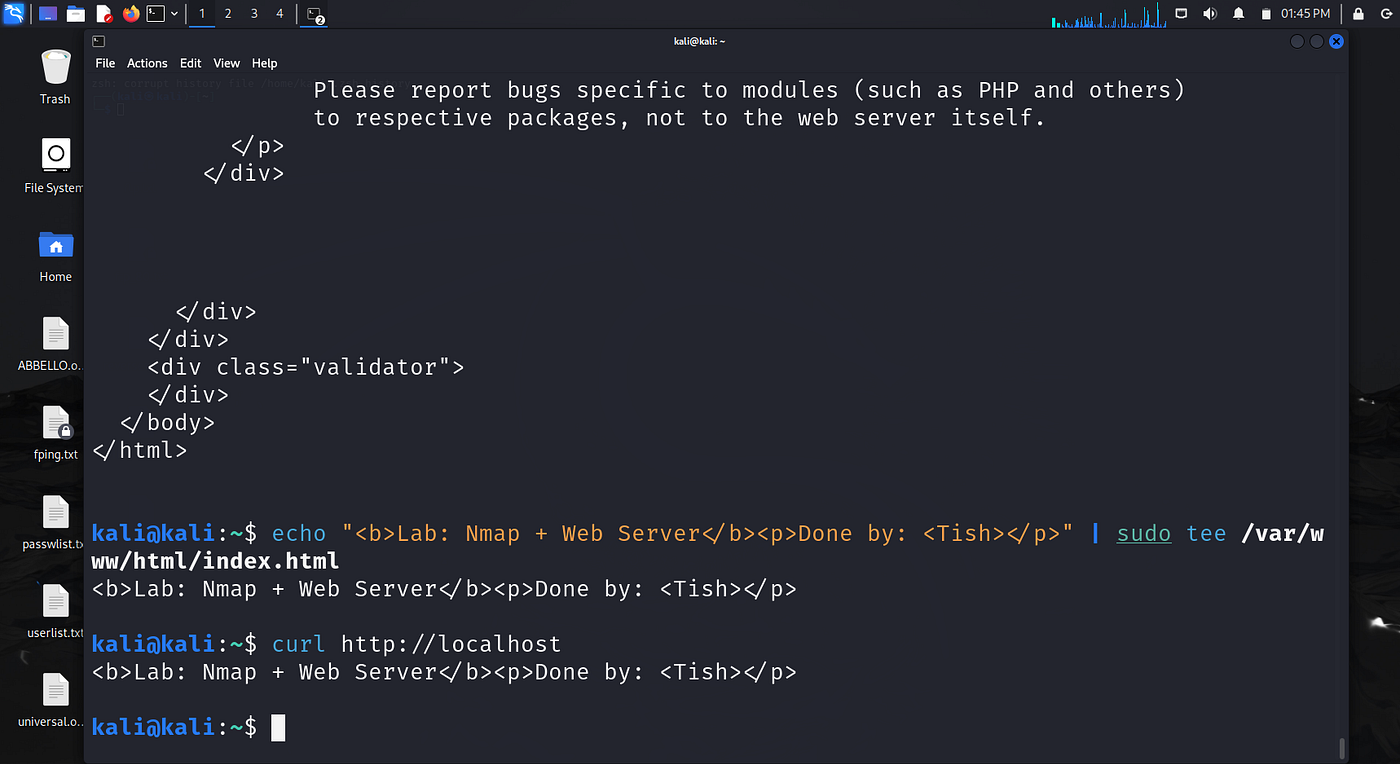
Modified Web Server
Step 6 — Demonstrate Port State Changes
After modification, it is recommended that the web server be stopped and started again for the embedded modification to take effect. stopping the web server closes the port 80 and restarting when the server is started again.
sudo systemctl stop apache2Check:
ss -tulnp | grep :80 || echo "port 80 closed"Start it again:
sudo systemctl start apache2
ss -tulnp | grep :80
Rescan:
sudo nmap -sS -p80 localhost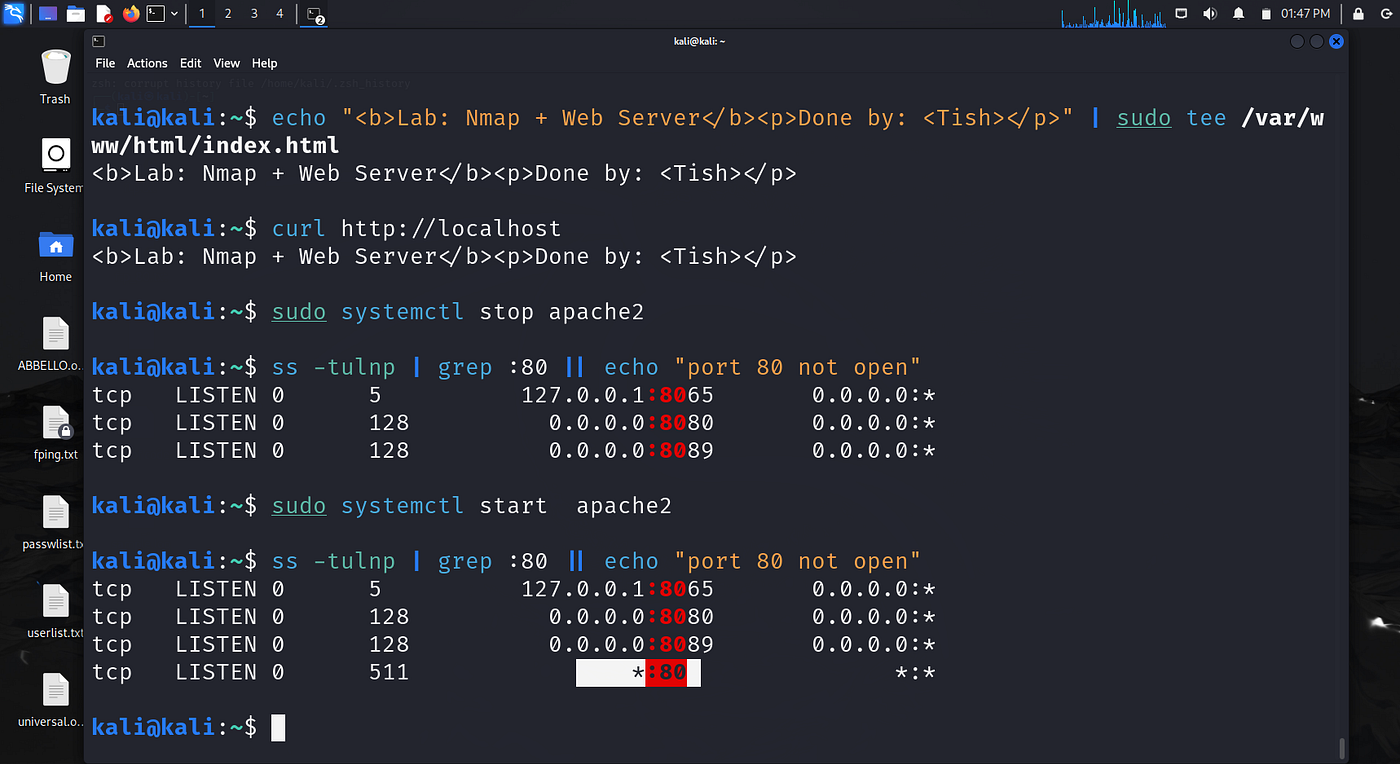
Port open/close verification
Step 7 — Capture HTTP Packets
The packets are captured to enable visible pattern of the HTTP GET request and ensure a complete connection was made without errors
sudo tcpdump -i any -n port 80 -w http_capture.pcapIn another terminal:
curl http://localhostStop capture:
Ctrl + C
View packet data:
sudo tcpdump -r http_capture.pcap -nn -X | head -n 10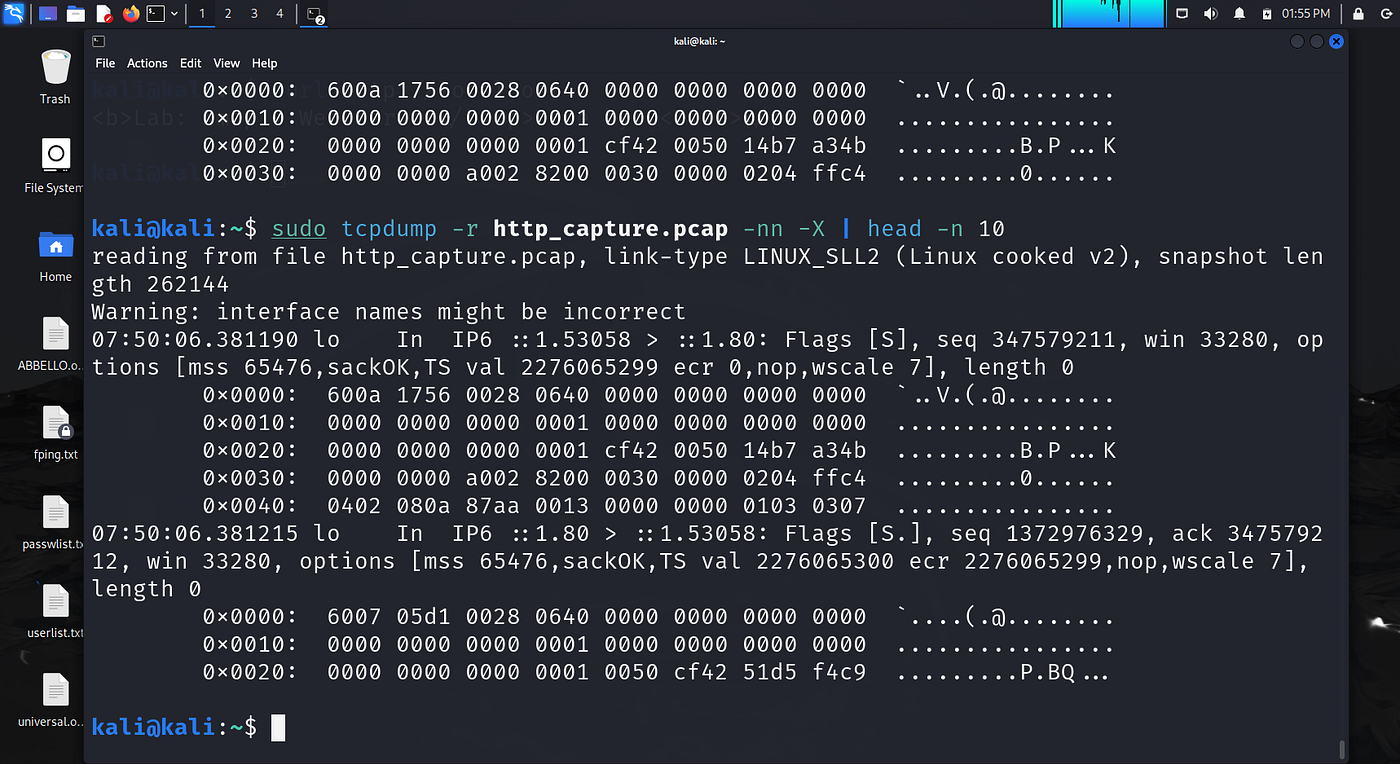
tcpdump capture
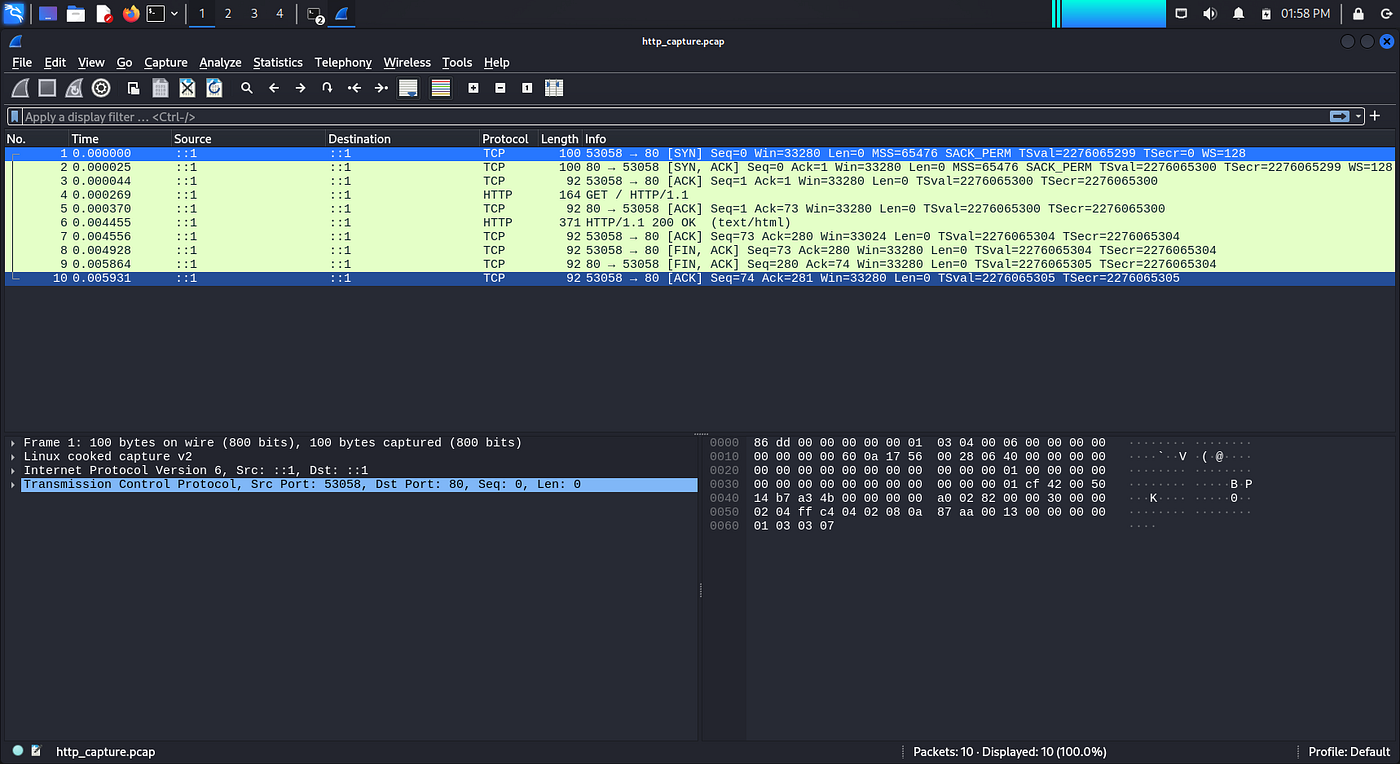
Wireshark HTTP packet view
Real-World Application
Organization rely on security analyst to expose vulnerabilities and services that are outdated to enable them provide patches or disable ports and services not required for daily operations. This shows the importance of this foundational knowledge of port scanning and server interaction with their applicability in several aspects such as:
- Used in vulnerability assessments to identify open and risky ports.
- Helps penetration testers map attack surfaces and discover exploitable services.
- Supports system administrators in installing, configuring, and troubleshooting web servers.
- Enables incident responders to detect suspicious network activity and unauthorized services.
- Assists network engineers in monitoring service availability and port behavior.
- Builds understanding of how hackers scan and profile systems, improving defensive skills.
- Useful for HTTP traffic inspection, debugging, and analyzing web communications.
- Strengthens core skills needed in SOC, DevSecOps, sysadmin, and cybersecurity roles.
Takeaway
This project highlights the importance of identifying ports and services listening on the network. By using this Nmap tool, administrators and security analyst can determine ports and services required for business operations and closed ports that are not required. This will ensure unauthorized users do not have vulnerabilities to exploit and affect the availability of a business.
This lab is foundational for gaining confidence in networking, Linux administration, and cybersecurity fundamentals.
Project was concieved by Ezechi Jeremiah Chigozie
메타데이터
- post_id
- af1ed3ddcdd7
- slug
- beginner-friendly-lab-nmap-port-scanning-web-server-interaction-on-linux-af1ed3ddcdd7
- url
- https://medium.com/@AishaBB/beginner-friendly-lab-nmap-port-scanning-web-server-interaction-on-linux-af1ed3ddcdd7
- canonical_url
- https://medium.com/@AishaBB/beginner-friendly-lab-nmap-port-scanning-web-server-interaction-on-linux-af1ed3ddcdd7
- author_url
- https://medium.com/@AishaBB
- status
- ok
- fetched_at
- 2026-06-23 17:05:31