Designing a Data Extraction System for Malaysian Hansard Parliamentary Records
From raw scans to structured datasets ready for NLP and analysis
Designing a Data Extraction System for Malaysian Hansard Parliamentary Records
From raw scans to structured datasets ready for NLP and analysis
Introduction
For most of the times, people often watch Malaysia’s parliamentary debates on the internet (the good & the bad). However, what most people tend to not notice is that these debates are always transcribed in text in the form of Hansard. In simple terms, Hansard is the official, edited verbatim report of parliamentary debates and proceedings in Britain and most Commonwealth countries including Malaysia.
For analysts, it is considered a goldmine as discussions & deliberations within Dewan Negara & Dewan Rakyat are recorded within said document and also gives people for understanding policy direction, political narratives, and legislative intent.
For others, it also helps to keep track of attendances for ministers & senators throughout the year.
Transforming Raw Data
Before we get into the data transformation, we first need to understand the structure of the Malaysian parliament so that those reading this can understand the difference between certain points:
- Dewan Rakyat — The main legislative chamber where elected MPs debate and pass laws.
- Dewan Negara — The upper house that reviews, amends, or delays laws passed by Dewan Rakyat.
- Kamar Khas — A special session for MPs to raise specific issues or questions without going through the full legislative process.
While the Hansard data is publicly available on the official Parliament page, many lacked the expertise or knowledge to transform the raw data into working statistics.
For those wanting to check the documents themselves: https://www.parlimen.gov.my/hansard-dewan-rakyat.html?uweb=dr#
Here’s an example of a Hansard document from Dewan Negara.
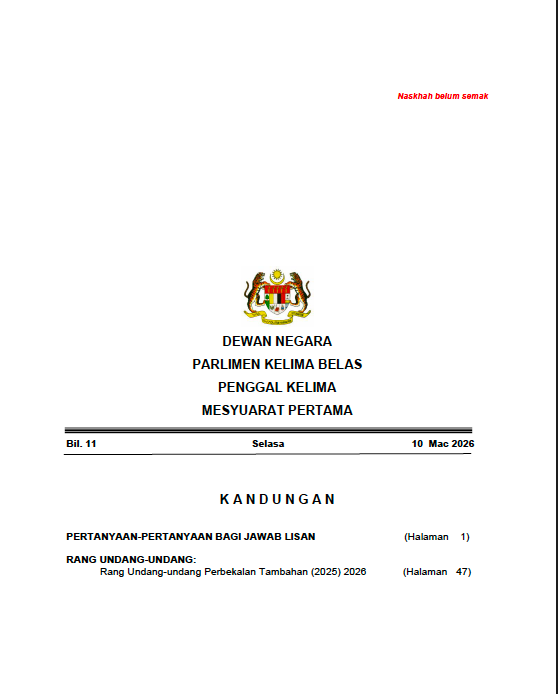
Front page of a Hansard document from Dewan Negara

Example transcribe from a recent hearing in Dewan Negara
Some documents are at minimum 100 pages, and if an analyst were to manually organize the raw data into workable information it would a long time. Thankfully with the advancement in LLMs (Large Language Machine) and AI, analysts are able to not only cut down the time taken to extract information but also allow them to convert the data with ease.
Extracting Text from PDF Documents
In today’s world, document digitization & text extraction play an important role in modern data analysis workflow, particularly when dealing with large collections of reports, archives or even official publications. Converting PDF contents into structured machine-readable text enables automated searching, parsing and even downstream analytical processing.
To achieve this, we’ll be making use of pdfplumber as the main PDF extraction library. PDFPlumber provides efficient access to embedded text within PDF documents while also preserving useful structural information such as page layouts, tables, spacing, and positional metadata.
However, in situations where PDFs consist solely of scanned images without embedded text, OCR frameworks such as PaddleOCR or TesseractOCR can be incorporated to convert the scanned content into readable digital text prior to extraction and analysis.
We’ll be focusing on two specific use cases, as specified below:
- Organizing attendance rate for Dewan Rakyat members.
- Transcript extraction from Kamar Khas session.
Use Cases
Attendance Rate
When it comes to attendance, it is usually straightforward as the document often specifies who is in attendance and vice versa. However, when extracting the data via text extraction there are certain things that needed to be specified.
Hansard documents follow semi-structured formatting, so regex is used heavily to identify:
- numbered attendance lists
- constituencies
- speaker titles
- dates
- parliamentary motions
The code used for these use cases are available at this GitHub repository for public use.
For example, this is the code for attendance number detection based on Dewan Rakyat’s Hansard document.
# Attendance Number Detection
NUMBER_LINE = re.compile(r'^\d+\.\s+(.+)$')

#Matches
1. Ahmad Ali
2. Lim Kit Siang
[embed]
Here’s a secondary code snippet for extracting constituency from the name list:
#Extracting constituency
CONSTITUENCY = re.compile(r'\(([^)]+)\)\s*$')

#Used to seperate constituency from raw data
- Raw Data: Ahmad Ali (Kubang Pasu)
- Expected Result: constituency = Kubang Pasu
Why this section matters
Without regex:
- parsing would be unreliable
- OCR text would be messy
- CSV structure would fail
Regex acts as the “detection engine” of the system.
As for the results, the cleaned data is saved within both CSV & JSON format for further data analysis & visualization:

Example of CSV data.

Example of visualization.
Kamar Khas Session Transcript Extraction
For transcript extraction, it is different as it focuses on other aspects of the Hansard document. Primarily the following:
- speaker turns
- debate text
- timestamps
- topics
- parliamentary roles
- structured proceedings
Below is the explanation of a few key code snippets that makes the overall extraction smoother:
Kamar Khas, or any parliament debate topics are usually in uppercase. In order to differentiate between topic headings and normal speech, the following code is used:
[embed]
#Topic Heading Detection

def is_topic_primary_line(line: str) -> bool:
    s = line.strip()

    if len(s) < 14:
        return False

    letters = re.sub(r"[^A-Za-z]", "", s)

    if len(letters) < 12:
        return False

    upper = sum(1 for c in letters if c.isupper())

    return upper / len(letters) >= 0.85
Another part is to preserve page-to-text position mappings, as speeches within the document tend to continue on different pages.
Without merging:
- speeches become fragmented
- topics reset incorrectly
- timestamps become disconnected
The following function helps to:
- merge all parliamentary pages into one continuous text stream.
- preserve page-to-text position mappings.
#Cross Page Merge System
def _merge_body_with_page_map(
    pages: list[tuple[int, str]], body_start_idx: int
) -> tuple[str, list[tuple[int, int, int]]]:

    spans: list[tuple[int, int, int]] = []
    parts: list[str] = []
    pos = 0

    for page_no, raw in pages[body_start_idx:]:
        body = strip_page_boilerplate(raw)

        if not body:
            continue

        body = merge_wrapped_bracket_lines(body)

        lo = pos
        parts.append(body)

        pos += len(body) + 2
        spans.append((lo, lo + len(body), page_no))

    text = "\n\n".join(parts)

    return text, spans
The speaker turn parser helps to transforms unstructured parliamentary text into structured debate turns.
It also helps us to :
- find all speaker labels
- calculates where each speech starts
- calculates where the next speech begins
It is important to note that each speech text for each member ranges between the start of his sentence to the beginning of the next member.
#Speaker Turn Builder
for i, m in enumerate(matches):
    t_start = m.end
    t_end = matches[i + 1].start if i + 1 < len(matches) else len(merged)

    speech = clean(merged[t_start:t_end])
As for the results, the data is saved within CSV, JSON & TXT format.

Example of JSON data.

Example of visualization in website.
Conclusion
Overall, parliamentary records such as the Hansard plays an important role in preserving Malaysia’s democratic process by documenting debates, questions, policies and even responses discussed in Parliament. However, these same documents are also lengthy, technical and difficult for the public to navigate efficiently, especially when stored as PDF files.
Modern text extraction & data processing approaches can help to bridge this gap by transforming parliamentary records into more accessible, searchable and analyzable information resources.
References
메타데이터
- post_id
- bcf91d47dc2b
- slug
- designing-an-data-extraction-system-for-malaysian-hansard-parliamentary-records-bcf91d47dc2b
- url
- https://medium.com/@CyberRaya/designing-an-data-extraction-system-for-malaysian-hansard-parliamentary-records-bcf91d47dc2b
- canonical_url
- https://medium.com/@CyberRaya/designing-an-data-extraction-system-for-malaysian-hansard-parliamentary-records-bcf91d47dc2b
- author_url
- https://medium.com/@CyberRaya
- status
- ok
- fetched_at
- 2026-06-20 20:29:01