LLM vs RAG vs MCP: I Finally Know When to Use Each One
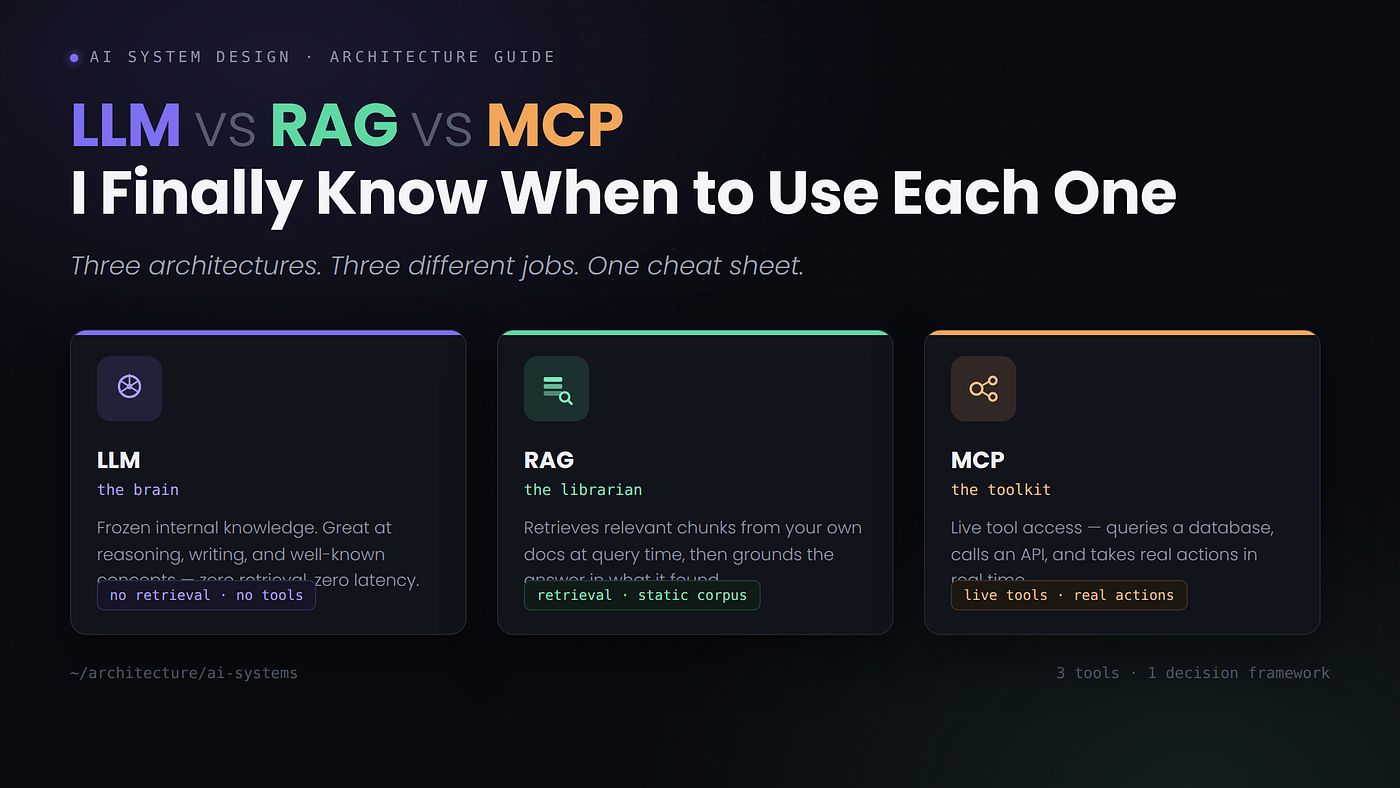
Three architectures. Three different jobs. One cheat sheet. 🧠
LLM vs RAG vs MCP: I Finally Know When to Use Each One
Three architectures. Three different jobs. One cheat sheet. 🧠
A few months ago, I was building an internal tool to help my team query our data pipeline documentation — schemas, lineage graphs, and transformation logic buried across 200 Markdown files. My first instinct was the obvious one: stuff it all into a system prompt. The model hit token limits almost immediately.
So I pivoted to RAG. I embedded the docs, built a retriever, wired up a vector store. It worked — mostly. Then the requirement shifted: instead of just searching documentation, the AI needed to run live queries against our Postgres database and check real-time Delta Lake table stats. RAG suddenly felt like the wrong tool entirely.
That’s when I discovered MCP, and it changed how I think about AI system design.
The question was never “which AI is smarter.” It’s “what does the AI actually need to do to solve this problem?” Once I started asking that instead, choosing between an LLM call, a RAG pipeline, and an MCP-connected agent stopped being a guessing game. Here’s how I think about all three now — and, more importantly, when to reach for which. 🧭
LLM — The Brain
Definition: A Large Language Model is a system whose knowledge is frozen at training time — everything it “knows” was baked in before you ever typed a prompt.
Think of a base LLM as a brilliant colleague who read every book ever written, then got locked in a room with no internet, no files, and no memory of your last conversation. Ask it something that depends purely on reasoning or general knowledge, and it’s fantastic. Ask it what happened in your systems five minutes ago, and it has nothing.
What it’s great at:
- Reasoning, synthesis, and writing — tasks that need intelligence, not fresh data
- Translating, reformatting, or debugging code in well-known languages and libraries
- Zero-latency responses, since there’s no retrieval step and no tool call round-trip
Where it falls apart:
- Anything time-sensitive — it has a training cutoff and genuinely doesn’t know what happened last week
- Private or company-specific data — it has never seen your internal wiki
- Precision recall over large corpora — it tends to summarize rather than retrieve exact facts
Good fit example: “Explain what a broadcast join is in Spark.” The model knows this cold — no retrieval needed, no external call needed, just reasoning over general knowledge. 💡
from anthropic import Anthropic

client = Anthropic()

# Simple LLM call — no retrieval, no tools
# Best for: reasoning, writing, well-known concepts
response = client.messages.create(
    model="claude-opus-4-5",
    max_tokens=1024,
    messages=[
        {
            "role": "user",
            "content": "Explain what a broadcast join is in Spark"
        }
    ]
)

print(response.content[0].text)

# When to use:
#   + General knowledge questions
#   + Reasoning and synthesis
#   + Code generation for known libraries
# When NOT to use:
#   - Private/internal data
#   - Real-time or live queries
Answer to a common question — “If the model is this capable, why bother with anything else?” Because capability isn’t the same as access. A brain without a library card or a set of hands can reason brilliantly about the world it was trained on, but it can’t tell you what’s in a document it’s never seen, and it can’t act on a system it has no connection to.
RAG — The Librarian
Definition: Retrieval-Augmented Generation fetches relevant context from an external source at query time, then hands that context to the LLM alongside the question, so the model can generate an answer grounded in real material instead of guessing from memory.
RAG gives the LLM a library card. When a user asks a question, a retriever searches a vector database or document store for relevant chunks, then passes those chunks into the model’s context window. The flow is straightforward: a user query goes to a retriever, the retriever fetches from a knowledge base — PDFs, code, a vector database — and those documents get passed to the LLM along with the original query to generate a grounded response. It’s runtime knowledge retrieval, not static baking. 📚
I lean on RAG heavily when the answer lives in a fixed corpus — documentation, policies, historical records, internal wikis — and the underlying data doesn’t change every few minutes.
What it’s great at:
- Company docs, runbooks, and internal knowledge bases — any fixed corpus
- Reducing hallucination by grounding answers in retrieved source text
- Semantic search over large document sets that could never fit into a single prompt
Where it falls apart:
- Live data — RAG is a snapshot, not a live connection
- Taking actions — it retrieves and summarizes, but it can’t actually do anything
- High-churn data — if your data changes hourly, your embeddings go stale fast
Good fit example: “Search our three-year archive of post-mortem reports and tell me the most common root causes for pipeline failures.” That’s a static corpus with a need for semantic search — classic RAG territory. 🔍
from anthropic import Anthropic
from sentence_transformers import SentenceTransformer
import chromadb

client   = Anthropic()
embedder = SentenceTransformer("all-MiniLM-L6-v2")
db       = chromadb.Client()
coll     = db.get_or_create_collection("pipeline_docs")

# --- Step 1: Index your corpus (run once) ---
docs = [
    "Delta Lake supports ACID transactions via transaction logs.",
    "Spark broadcast joins send small tables to every executor.",
    "Kafka retention is configured with retention.ms per topic.",
]
coll.add(
    documents=docs,
    embeddings=embedder.encode(docs).tolist(),
    ids=[f"doc-{i}" for i in range(len(docs))]
)

# --- Step 2: Retrieve + generate at query time ---
query   = "How does Spark handle joins with small tables?"
results = coll.query(
    query_embeddings=embedder.encode([query]).tolist(),
    n_results=2
)
context = "\n".join(results["documents"][0])

response = client.messages.create(
    model="claude-opus-4-5",
    max_tokens=512,
    system=f"Answer using only this context:\n{context}",
    messages=[{"role": "user", "content": query}]
)

print(response.content[0].text)

# When to use:
#   + Internal docs, wikis, runbooks
#   + Reducing hallucination with source grounding
#   + Large static corpora that won't fit in context
# When NOT to use:
#   - Live/real-time data (embeddings go stale)
#   - Taking actions in external systems
Answer to a common question — “Can’t I just widen the context window instead of building a retriever?” Sometimes, for small corpora. But a 200-file documentation set doesn’t fit even in a generous context window, and stuffing it in anyway means paying for tokens the model doesn’t need on every single call. Retrieval narrows the field before generation ever starts.
MCP — The Toolkit
Definition: The Model Context Protocol is a standardized way for an LLM host — like an AI assistant, an IDE, or a custom app — to connect to external servers that expose live tools the model can invoke in real time: querying a database, calling an API, reading and writing files on disk.
This is not retrieval from a pre-indexed store. It’s live execution. An MCP host talks to one or more MCP servers over the protocol, and each server performs a specific job — one might invoke web APIs like GitHub or Slack, another might execute database queries, a third might read and write the filesystem. The model decides which tool to call, calls it, gets real-time results back, and folds those results into its response. 🔌
What it’s great at:
- Live database queries — getting the actual row count in your Postgres table right now
- Taking actions in external systems — creating a Jira ticket, pushing a commit, triggering a job
- Dynamic workflows where the next step depends entirely on what the previous tool call returned
- Local development environments — reading your actual codebase, not an indexed snapshot of it
Where it falls apart:
- More setup complexity — you need to stand up and maintain MCP servers
- Latency — every tool call adds a round trip
- Trust and security surface — you’re giving the model real system access, which demands real guardrails
Good fit example: “Check the current row count for the orders_delta table, compare it against yesterday’s snapshot, and flag any anomalies.” MCP executes that query live. RAG simply can’t. ⚡
import anthropic, psycopg2, json

client = anthropic.Anthropic()

# --- Define tools the LLM can invoke ---
tools = [
    {
        "name": "query_database",
        "description": "Run a read-only SQL query on the data warehouse",
        "input_schema": {
            "type": "object",
            "properties": {
                "sql": {"type": "string", "description": "SQL to execute"}
            },
            "required": ["sql"]
        }
    }
]

# --- Tool execution (called when model decides to use it) ---
def run_tool(name, inputs):
    if name == "query_database":
        conn = psycopg2.connect("postgresql://localhost/warehouse")
        cur  = conn.cursor()
        cur.execute(inputs["sql"])
        rows = cur.fetchall()
        conn.close()
        return json.dumps({"rows": rows})

# --- Agentic loop: model calls tools until it has the answer ---
messages = [{
    "role": "user",
    "content": "How many rows landed in orders_delta today vs yesterday?"
}]

while True:
    resp = client.messages.create(
        model="claude-opus-4-5",
        max_tokens=1024,
        tools=tools,
        messages=messages
    )

    if resp.stop_reason == "end_turn":
        print(resp.content[0].text)
        break

    # Model requested a tool — execute it and return result
    tool_use = next(b for b in resp.content if b.type == "tool_use")
    result   = run_tool(tool_use.name, tool_use.input)

    messages += [
        {"role": "assistant", "content": resp.content},
        {"role": "user", "content": [{
            "type": "tool_result",
            "tool_use_id": tool_use.id,
            "content": result
        }]}
    ]

# When to use:
#   + Live DB queries, real-time data
#   + Taking actions (write, trigger, push)
#   + Analyzing local files / active codebase
# When NOT to use:
#   - Simple Q&A that doesn't need external state
#   - High-frequency low-latency calls (tool round-trips add up)
Answer to a common question — “Isn’t MCP just tool use with extra steps?” Not quite. Tool use is the mechanism; MCP is the standard that makes tools portable. Instead of writing a bespoke integration for every AI app you build, an MCP server exposes its tools once, and any MCP-compatible host can plug into it — your IDE today, a different assistant tomorrow.
My Real Experience: Building the Codebase Analyzer
Here’s the project that made all three concepts concrete for me. I was building a tool where engineers could ask natural language questions about our Spark codebase — things like “which jobs write to the customer table?” or “find all places where we use repartition without a shuffle hint."
My first pass was pure RAG: embed all the Python files, retrieve relevant chunks, pass them to the LLM. It sort of worked, but the chunking was brutal. Python files don’t chunk cleanly — function context got split across boundaries, and retrievals kept surfacing the wrong file sections.
“RAG felt like handing the model a shredded version of our codebase. MCP felt like giving it a terminal.”
When I switched to an MCP server that could directly read files from disk, list directories, grep for patterns, and run lightweight AST analysis scripts, the experience was night and day. The model could ask the tool to list every **.py file under `/src/jobs**, read specific files on demand, and grep for everyrepartition` call — no stale embeddings, no chunking artifacts, just live file access. 🛠️
For the documentation side — onboarding guides, architecture decision records, runbooks — I kept RAG. Those change slowly, semantic search works well against them, and retrieval latency barely matters when someone’s just reading a doc. But for anything touching the live codebase or a running system, MCP was clearly the right answer.
The Cheat Sheet: If You Need X, Use Y
Rather than a table, here’s the same logic as a quick-reference list — each one paired with an example and the answer it points to:
- Need general reasoning or well-known knowledge? → Use an LLM call directly. Example: “Explain the CAP theorem.” Answer: plain LLM call — no retrieval, no tools needed.
- Need answers grounded in your own static documents? → Use RAG. Example: “What does our runbook say about restarting a stuck Kafka consumer?” Answer: retriever pulls the relevant runbook section, then the LLM answers from it.
- Need to check something happening right now? → Use MCP. Example: “Is the orders pipeline still running, and how many rows has it processed?” Answer: MCP calls a live query tool, not a stored embedding.
- Need the AI to take an action, not just answer a question? → Use MCP. Example: “Create a Jira ticket for this failed job.” Answer: MCP invokes the Jira tool directly.
- Need to search across thousands of documents that would never fit in a prompt? → Use RAG. Example: “Find every incident report mentioning schema drift.” Answer: semantic search over embeddings, then summarized by the LLM.
- Need low latency with zero external dependencies? → Use an LLM call. Example: “Reformat this JSON into YAML.” Answer: no retrieval or tool call required — it’s a pure transformation task.
Article Summary (For Your Notes 📝)
- LLM — frozen, internal knowledge; best for reasoning, writing, and well-known concepts; fails at anything time-sensitive or private
- RAG — retrieval at query time from a fixed corpus; best for grounding answers in docs and reducing hallucination; fails at live data and taking actions
- MCP — standardized live tool access; best for real-time queries and taking actions in external systems; fails when simple Q&A would have been enough
- Decision rule — start with the simplest option that works: plain LLM first, RAG when you need grounding in static content, MCP when the AI needs to interact with live systems or take action
- Real lesson — RAG chunked a codebase into “shredded” fragments; MCP gave the model a terminal instead, with live file and query access
Final Thoughts
When I started out, I treated LLMs as magic boxes and kept stuffing more context into the prompt, hoping things would improve. RAG taught me to separate retrieval from generation. MCP taught me that the model doesn’t need to know everything — it just needs the right tools, and the judgment to use them.
If you’re building anything non-trivial with AI right now, learning where each of these fits will save you a lot of architectural regret. Start with the simplest thing that works — often that’s a plain LLM call. Add RAG when you need to ground answers in a specific corpus. Reach for MCP when the AI needs to interact with the world, not just describe it.
Pick the tool that matches the job. The best AI architecture isn’t the most complex one — it’s the one that actually solves the problem in front of you.
If this helped you think about AI system design differently, give it a few claps 👏, drop a comment on which of the three you’re using right now 💬, and follow CodingSprints for more practical AI and data engineering breakdowns.
Before you go
- Please take a moment to like the post and follow the writer!
- Did you know that over 400,000 developers share what they’re building, learning, and discovering across our platforms every month? Learn how you can contribute here
메타데이터
- post_id
- bdc894ff9775
- slug
- llm-vs-rag-vs-mcp-i-finally-know-when-to-use-each-one-bdc894ff9775
- url
- https://ai.plainenglish.io/llm-vs-rag-vs-mcp-i-finally-know-when-to-use-each-one-bdc894ff9775
- canonical_url
- https://ai.plainenglish.io/llm-vs-rag-vs-mcp-i-finally-know-when-to-use-each-one-bdc894ff9775
- author_url
- https://medium.com/@codingsprints
- status
- ok
- fetched_at
- 2026-07-16 18:03:01