Exploring the Lumive Smart IR Remote Control
I recently bought a Lumive Smart IR Hub to control my old AC, it has a android application, but who wants just an app? I want full control…
Exploring the Lumive Smart IR Remote Control
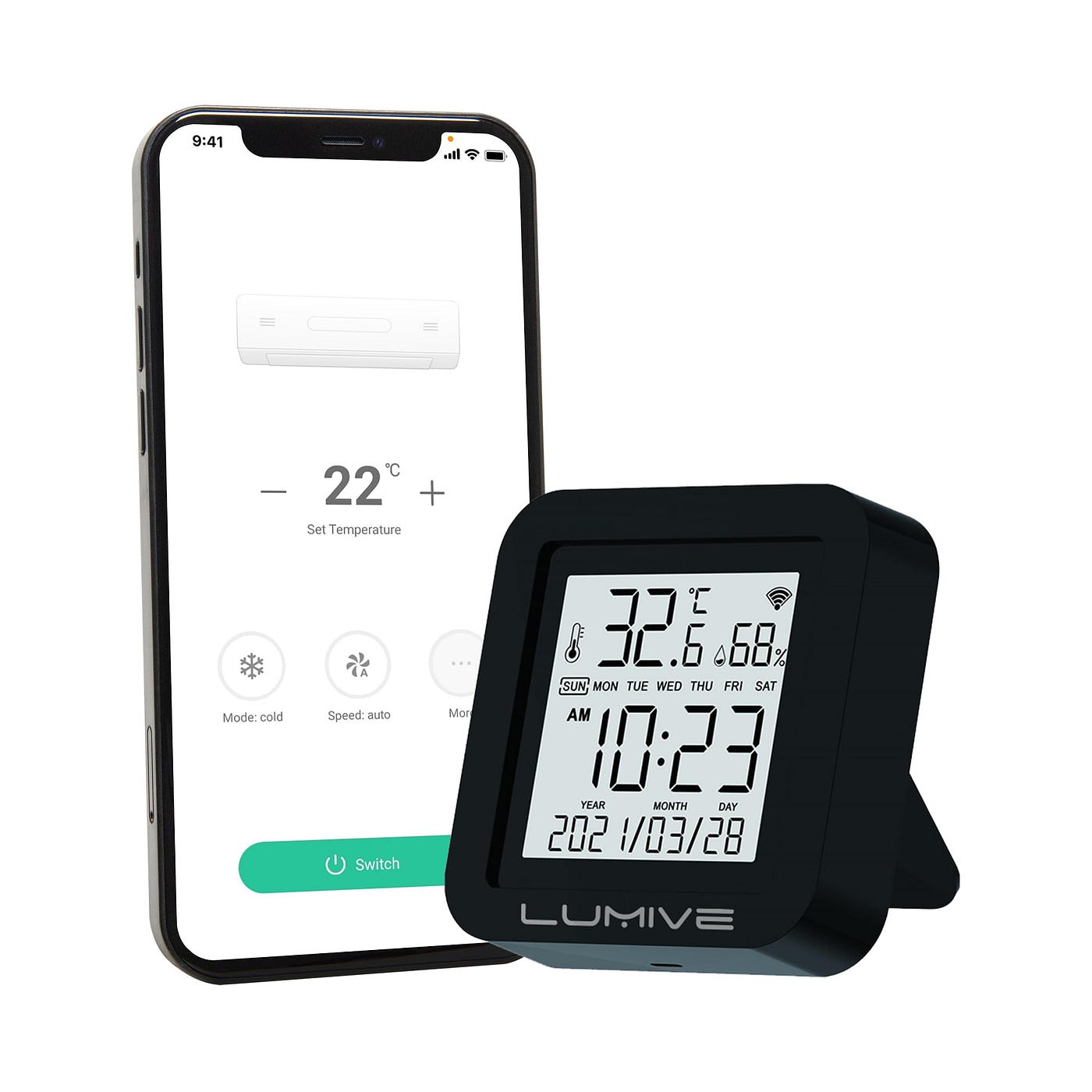
I recently bought a Lumive Smart IR Hub to control my old AC, it has a android application, but who wants just an app? I want full control over my device. As always, I’ve started analyzing it to see what I can do and to explore all the possibilities. :)
A few days ago, I created a GUI for Frida integrated with Claude Code, which I used to analyze their application and understand how it communicates with and discovers the device.
at first I’ve found that Lumive app is just a re-branded app and it’s actually Tuya Smart Life app
Great findings. The app uses Tuya IoT SDK — the IR hub sends AC commands via
infraredPublishDps()over MQTT/cloud. I’ll write a Frida hook that intercepts the actual runtime calls to capture: your device ID, auth token, exact IR DP payloads for AC commands, and temperature updates.
well, i had no idea about Tuya SDK at first and tried to find more details, i’ve asked it how the app communicate withe api
┌─────────────┐     HTTPS POST /api.json      ┌──────────────────────┐
│  Mobile App │ ─────── (AES-GCM, signed) ──► │  a1.tuyaeu.com       │ Cloud API
└─────────────┘                                └──────────────────────┘
       │                                                │
       │         MQTT (paho, port 1883/8883)            │ MQTT bridge
       │ ◄───────────────────────────────────────────── │
       │         mq.mb.tuyaeu.com                       │
       │                                                │
       │         TCP :6668 (LAN, AES-ECB)               │
       └──────────────────────────────────────► Gateway │ Local WiFi
                                                (192.168.100.x)
I started digging into the app to find possible secrets, but no luck, everything was embedded in libthing_security.so , as im not good enough for ARM asm i asked frida-ide again to give me some hints.
GLOBAL_STRING — The Master Secret
Stored as a
std::stringin the BSS segment at offset0x39070. It is a concatenation of four components separated by underscores:
{packagename}{cert_sha256_colonhex}{bmpkey}{app_secret}
For this app:
lumivestore.com.lumivesmart_F0:D4:50:22:BC:15:B2:B0:AC:B0:FE:00:5B:AA:89:B2:AB:E5:02:2F:27:E0:C6:84:E0:D2:F9:99:CF:F3:AD:07_58jdrdyypc7auq5jdxtrk9ksamqxmae3_utyufyvxuayfkkj8vwdvda9tpqpq49qu
Well, that was the master secret, but the app was using derivation, so the HTTP signing key and the MQTT password were different but derived from a single key. Good progress!
The static HTTP signing key was computed once when app get installed and never change
import hashlib

GLOBAL_STRING = (
    "lumivestore.com.lumivesmart_"
    "F0:D4:50:22:BC:15:B2:B0:AC:B0:FE:00:5B:AA:89:B2:"
    "AB:E5:02:2F:27:E0:C6:84:E0:D2:F9:99:CF:F3:AD:07_"
    "58jdrdyypc7auq5jdxtrk9ksamqxmae3_"
    "utyufyvxuayfkkj8vwdvda9tpqpq49qu"
)

SIGNING_KEY = hashlib.sha256(GLOBAL_STRING.encode()).digest()
# = bytes.fromhex("14f42aba50e54e1418e7e78657bc1cbaad67c22ec79422f63a5f81eeaa285b01")
so JNICLibrary.getSigningKey() was returning this key and Each HTTP request uses a fresh AES-128-GCM key derived from the request’s UUID and the ecode session value
import hmac, hashlib

def get_encrypto_key(request_id: str, ecode: str | None) -> bytes:
    # request_id = UUID4 string, 36 bytes
    key = request_id.encode("utf-8")
    suffix = ("_" + ecode) if ecode else ""
    msg = (GLOBAL_STRING + suffix).encode("utf-8")
    digest = hmac.new(key, msg, hashlib.sha256).digest()
    return digest.hex()[:16].encode("ascii")   # 16-byte key
The ecode is an opaque token returned in the HTTP response header on the first authenticated request. The server uses it to bind per-session encryption keys to the session, preventing key replay across sessions.
*Reversed from:**
libthing_security.soat ARM64 function offset~0x13ed8(nameddoCommandNative cmd=1in Frida hook output). The function takes[requestId, ecode]via JNIGetStringUTFChars.
All requests POST to https://a1.tuyaeu.com/api.json as application/x-www-form-urlencoded and every requests includes these query parameters :
a=<method>          # API method name, e.g. "thing.m.device.dp.publish"
v=<version>         # API version, e.g. "2.0"
lang=en_US
os=Android
appVersion=1.2.4
sdkVersion=7.0.5
clientId=cdgcdes4tvtnkjmjdnru
deviceId=<install_uuid>
ttid=sdk_international@cdgcdes4tvtnkjmjdnru
chKey=e8e4f69c
et=3                # encryption type: 3 = AES-GCM
cp=gzip             # compression flag
ct=RN
time=<unix_seconds>
requestId=<uuid4>
timeZoneId=<timezone>
postData=<base64_encrypted_body>
sid=<session_id>    # only for authenticated calls
sign=<hmac_sha256>
Signing Algorithm
The sign is computed by ThingApiSignManager.java:
SIGN_FIELDS = {
    "a", "v", "lat", "lon", "lang", "deviceId", "appVersion", "ttid",
    "isH5", "h5Token", "os", "clientId", "postData", "time",
    "requestId", "et", "n4h5", "sid", "chKey", "sp",
}

def compute_sign(params: dict, encrypted_b64: str) -> str:
    # Step 1: compute swap(md5(encrypted_postData)) for the postData field
    md5_hex = hashlib.md5(encrypted_b64.encode()).hexdigest()
    swapped = md5_hex[8:16] + md5_hex[0:8] + md5_hex[24:32] + md5_hex[16:24]

    # Step 2: filter params to SIGN_FIELDS, replace postData with swapped value
    sign_params = {k: str(v) for k, v in params.items()
                   if k in SIGN_FIELDS and v is not None and str(v) != ""}
    sign_params["postData"] = swapped

    # Step 3: sort alphabetically, join with "||"
    parts = sorted(f"{k}={sign_params[k]}" for k in sign_params)
    string_to_sign = "||".join(parts)

    # Step 4: HMAC-SHA256 with the static SIGNING_KEY
    return hmac.new(SIGNING_KEY, string_to_sign.encode(), hashlib.sha256).hexdigest()
The swapSignString shuffle ([1][0][3][2]on 8-char chunks) is a Tuya-specific obfuscation found in ThingApiSignManager.swapSignString(). It makes the MD5 of the payload a non-trivial string to forge.
The postData field is not plain JSON but AES-128-GCM encrypted. This is Tuya’s et=3mode (encryption type 3), replicated from AesGcmUtil.java.
from cryptography.hazmat.primitives.ciphers.aead import AESGCM
import os, base64

def encrypt_request_body(payload_dict: dict, aes_key: bytes) -> str:
    """
    aes_key = get_encrypto_key(request_id, ecode)  # 16 bytes ASCII
    Returns Base64(12-byte-nonce + ciphertext + 16-byte-GCM-tag)
    """
    plaintext = json.dumps(payload_dict, separators=(",", ":")).encode()
    nonce = os.urandom(12)
    ct_tag = AESGCM(aes_key).encrypt(nonce, plaintext, None)
    return base64.b64encode(nonce + ct_tag).decode("ascii")
The server response is a JSON envelope with an encrypted result field:
{
    "t": 1776532535351,
    "sign": "<some_value>",
    "result": "<base64_encrypted_inner_response>"
}
The result is decrypted with the same per-request AES key:
def decrypt_response(b64_data: str, aes_key: bytes) -> dict:
    raw = base64.b64decode(b64_data)
    nonce, ct_tag = raw[:12], raw[12:]
    plaintext = AESGCM(aes_key).decrypt(nonce, ct_tag, None)
    # Server sometimes gzip-compresses before encrypting
    # (signalled by x-content-compress: gzip response header)
    return json.loads(plaintext)
Each request uses a fresh UUID -> fresh requestId → fresh AES key. The server encrypts the response with the same ephemeral key. This means an attacker who captures one request-response pair gets nothing useful for future requests. However, since getEncryptoKey is fully deterministic from requestId + ecode`` anyone who knows theGLOBAL_STRINGand theecode` can recompute any past or future key. (what a shame)
Login Flow
Authentication is a two-step process , Pre-Login Token, Login with RSA-Encrypted Password
POST /api.json
a=thing.m.user.username.token.get
v=2.0
postData={"countryCode":"964","username":"user@example.com","isUid":false}
Response contains:
token: one-time session bootstrap tokenpublicKey: RSA modulus (decimal string) for password encryptionexponent: RSA public exponent (typically65537)
import hashlib
from cryptography.hazmat.primitives.asymmetric import padding as asym_padding

# 1. MD5 the password
pwd_md5 = hashlib.md5(password.encode()).hexdigest()  # 32-char hex

# 2. RSA-PKCS1v15 encrypt with server's public key
pub = RSAPublicNumbers(int(exponent), int(modulus)).public_key()
passwd_enc = pub.encrypt(pwd_md5.encode("ascii"), asym_padding.PKCS1v15()).hex()

# 3. Send
POST: a=thing.m.user.email.password.login
postData={"countryCode":"964","email":"...","passwd":"<hex>","ifencrypt":1,"token":"<token>"}
LoginRepository.javalines ~703–706. Theifencrypt=1flag tells the server the password is RSA-encrypted.
The MQTT connection does not use a simple username/password from the API response. All three components are derived from constants already in the app and the ecode session token.
def mqtt_password_from_ecode(ecode: str) -> str:
    """
    Reversed from libthing_security.so offset ~0x13ed8 (doCommandNative cmd=2).
    Input via JNI: [ecode]
    """
    step1 = md5hex(GLOBAL_STRING)          # md5 the entire GLOBAL_STRING
    full  = md5hex(step1 + ecode)          # md5 the concatenation
    return full[8:24]                      # take characters 8–24 (16 chars)
This produces a 16-character hex string that is the MQTT password.
CLIENT_ID        = "cdgcdes4tvtnkjmjdnru"
CH_KEY           = "e8e4f69c"
PARTNER_IDENTITY = "p1594250"   # from login response

def mqtt_credentials(uid, sid, ecode):
    suffix    = md5hex(md5hex(CLIENT_ID) + ecode)[-16:]   # last 16 chars of MD5
    client_id = f"{PARTNER_IDENTITY}/mb/{uid}"
    username  = f"{PARTNER_IDENTITY}_v1_{CLIENT_ID}_{CH_KEY}_mb_{sid}{suffix}"
    password  = mqtt_password_from_ecode(ecode)
    return client_id, username, password
clientId = p1594250/mb/eu17764211994869ziAN
username = p1594250_v1_cdgcdes4tvtnkjmjdnru_e8e4f69c_mb_eu177642g11994869WziAN...<32-char suffix>
password = <16 hex chars derived from ecode>
dbpdpbp.java(MQTT connection setup) +UserConfigSessionLogoutManager.java:844.
smart/mb/in/{uid}           ← user-level DPS updates (all devices)
smart/mb/in/{deviceUUID}    ← per-device updates (UUID from device list)
smart/mb/out/{gatewayId}    ← outbound commands to a specific gateway
Message Format :
{
    "protocol": 4,
    "pv": "2.2",
    "t": 1713456789000,
    "sign": "<md5_hex>",
    "data": "<base64_or_dict>"
}datais either a plain JSON dict (no encryption) or a Base64-encoded AES-128-ECB ciphertext- AES key:
localKey[:16]padded to 16 bytes with null bytes - Encryption: AES-128-ECB + PKCS7 padding
def decrypt_mqtt_data(b64_data: str, local_key: str) -> dict:
    raw = base64.b64decode(b64_data + "==")
    key = local_key[:16].encode("utf-8").ljust(16, b"\x00")
    cipher = AES.new(key, AES.MODE_ECB)
    raw_decrypted = cipher.decrypt(raw)
    pad = raw_decrypted[-1]
    return json.loads(raw_decrypted[:-pad])
The payload after decryption is a nested envelope :
{
    "protocol": 4,
    "s": "<devId_or_nodeId>",
    "t": 1713456789,
    "data": {
        "devId": "<sub_device_id>",
        "cid": "<node_id>",
        "dps": {"101": true, "102": "0", "103": 22}
    }
}**t_s.bmp— Key Material Hidden as an Image**
The BMP key component (58jdrdyypc7auq5jdxtrk9ksamqxmae3) is loaded from assets/t_s.bmp via:
ThingNetworkInterface.setSecurityContent(
    ThingUtil.getAssetsData(context, "t_s.bmp", "soisiwoejre".getBytes())
);
The second argument soisiwoejre is a **decryption key** for the BMP file — it is stored in plaintext in the Java code (bqpdbqq.java:1590). The BMP file is not actually a bitmap! it’s encrypted key material with a .bmp extension to evade static scanners.
Extraction:
Hook ThingUtil.getAssetsData with Frida to capture the decrypted bytes after the BMP is loaded. The HMAC key derivation in mbedcrypto_md_hmac_starts will then have the exact key bytes.
**fixed_key.bmp— A Second Hidden Key File**
There are two BMP key files in the assets:
-
t_s.bmp— contains the signing/MQTT key component (thebmp_key) -
fixed_key.bmp— contains the key for a secondary security layer (used forThingNetworkInterfaceLAN protocol security content)
so, at this point, i was able to read device temperature , humidity , and even publish the IR Commands via MQTT but still no direct access to the device (sad)
i’ve found https://github.com/jasonacox/tinytuya , a project that help to talk with your device via lan , but it required the device key , thanks to previous finding i was able to find the device key in http responses :) and it was working but i had no interest to use it for controling the device so i installed the Tuya Smart Life app , at first it was not able to find the device , but after hard resetting the device , it paired with it. the UI and other components was exactly same as the re-branded app, but there was a difference , it was able to pair with the Tuya Cloud , but WTF is Tuya Cloud now?
I’ve registered as developer on Tuya Cloud and created a test project , and i was able to link my app account to the cloud project , after i paired my account with the cloud project , it has found my device and sub devices (AC Remote) the actual product name (Smart IR Hub) was S09-CB3S-三期面板(带告警) and it has great apis
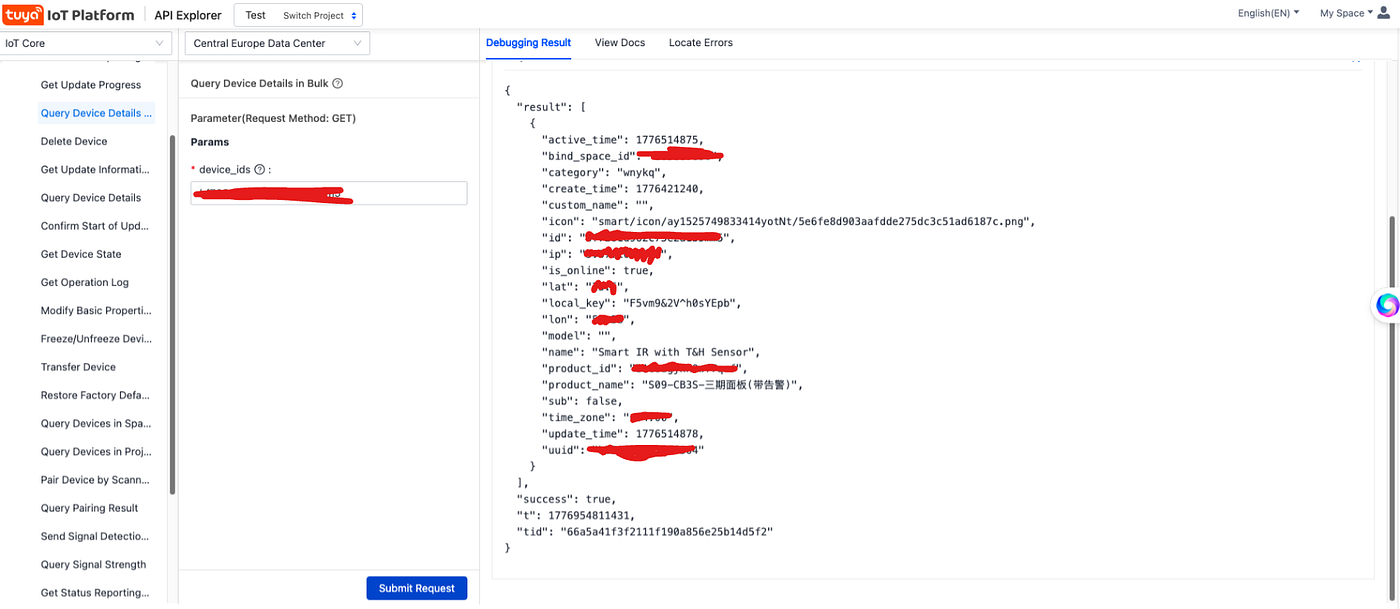
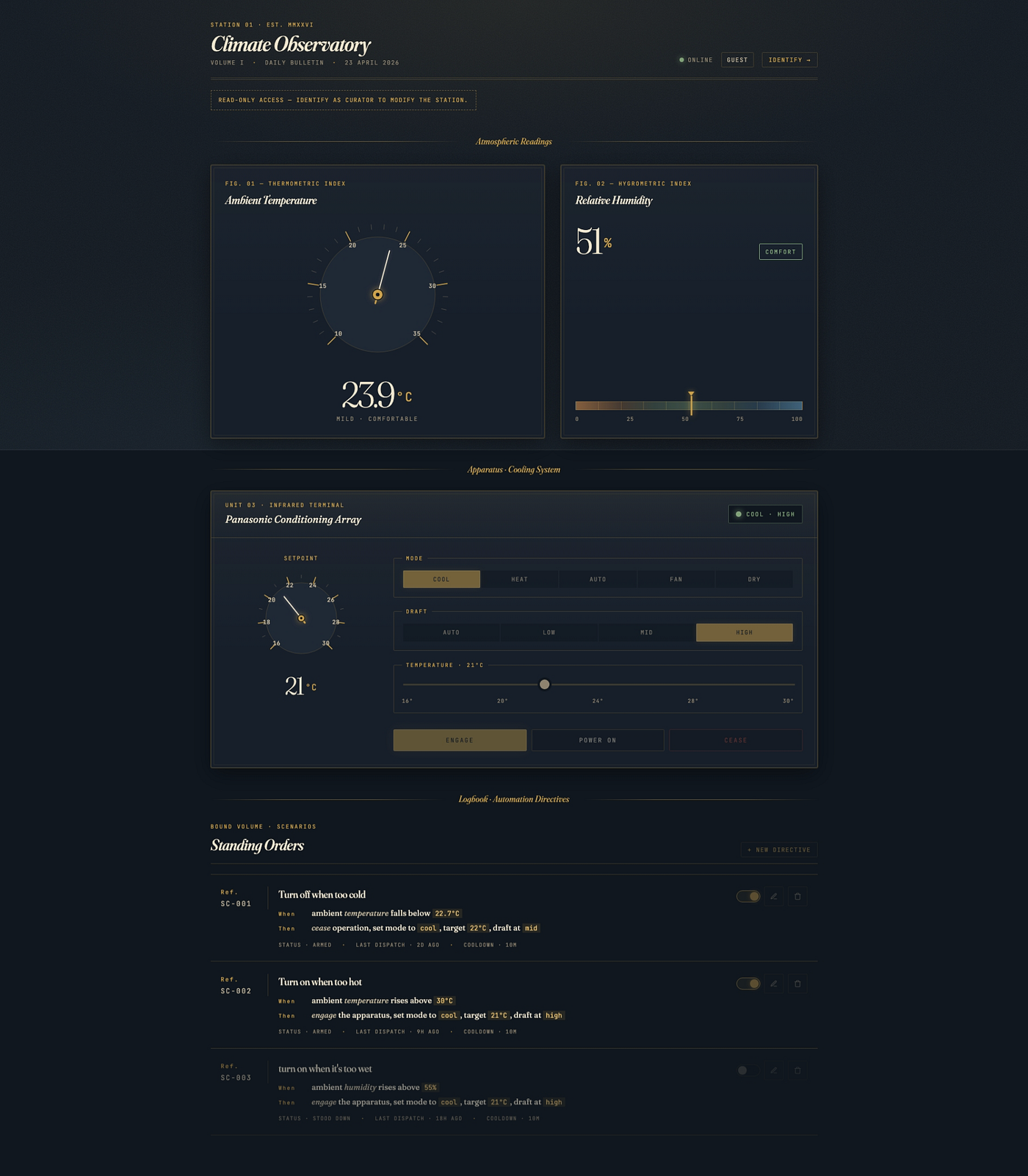
so finally i was able to control the device via actual api so i’ve created a monitoring and scenario control app to control my AC !
[embed]Climate Observatory Read-only access - identify as curator to modify the station.smart.koorosh.me
메타데이터
- post_id
- d997af7a0b70
- slug
- a-journey-through-lumive-smart-ir-remote-control-d997af7a0b70
- url
- https://medium.com/@mroplus/a-journey-through-lumive-smart-ir-remote-control-d997af7a0b70
- canonical_url
- https://medium.com/@mroplus/a-journey-through-lumive-smart-ir-remote-control-d997af7a0b70
- author_url
- https://medium.com/@mroplus
- status
- ok
- fetched_at
- 2026-06-21 19:25:17






