Why Great AI Analysis Starts With Planning, Not Prompting
As data analysts, we have been increasingly leveraging AI to our benefit, from writing and ideation, all the way to coding and bug fixing…
Why Great AI Analysis Starts With Planning, Not Prompting

As data analysts, we have been increasingly leveraging AI to our benefit, from writing and ideation, all the way to coding and bug fixing. Recently, as a data analyst at Fiverr, I took a significant step forward by using AI IDEs like Cursor and Antigravity for entire analysis processes. While this presented the opportunity to significantly speed up and improve our output, it disconnected the analyst from the process, leading to a wide range of issues.
In this article, I will discuss my AI journey to date, and the challenges & pitfalls I’ve come across when using these tools. I will also discuss how I’m overcoming these challenges, even if it’s still a work in progress.
AI Works Faster, but We Lose Control of the Process
Recently, I started using Cursor for the first time, and I immediately realized there was no way back.
No more need for writing queries, building Python scripts, grappling with Tableau to create charts, or “copy-pasting” images into long and ugly analysis documents. The agent does the process end-to-end, and all I would need is a (good) prompt.
At this point, I assumed that my main effort would go into validating the SQL queries. However, while that’s a must, it’s not the biggest issue.
After the first analysis I ran, it became obvious that there were bigger issues. In one case, I completed an analysis in approximately 5 hours instead of 1.5 weeks, but then spent days on fixes and methodology changes. This shouldn’t have happened.
So, let’s discuss the 2 main issues I encountered.
- Although I defined the KPIs and the structure, I didn’t spend enough time thinking them through. The business question wasn’t polished, and the agent made its own decisions about how to implement it, when to use it, and how it was defined. This left me with an output that, even when accurate, gave little to no business value. In one case, I had a complex Conversion metric, and I didn’t even realize how complex it was until the end. The agent didn’t make good calls.
- I was disconnected from the process. I had no idea what the agent did along the way, and to change things later was extremely time-consuming and ineffective. This also made verification of the SQL difficult, as it was extremely long, and validating a complex query I didn’t write is very time-consuming.
The attempted fix
I realized I needed to spend more time on planning.
If you’ve already used Cursor, here comes the “plan” mode. The agent doesn’t start working. You put in a prompt, it creates a plan, asks clarifying questions, and only once all is good do we click “build,” and off it goes.
Sounds good, right?
No. This simply didn’t work. In fact, it made things worse.
I was also giving the planning over to AI, not using the contextual knowledge I have, not asking the right questions, and honestly, it’s easy to just scan the plan and say “ya, that looks great”. This meant I was even less involved than before, and the output, while pretty and breathtaking, had very little business impact.
The Blueprint to an Analysis — The 5 Steps Before Agents
I realized I need to take a step back, figure out exactly what the stakeholders need, how I think it should be achieved, and create a proper plan. This was always essential as analysts, but we could get away with “winging it” when we controlled the entire process. No more.
I created a phased plan that I would need to go through before even touching an AI agent for execution.
If I thought this process was small, it was not. After a few attempts at different analyses, I realized this was where the analyst’s main effort should be.
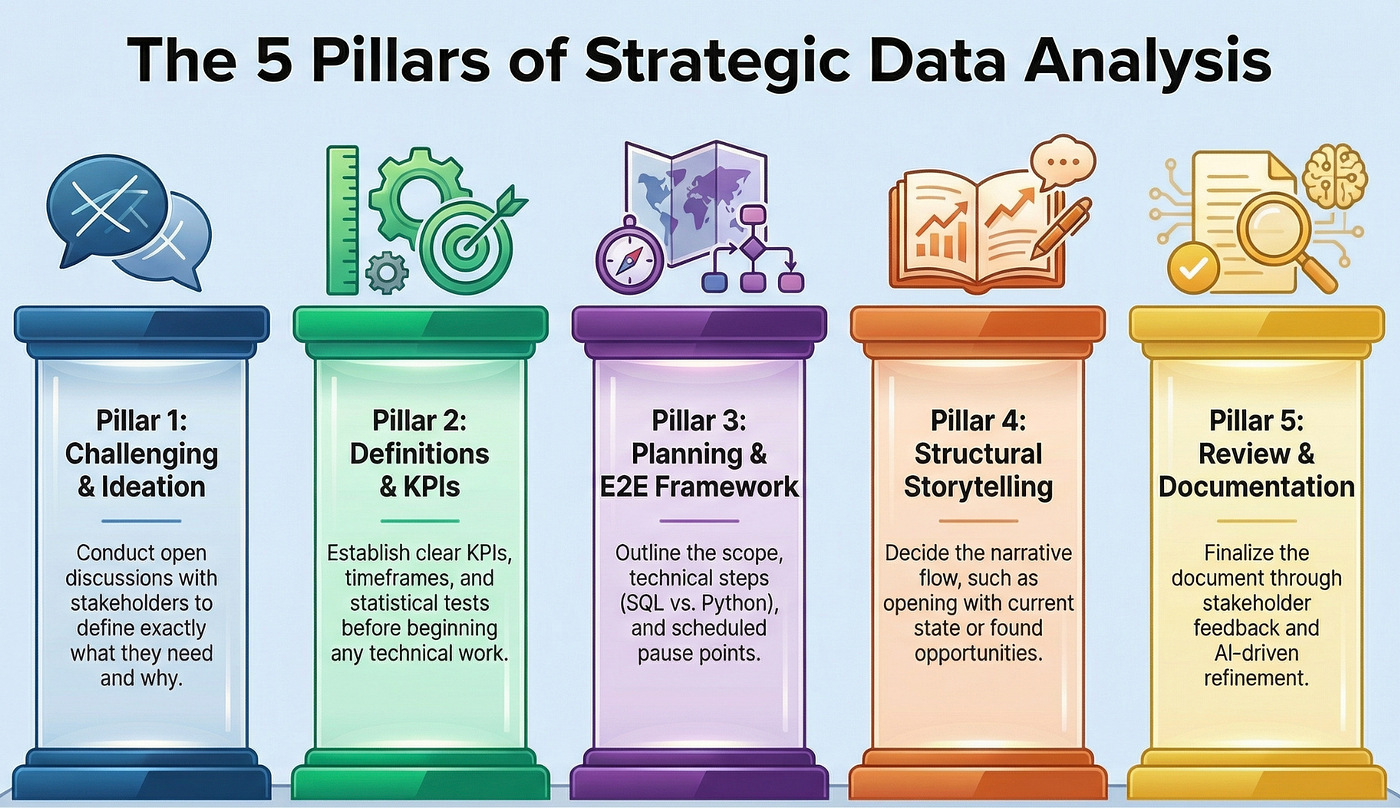
The 5 steps of data analysis prep
Step 1 — Stakeholder ideation & challenging
When an analysis was needed, I had to first sit down with the stakeholders and ask them to explain exactly what they wanted. Why did they need this? What did they expect to get? Was this question going to get us there? This was an open discussion.
Step 2 — Definitions & KPIs
I needed to decide which KPIs I needed for this analysis and which definitions would help me answer the questions. If, for example, I wanted to measure Revenue and Conversion Rate, how would those be defined? What timeframe was relevant? What population did I want? Were there any dimensions that were a must? Which statistical tests did I want or need?
Step 3 — Planning the scope of the analysis and E2E framework
In any analysis, it’s easy to get lost. This is especially true when technical limitations have been lifted. The agent can run anything I want.
I realized I needed to create an outline of what we were looking at, the steps I wanted, and the stages at which I wanted to pause to review what we had. Additionally, I needed to decide how I expected the analysis to be done. What parts are SQL, and what was done in Python? How did I want the final product to be presented?
There was no right or wrong answer to these questions — it was simply about knowing what I wanted, who I needed to present this to, and what was best for each specific scenario.
Step 4 — Define the structure of the analysis doc
Even if I ended up making the insights myself, I realized I wanted the file to “look good”, and AI could do that for me. But the same data and insights could be presented in many different ways. I needed to decide what story I was trying to tell, and how I wanted it told. Did I want to open with the opportunity found? With the challenges? The current state? This was flexible and didn’t need to happen so early on, but it would save plenty of time later.
Step 5 — Review and document
Once I had the entire structure and plan, I put all the information in a document and had the agent read it. I had to make final reviews, send them to stakeholders for feedback, and yes, even ask an LLM to improve the document for me.
Once I completed these steps properly, I referenced this file to the agent in build mode, clarified that it should stick to the plan, and asked the agent to bring up any potential issues.
My next analysis took a few hours, and I still needed to validate the queries and make a few changes.
But that was it.
The analysis answered exactly what we needed. It was scalable, easy to read, and there was no need for endless back and forth.
There Are Many Ways to Plan — Not Planning Isn’t One of Them
This system isn’t foolproof and might not work for everyone. You need to find what works for you. But, for a good output, although it takes time, it’s time well spent. As analysts, planning is really where our analytical thinking, contextual knowledge, and insights really shine.
Things will evolve, and tech will improve, but at least for now, analysts are still needed, maybe more than ever before. There are tools that hallucinate, make up facts to please stakeholders. This makes our expertise and knowledge even more important. Without it, we won’t be able to add value and drive data-driven decision-making.
메타데이터
- post_id
- ea79d468a323
- slug
- why-great-ai-analysis-starts-with-planning-not-prompting-ea79d468a323
- url
- https://medium.com/fiverr-engineering/why-great-ai-analysis-starts-with-planning-not-prompting-ea79d468a323
- canonical_url
- https://medium.com/fiverr-engineering/why-great-ai-analysis-starts-with-planning-not-prompting-ea79d468a323
- author_url
- https://medium.com/@shimros94
- status
- ok
- fetched_at
- 2026-06-14 11:28:49






