Building an automated design token pipeline from Figma to React
How to stop manually copying hex codes and start syncing design decisions directly to your codebase using GitHub and CSS variables.
Building an automated design token pipeline from Figma to React
How to stop manually copying hex codes and start syncing design decisions directly to your codebase using GitHub and CSS variables.
The rebrand that broke our workflow
We had three weeks to implement a massive brand refresh across our entire product suite. The design team had spent months perfecting a gorgeous new visual language. They built a meticulously organised Figma file with variables for absolutely everything. We had light mode. We had dark mode. We had different spacing scales for mobile and desktop. It was a masterpiece of modern design system thinking.

Then came the handover meeting.
The lead designer proudly shared a link to the Figma file. I opened it up and looked at the sheer volume of variables. There were hundreds of them. Colours, typography variables, corner radii, and elevation shadows. My heart sank. I realised right then that our usual workflow was going to fail spectacularly.
Normally a designer would just ping me a hex code on Slack. Or they would leave a comment on a Jira ticket saying they tweaked a border radius. I would then open up our global CSS file and manually type out the change. It was annoying but manageable for small updates.
This time was different. We were talking about a complete overhaul of our foundational styles. Manually translating hundreds of Figma variables into CSS custom properties was not just going to take days. It was going to introduce a terrifying amount of human error. I could already picture the bug reports. The primary blue would be slightly off in dark mode. The padding on the secondary buttons would be weird on mobile.
We needed a better way to get these design decisions out of Figma and into our React codebase. We needed a real pipeline.
What we tried first
Our first attempt was incredibly basic. We found a random community plugin that exported Figma styles to a JSON file. The workflow went something like this. A designer would run the plugin in Figma. They would download the JSON file to their local machine. Then they would drag and drop that file into a Slack channel. An engineer would download it from Slack and manually copy the values into our CSS files.
It was a disaster.
Files got lost in the Slack history. People would forget which version of the JSON was the most recent. We ended up with merge conflicts constantly because two engineers would try to update the token file at the same time.
Next we tried writing a custom Node script. We thought we were being very clever. We set up an endpoint that would fetch the token JSON. The script would parse the file and spit out some raw CSS. It worked for about a week.
Then the design team restructured their Figma variables. They nested a few colour groups to make things cleaner on their end. Our custom script instantly broke. It was hardcoded to look for a very specific JSON structure. I spent a whole afternoon rewriting the parsing logic. Two weeks later they added a new theme and the script broke again.
We realised that maintaining a custom parser was a full-time job. We were spending more time fixing the script than actually building features. We needed a standardised format. We also needed a system that removed the human element entirely. No more downloading files. No more copying and pasting over Slack.
The approach that actually worked
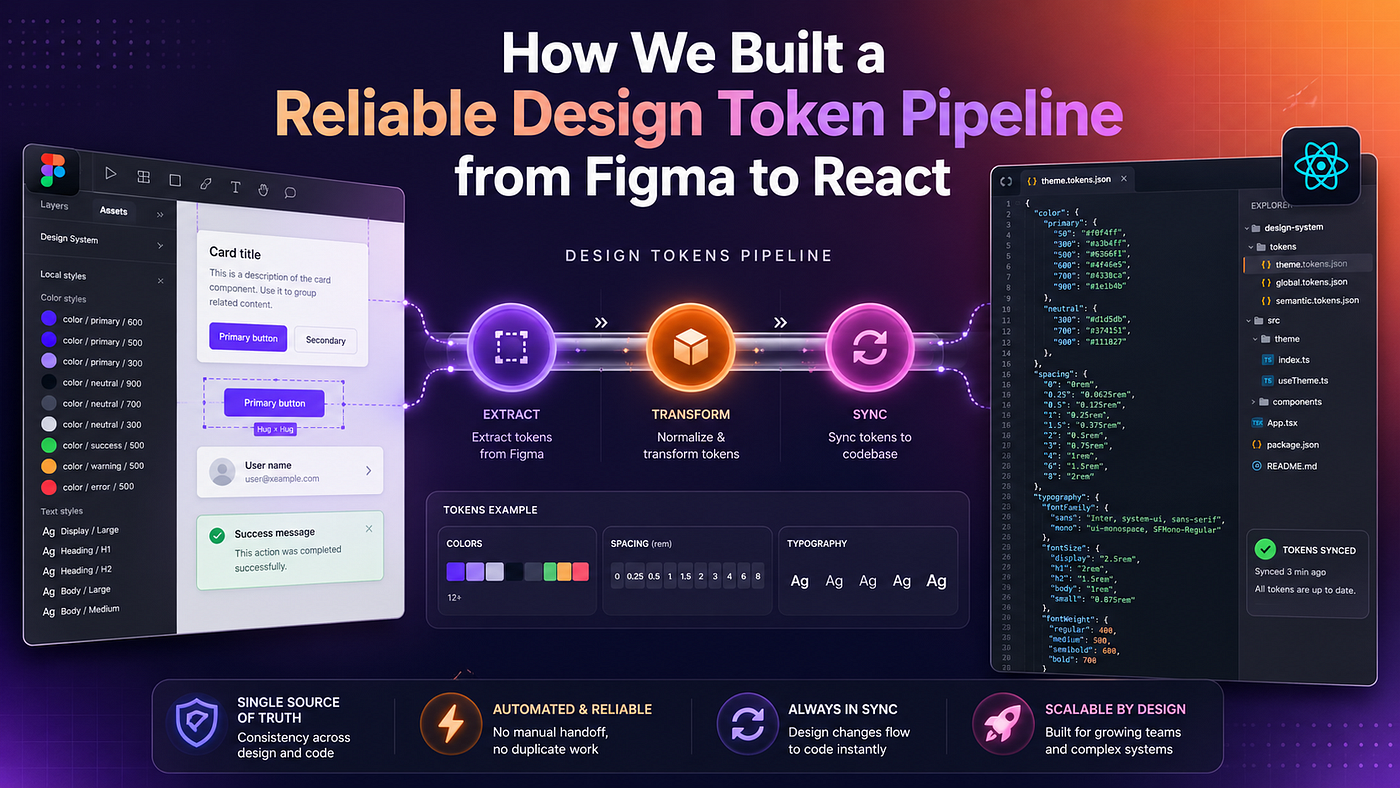
We took a step back and looked at the problem fundamentally. We needed a single source of truth. That truth had to live in Figma because that is where the designers work.
But we also needed a bridge. We needed a way to translate Figma variables into a language that our codebase understood. And we needed that translation to happen automatically.
Here is the architecture we finally settled on.
First we adopted the W3C Design Tokens format. This is a standard way of structuring design tokens in JSON. It means you are not relying on a proprietary structure. Many tools in the industry understand this format out of the box.
Second we brought in Style Dictionary. This is a brilliant open source tool built by Amazon. It takes a JSON file of design tokens and transforms it into almost any format you can imagine. It can output CSS variables. It can output SCSS. It can even output Swift code for iOS or XML for Android.
Third we automated the bridge using GitHub Actions. We wanted a workflow where a designer pressing a button in Figma would automatically create a Pull Request in our repository. The PR would contain the updated tokens. An engineer could review the visual diff and click merge.
This setup changed everything. It removed the friction completely.
Setting up the pipeline step by step
Let me walk you through exactly how we built this. You can replicate this in your own projects fairly easily.
1. The standardised JSON structure
Everything starts with the JSON file. We structured our tokens using the W3C specification. This format uses a specific nesting structure. Each token has a value and a type.
Here is what a small slice of our token file looks like.
{
  "color": {
    "brand": {
      "primary": {
        "value": "#0052CC",
        "type": "color",
        "description": "Our main brand color used for primary actions."
      },
      "secondary": {
        "value": "#EAE6FF",
        "type": "color"
      }
    },
    "background": {
      "default": {
        "value": "#FFFFFF",
        "type": "color"
      }
    }
  },
  "spacing": {
    "small": {
      "value": "8px",
      "type": "dimension"
    },
    "medium": {
      "value": "16px",
      "type": "dimension"
    }
  }
}
Notice how clean that is. It is completely platform agnostic. It does not know anything about CSS or React. It just describes the design decisions.
2. Configuring Style Dictionary
Next we set up Style Dictionary in our repository. We installed it via npm and created a configuration file. This file tells Style Dictionary where to find the JSON tokens and how to format the output.
We wanted CSS variables for our web project. Here is the configuration we used. We put this in a file called config.json at the root of our token directory.
{
  "source": ["tokens/**/*.json"],
  "platforms": {
    "css": {
      "transformGroup": "css",
      "buildPath": "src/styles/",
      "files": [
        {
          "destination": "variables.css",
          "format": "css/variables"
        }
      ]
    }
  }
}
This configuration is incredibly powerful. It tells the tool to look for any JSON file in the tokens folder. Then it applies a predefined set of transformations specifically for CSS. Finally it outputs a file called variables.css in our styles folder.
We added a simple script to our package.json to run the build.
"scripts": {
  "build:tokens": "style-dictionary build"
}
3. The CSS output
When we run that build command Style Dictionary works its magic. It flattens the JSON structure and creates standard CSS custom properties. It even converts the names into a kebab-case format which is standard for CSS.
This is what the generated variables.css looks like.
/**
 * Do not edit directly
 * Generated on Tue Oct 24 2023
 */
:root {
--color-brand-primary: #0052CC;
--color-brand-secondary: #EAE6FF;
--color-background-default: #FFFFFF;
--spacing-small: 8px;
--spacing-medium: 16px;
}We completely ban engineers from editing this file manually. That comment at the top is a strict rule. If you want to change a colour you have to change it in Figma. This enforces the single source of truth.
4. Consuming the tokens in React
Now we had our CSS variables perfectly synced. Using them in our React components became trivial. We just imported the CSS file at the root of our application.
Then we could use standard CSS modules or styled-components to access the variables. Here is a quick example of how a simple button component looks using these tokens in a standard CSS file.
.primaryButton {
  background-color: var(--color-brand-primary);
  color: var(--color-background-default);
  padding: var(--spacing-small) var(--spacing-medium);
  border: none;
  border-radius: 4px;
  cursor: pointer;
}
.primaryButton:hover {
opacity: 0.9;
}The beauty of this is that the React component never has to change. If the design team decides that medium spacing should actually be 20px instead of 16px they update it in Figma. The pipeline runs and updates the CSS file. The button automatically gets bigger. The engineer does not have to write a single line of code.
5. Automating with GitHub Actions
The final piece of the puzzle was automation. We did not want to run Style Dictionary manually every time.
We set up a GitHub Action that triggers whenever a new Pull Request is opened with changes to the tokens folder. This is a simplified version of our YAML workflow.
name: Build Design Tokenson:
pull_request:
paths:
- 'tokens/**'jobs:
build:
runs-on: ubuntu-latest
steps:
- uses: actions/checkout@v3
- name: Setup Node.js
uses: actions/setup-node@v3
with:
node-version: '18'
- name: Install dependencies
run: npm ci
- name: Build tokens
run: npm run build:tokens
- name: Commit generated CSS
uses: stefanzweifel/git-auto-commit-action@v4
with:
commit_message: "chore: update generated css tokens"
file_pattern: src/styles/variables.cssThis workflow is fantastic. When new tokens arrive in a PR the action automatically runs Style Dictionary. It generates the new variables.css file and adds it to the same PR. The reviewer can see exactly what CSS is going to change before they hit merge.
Results and what we learned
Implementing this pipeline completely transformed how our design and engineering teams collaborate.
The biggest win was trust. Designers finally felt confident that what they designed in Figma was exactly what would appear in the browser. There was no more guessing if an engineer had picked the right hex code.
Engineers were thrilled too. We saved countless hours of tedious manual typing. Code reviews became much faster. When a PR came in with a design token update we just checked the visual diff and approved it. We could focus on building complex logic instead of translating padding values.
We also learned that naming conventions are critical. You have to agree on how you name your variables early on. If a designer renames a variable in Figma it will break any CSS that references the old name. We had a few hiccups early on where a colour was renamed from brand-blue to primary-brand. We had to do a massive find and replace in our codebase.
Because of this we established a strict governance process. Adding new variables is completely fine. But renaming or deleting existing variables requires a conversation between design and engineering. We treat token names like a public API. You cannot just introduce breaking changes without warning the consumers.
Setting up multi-theme support also became incredibly easy. We just structured our JSON to output two different CSS files. One for theme-light.css and one for theme-dark.css. We toggle a data attribute on the body tag in React and the entire application switches themes instantly.
The missing piece of the puzzle
The only part of this workflow that was still a bit painful was getting the JSON out of Figma and into GitHub in the first place. Early on we used a mix of manual exports and messy scripts to create those Pull Requests. It was the one weak link in an otherwise perfect system.
I got tired of doing this manual export dance so I actually built a tool to solve it. It is called Design System Sync. It is a Figma plugin that handles the exact pipeline I described above. You just select your Figma variables and click export. It automatically generates W3C compliant tokens and opens a Pull Request directly in your GitHub or Bitbucket repository. It even writes the PR description and assigns a reviewer. You can find more details on the Design System Sync website or grab it directly from the Figma Community.
Building a proper design token pipeline is an investment. It takes a bit of time to configure Style Dictionary and set up the repositories. But the payoff is massive. Once you stop manually copying hex codes you will wonder how you ever worked any other way. Your designs will be more consistent and your team will be much happier.
메타데이터
- post_id
- ed6b4c9d1290
- slug
- building-an-automated-design-token-pipeline-from-figma-to-react-ed6b4c9d1290
- url
- https://medium.com/@alexdev82/building-an-automated-design-token-pipeline-from-figma-to-react-ed6b4c9d1290
- canonical_url
- https://medium.com/@alexdev82/building-an-automated-design-token-pipeline-from-figma-to-react-ed6b4c9d1290
- author_url
- https://medium.com/@alexdev82
- status
- ok
- fetched_at
- 2026-07-16 18:08:31