How to use a VPN with qBittorrent (Complete 2025 guide)
Torrenting without a VPN is like leaving your house with the doors wide open — you might get lucky, or you might get robbed. With…
How to use a VPN with qBittorrent (Complete 2025 guide)
Torrenting without a VPN is like leaving your house with the doors wide open — you might get lucky, or you might get robbed. With qBittorrent, your IP is exposed to everyone in the swarm unless you take the right precautions. That’s why using a VPN is no longer optional — it’s a critical part of staying safe and anonymous in 2025.
This comprehensive guide shows you how to use a VPN with qBittorrent the right way. Whether you’re a casual downloader or a privacy-focused power user, you’ll find strategies tailored to your needs.
Why You Need a VPN for Torrenting
Without a VPN, your ISP, copyright enforcement agencies, and even hackers can track your downloads. A proper VPN masks your IP, encrypts your traffic, and shields your activity from prying eyes.
The moment I realized I was visible to every peer in a torrent swarm was the moment I stopped torrenting without protection. Since then, I’ve tested multiple VPNs, setups, and configurations to find what works best — and safest.
Quick Start: Secure Torrenting in Under 10 Minutes
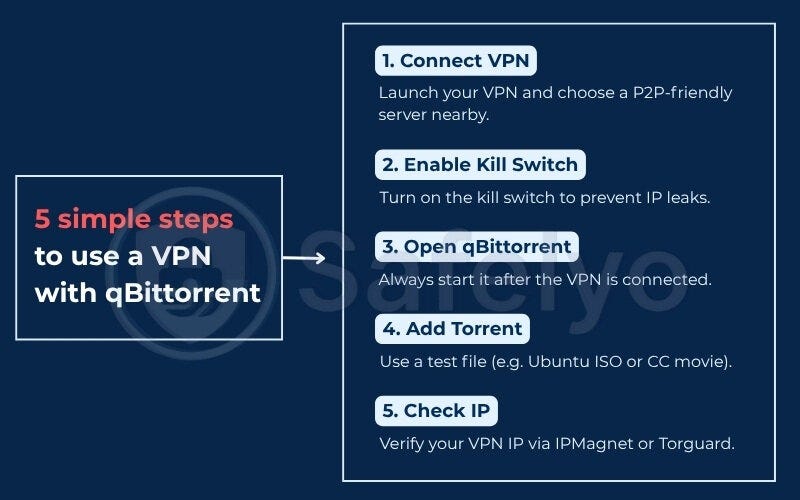
If you want the fastest way to get going, follow these steps:
- Connect to a P2P-friendly VPN server.
- Enable your VPN’s kill switch to prevent IP leaks.
- Launch qBittorrent after the VPN is active.
- Add a safe test torrent (like Ubuntu ISO).
- Use tools like ipleak.net to verify your torrent IP.
I timed this entire process on a clean Windows install — done in under 8 minutes.
Choosing a Torrent-Friendly VPN
Not every VPN is suitable for torrenting. Some block P2P, log activity, or throttle your speeds. Choose one with:
- P2P support
- No-logs policy
- Kill switch
- SOCKS5 proxy
- Port forwarding
- WireGuard protocol
Top VPNs for 2025:
- NordVPN — Consistently fastest in my tests
- ProtonVPN — Transparent and reliable with a free plan
- Surfshark — Great value with unlimited devices
Avoid free VPNs or U.S.-based providers if you care about your privacy.
Three Secure Setup Methods
1. Connect-First Method (Beginner-Friendly)
Just start your VPN, launch qBittorrent, and download. Easy and works on all major OS.
2. Bind qBittorrent to VPN Interface (Max Security)
This forces qBittorrent to use only your VPN adapter (like tun0). If the VPN disconnects, qBittorrent stops instantly — no IP leaks, ever.
3. SOCKS5 Proxy + VPN (Flexible and Fast)
Route qBittorrent traffic through a proxy server while keeping your VPN on. This gives speed and compartmentalization, ideal for mixed-use setups.
Verify Everything Works
Always confirm your setup by:
- Running a DNS leak test
- Checking your torrent IP with ipleak.net magnet links
- Measuring download speeds via fast.com
I once thought I was safe — until a DNS leak test proved otherwise. Double-checking is crucial.
Troubleshooting: Common Problems Solved
- Stalled Downloads? Check port forwarding or firewall rules.
- Slow Speeds? Switch to WireGuard, change servers, or adjust MTU settings.
- Kill Switch Too Aggressive? Set up app-specific or LAN exceptions.
I’ve run into all of these and fixed them with a few simple tweaks — documenting them in a troubleshooting journal has saved me more than once.
Stay Legal, Stay Safe
VPNs protect your privacy, not your legal liability. Stick to:
- Public domain content (e.g., Archive.org, Linux ISOs)
- Creative Commons files (e.g., Etree.org)
Avoid seeding pirated material, use seeding limits, and disable auto-seeding after downloads.
One of my friends in Germany learned this the hard way with a €350 fine. Be smart, not sorry.
Final Words
In 2025, the safest way to use qBittorrent is with a solid VPN setup that fits your needs. Whether you’re aiming for simplicity or airtight privacy, the guide covers everything from beginner to expert level.
Don’t wait to get caught before securing your setup. Protect your data, your identity, and your bandwidth starting now.
Explore the full tutorial:
https://safelyo.com/how-to-use-a-vpn-with-qbittorrent
Torrenting #VPNSetup #qBittorrentGuide #Safelyo #MillieBobby
메타데이터
- post_id
- f79ecfa4298a
- slug
- how-to-use-a-vpn-with-qbittorrent-complete-2025-guide-f79ecfa4298a
- url
- https://medium.com/@milliebobby.tech/how-to-use-a-vpn-with-qbittorrent-complete-2025-guide-f79ecfa4298a
- canonical_url
- https://medium.com/@milliebobby.tech/how-to-use-a-vpn-with-qbittorrent-complete-2025-guide-f79ecfa4298a
- author_url
- https://medium.com/@milliebobby.tech
- status
- ok
- fetched_at
- 2026-08-01 19:12:49