Investigating a Phishing Email Like a SOC Analyst — Part 3: Content Analysis
Modern phishing emails rarely rely on poor grammar or obvious mistakes anymore. Today’s attackers invest significant effort into designing…
Investigating a Phishing Email Like a SOC Analyst — Part 3: Content Analysis
Modern phishing emails rarely rely on poor grammar or obvious mistakes anymore. Today’s attackers invest significant effort into designing emails that closely resemble legitimate communications from trusted organizations.
In this investigation, I analyzed the content of a phishing email claiming to originate from Amazon. Rather than focusing on email headers or URLs, this investigation concentrated on the psychological techniques, branding, language, and social engineering methods used to deceive the recipient.
Objective
The goal of this investigation was to determine whether the email content was legitimate or a phishing attempt by analyzing:
- Subject line
- Branding
- Message structure
- Language
- Social engineering techniques
- Psychological manipulation
- Overall legitimacy
Step 1 — Opening the Email Safely
Before interacting with any suspicious email, it is important to avoid clicking links or downloading attachments.
I opened the email in a controlled analysis environment and viewed only its content.
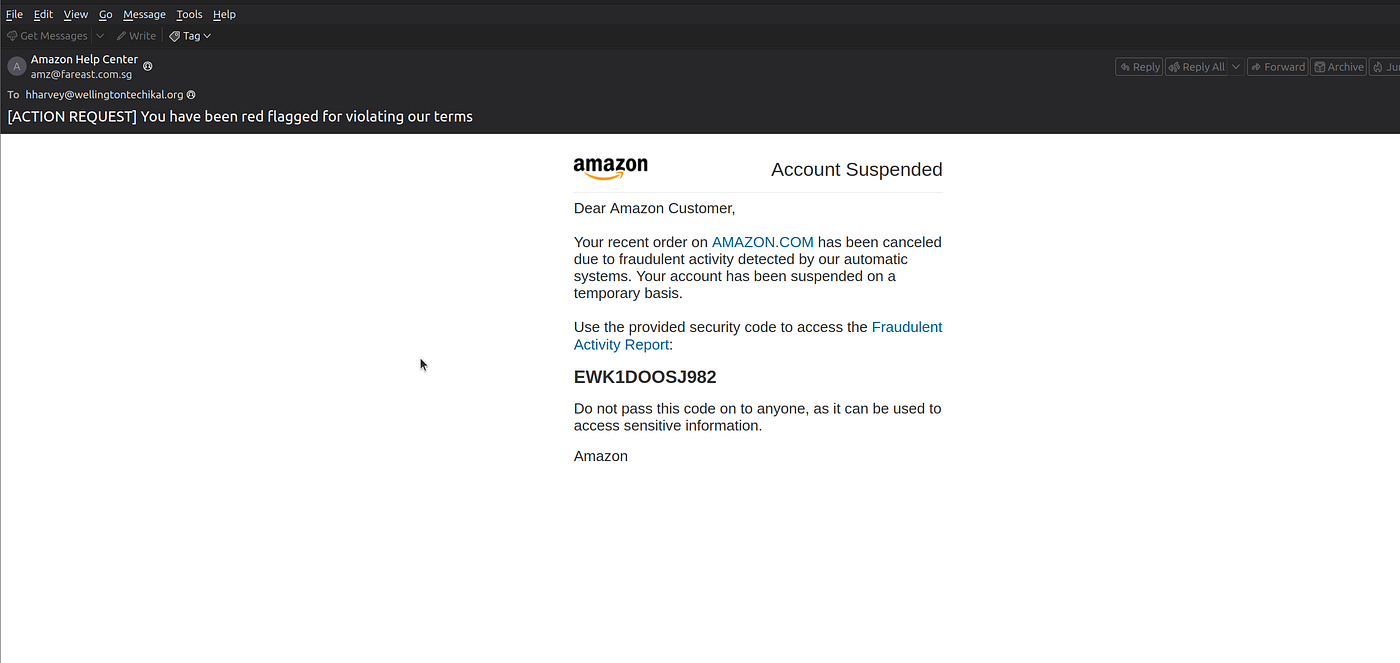
The email claimed to be from Amazon Help Center.
The subject line read:
[ACTION REQUEST] You have been red flagged for violating our termsImmediately, several warning signs became visible.
Step 2 — Analyzing the Subject Line
The subject line is one of the most important parts of any phishing email because it is designed to capture attention within seconds.
The sender used:
[ACTION REQUEST]This immediately creates urgency.
The next part stated:
You have been red flagged for violating our termsThis attempts to create fear by suggesting that the user’s account has violated company policies.
Legitimate companies usually communicate account issues professionally and rarely use aggressive wording like this.
Instead, attackers intentionally pressure users into acting before thinking.
Step 3 — Examining the Branding
The email was designed to imitate an official Amazon notification.
Inside the email I observed:
- Amazon logo
- Professional formatting
- Corporate colors
- Account Suspended banner
- Security notification layout
At first glance, the email appeared genuine.
This demonstrates one of the most common phishing techniques:
Attackers copy the visual identity of trusted organizations to gain the victim’s confidence.
Many users trust what they see without verifying whether the email is actually legitimate.
Step 4 — Reading the Message Carefully
The email stated that:
- A recent Amazon order had been cancelled.
- Fraudulent activity had been detected.
- The Amazon account had been temporarily suspended.
The message continued by instructing the recipient to review a “Fraudulent Activity Report.”
Although this sounds believable, the wording is intentionally designed to alarm the recipient.
Rather than providing information, the email attempts to trigger an emotional response.
Step 5 — Identifying Social Engineering Techniques
This email contained several classic phishing tactics.
Fear
The email claims that fraudulent activity has been detected and that the account has been suspended.
Most users fear losing access to important accounts, making them more likely to react immediately.
Urgency
The phrase:
[ACTION REQUEST]encourages immediate action.
Attackers know that rushed decisions reduce critical thinking.
Authority
The email impersonates Amazon, one of the world’s most trusted companies.
People naturally trust communications from well-known organizations.
The attacker abuses that trust.
Sense of Security
The email displays what appears to be a security verification code.
Example:
EWK1DOOSJ982Although this looks official, it is simply another psychological trick.
The random code creates the illusion that the email is connected to a legitimate security system.
Many phishing campaigns include fake ticket numbers, case IDs, or verification codes to appear authenStep 6 — Looking for Generic Language
Another important observation was the greeting:
Dear Amazon Customer,The email never addressed the recipient by name.
Legitimate companies usually personalize important account notifications using the customer’s registered name.
Generic greetings are commonly seen in phishing campaigns because attackers often send the same email to thousands of recipients simultaneously.
Step 6—Inspecting the Email Content
After reviewing the email headers, I moved on to analyzing the actual email content. The message claimed that Amazon had detected fraudulent activity on my account and that my account had been temporarily suspended. It instructed me to review a “Fraudulent Activity Report” using a provided security code.
At first glance, the email looked convincing. It contained the Amazon logo, professional formatting, branded colors, and language that closely resembled legitimate Amazon security notifications. This is a common social engineering tactic used by attackers to gain the victim’s trust before directing them to a malicious website.
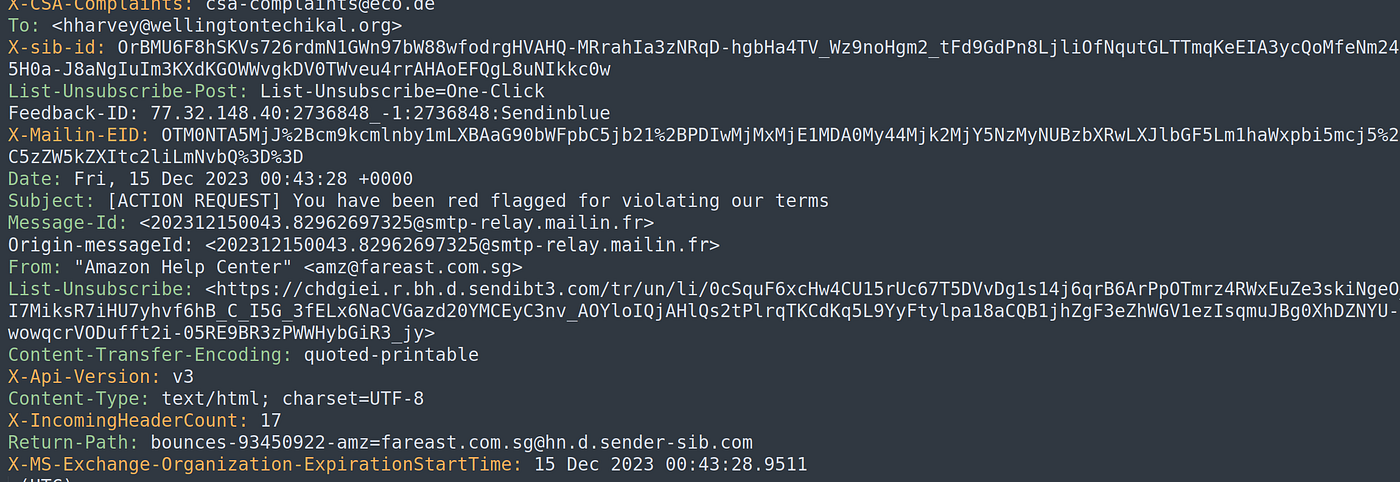
Rather than trusting the appearance of the email, I inspected the underlying HTML source. Since the email was encoded using Quoted-Printable encoding, I first decoded it to make the HTML readable. This allowed me to inspect every hyperlink embedded in the email.
One observation immediately stood out.
Although the email displayed multiple clickable elements — including:
- AMAZON.COM
- Fraudulent Activity Report
- Reactivate Your Account
every one of these buttons and hyperlinks pointed to exactly the same destination.
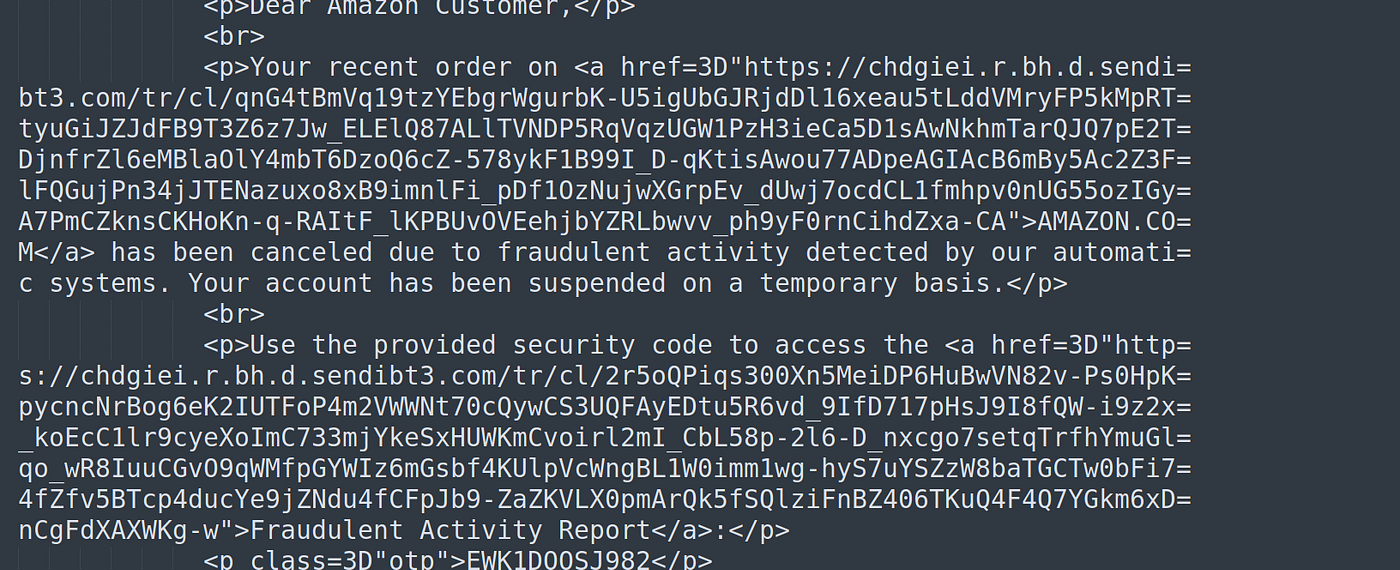
Instead of directing users to an official Amazon domain such as:
amazon.com
amazon.in
amazon.co.uk
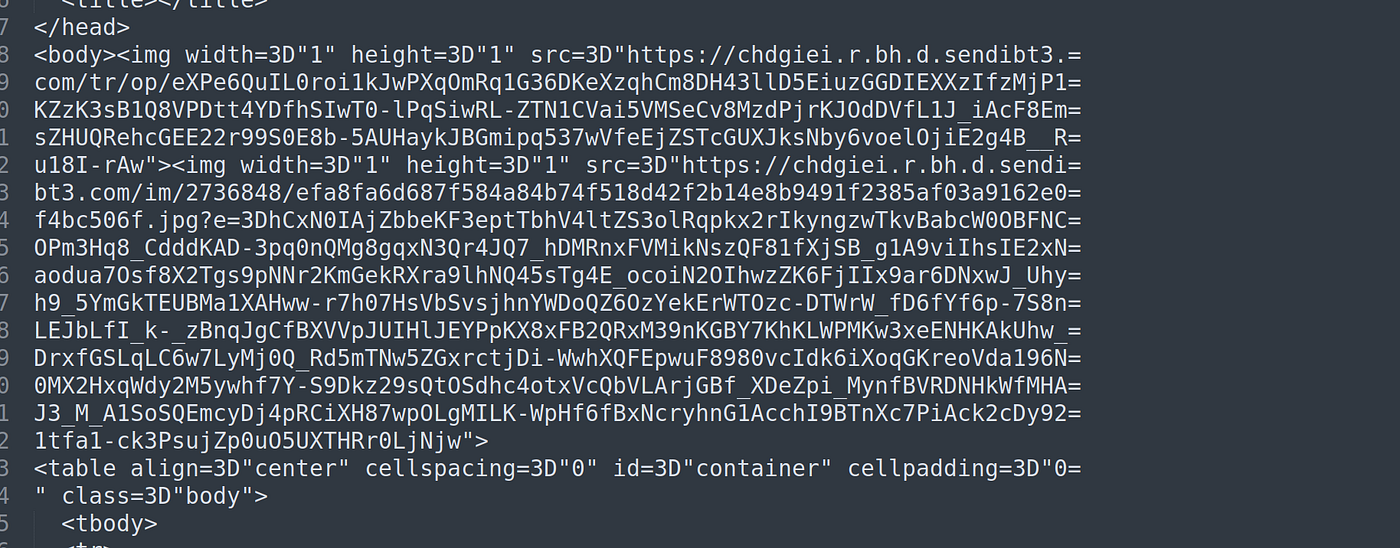
every clickable object redirected to a completely unrelated tracking URL hosted on:
chdgiei.r.bh.d.sendibt3.comThe visible text attempted to convince the recipient they were visiting Amazon, but the actual destination hidden behind every hyperlink had no relationship with Amazon whatsoever.
This technique is one of the most common phishing tactics used by attackers. Users naturally focus on what they see on the screen rather than inspecting the actual hyperlink behind the button.
The attackers took advantage of this behavior by making every button appear legitimate while silently redirecting victims to an attacker-controlled infrastructure.
To further verify my findings, I examined the decoded HTML source. Every <a href=""> tag contained the same suspicious destination, confirming that the email had been intentionally designed so that regardless of which button the victim clicked, they would always be redirected to the same malicious website.
At this stage, the evidence became much stronger:
- The email created urgency by claiming the account had been suspended due to fraudulent activity.
- Multiple branded elements were used to imitate Amazon.
- Every clickable object redirected to a domain unrelated to Amazon.
These indicators clearly demonstrated that the email was designed to trick recipients into visiting a phishing website rather than Amazon’s legitimate platform.
This analysis reinforces an important lesson for SOC analysts:
Never trust the visible text of a hyperlink. Always inspect the actual destination URL hidden behind every clickable object. Many phishing emails rely on convincing branding while directing victims to attacker-controlled domains behind the scenes.
Step 7— Overall Content Assessment
Although the email appeared professionally designed, its content revealed multiple indicators of phishing.
The message relied almost entirely on psychological manipulation rather than providing genuine information.
Key observations included:
- Fear-based messaging
- Urgent call to action
- Account suspension warning
- Fake security verification code
- Generic greeting
- Heavy use of trusted branding
- Same link on every clickable, that has no relation with amazon.
Each of these characteristics aligns with common phishing techniques observed in real-world attacks.
SOC Analyst Perspective
As a SOC Analyst, content analysis is just as important as technical analysis.
Even if an email passes authentication checks, suspicious language and social engineering techniques can still reveal malicious intent.
Understanding attacker psychology helps analysts identify phishing campaigns before users become victims.
Content analysis should always be combined with:
- Header Analysis
- Attachment Analysis
- URL Analysis
- Threat Intelligence
to build a complete picture of the attack.
Final Verdict
After reviewing the email content, I concluded that this is a phishing email.
Although it uses convincing branding and professional formatting, the message relies heavily on fear, urgency, authority, and psychological manipulation to trick recipients into taking immediate action.
These social engineering indicators and the malicious link strongly suggest that the email was designed to deceive users rather than provide legitimate account information.
Lessons Learned
This investigation reinforced several important cybersecurity principles:
- Professional branding does not guarantee legitimacy.
- Fear and urgency are common phishing techniques.
- Generic greetings are a common indicator of mass phishing campaigns.
- Fake verification codes and security messages are often used to build trust.
- Content analysis is an essential component of every phishing investigation and should always be performed alongside header, attachment, and URL analysis.
메타데이터
- post_id
- 063e2291669a
- slug
- investigating-a-phishing-email-like-a-soc-analyst-part-3-content-analysis-063e2291669a
- url
- https://medium.com/@najeebparkar15/investigating-a-phishing-email-like-a-soc-analyst-part-3-content-analysis-063e2291669a
- canonical_url
- https://medium.com/@najeebparkar15/investigating-a-phishing-email-like-a-soc-analyst-part-3-content-analysis-063e2291669a
- author_url
- https://medium.com/@najeebparkar15
- status
- ok
- fetched_at
- 2026-07-08 16:01:05




