Your AI’s Test Fixtures Are Lying to You
How to turn real documents into PII-safe test data, no leaks, no synthetic guesswork.
Your AI’s Test Fixtures Are Lying to You
How to turn real documents into PII-safe test data, no leaks, no synthetic guesswork.
How to turn real documents into PII-safe test data, no leaks, no synthetic guesswork.
flatex sends its customers a steady stream of financial statements: trade confirmations, dividend notices, crypto settlements, all as PDFs. The documents are well-structured, but the data is locked inside them. I wanted it as structured JSON: sorted into folders, key fields fed into my analytics tool. So I had Claude code a CLI to extract it.
Not a member? Read it for free with the Friends Link!
My development workflow with Claude is Test-Driven Development: write tests first, implement until they pass, repeat. TDD demands fixtures before anything else. Claude had never seen a flatex PDF, so it did the only thing it could: it took the fields I wanted to extract, pasted the text into a PDF, and called it a fixture. The tests passed. The implementation looked clean.
Then I ran it against a real flatex statement. It broke on the first try.
The Problem with Synthetic Fixtures
TDD is only as honest as its fixtures.
Claude’s “synthetic PDFs” weren’t synthetic versions of flatex documents. They were plain text pasted into a PDF wrapper. No embedded fonts, no real layout, no structural complexity. Of course the parser worked against them. They were nothing like what the tool would encounter in production.
Real flatex PDFs are a different animal entirely:
- Embedded fonts with Identity-H encoding that only include the exact glyphs used in that document
- Column alignment that depends on precise character counts, not approximate positioning
- Layout structure that varies significantly across document types. Trade confirmations, dividends, and crypto settlements each have their own header format and field positioning
A parser built against a plain-text PDF fixture isn’t tested at all. It’s just tested against Claude’s best guess at what a flatex document might look like. The TDD cycle passed because the tests weren’t asking the right questions.
The issue isn’t TDD. TDD worked exactly as it should: it exposed the gap between the fixtures and reality. The issue was the fixtures. Without a real document to work from, Claude had nothing to replicate.
The Constraint and the Solution
The obvious fix: use real flatex documents as fixtures. But real PDFs contain personally identifiable information (PII): customer names, addresses, account numbers, transaction history. That doesn’t belong in a public GitHub repo, period.
I needed real documents, but without the PII. Fixtures that behaved exactly like production documents, with customer data swapped out for synthetic values.
Key insight: Visual fidelity is non-negotiable. If the fixture doesn’t look exactly like a real flatex statement (same fonts, same layout, same text positioning), the test is invalid. The parser won’t encounter the same extraction quirks as it would on production data.
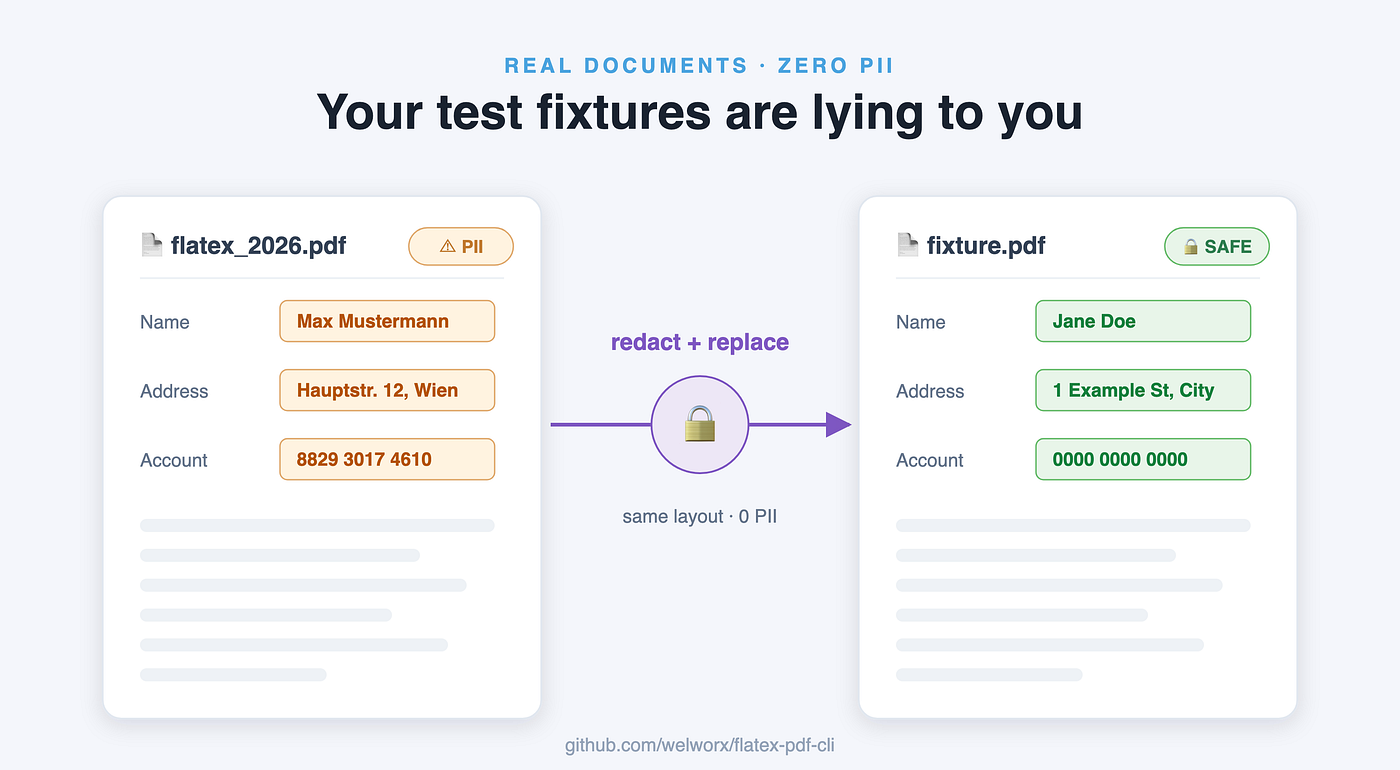
The approach: take real flatex documents, identify the PII, redact those exact text rectangles, and re-insert synthetic values at the exact same position. Everything else stays untouched. The result is a fixture that’s structurally identical to the original, because it is the original, with only the customer data replaced.
This is the distinction that matters: these fixtures behave exactly like production. They’re real documents. The only thing synthetic about them is the customer data.
The Workflow
Here’s how the redaction process works (high level; the skill captures the details):

Redaction workflow for anonymized testdata. Diagram created by author.
Step 1: Parse the PDF
Use PyMuPDF (fitz) to extract all text along with the bounding box and font metadata for every text span. This gives you the raw material for PII detection and the exact coordinates you'll need for redaction. Without this step, Presidio has nothing to scan, and you have no coordinate map for the replacements.
Step 2: Detect PII
Feed the extracted text into Presidio, Microsoft’s PII detection library, to flag potential PII: names, addresses, account numbers, transaction IDs. Presidio combines pattern matching with NER, but its built-in recognizers are tuned primarily for US/English formats. The NER models aren’t trained on German context, so German-specific patterns need attention. It catches the obvious candidates; the visual verification step catches the rest.
Step 3: Redact and replace
In a single pass: locate each PII string’s exact text rectangle, white it out, and insert the synthetic replacement at the same position using base-14 fonts (Helvetica or Courier). These are built into every PDF renderer and have full glyph coverage, so there’s no risk of silent character fallback. The PII fields render in a slightly different font than the originals, but positions, sizes, and structure are identical. That’s what the parser sees.
Step 4: Verify
Render the output PDF to PNG and visually compare it against the original. Two things to confirm: all PII is gone, and the layout still matches. A broken layout means the parser won’t see the same document structure, and you’ve defeated the purpose.
When something looks off, the usual causes are a synthetic value with a different character count than the original (an 11-digit account number replaced with 10 digits shifts the entire column), or a piece of text Presidio missed. Go back to Step 3, adjust, re-run. Most documents need one or two passes.
One thing to leave alone: rotated text like barcodes. They don’t contain PII and can’t be cleanly re-inserted.
The result: a fixture that parses identically to the real thing (same structure, same positions, same extraction behavior) without any actual customer data. The replacement font differs slightly from the original, but the parser keys off text and position, not typeface: in my real-world tests it handled the redacted fixtures and live statements the same way. The principle holds either way: test data should represent real-world data as closely as possible.
Why Opus 4.8 Mattered
That workflow looks tidy written down. Getting it to work was not.
My first attempts at redacting documents didn’t work: text misaligned, spacing off. I started with Haiku 4.5. It’s fast, cheap, and follows instructions well, the right default for straightforward tasks.
This wasn’t a straightforward task. Haiku could execute the redaction steps mechanically, but it couldn’t reason through what was going wrong when the output looked wrong: why a font substitution was silently falling back to the wrong glyph, why text alignment was off by a few pixels after reinsertion, what a baseline shift would do downstream. Every iteration needed manual diagnosis before Haiku could proceed. After many passes, I didn’t have the feeling it would ever get there.
Then I switched to Opus 4.8, and it figured it out fast. It could reason through the PDF internals, diagnose what was breaking, and propose fixes without hand-holding. Each iteration was a real step up in visual fidelity, not just “try again.”
This is one of those tasks where model capability genuinely matters. The problem space (PDF font encoding, coordinate transforms, glyph mapping) is complex enough that you need a model that can reason about it, not just execute against it.
The Skill and the Pattern
I captured this entire workflow as a Claude skill: redacting-flatex-pdfs, living in the flatex-pdf-cli repo. It documents the redaction process, the field table, a reference implementation, and the verification steps in one reusable package. Point Claude at a folder of real documents, run the skill, and Claude handles the redaction. Then verify the visual output manually: render to PNG, confirm no PII remains, iterate if needed.
Human verification is critical. This isn’t a fully automated process; it’s AI plus human review. That’s by design: you’re confirming the fixtures are legitimate and complete.
No automation should hide the data handling step.
If you’re building a parser for any PII-containing document format (bank statements, medical records, invoices, contracts) the same workflow applies. Synthetic-from-scratch data won’t replicate the font quirks and layout edge cases of the real thing. Real documents with replaced PII will, and unlike generated fixtures, they won’t lie to your test suite.
메타데이터
- post_id
- 0bc4f4ec7604
- slug
- your-ais-test-fixtures-are-lying-to-you-0bc4f4ec7604
- url
- https://medium.com/@werner-liemberger/your-ais-test-fixtures-are-lying-to-you-0bc4f4ec7604
- canonical_url
- https://medium.com/@werner-liemberger/your-ais-test-fixtures-are-lying-to-you-0bc4f4ec7604
- author_url
- https://medium.com/@werner-liemberger
- status
- ok
- fetched_at
- 2026-06-29 22:44:20




