How I Started Learning MCP with Figma and Claude as a UI/UX Designer
Understanding MCP as a UI/UX Designer
How I Started Learning MCP with Figma and Claude as a UI/UX Designer
Understanding MCP as a UI/UX Designer
MCP (Model Context Protocol) is a bridge that helps AI tools connect with external apps, files, and workflows. Last Saturday, I attended a Figma event (FoF) where they talked about MCP, AI workflows, and AI-powered prototyping. At first, I honestly didn’t understand what MCP actually was.
Simple workflow: Figma ↔ MCP ↔ Claude
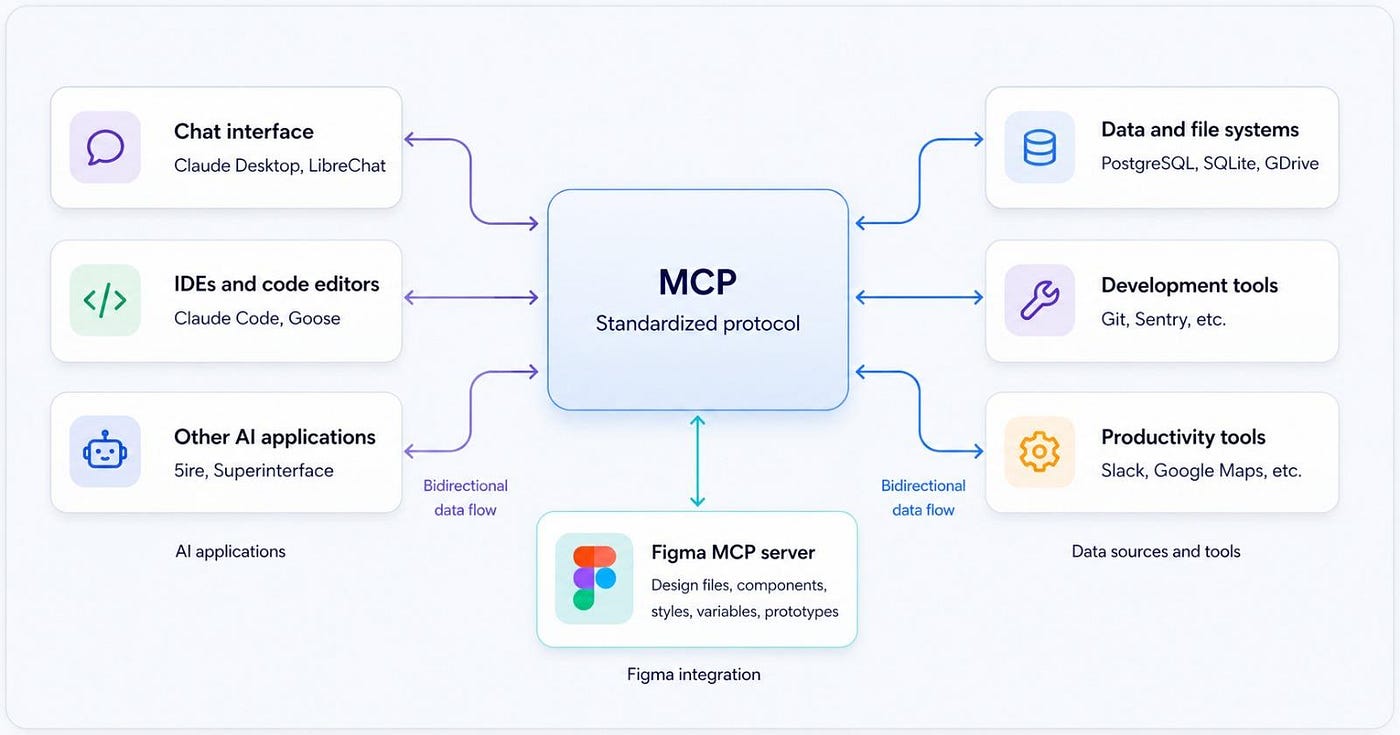
Normally, AI only sees screenshots. But with MCP, AI can understand:
- frames
- typography
- spacing
- layouts
- components
instead of visually guessing the UI. That was my biggest “aha” moment.
Connecting Figma with Claude using MCP
Inside Claude, there’s an option called: Add Connector in Claude
Inside that, I connected: Figma MCP
After connecting, Claude can access Figma designs more intelligently.
Even though I’m still learning the full MCP workflow, I started understanding how AI can become part of the design process instead of just a chatbot.
My Current Workflow
workflow.
I upload:
- landing page screenshots
- hero sections
- UI screens
Then Claude helps with:
- UX feedback
- responsive redesigns
- HTML generation
- futuristic UI improvements
I even explored online hosting using: Netlify Drop
One thing I realized during this process:
AI doesn’t replace designers. It helps designers experiment and iterate faster.
Still Learning MCP
Right now, I’m still learning MCP step by step.
One important thing I understood is:
Both Claude and Figma desktop apps need to be installed on your PC or laptop for some MCP workflows.
It doesn’t fully work like a normal browser-based workflow.
Especially for:
- Figma MCP
- local file access
- advanced AI integrations
Final Thought:
The more I explore MCP, the more I feel like:
AI tools are slowly becoming design collaborators instead of just chat tools.
And honestly, this feels like the beginning of a new design workflow era.
메타데이터
- post_id
- 3013b7f8ae4c
- slug
- how-i-started-learning-mcp-with-figma-and-claude-as-a-ui-ux-designer-3013b7f8ae4c
- url
- https://medium.com/@bala.visualdesigner/how-i-started-learning-mcp-with-figma-and-claude-as-a-ui-ux-designer-3013b7f8ae4c
- canonical_url
- https://medium.com/@bala.visualdesigner/how-i-started-learning-mcp-with-figma-and-claude-as-a-ui-ux-designer-3013b7f8ae4c
- author_url
- https://medium.com/@bala.visualdesigner
- status
- ok
- fetched_at
- 2026-06-09 15:37:30



