Reactive Data Pipelines in React Native: TanStack Query + SQLite Sync at Scale
Building offline-first reactive architectures with Drizzle ORM, background sync, and cache invalidation
Reactive Data Pipelines in React Native: TanStack Query + SQLite Sync at Scale
Building offline-first reactive architectures with Drizzle ORM, background sync, and cache invalidation
Most React Native apps fetch data the same way. A screen mounts → A useEffect fires → An API gets called → The result gets pushed into local state → Redux or context. This feels simple but as the app grows and we have situations like another screen needs the same data. You add polling. Then offline support becomes a requirement. Push notifications arrive. Background refresh appears. Locale changes need to re-fetch content.
Suddenly, every screen starts owning its own synchronization logic:
- loading states,
- retries,
- stale data,
- race conditions,
- duplicated requests,
- manual cache coordination.
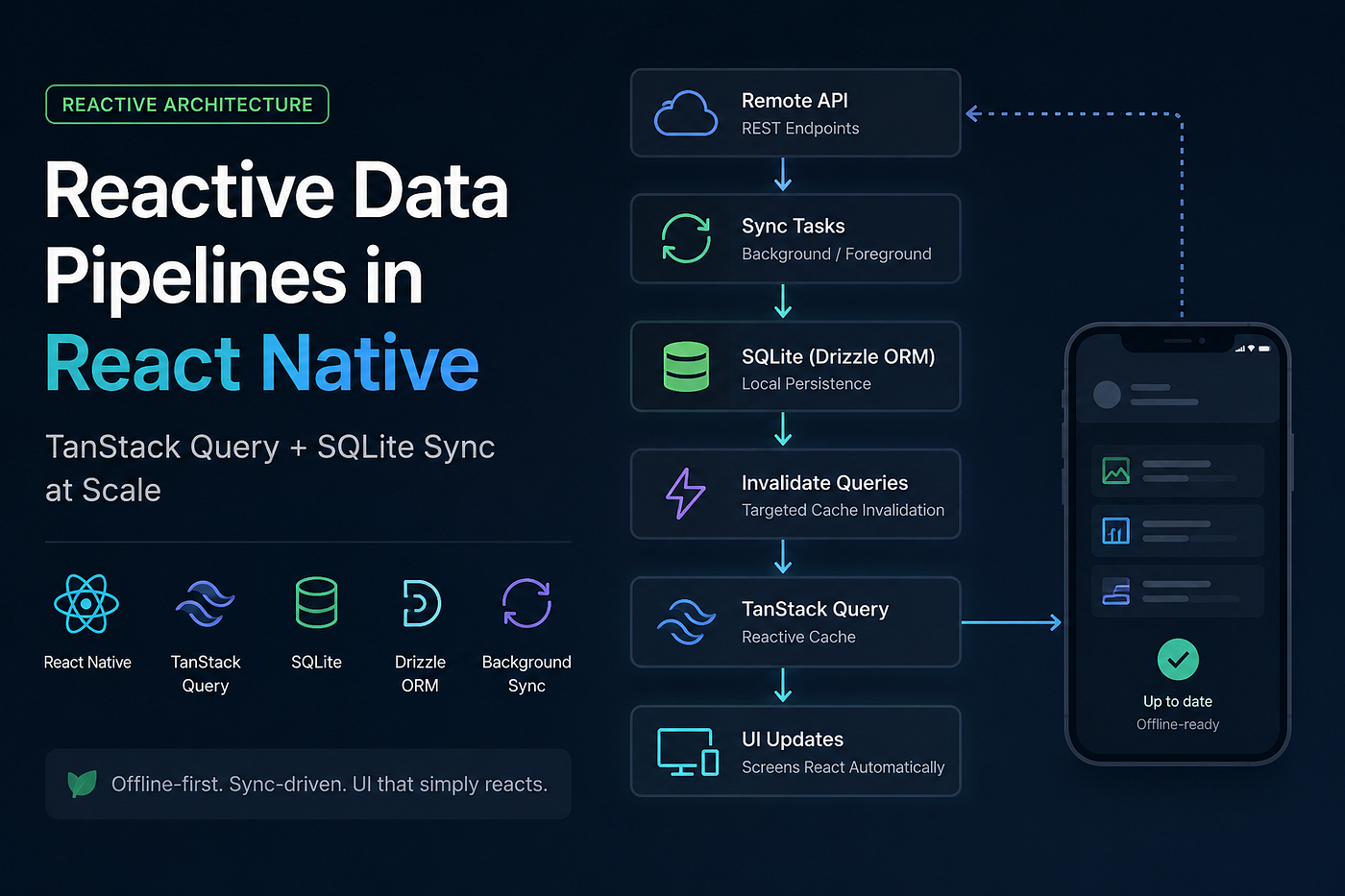
And eventually, the synchronization logic becomes more complicated than the UI itself. I hit that point in my React Native application and stopped thinking about screens as “things that fetch data” and moved towards a reactive sync pipeline architecture where:
- background tasks fetch remote data,
- SQLite becomes the local source of truth,
- TanStack Query handles reactivity,
- and screens simply react to database changes.
No screen directly calls APIs anymore. The UI doesn’t coordinate synchronization. It just reacts.
The Core Philosophy
Data should not be fetched because a screen mounted.
It should be: synchronized, persisted, invalidated, and reactively consumed.
Instead of:
useEffect(() => {
  fetchData();
}, []);
…the system becomes:
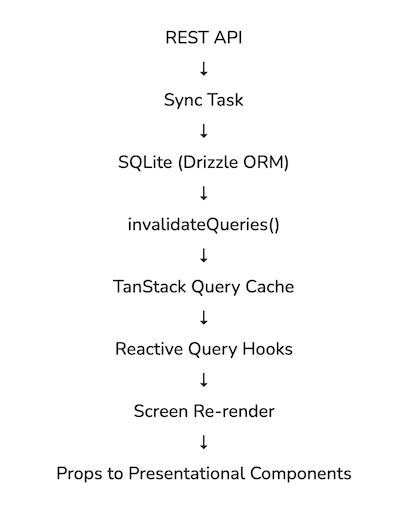
Background Sync → SQLite → Cache Invalidation → Reactive Queries → UI UpdatesThe pipeline works like this:
Why Traditional Mobile Data Fetching Broke at Scale
The classic React Native pattern usually looks like this:
useEffect(() => {
  const fetch = async () => {
    setLoading(true);

    try {
      const data = await fetchFromAPI(orderId);
      setOrder(data);
    } catch (e) {
      setError(e);
    } finally {
      setLoading(false);
    }
  };

  fetch();

  const interval = setInterval(fetch, 60000);

  return () => clearInterval(interval);
}, [orderId]);
Layer 1 — The API Layer
Pure async functions. Nothing more.
export const fetchConsents = async (
  cookieId: string,
): Promise<ConsentResponse> => {
  return apiClient.get(`/consents/${cookieId}`);
};
No hooks. No state. No cache awareness. No React knowledge.
Layer 2 — SQLite as the Local Source of Truth
The application uses:
expo-sqlite- Drizzle ORM
- a singleton database instance
- Write-Ahead Logging (WAL)
export const getDatabase = () => {
  if (!databaseInstance) {
    const clientDatabase = openDatabaseSync(DATABASE_NAME);

    configureConnection(clientDatabase);

    databaseInstance = drizzle(clientDatabase, { schema });
  }

  return databaseInstance;
};
The database is shared everywhere:
- React hooks,
- sync tasks,
- background jobs,
- push notification handlers.
One database. One persistence layer. No competing state containers.
Layer 3 — Sync as a Query
This became the centerpiece of the architecture.
I built a small abstraction called useSyncQuery.
useQuery({
  queryKey: syncConfig.syncKey,
  queryFn: createWrappedSyncFn(syncConfig),

  staleTime: (result) =>
    result.state.data ? Infinity : 0,

  gcTime: Infinity,

  refetchInterval: syncConfig.pollInterval,
});
The Key Insight: Dynamic staleTime
Meaning:
- successful syncs are never automatically stale,
- failed syncs are immediately stale.
That means:
- successful sync tasks don’t constantly re-run,
- failed sync tasks retry naturally through TanStack Query behavior.
This allowed synchronization logic to become reactive instead of imperative.
Imperative Sync Triggers
Sometimes synchronization still needs manual triggers. Like push notification recovery, locale changes, pull-to-refresh, background events.
For those cases, I added runSyncTask.
queryClient.fetchQuery({
  queryKey: syncConfig.syncKey,
  queryFn: createWrappedSyncFn(syncConfig, false),
  staleTime: 0,
});
The important part: Even imperative triggers still go through TanStack Query.
That means, deduplication still works, concurrent sync requests collapse together, synchronization remains centralized.
Foreground polling
Controlled through Firebase Remote Config.
Background tasks
Using Expo Background Task APIs.
Event-driven sync
Push notifications. Locale changes. Manual refreshes. All of them converge on the same sync pipeline.
Cache Invalidation Becomes the Real Engine
Once data is written into SQLite, synchronization isn’t finished.
The critical step is:
queryClient.invalidateQueries(...)After invalidation: active queries re-run → Drizzle re-reads SQLite → hooks receive updated data → screens re-render automatically.
Layer 4— Query Hooks Read Only from SQLite
useQuery({
  queryFn: () => getOrderById(orderKey),
  queryKey: orderDatabaseQueryKeys.orderById(
    orderKey.orderId,
    locale,
  ),
});
Notice what’s missing: no API calls, no fetch logic, no loading orchestration, no synchronization logic. The hook only reads SQLite. This separation massively simplified UI logic.
Screens Became Thin Controllers
The screens themselves became lightweight orchestration layers.
const { order, loadingState } =
  useOrderLoader(params.orderId);

return (
  <BoundContent
    data={DataItem}
    loadingState={loadingState}
  />
);
Offline-First by Default
Since screens always read SQLite:
- cached data remains available offline,
- UI continues functioning without network access,
- synchronization resumes later automatically.
Instant Cached Reads
On app reopen:
- SQLite data appears immediately,
- TanStack Query returns cached state instantly,
- background synchronization updates silently afterward.
Locale Changes Became Reactive
Changing language invalidates locale-aware query keys. The UI updates automatically. No manual refetch coordination.
Push Notification Recovery Became Trivial
If push notifications fail or get dropped:
runSyncTask()manually catches up synchronization.
Conclusion:
Instead of screens coordinating network state, background sync tasks persist data into SQLite, TanStack Query handles reactivity, and the UI simply reflects current local state.
The is a cleaner architecture that naturally supports offline-first behavior, background sync, cache consistency, and reactive updates without scattering synchronization logic across the UI.
메타데이터
- post_id
- 4efe09d925d3
- slug
- reactive-data-pipelines-in-react-native-tanstack-query-sqlite-sync-at-scale-4efe09d925d3
- url
- https://medium.com/@_.sirsha/reactive-data-pipelines-in-react-native-tanstack-query-sqlite-sync-at-scale-4efe09d925d3
- canonical_url
- https://medium.com/@_.sirsha/reactive-data-pipelines-in-react-native-tanstack-query-sqlite-sync-at-scale-4efe09d925d3
- author_url
- https://medium.com/@_.sirsha
- status
- ok
- fetched_at
- 2026-06-16 19:09:56