Amazon ECS Under the Hood: 4 Production Features Every Platform Engineer Should Know
Overview
Amazon ECS Under the Hood: 4 Production Features Every Platform Engineer Should Know
Overview
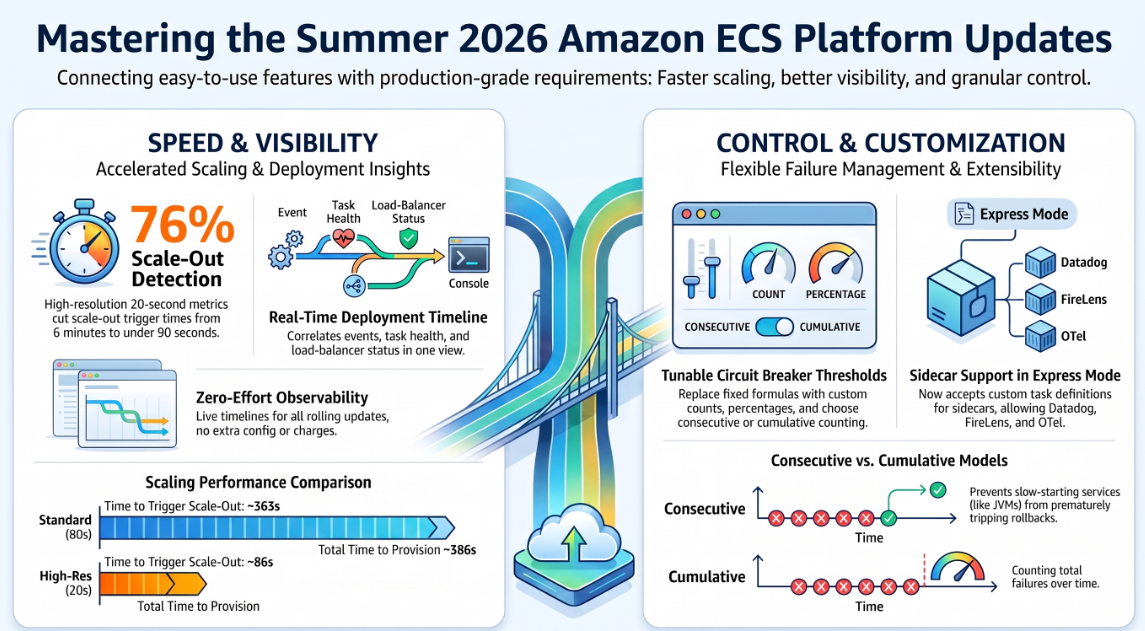
Four ECS updates shipped between June and July 2026. Together they close four gaps platform teams have long worked around with custom tooling: slow autoscaling, opaque deployment failures, one-size-fits-all rollback sensitivity, and a hard choice between “easy” and “production-grade” deployment paths.
1. Faster Service Autoscaling
The Problem
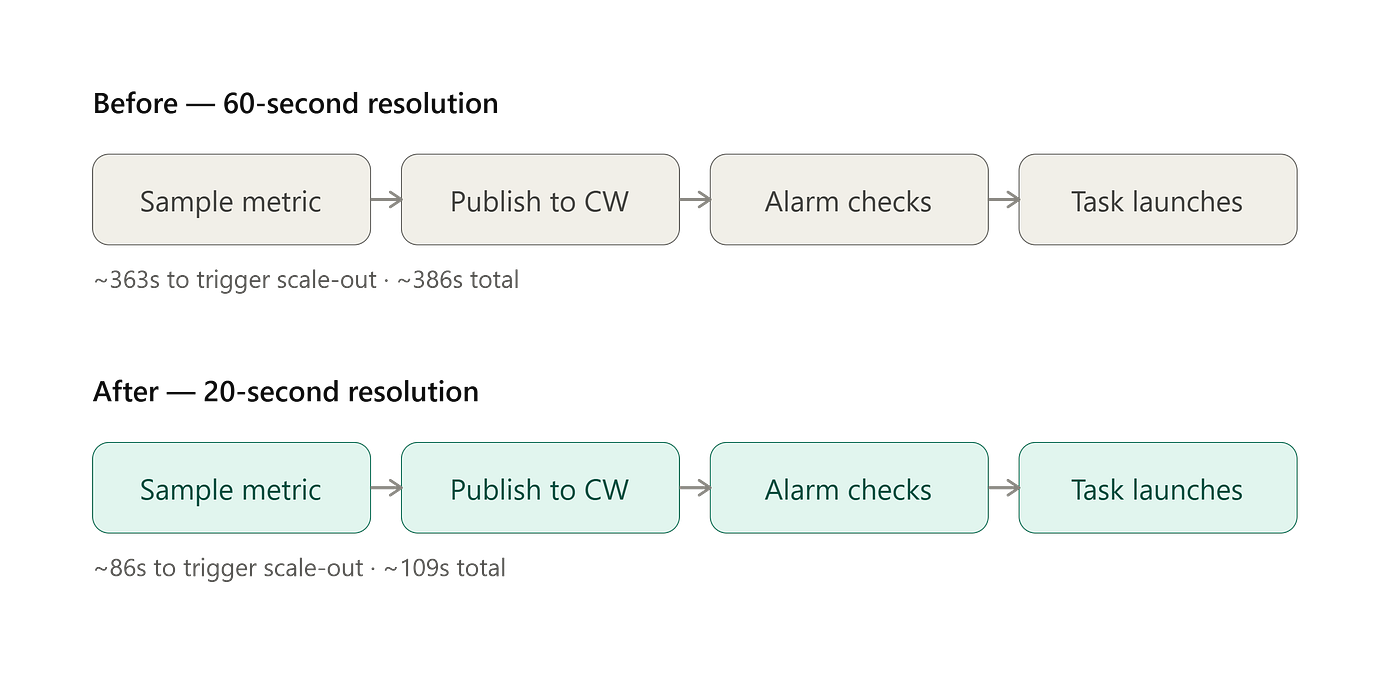
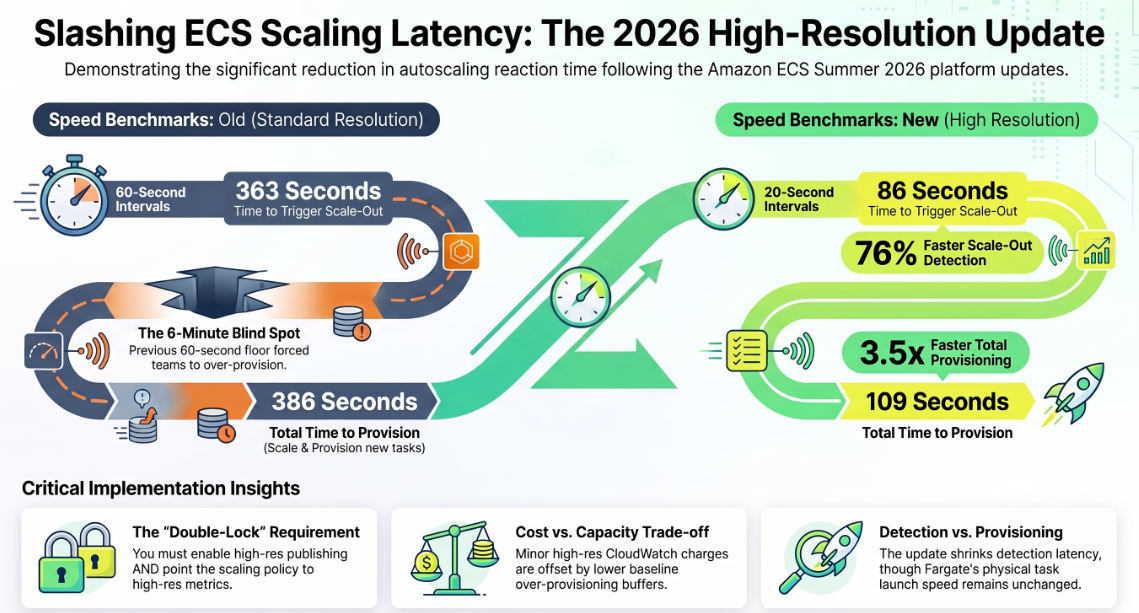
Target tracking autoscaling polled CloudWatch at 60-second resolution. AWS’s benchmark for that: 363s to trigger scale-out, 386s total. A traffic spike could run 5–6 minutes before new tasks served traffic — pushing teams toward over-provisioning and manual step-scaling as workarounds.
What Changed
20-second metric resolution drops trigger time to 86s (76% faster) and total scale-out to 109s (72% faster). Available on Fargate, ECS Managed Instances, and EC2, for CPU/memory target tracking metrics, in all commercial and GovCloud regions. Billed at standard CloudWatch high-resolution rates.
Under the Hood
Two things had to move together:
- Publish cadence. ECS aggregates task-level CPU/memory into service metrics and pushed them once a minute. Enabling high-resolution publishing drops that to 20s.
- Evaluation cadence. Target tracking runs on a CloudWatch alarm managed by Application Auto Scaling. That alarm only evaluates as fast as the metric it’s bound to — so the policy has to reference the high-resolution predefined metric variant, not just rely on the service publishing faster. Miss this pairing and you get fresher data in CloudWatch but a policy still checking it once a minute.
Application Auto Scaling’s ECS target tracking was hardcoded to a 60s period for years, which is why this needed a dedicated launch rather than a config flag. Scheduler and provisioning speed are unchanged — the improvement is almost entirely in detection latency, not task startup time.
Terraform
resource "aws_ecs_service" "api" {
  name            = "checkout-api"
  cluster         = aws_ecs_cluster.main.id
  task_definition = aws_ecs_task_definition.checkout_api.arn
  desired_count   = 4
  launch_type     = "FARGATE"
network_configuration {
    subnets          = var.private_subnet_ids
    security_groups  = [aws_security_group.checkout_api.id]
    assign_public_ip = false
  }
  load_balancer {
    target_group_arn = aws_lb_target_group.checkout_api.arn
    container_name    = "checkout-api"
    container_port    = 8080
  }
  deployment_circuit_breaker {
    enable   = true
    rollback = true
  }
  lifecycle {
    ignore_changes = [desired_count]
  }
}
# High-resolution opt-in: not yet a native hashicorp/aws argument as of
# writing. Bridge with local-exec until it lands:
#   aws ecs update-service --cluster checkout-cluster --service checkout-api \
#     --service-metric-resolution PERIOD_20_SECONDS
resource "aws_appautoscaling_target" "checkout_api" {
  max_capacity       = 20
  min_capacity       = 2
  resource_id        = "service/${aws_ecs_cluster.main.name}/${aws_ecs_service.api.name}"
  scalable_dimension = "ecs:service:DesiredCount"
  service_namespace  = "ecs"
}
resource "aws_appautoscaling_policy" "cpu_target_tracking_high_res" {
  name               = "checkout-api-cpu-highres"
  policy_type        = "TargetTrackingScaling"
  resource_id        = aws_appautoscaling_target.checkout_api.resource_id
  scalable_dimension = aws_appautoscaling_target.checkout_api.scalable_dimension
  service_namespace  = aws_appautoscaling_target.checkout_api.service_namespace
  target_tracking_scaling_policy_configuration {
    predefined_metric_specification {
      predefined_metric_type = "ECSServiceAverageCPUUtilization"
    }
    target_value       = 60
    scale_in_cooldown  = 120
    scale_out_cooldown = 30
  }
}
Reality check:
hashicorp/awsdoesn't yet expose aservice_metric_resolution-style argument onaws_ecs_service. Bridge withnull_resource/local-execand track removal once the provider catches up — check the CHANGELOG first.
2. Live Deployment Observability in the Console
The Problem
Diagnosing a stuck deployment meant stitching together describe-services, Container Insights, the ALB target group's health tab, and CloudTrail by hand — nothing correlated, and a 2am failure meant polling loops in one terminal and log grepping in another.
What Changed
The ECS console now shows a live deployment timeline: phases, service events, task launch/termination, circuit breaker proximity (failures vs. threshold), deployment alarm state, and container/ALB health checks — with failed tasks linking straight to CloudTrail. Free, no opt-in, works on any rolling-update service, all commercial and GovCloud regions.
Under the Hood
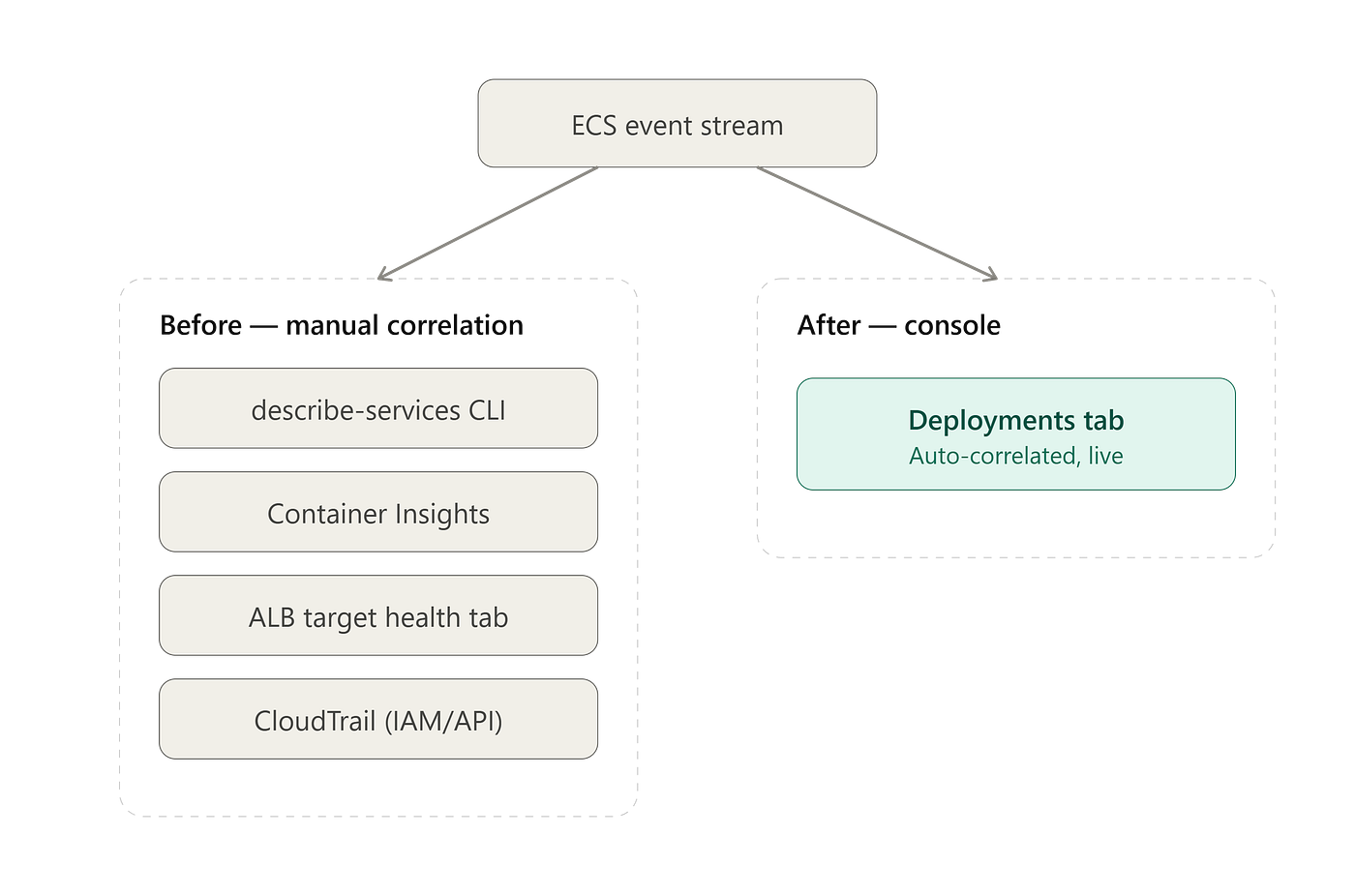
None of the data is new — ECS Deployment State Change and ECS Task State Change events have gone to EventBridge for years, and DescribeServices has always returned rolloutState. What changed is who wires it together.
The old pattern: an EventBridge rule → Lambda/SNS → a hand-built timeline from raw events. Circuit breaker proximity wasn’t an event at all — you polled DescribeServices and computed failedTasks / threshold yourself. AWS separately auto-provisions an EventBridge rule + CloudWatch Logs group per cluster (event capture) for queryable history; the console timeline builds on that same stream but correlates it live instead of leaving you to interpret a log.
What This Replaces
Custom Slack bots or Grafana dashboards built on describe-services polling aren't obsolete, but their job shrinks to alerting and auto-rollback triggers — the console now owns first-look triage.
3. Tunable Deployment Circuit Breaker Thresholds
The Problem
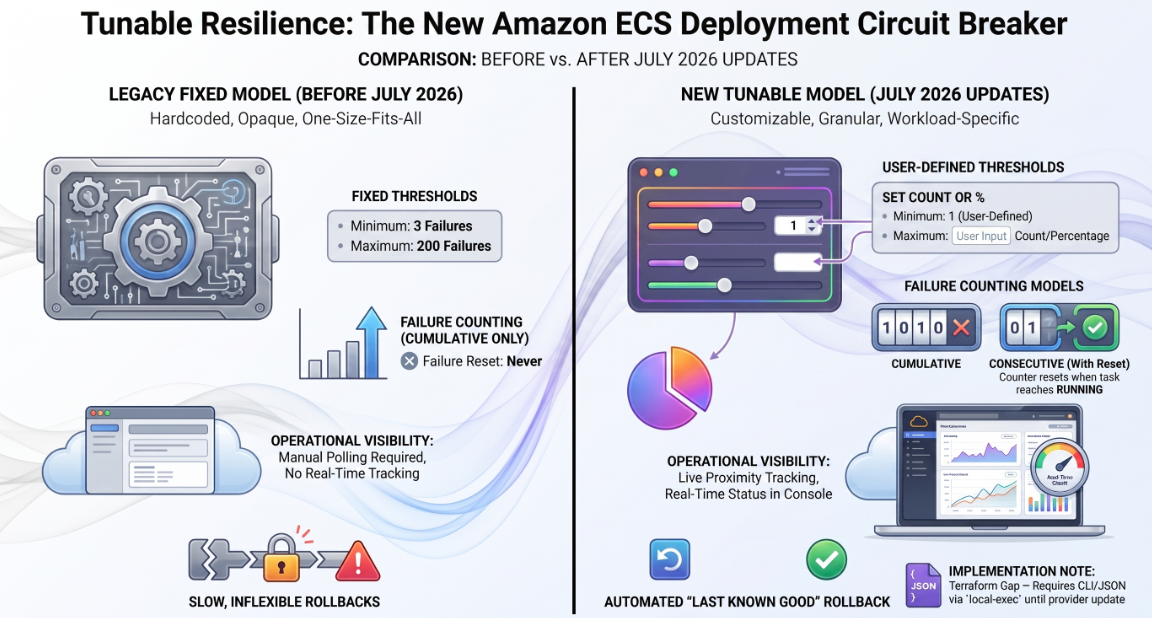
The circuit breaker rolled back unhealthy deployments automatically, but with one fixed, AWS-determined threshold for everyone. A stateless API that should fail on the first bad health check and a JVM service with a known 90-second warm-up used the same logic — forcing teams to either disable the breaker for slow-starters or over-tune grace periods.
What Changed
Set the threshold as a fixed count or a percentage of desired count, and choose the counting model: consecutive (resets on a healthy task) or cumulative (keeps accumulating). Configurable via Console, CLI, SDKs, CloudFormation, CDK, and Terraform, for new and existing services.
Under the Hood
The old formula, rarely documented in the open:
threshold = clamp(0.5 × desired_count, minimum = 3, maximum = 200)desired_count = 4 tripped after 3 failures (the floor). desired_count = 500 still tripped at 200 (the cap). Neither bound was configurable.
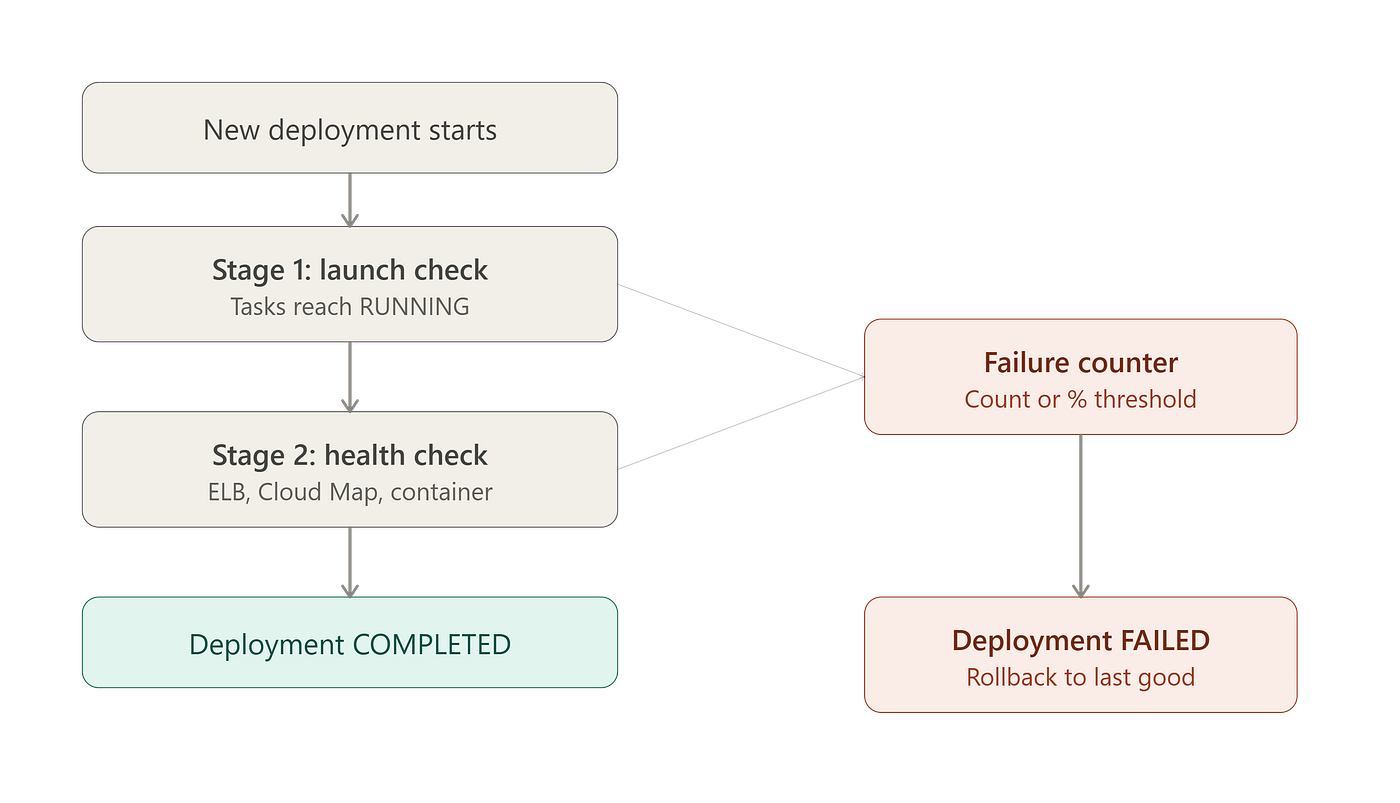
The evaluation state machine hasn’t changed — only the threshold and counting model feeding it have:
- Stage 1 — launch. Watches tasks reach
RUNNING. Skipped once at least one task is running. - Stage 2 — health. Validates ELB target health, Cloud Map, and container health checks.
Failures at either stage increment one counter; hitting the threshold marks the deployment FAILED, and with rollback = true, ECS redeploys the most recent COMPLETED deployment. Two sharp edges regardless of threshold model: pushing a new image under the same tag without a new task definition revision doesn't count as a deployment, so nothing trips even if containers are broken — and rollback needs a COMPLETED deployment to exist, so two bad deployments in a row leave nothing to revert to.
What’s new: instead of the fixed formula, you set the threshold directly, and choose consecutive vs. cumulative counting. Consecutive is what actually fixes the JVM warm-up case — an early expected failure no longer permanently eats into the failure budget.
Terraform
resource "aws_ecs_service" "internal_batch_api" {
  name            = "internal-batch-api"
  cluster         = aws_ecs_cluster.main.id
  task_definition = aws_ecs_task_definition.internal_batch_api.arn
  desired_count   = 6
  launch_type     = "FARGATE"
network_configuration {
subnets = var.private_subnet_ids
security_groups = [aws_security_group.internal_batch_api.id]
} deployment_circuit_breaker {
enable = true
rollback = true
} deployment_maximum_percent = 200
deployment_minimum_healthy_percent = 100
}Reality check: the granular threshold/counting-model fields are new on
DeploymentConfiguration.hashicorp/aws'sdeployment_circuit_breakerblock still only exposesenable/rollback. Bridge via CLI JSON or the CloudFormation-backedawsccprovider if it's ahead:
aws ecs update-service \
  --cluster prod-cluster \
  --service internal-batch-api \
  --deployment-configuration '{
    "deploymentCircuitBreaker": { "enable": true, "rollback": true },
    "minimumHealthyPercent": 100,
    "maximumPercent": 200
  }'
Track any local-exec bridge with a ticket to remove it once the provider argument ships.
4. Express Mode with Custom Task Definitions
The Problem
Express Mode automates domains, networking, load balancing, and autoscaling in one call — great for stateless APIs and rapid prototyping. But it generated its own task definition, so any org standardizing on sidecars (Datadog, OTel, FireLens) or custom ulimits couldn't use it for production. The choice was Express Mode's defaults or hand-building the whole ALB/target group/security group/scaling stack.
What Changed
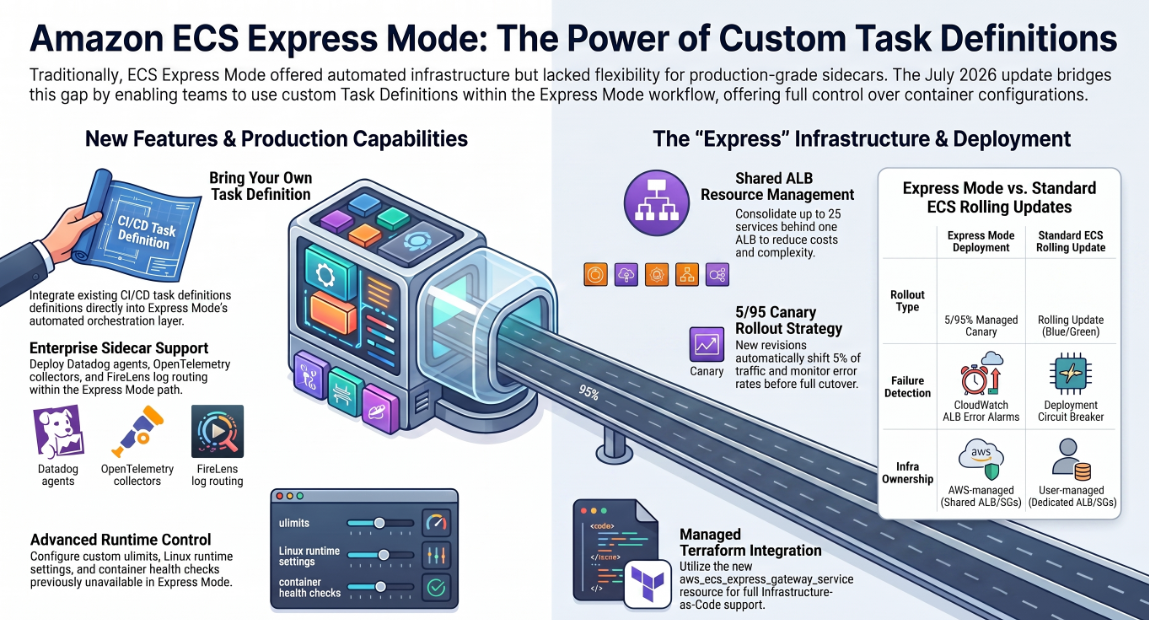
Express Mode now accepts custom task definitions — reuse what’s already in your CI/CD and IaC, keep the simplified deployment experience. Extends to observability/security sidecars, custom health checks, ulimits, Linux runtime settings, and FireLens. You can manage the app via task definition updates or Express Mode directly.
Under the Hood
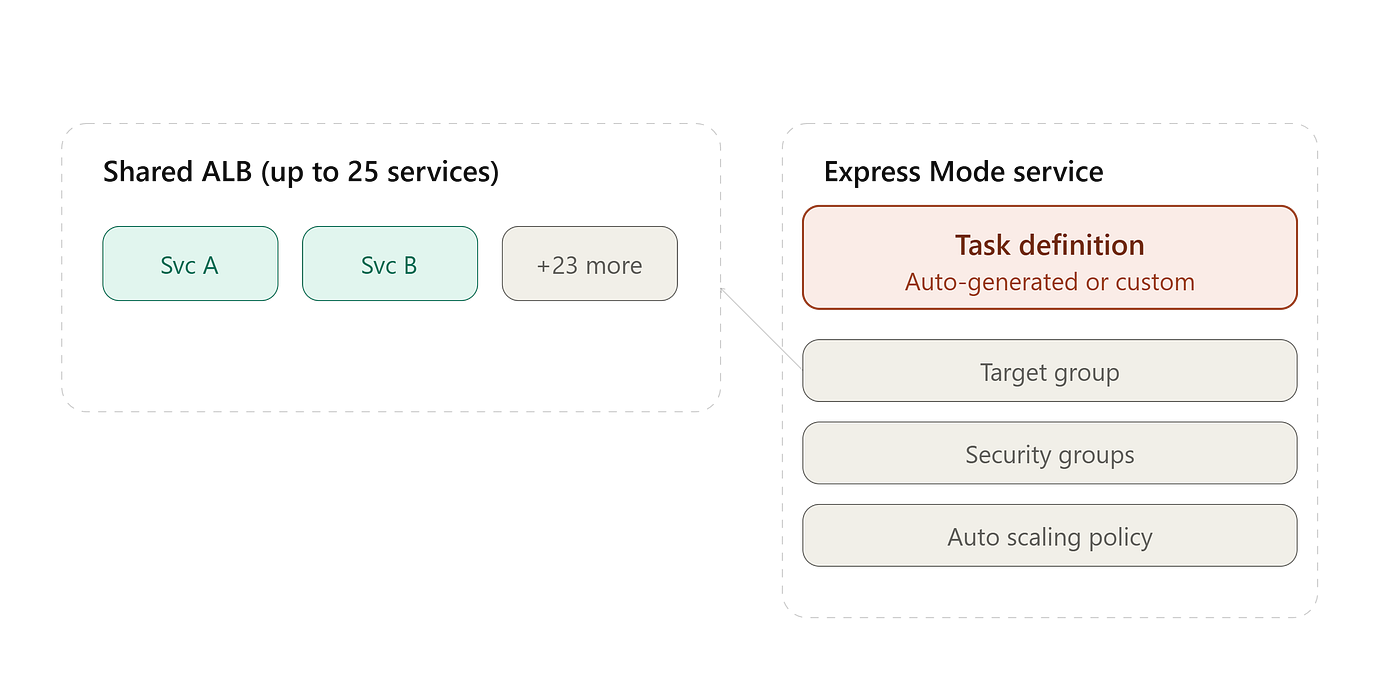
What Express Mode provisions for a new service: an ECS cluster with Fargate capacity providers, a task definition (now optional to auto-generate), an ALB (or a share of one), a target group with a host-header listener rule, two security groups (ALB inbound, tasks inbound-from-ALB-only), an Application Auto Scaling target + policy (60% CPU default), a generated domain (plus Route 53 if you attach your own), and a log group.
Shared ALB: up to 25 services share one ALB per VPC when networking is compatible, routed by host-header rules (service-a.<domain>, service-b.<domain>). The first service in a VPC pins subnets and public/private-ness; later services must match. Cheaper per-service, but less infrastructure isolation than separate ALBs — a listener rule change is a shared blast radius even though target groups and security groups stay separate.
What actually changed: only the task definition step becomes swappable. You register your own aws_ecs_task_definition with your sidecars and hand Express Mode the ARN; it still owns the ALB, target group, security groups, and scaling policy.
Rollout mechanics differ from the rest of ECS: Express Mode updates use a canary by default — 5% traffic shift, CloudWatch alarm-monitored bake period on 4xx/5xx, then the remaining 95%, with automatic revert if the alarm trips. Don’t assume this matches rolling-update-plus-circuit-breaker behavior elsewhere in your account.
Terraform
resource "aws_ecs_task_definition" "orders_api" {
  family                   = "orders-api"
  requires_compatibilities = ["FARGATE"]
  network_mode             = "awsvpc"
  cpu                      = 512
  memory                   = 1024
  execution_role_arn       = aws_iam_role.ecs_execution.arn
  task_role_arn            = aws_iam_role.orders_api_task.arn
container_definitions = jsonencode([
{
name = "orders-api"
image = "${var.ecr_repository_url}:${var.image_tag}"
essential = true
cpu = 384
memory = 768
portMappings = [
{ containerPort = 8080, protocol = "tcp" }
]
healthCheck = {
command = ["CMD-SHELL", "curl -f http://localhost:8080/healthz || exit 1"]
interval = 15
timeout = 5
retries = 3
startPeriod = 30
}
ulimits = [
{ name = "nofile", softLimit = 65536, hardLimit = 65536 }
]
logConfiguration = {
logDriver = "awsfirelens"
options = {
Name = "datadog"
Host = "http-intake.logs.datadoghq.com"
dd_service = "orders-api"
dd_source = "ecs"
TLS = "on"
provider = "ecs"
}
secretOptions = [
{ name = "apikey", valueFrom = aws_secretsmanager_secret.datadog_api_key.arn }
]
}
dependsOn = [
{ containerName = "log-router", condition = "START" },
{ containerName = "datadog-agent", condition = "HEALTHY" }
]
},
{
name = "log-router"
image = "amazon/aws-for-fluent-bit:stable"
essential = true
firelensConfiguration = {
type = "fluentbit"
}
},
{
name = "datadog-agent"
image = "public.ecr.aws/datadog/agent:latest"
essential = false
environment = [
{ name = "ECS_FARGATE", value = "true" },
{ name = "DD_APM_ENABLED", value = "true" }
]
secrets = [
{ name = "DD_API_KEY", valueFrom = aws_secretsmanager_secret.datadog_api_key.arn }
]
healthCheck = {
command = ["CMD-SHELL", "agent health"]
interval = 30
timeout = 5
retries = 3
}
}
])
}resource "aws_ecs_express_gateway_service" "orders_api" {
name = "orders-api" cluster_name = aws_ecs_cluster.main.name task_definition_arn = aws_ecs_task_definition.orders_api.arn
execution_role_arn = aws_iam_role.ecs_execution.arn
infrastructure_role_arn = aws_iam_role.ecs_express_infrastructure.arn primary_container {
name = "orders-api"
port = 8080
} network_configuration {
subnets = var.private_subnet_ids
security_groups = [aws_security_group.orders_api.id]
} auto_scaling_configuration {
metric = "ECSServiceAverageCPUUtilization"
target_value = 60
minimum_task_count = 2
maximum_task_count = 15
} tags = {
Environment = "production"
Team = "platform"
}
}Reality check — schema stability:
aws_ecs_express_gateway_serviceis new (hashicorp/awsv6.23.0+); verify argument names against your pinned provider version withterraform providers schema -jsonbefore treating this as gospel.
Reality check — not a drop-in ALB replacement: Express Mode still owns the ALB, target group, security groups, and scaling policy behind the scenes. If your org already manages ALBs centrally (shared WAF rules, custom listener ordering), Express Mode’s “creates and shares its own” model may fight your conventions. Custom task definitions fix the container-level gap, not the infrastructure-ownership one — evaluate per service.
Summary

Closing Thoughts
The pattern: AWS is narrowing the gap between the “easy path” and the “we need control” path that used to force a binary choice. None of these are dramatic new capabilities — but the IaC tooling for two of the four (circuit breaker thresholds, high-res metrics) hasn’t caught up to the API yet. Check the hashicorp/aws CHANGELOG before committing to a module design; the CLI/JSON fallback is a bridge, not a destination.
References
- Amazon ECS Express Mode now supports custom task definitions — AWS What’s New, Jul 2026
- Amazon ECS now supports configurable deployment circuit breaker settings — AWS What’s New, Jul 2026
- Amazon ECS now provides real-time deployment observability in the AWS Management Console — AWS What’s New, Jul 2026
- Amazon ECS announces faster service auto scaling — AWS What’s New, Jun 2026
- Amazon ECS introduces new high-resolution metrics for faster service auto scaling — AWS Blog
- Announcing Amazon ECS Express Mode — AWS What’s New, Nov 2025
- Resources created by Amazon ECS Express Mode services — AWS Developer Guide
- How the Amazon ECS deployment circuit breaker detects failures — AWS Developer Guide
- Amazon ECS service deployment state change events — AWS Developer Guide
- Automatically scale your Amazon ECS service — AWS Developer Guide
About the Author
I’m Ashish Kasaudhan, a DevOps and platform Architect working across infrastructure automation, cloud architecture, and enterprise container platforms. I write about the mechanics behind AWS and DevOps tooling — what actually changed, not just the marketing summary.
If this was useful, I’d appreciate a connect on LinkedIn: linkedin.com/in/ashish-kasaudhan-713a4225
And if you’re reading this on Medium — a clap (or a few) helps this reach more platform engineers dealing with the same ECS rollout decisions. Comments and corrections are welcome, especially if you’ve already hit the Terraform provider gaps called out above.
메타데이터
- post_id
- 5757433f238c
- slug
- amazon-ecs-under-the-hood-4-production-features-every-platform-engineer-should-know-5757433f238c
- url
- https://blog.devops.dev/amazon-ecs-under-the-hood-4-production-features-every-platform-engineer-should-know-5757433f238c
- canonical_url
- https://blog.devops.dev/amazon-ecs-under-the-hood-4-production-features-every-platform-engineer-should-know-5757433f238c
- author_url
- https://medium.com/@ashishkasaudhan
- status
- ok
- fetched_at
- 2026-07-08 17:17:42