Google’s new T5Gemma is smart and designed for you — part 2
Run a powerful AI on your Laptop — no tech degree required
Google’s new T5Gemma is smart and designed for you — part 2
Run a powerful AI on your Laptop — no tech degree required
If you are not a Medium.com member, you can read the full article at this link… but consider joining the community!
Imagine you’re at a United Nations summit. A delegate speaks in French. Moments later, a skilled interpreter delivers a fluent, nuanced Mandarin translation.
They didn’t blurt out words as they heard them — that would sound robotic and be full of mistakes. Instead, they listened first, grasped the full meaning, and then crafted a thoughtful response.
This two-step process (understand, then respond ) is how expert human interpreters work and also the secret behind one of the most powerful and efficient designs in artificial intelligence: the encoder-decoder model.
For a while, this elegant architecture was pushed aside in favor of flashier, simpler models , the kind that power popular chatbots like ChatGPT.
But now, it’s making a stunning comeback. And the best part? You don’t need a supercomputer or a Computer Science degree to use it.
In fact, you can run one of these cutting-edge AI systems right on your personal laptop, without even a dedicated graphics card.
This is part 2 of the series about modern encoder-decoder models:
In this article, I’ll walk you through what makes Google’s new **T5Gemma** so special. More importantly, I’ll show you — step by step — how to bring this intelligent, efficient, and open-source AI into your own hands. No prior coding experience is needed. Just a little curiosity and a willingness to try something new.
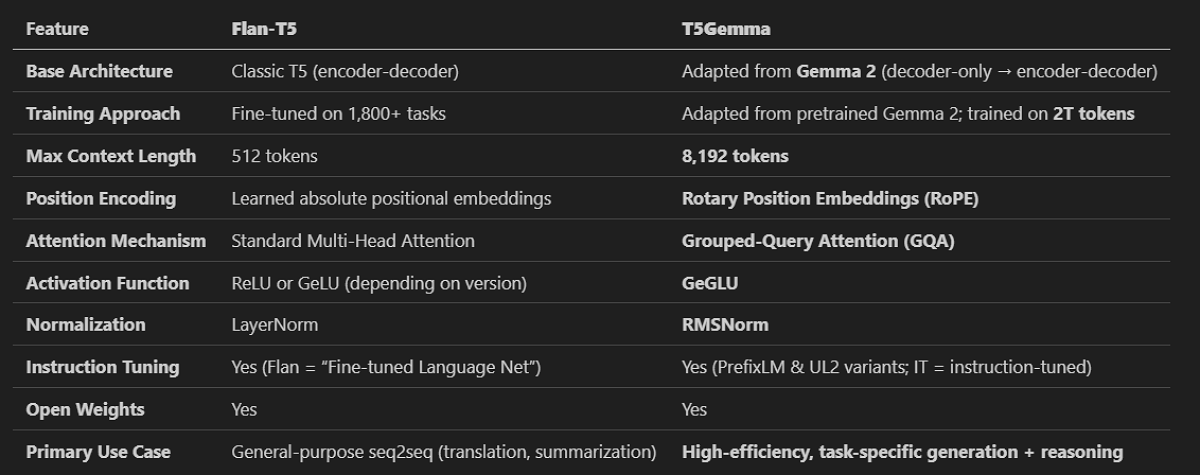
T5Gemma is not just “Flan-T5 but newer.” It’s a modern re-engineering of the encoder-decoder using Gemma’s stronger language foundations and today’s architectural best practices (RoPE, GQA, RMSNorm), enabling far better performance on long-context and reasoning tasks.
The Forgotten Architect of AI
Before there were chatty AI assistants, there were translators and summarizers. The original encoder-decoder model was a breakthrough in early AI, specifically for tasks like turning one language into another.
The encoder would read a sentence — say, in English — and compress all its meaning into a dense “thought vector.”
Then, the decoder would take that vector and expand it into a new, coherent sentence, perhaps in Spanish.
This design is intuitive. It mirrors how we actually think and communicate: we absorb information first, then formulate a response.
However, as the AI gold rush began, tech companies favored decoder-only models like GPT.
Why?
Because they’re simpler to build at scale. You feed them any text, and they predict the next word, over and over, until they’ve “written” a reply. It’s a clever trick that works shockingly well for open-ended conversation.
But it’s fundamentally inefficient for many real-world tasks. Asking a decoder-only model to summarize a long article is exactly like asking a fortune teller to predict the weather: they’re using the same general-purpose tool for a job that really needs a specialist.
The encoder-decoder is another story. It’s purpose-built. The encoder reads and understands. The decoder writes and answers.
This division of labor makes it faster, cheaper, and more accurate for structured tasks like translation, summarization, or answering factual questions.
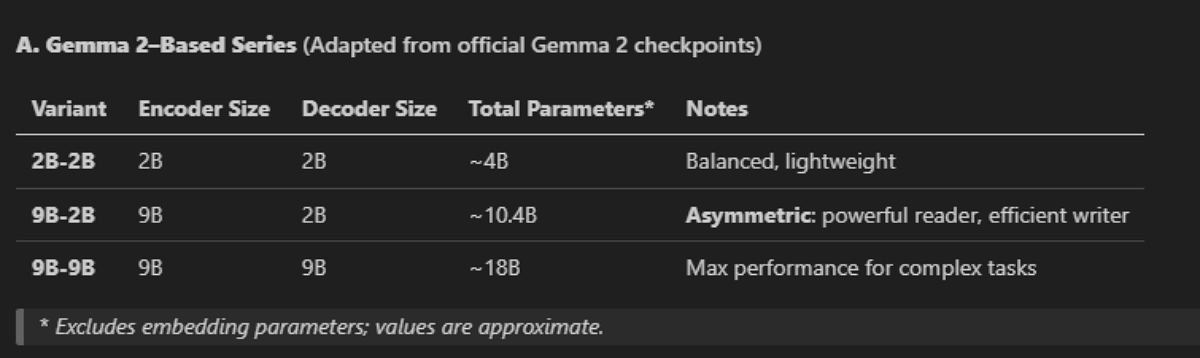
The new T5Gemma seires based only on Gemma2 variants
T5Gemma: The AI That’s Smart and Frugal
In mid-2025, Google did something brilliant.
Instead of building a new AI from the ground up — a process that costs millions of dollars and months of supercomputer time — they looked at what they already had.
They took their powerful, open-source Gemma 2 models (which are decoder-only) and “adapted” them into a full encoder-decoder architecture. This process, which they call “adaptation,” is like giving a talented painter the training and tools to become an equally talented sculptor — without having to start their artistic journey all over again.
The result is T5Gemma: a family of models that are lightweight, powerful, and open to everyone.
Here’s the re-evolution: T5Gemma was built not just as a copy of the old design. It’s been upgraded with the latest AI tech:
- Asymmetric design: You can pair a huge “brain” for reading (the encoder) with a smaller, more efficient “voice” for writing (the decoder). For example, the 9B-2B model uses a 9-billion-parameter encoder and a 2-billion-parameter decoder. This is perfect for summarizing a 10-page legal brief into three clear sentences.
- Modern features: It uses advanced techniques like Rotary Position Embeddings for handling long documents and Grouped-Query Attention for faster responses.
- Task-focused: It’s been optimized for the kinds of tasks that matter most in the real world, not just for sounding human in a chat.
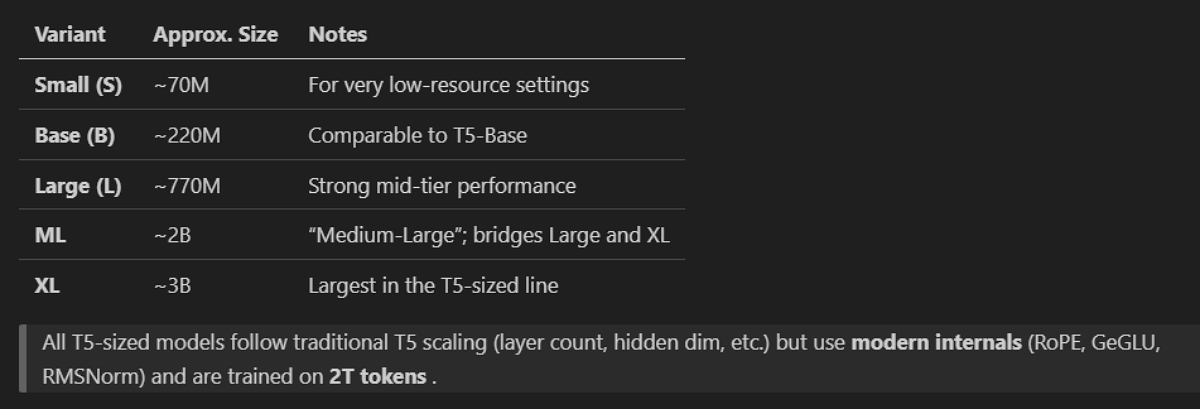
the new T5Gemma variants based on the old google T5 models
In benchmark tests, T5Gemma outperforms much larger models on reasoning, math, and reading comprehension — while using a fraction of the computing power. This is at the same time a technical win and a philosophical one. In a world obsessed with “bigger is better,” Google has chosen elegance over bloat.
Why This Matters to You
You might be thinking, “That’s great for engineers, but I’m not one.” That’s exactly the point.
For years, the most powerful AI has been locked away in the cloud, behind paywalls and corporate firewalls. Or, even worse, you needed expensive hardware and deep technical knowledge.
T5Gemma changes that. Because it’s open-source and efficient, it can run on a standard laptop. This opens the door for:
- Writers who want to quickly summarize research or draft ideas.
- Students who need help understanding complex topics.
- Curious minds who want to see how AI really works, not just as a black box, but as something they can touch and control.
This is a new open-to-everyone intelligence. We can move from a world where AI is a service you consume to one where it’s a tool you can own and shape.

Your Step-by-Step Guide to Running T5Gemma
Now, let’s get our hands dirty. Don’t worry , this is not a coding tutorial in the traditional sense. I’m going to give you a simple script and walk you through every single step.
You’ll copy, paste, and run. That’s it.
What You’ll Need
- A computer (Windows, Mac, or Linux). In my example I am using Windows 11
- A basic installation of Python (version 3.8 or higher): I am using python 3.12
- An internet connection (to download the AI model, which is about 2–5 GB).
- About 15 minutes of your time.
Step 1: Create a Project Folder
Find a place on your computer (like your Documents folder) and create a new folder. Name it something simple, like T5Gemma.
Open a terminal or command prompt and navigate to that folder. If you’re on Windows, you can hold Shift and right-click inside the folder, then choose “Open PowerShell window here” or “Open command window here.” On a Mac or Linux, you’d open your terminal and use the cd command to get there.
Step 2: Set Up Your Software Environment
We’re going to create a clean, isolated environment for our AI. This just means we won’t mess up any other Python projects you might have.
In your terminal, run these commands one by one:
# Create a virtual environment
python -m venv venv
# Activate it
# On Windows:
.\venv\Scripts\activate
# On Mac/Linux:
source venv/bin/activate
You’ll know it’s working when you see (venv) appear at the beginning of your command line.
Now, install the required libraries. This is the critical part: we need a slightly older version of the transformers library because the newest versions have a bug that breaks the classic encoder-decoder setup.
pip install transformers==4.53.3 accelerate torch richThis will take a few minutes as it downloads and installs everything you need. The torch library is the engine that runs the AI, and accelerate helps it use your computer’s resources efficiently. The rich library is just for making the output look nicer in your terminal.
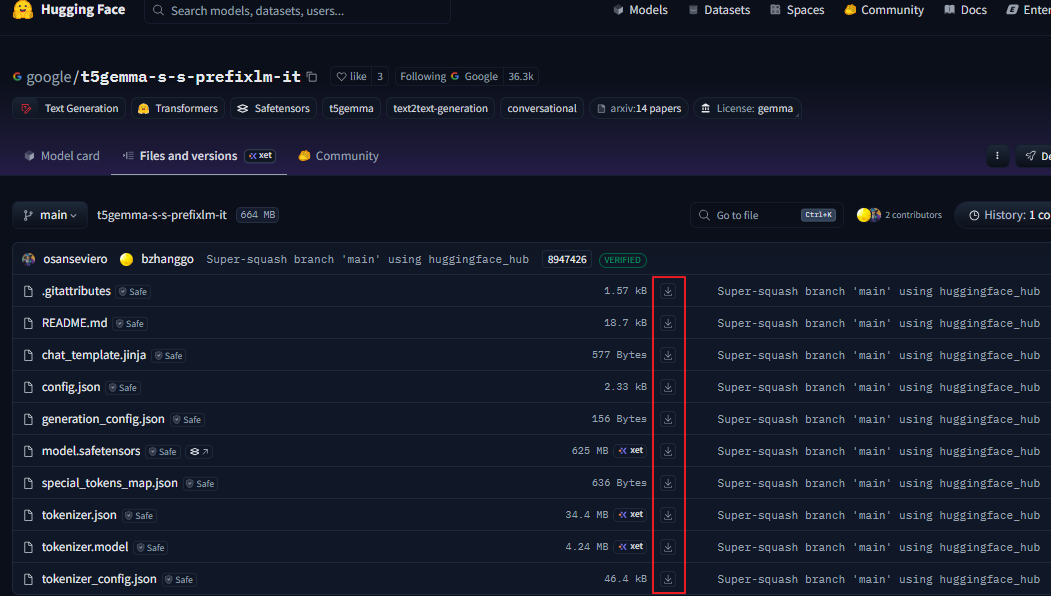
Step 3: Download the AI Model
Now, we need to get the brain of our AI: the T5Gemma model files.
First, you’ll need a free account on Hugging Face (a website that hosts AI models). Go to huggingface.co and sign up if you don’t have an account.
Once you’re logged in, you must agree to Google’s terms to access the model. Go to the model’s page: https://huggingface.co/google/t5gemma-s-s-prefixlm-it and click the “Agree and access repository” button.
Now, you can either download the files manually or use a command in your terminal.
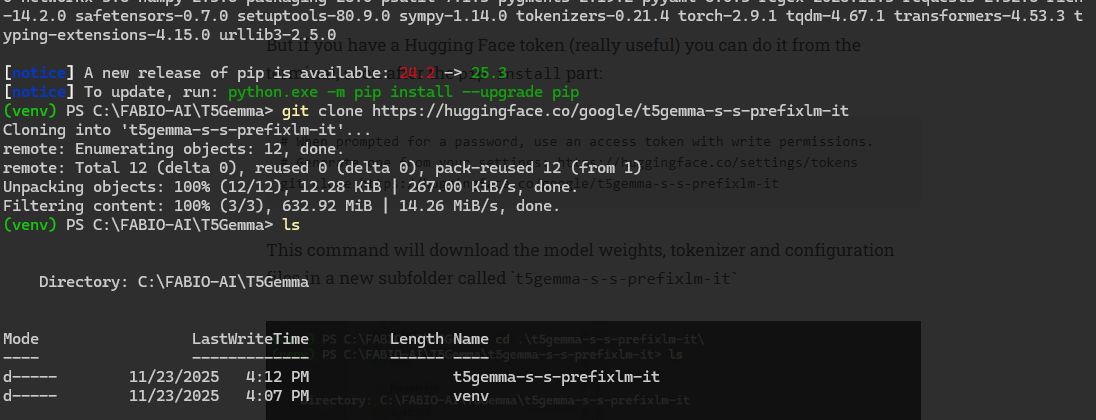
The command-line method is easier and more reliable:
- Go to your Hugging Face settings and create a new access token. You can find this at
https://huggingface.co/settings/tokens. Give it a name like “T5Gemma” and make sure it has “write” permissions. - Back in your terminal (which should still be in your
T5Gemmafolder and have the(venv)environment active), run this command:
git clone https://huggingface.co/google/t5gemma-s-s-prefixlm-itIt will ask you for a username and password. Use your Hugging Face username as the username, and paste the access token you just created as the password.
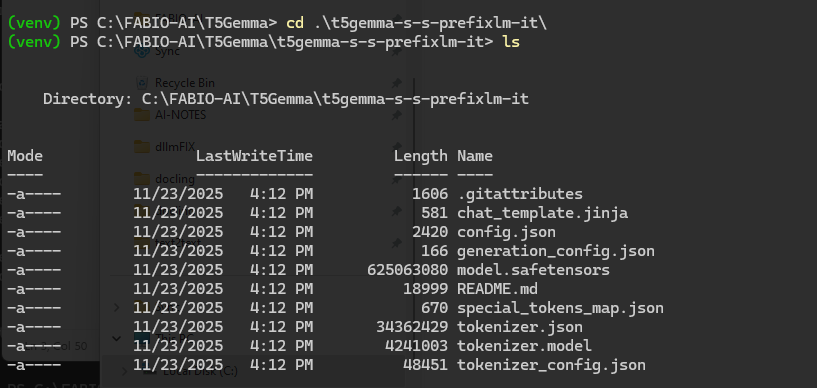
This will create a new subfolder called t5gemma-s-s-prefixlm-it and fill it with all the model files. This is the “brain” we’ll be using.
Step 4: Create the Magic Script
Now, we’ll create a Python file that tells our computer how to talk to the AI.
In your main T5Gemma folder (not inside the model subfolder), create a new file named T5run.py. You can do this with any text editor—Notepad on Windows, TextEdit on Mac (in plain text mode), or VS Code.
Now, copy and paste the exact code below into that file. This code is the “user interface” for our AI.
from transformers import AutoTokenizer, AutoModelForSeq2SeqLM
import torch
from datetime import datetime
print('1. Loading the tokenizer...')
tokenizer = AutoTokenizer.from_pretrained("t5gemma-s-s-prefixlm-it")
print('2. Loading the T5Gemma model...')
model = AutoModelForSeq2SeqLM.from_pretrained(
    "t5gemma-s-s-prefixlm-it",
    device_map="auto",
    torch_dtype=torch.bfloat16)

################### HELPER FUNCTIONS ##############################
def T5bot(tokenizer, model, mymessage):
    import time
    start_time = time.time()
    messages = [{"role": "user", "content": mymessage},]
    print('1) apply the tokenizer chat template...')
    input_ids = tokenizer.apply_chat_template(messages,
        return_tensors="pt",
        return_dict=True,
        add_generation_prompt=True)
    print('2) Generating the reply...')
    outputs = model.generate(**input_ids, max_new_tokens=512)
    print('3) Decoding the output...')
    response = tokenizer.decode(outputs[0], skip_special_tokens=True)
    retrieval_time = time.time() - start_time
    print(response)
    print('---')
    print(f"Generation Time: {retrieval_time:.4f} seconds\n\n")
    return response

def readContext():
    """
    Accept multi-line input (perfect for pasting full article text).
    Press Ctrl+D (Unix) or Ctrl+Z (Windows) + Enter to finish.
    """
    print("📝 Paste the article text below. Press Ctrl+D (or Ctrl+Z) when done:\n")
    lines = []
    try:
        while True:
            line = input()
            lines.append(line)
    except EOFError:
        pass
    return '\n'.join(lines)

################### MAIN APP ################################
# Ask to paste the article text
article_text = readContext()
# create the prompt for summarization
prompt=f"""
Summarize the following article and report the core ideas.
[Start of Article]
{article_text}
[End of Article]
Summary:"""
# run the generation and print the output
reply = T5bot(tokenizer, model, prompt)
Don’t worry if this looks like gibberish. It’s just a set of instructions. The key parts are:
- It loads our model and a “tokenizer” (which turns your words into numbers the AI can understand).
- It has a
T5botfunction that sends a message to the AI and prints its reply. - It has a
readContextfunction that lets you paste a big block of text (like an entire news article).
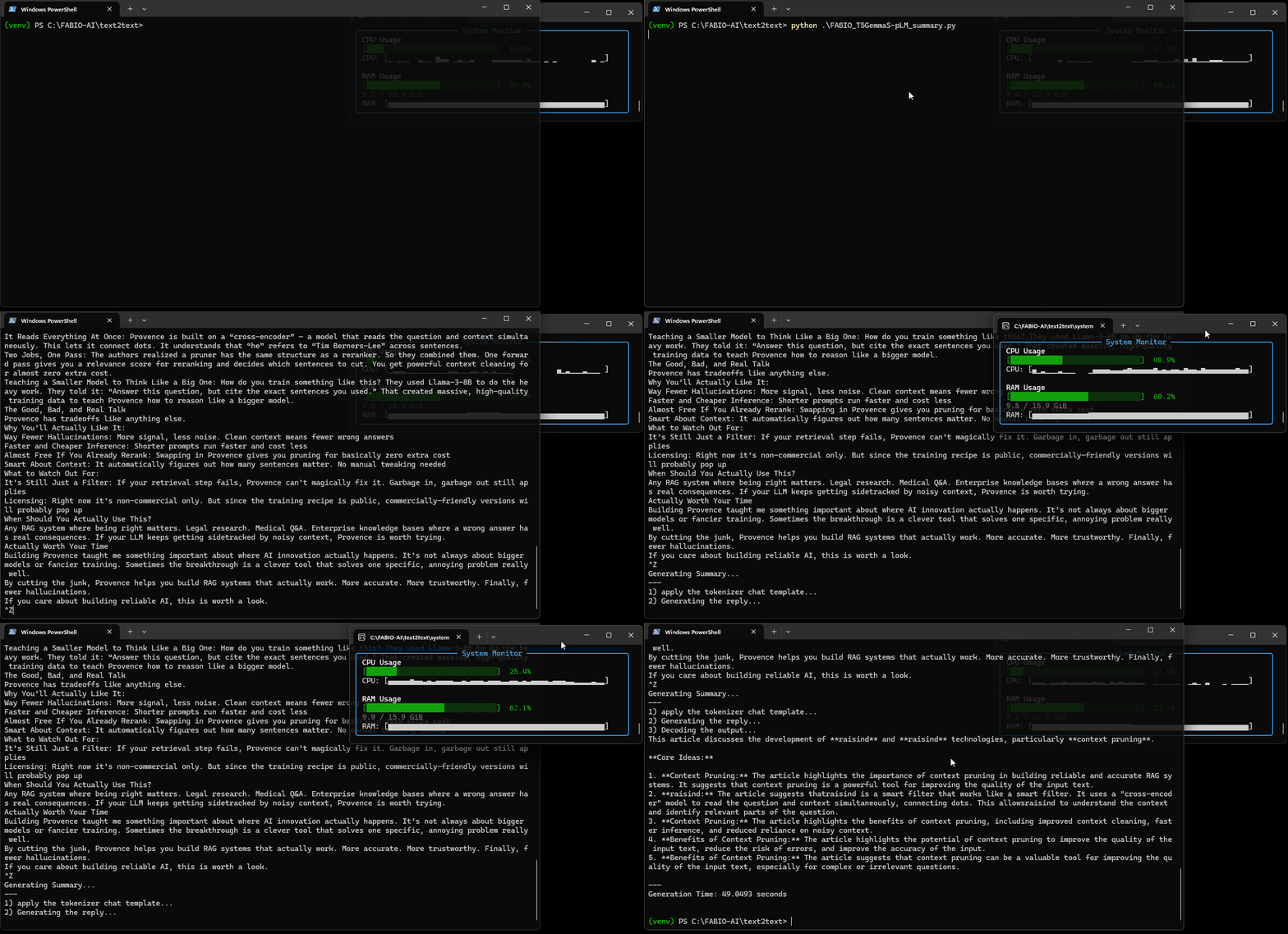
Step 5: Run the AI!
You’re ready. Go back to your terminal (still in the T5Gemma folder with the (venv) environment active).
Run your script with this command:
python T5run.pyThe first time you run it, it will take a minute or two to load the model into your computer’s memory. You’ll see messages like “Loading the tokenizer…” and “Loading the T5Gemma model…”.
Once it’s loaded, you’ll see a prompt:
📝 Paste the article text below. Press Ctrl+D (or Ctrl+Z) when done:Now, go find any article online — a news story, a blog post, a long email. Copy the entire text and paste it into your terminal. When you’re done pasting, press Ctrl+Z (on Windows) or Ctrl+D (on Mac/Linux) and then press Enter.
The AI will get to work. You’ll see it “apply the tokenizer,” “generate the reply,” and finally “decode the output.”
In a few seconds, you’ll get a concise, well-written summary of the entire article, along with a timer showing how long it took.
And that’s it! You’ve just run a state-of-the-art, research-grade AI model on your personal computer.
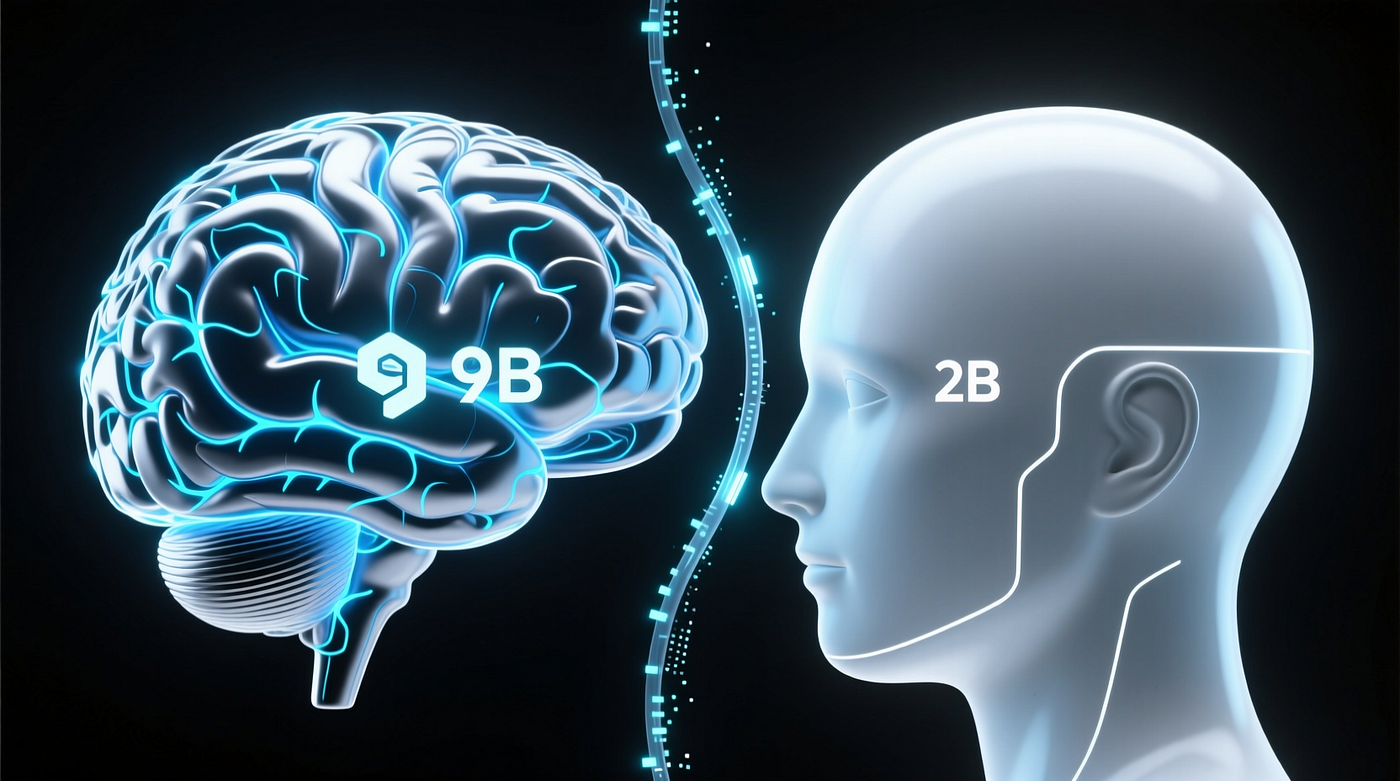
an encoder 4 times bigger than the decoder
The Future is in your… laptop and your hands
As you can see there is no special trick.
With few lines you can even automate the entire process of summarization for all the files in one of your local folders!
T5Gemma is an example to the idea that the best innovations often come not from building something entirely new, but from reimagining what we already have.
So, give it a try and see what it can do. The AI that can understand and summarize the world is no longer locked away.
It can run right here, on your screen, waiting for you to say so.
References:
[embed]Google Cloud console Edit descriptionconsole.cloud.google.com
I hope you enjoyed the article. If this story provided value and you wish to show a little support, you could:
- Clap a lot of times for this story
- Highlight the parts more relevant to be remembered (it will be easier for you to find them later and for me to write better articles)
- Join my totally free weekly Substack newsletter here
- Follow me on Medium
- Read my latest articles at https://medium.com/@fabio.matricardi
- Follow my publication https://medium.com/artificial-intel-ligence-playground
If you want to read more, here are some ideas:
[embed]Building Intelligence that matters Ground AI work in reality, not hype — Part 2.generativeai.pub
[embed]Go Tiny LLM, go! Why we need TinyLLM in our AI orchestra.generativeai.pub
메타데이터
- post_id
- 7dad9c990c2b
- slug
- googles-new-t5gemma-is-smart-and-designed-for-you-part-2-7dad9c990c2b
- url
- https://medium.com/artificial-intel-ligence-playground/googles-new-t5gemma-is-smart-and-designed-for-you-part-2-7dad9c990c2b
- canonical_url
- https://medium.com/artificial-intel-ligence-playground/googles-new-t5gemma-is-smart-and-designed-for-you-part-2-7dad9c990c2b
- author_url
- https://medium.com/@fabio.matricardi
- status
- ok
- fetched_at
- 2026-06-22 05:41:33