GCP Hybrid Subnets: Migrate to Google Cloud Without Changing a Single IP Address
How GCP Hybrid Subnets Make Cloud Migration Painless
Your VMs. Your IPs. Google Cloud
Imagine you’ve been running a production workload on-premises for five years. Your VMs, your firewall rules, your DNS entries — all wired to a carefully managed 10.0.1.0/24 IP range. Then someone asks you to migrate to the cloud.
The first question most engineers ask is: “Do we have to re-IP everything?”
With GCP Hybrid Subnets, the answer is no.
The Problem: IP Changes Break Everything
Migrating to the cloud isn’t just a technical lift — it’s a coordination nightmare. A single IP change can cascade into:
- Updated DNS records across dozens of services
- Rewritten application configuration files
- Updated firewall rules on both ends
- Broken inter-service communication during cutover
- A very long night for your ops team
Traditional cloud migration forces you to allocate a new VPC CIDR range, move workloads, and deal with the resulting chaos. For large enterprises with hundreds of VMs and tightly coupled services, this can mean months of re-mapping work before a single VM moves.
There had to be a better way.
The Solution: Hybrid Subnets
GCP Hybrid Subnets let you extend your on-premises IP address space directly into a Google Cloud VPC. Your cloud-hosted VMs can use the exact same IP addresses they had on-premises — no changes, no remapping, no surprises.
Think of it as a subnet that lives in two places at once: partly on your data center, partly in Google Cloud. VMs on both sides communicate as if they’re on the same flat network, because from an IP routing perspective, they are.
In short: Hybrid Subnets allow your on-premises CIDR range to be shared with a GCP VPC subnet, enabling workloads to migrate gradually without changing a single IP address.
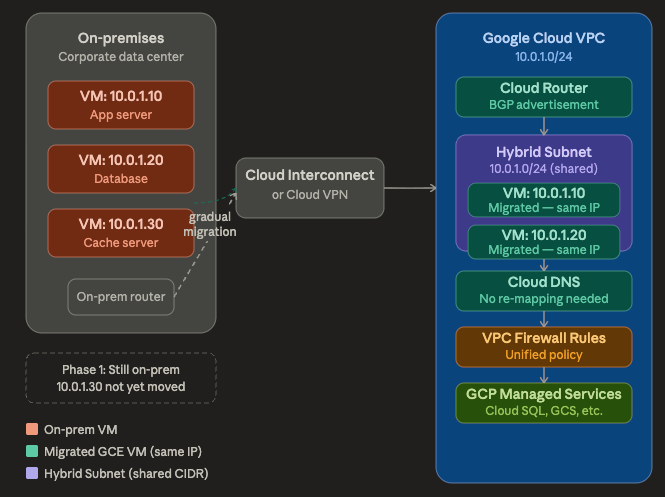
GCP Hybrid Subnet
How It Actually Works
The architecture has three key ingredients:
1. Cloud Interconnect or Cloud VPN Your on-premises network connects to GCP through a dedicated interconnect or VPN tunnel. This is the physical (or virtual) bridge between the two environments.
2. Cloud Router with BGP Cloud Router dynamically advertises routes between your on-premises router and GCP. It knows which IPs currently live on-prem versus in the cloud, and routes traffic accordingly.
3. The Hybrid Subnet: This is the magic piece. You create a VPC subnet in GCP using the same CIDR block as your on-premises subnet. GCP’s routing layer intelligently directs traffic — if it 10.0.1.10 has been migrated to a GCE instance, traffic goes to the cloud VM. If it 10.0.1.30 is still on-prem, traffic is forwarded through the interconnect.
The diagram above shows exactly this: 10.0.1.10 and 10.0.1.20 have been migrated to GCE while 10.0.1.30 still runs on-premises. All three VMs communicate with each other using their original IPs. No one rewrote a config file.
Real-World Example: MigrateCorp’s Lift-and-Shift
Let’s say MigrateCorp runs a classic three-tier web application on-premises:
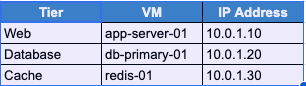
Sample IP Table
The database (10.0.1.20) talks to the cache (10.0.1.30) dozens of times per second. Their ops team has hardcoded connection strings in three different config files across two repositories.
Without Hybrid Subnets: They would need to allocate a new GCP subnet (say 10.20.0.0/24), move the DB to 10.20.0.10, update every connection string, re-test everything — and pray they caught all the references.
With Hybrid Subnets:
# Step 1: Create the VPC with the same CIDR as on-prem
gcloud compute networks create migratecorp-vpc \
  --subnet-mode=custom

# Step 2: Create a Hybrid Subnet mirroring the on-prem range
gcloud compute networks subnets create hybrid-subnet-us-central1 \
  --network=migratecorp-vpc \
  --region=us-central1 \
  --range=10.0.1.0/24 \
  --enable-private-ip-google-access \
  --allow-cidr-routes-overlap

# Step 3a: Configure Cloud Router with BGP
gcloud compute routers create migratecorp-router \
  --network=migratecorp-vpc \
  --region=us-central1 \
  --asn=65001

# Step 3b: Ensure the router is locked down to ONLY custom advertisements
# (Run this against your established BGP peer during tunnel/interconnect configuration)
gcloud compute routers update-bgp-peer migratecorp-router \
  --peer-name=YOUR_BGP_PEER_NAME \
  --region=us-central1 \
  --advertisement-mode=custom \
  --set-advertisement-ranges=10.0.1.20/32

# Step 4: Create a GCE VM preserving the original IP
gcloud compute instances create db-primary-01 \
  --zone=us-central1-a \
  --network-interface="subnet=hybrid-subnet-us-central1,private-network-ip=10.0.1.20" \
--machine-type=n2-standard-4NOTE: Point 3b is important and must not be skipped.
MigrateCorp’s DB now runs in Google Cloud at 10.0.1.20. The cache on-premises at 10.0.1.30 still talks to it at the same address. The connection strings were never touched.
They migrate redis-01 next week, then the app server the week after. Each migration is independent, low-risk, and reversible.
Key Benefits at a Glance
Zero re-IP migration — Move workloads without touching DNS, firewall rules, or application configs.
Gradual, phased migration — Move VMs one at a time. The routing layer handles which IPs are in the cloud versus on-prem transparently.
Unified security policy — VPC Firewall rules apply uniformly to all IPs in the hybrid subnet, whether the VM lives in GCP or on-premises.
BGP-driven traffic steering — Cloud Router uses BGP to automatically prefer the GCE instance once a workload is migrated, with no manual route updates needed.
Important Limitations to Know
Hybrid Subnets are powerful, but come with real constraints you should plan around:
- No IP duplication. An IP address can only be active in one location at a time — either on-prem or in GCP. You can’t run two VMs with the same IP simultaneously.
- Requires Cloud Interconnect or HA VPN. This isn’t a public-internet feature. You need a dedicated connectivity path, which has cost implications.
- BGP convergence time. During migration cutover, there’s a brief BGP re-convergence window. Plan your maintenance windows accordingly.
- Regional scope. Hybrid Subnets are per-region. If you have a multi-region on-prem setup, you’ll need a hybrid subnet in each GCP region.
- Not compatible with VPC Peering across the hybrid boundary. Traffic from a peered VPC doesn’t traverse the hybrid subnet path by default.
Who Should Use This?
Hybrid Subnets are purpose-built for teams who:
- Have legacy applications with hardcoded IPs or tight service mesh dependencies
- Want a phased, reversible migration path rather than a big-bang cutover
- Are you running Cloud Interconnect or HA VPN already (or are you willing to invest in it)
- Need to maintain on-premises failback capability during migration
If you’re doing a greenfield cloud build or migrating stateless containerised workloads, you probably don’t need this — a standard VPC subnet with new IPs is simpler. But for enterprise workloads with years of IP-embedded configuration, Hybrid Subnets are worth every bit of setup effort.
Wrapping Up
Cloud migration has a reputation for being painful — and IP management is one of the biggest reasons why. GCP Hybrid Subnets flip the model: instead of adapting your workloads to fit the cloud’s addressing, the cloud adapts to fit yours.
The result is a migration path that’s genuinely incremental, genuinely low-risk, and genuinely reversible. One VM at a time, on your schedule, with your IPs intact.
Read my other tech blogs
Connect with me on LinkedIn: Rahul Kumar Singh
Clap and share this blog to show your support.
메타데이터
- post_id
- 829bc39f1e40
- slug
- gcp-hybrid-subnets-migrate-to-google-cloud-without-changing-a-single-ip-address-829bc39f1e40
- url
- https://medium.com/google-cloud/gcp-hybrid-subnets-migrate-to-google-cloud-without-changing-a-single-ip-address-829bc39f1e40
- canonical_url
- https://medium.com/google-cloud/gcp-hybrid-subnets-migrate-to-google-cloud-without-changing-a-single-ip-address-829bc39f1e40
- author_url
- https://medium.com/@rahulvatsya
- status
- ok
- fetched_at
- 2026-06-11 22:20:54