📊 Displaying Top 5 and Bottom 5 Performers in Oracle Narrative Reporting Using Rank, Sorting, and…
Introduction
📊 Displaying Top 5 and Bottom 5 Performers in Oracle Narrative Reporting Using Rank, Sorting, and Suppression functions
Introduction
Business users frequently ask questions such as:
- What are the Top 5 performers for the current period?
- Which are the Bottom 5 contributors?
- Where should management focus its attention immediately?
Oracle Narrative Reporting provides an efficient way to answer these questions using built-in features such as the Rank function, Sorting, and Conditional Suppression. This approach eliminates the need for manual filtering and ensures that reports automatically update as underlying data changes.
This blog explains how to display Top 5 and Bottom 5 performers within a report using a simple and repeatable method.
Business Scenario
Assume an organization wants to analyze performance across a list of items — such as products, entities, customers, or cost centers — based on a numeric measure like sales, revenue, expense, or variance.
Management requires:
- A Top 5 view to highlight the best performers
- A Bottom 5 view to identify underperformers
Both views should be generated directly within the same report, without creating separate reports.
To achieve this, the following three features are used:
- Rank Function
- Sorting
- Conditional Suppression
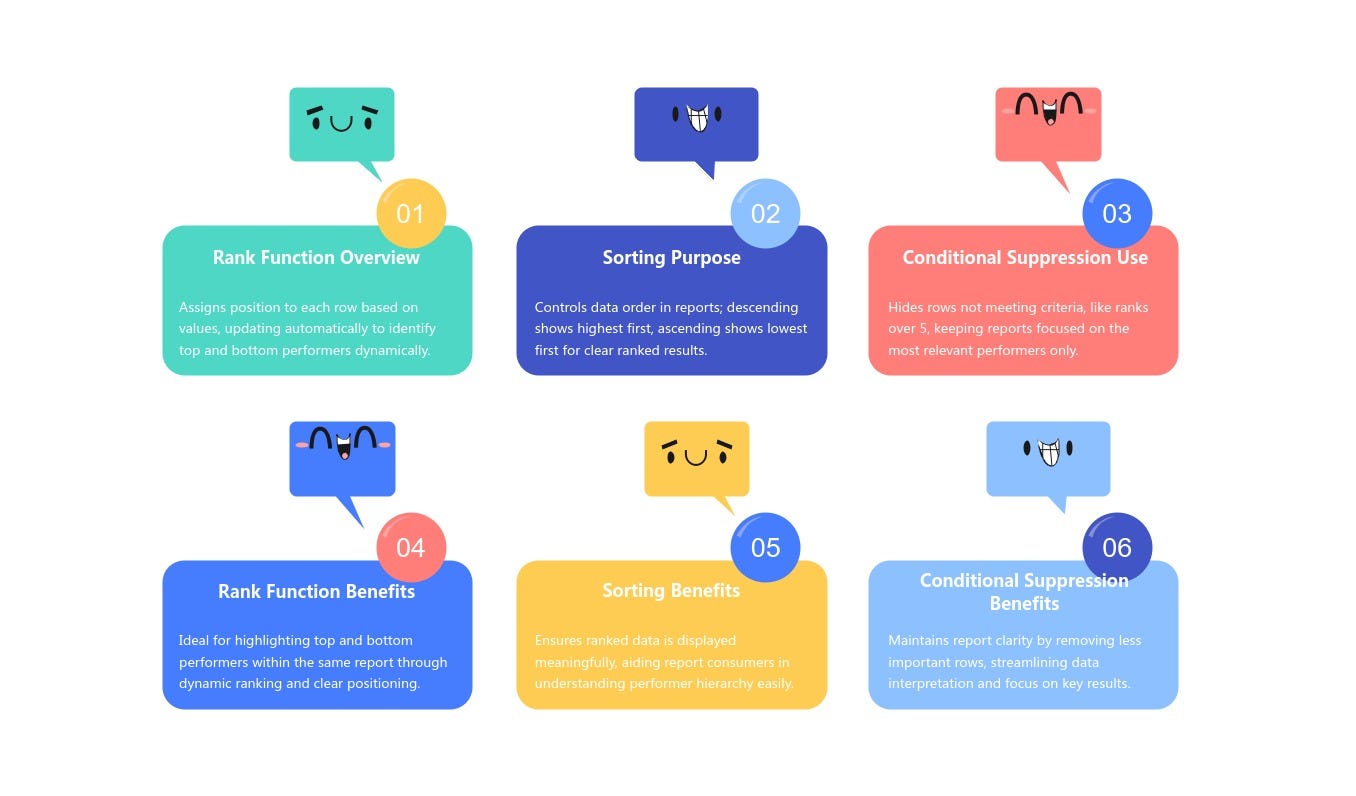
Usage of each function
Report Layout
In this report:
· Products are displayed in the rows
· The first column shows the data value (Sales)
· The second column is a formula column used for ranking
· In the POV, the Sales account and Actual scenario are selected
The goal is to display:
· Top 5 products based on Sales
· Bottom 5 products based on Sales
Step 1: Rank Formula Setup
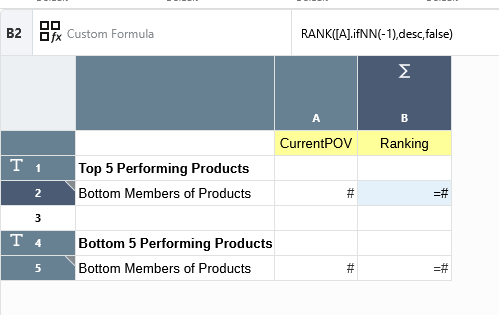
Report Design mode
Note: The Rank function works only in a formula row or formula column.
The following formulas are used:
- Top 5 Ranking (Descending)
RANK([A].ifNN(-1), desc, false)
- Bottom 5 Ranking (Ascending)
RANK([A].ifNN(-1), asc, false)
Formula Explanation
- [A] → Value column being ranked
- desc / asc → Determines ranking order
- ifNN(-1) → Handles missing or null values
- false → Allows duplicate ranks
Step 2: Sorting Configuration.
Sorting is applied to the ranking column.
- For the Top 5 section:
- Sort by Rank in ascending order
- Highest sales appear first, followed by the next four in descending order
- For the Bottom 5 section:
- Sort by Rank in ascending order
- Lowest sales appear first, followed by the next four in ascending order
This requires creating two sorts within the same report — one for the Top section and one for the Bottom section.
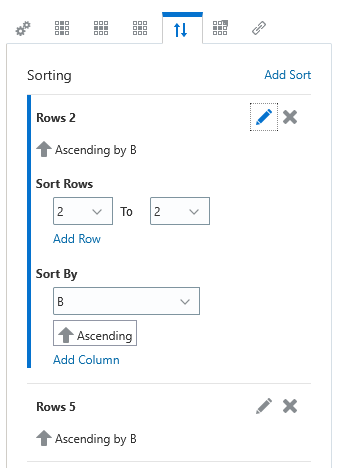
Sorting
Step 3: Conditional Suppression Setup
Finally, conditional suppression is applied to limit the output to only five rows per section.
Since the Rank function returns a numeric value representing each item’s position, the suppression condition is simple:
- Suppress rows where Rank > 5
The same suppression condition can be applied to both ranking rows due to the way the formulas are designed.

Conditional Suppression
Final Output
With Rank, Sorting, and Conditional Suppression in place, the report dynamically displays:
- Top 5 performers based on Sales
- Bottom 5 performers based on Sales
The report automatically updates as data changes, without any manual intervention.
Note: The final report may include the ranking column, which is used only for logic. This column can be hidden so that the report displays only the actual data values.
The ranking column is essential for:
- Applying Rank logic
- Sorting in ascending and descending order
- Applying conditional suppression
But it does not need to be visible to end users.
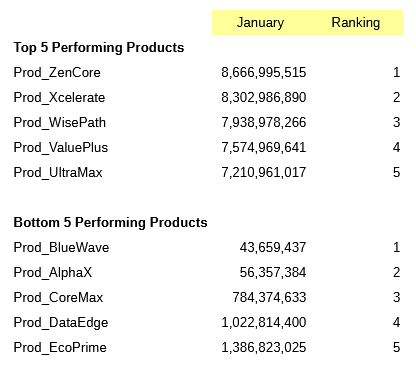
Report with Ranking column
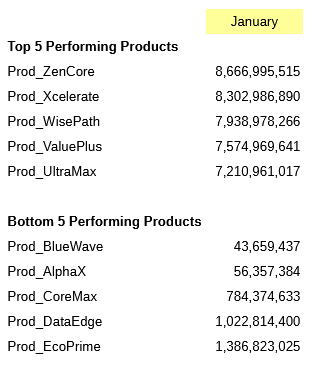
Report without Raking column
Conclusion
Using Rank, Sorting, and Conditional Suppression together provides a clean and efficient way to highlight Top 5 and Bottom 5 performers directly within Oracle Narrative Reporting. This approach improves report clarity, reduces maintenance effort, and delivers immediate insights to management.
메타데이터
- post_id
- 8511ec00c969
- slug
- displaying-top-5-and-bottom-5-performers-in-oracle-narrative-reporting-using-rank-sorting-and-8511ec00c969
- url
- https://medium.com/@anandjoy8/displaying-top-5-and-bottom-5-performers-in-oracle-narrative-reporting-using-rank-sorting-and-8511ec00c969
- canonical_url
- https://medium.com/@anandjoy8/displaying-top-5-and-bottom-5-performers-in-oracle-narrative-reporting-using-rank-sorting-and-8511ec00c969
- author_url
- https://medium.com/@anandjoy8
- status
- ok
- fetched_at
- 2026-07-18 12:15:57