I Built LLMBridge: Switching AI Providers With Single Step
Switching from GPT-4o to Claude to Gemini to a local model takes exactly one config change. Not one PR. Not a refactor.
I Built LLMBridge: Switching AI Providers With Single Step
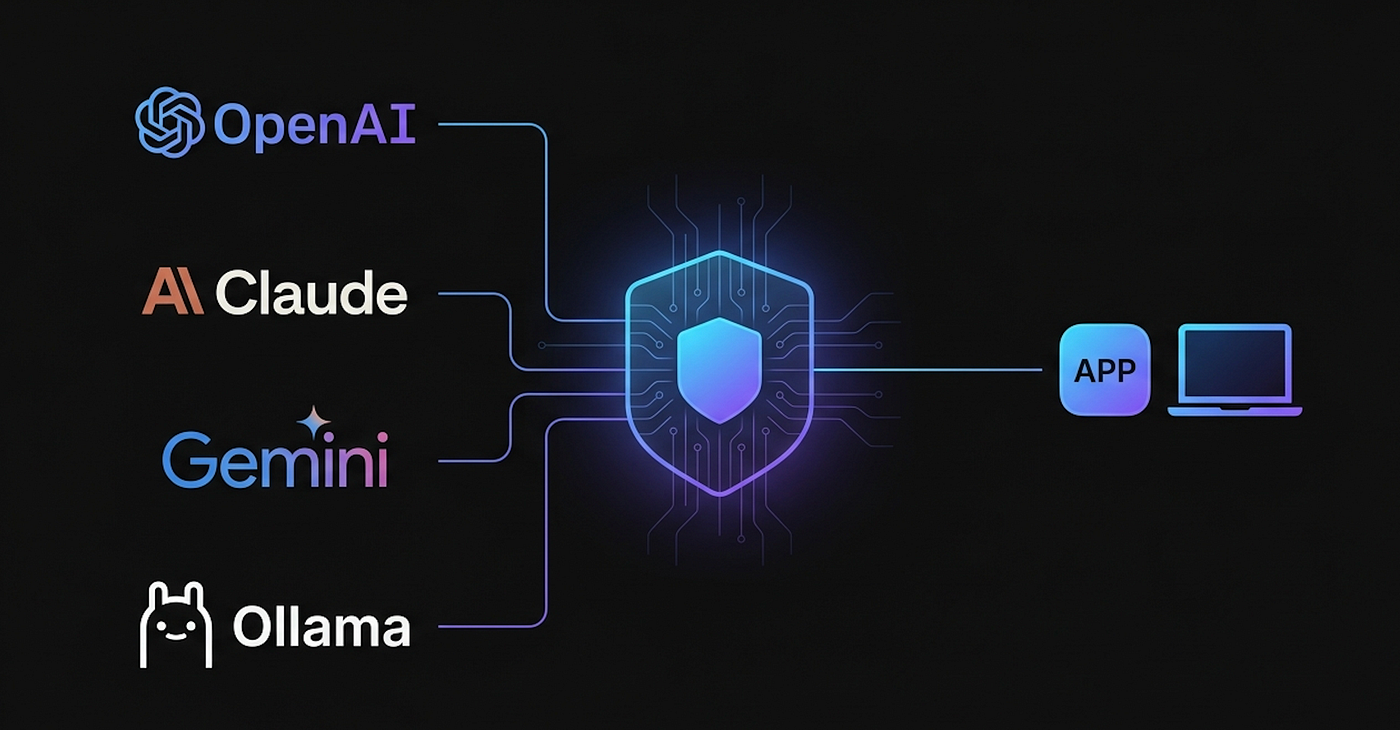
Switching from GPT-4o to Claude to Gemini to a local model takes exactly one config change. Not one PR. Not a refactor.
Just run:
docker compose up - buildBy default that boots with qwen2.5:3b running locally via Ollama — no API key, no account needed. That is the hardcoded default.
Want Claude instead? Create a .env file in the project root with two variables:
ANTHROPIC_API_KEY=your_key_here
MODEL=anthropic/claude-haiku-3–5
ANTHROPIC_API_KEY=your_key_here
MODEL=anthropic/claude-haiku-3–5
Then docker compose up — build again. That is the entire switch.
Same pattern for OpenAI:
OPENAI_API_KEY=your_key_here
MODEL=openai/gpt-4o-mini
Two things for hosted providers: an API key and a model name in provider/model format. One variable for local. No application code touched in any case.
Let me explain how I got here.
The Problem with Building Directly Against AI APIs
Every major AI provider ships their own SDK, their own request format, their own authentication flow, their own error codes. OpenAI uses one shape. Anthropic uses another. Google’s Gemini uses yet another. Even the way you pass a system prompt differs.
If you build your application directly against OpenAI’s API today, and next month you want to try Claude because it performs better on your workload you are not doing a one-line change. You are touching your HTTP client, your message formatter, your retry logic, your response parser. If you have tests, those break too.
This is provider lock-in, and it is subtle. It does not feel like lock-in on day one. It feels like just calling an API. The lock-in shows up the moment you want to leave.
What Is an AI Gateway?
An AI gateway sits between your application and the AI providers. Your application talks to the gateway using one consistent API format, usually OpenAI-compatible, since that has become the de facto standard. The gateway translates that request to whatever format the downstream provider expects, forwards it, gets the response back, and returns it in the standard format.
Your app never changes. The gateway handles all the provider-specific translation. Switching providers becomes a configuration problem, not a code problem.
Beyond routing, a mature gateway also gives you:
- Unified observability — one place to see latency, token usage, and costs across all providers
- Fallback and retry logic — if one provider is down or rate-limits you, automatically fall back to another
- Load balancing — spread traffic across providers or model instances
- Caching — cache identical prompts to reduce cost and latency
- Rate limiting — protect yourself from runaway usage
- Authentication — one API key for your app, the gateway manages individual provider keys
Without a gateway, you rebuild pieces of this for every provider, or you skip it and pay for it later.
Bifrost: The Open-Source Gateway I Built On
Bifrost (github.com/maximhq/bifrost) is an open-source AI gateway written in Go. It exposes an OpenAI-compatible HTTP API and handles routing to multiple backends OpenAI, Anthropic, Google Vertex AI, AWS Bedrock, and Ollama for local models.
What made Bifrost the right choice:
It is OpenAI-compatible out of the box. Any client that already speaks OpenAI’s API format works with zero modification. Most AI SDKs support this as a base URL override.
It handles the translation layer. When you send a request to Bifrost pointing at Claude, it rewrites the request into Anthropic’s format internally. You never see that. You just get the response back.
It supports Ollama. I wanted the project to run fully locally with no API key required. Bifrost’s Ollama support meant I could include that as the default.
It is a single Docker image. No external state store required for basic usage. Easy to compose with other services.
A typical Bifrost use case beyond my project: a company with multiple internal teams using different AI providers. Instead of each team managing their own API keys and retry logic, they run a central Bifrost instance. All teams route through it. The ops team gets unified cost dashboards. If OpenAI has an outage, the gateway fails over to another provider automatically.
Building LLMBridge on Top of Bifrost
I built LLMBridge (github.com/monirz/llmbridge) as a platform that composes three services: LLMBridge itself (a UI and config layer), Bifrost (the gateway), and Ollama (for local model serving). Docker Compose wires them together.
The config uses Viper (github.com/spf13/viper) to wire up environment variable overrides:
viper.BindEnv("default_model", "MODEL")
viper.SetDefault("default_model", "ollama/qwen2.5:3b")
No .env file means ollama/qwen2.5:3b runs automatically. The MODEL env var overrides it. No code change, no recompile.
There is also a provider_config.yaml in the project, but that serves a different purpose it defines what shows up in the UI selector: provider names, icons, badge labels, and colors. The active model at runtime is controlled purely by the MODEL env var.
Running locally with no API key is the default. Clone the repo, run docker compose up — build, and it boots with qwen2.5:3b via Ollama. No account, no billing, no rate limits.
Switching to a hosted provider means two lines in a .env file and a rebuild. That is the entire migration.
[H2] Why the Gateway Layer Matters Long-Term
The AI landscape right now is genuinely unstable in a useful way. The best model today probably will not be the best model in six months. Pricing changes. New open-source models keep getting competitive — a year ago, running a local model that could handle real tasks felt marginal. Now qwen2.5:3b is surprisingly capable for many workloads.
If your code is coupled to one provider, every one of these shifts is a potential refactor. If you have a gateway in front, they are just config changes.
There is also the cost angle. Different providers have different pricing for input tokens, output tokens, and context length. With a gateway in place, you can route different tasks to different models — use a cheap fast model for simple classification, a more capable one for generation — and switch between them without touching application code.
[H2] What’s Next
The gateway and the switching mechanism were the fast part to build. What is more interesting is what you can build on top of it — tools that take advantage of having a provider-agnostic AI layer underneath them.
More on that soon.
Repository: https://github.com/monirz/llmbridge
If you find it useful, a star helps. And if you run into issues or have ideas for what to build on top of it, open an issue or reach out.
메타데이터
- post_id
- 8553ae1e7e77
- slug
- i-built-llmbridge-switching-ai-providers-with-single-step-8553ae1e7e77
- url
- https://medium.com/@monirz/i-built-llmbridge-switching-ai-providers-with-single-step-8553ae1e7e77
- canonical_url
- https://medium.com/@monirz/i-built-llmbridge-switching-ai-providers-with-single-step-8553ae1e7e77
- author_url
- https://medium.com/@monirz
- status
- ok
- fetched_at
- 2026-06-09 15:37:30




