MCP Explained: The Protocol That Finally Gives AI a Standard Way to Talk to the World
There is a moment every developer hits when building AI-powered products. You have a capable model. You have useful data sitting in a…
MCP Explained: The Protocol That Finally Gives AI a Standard Way to Talk to the World
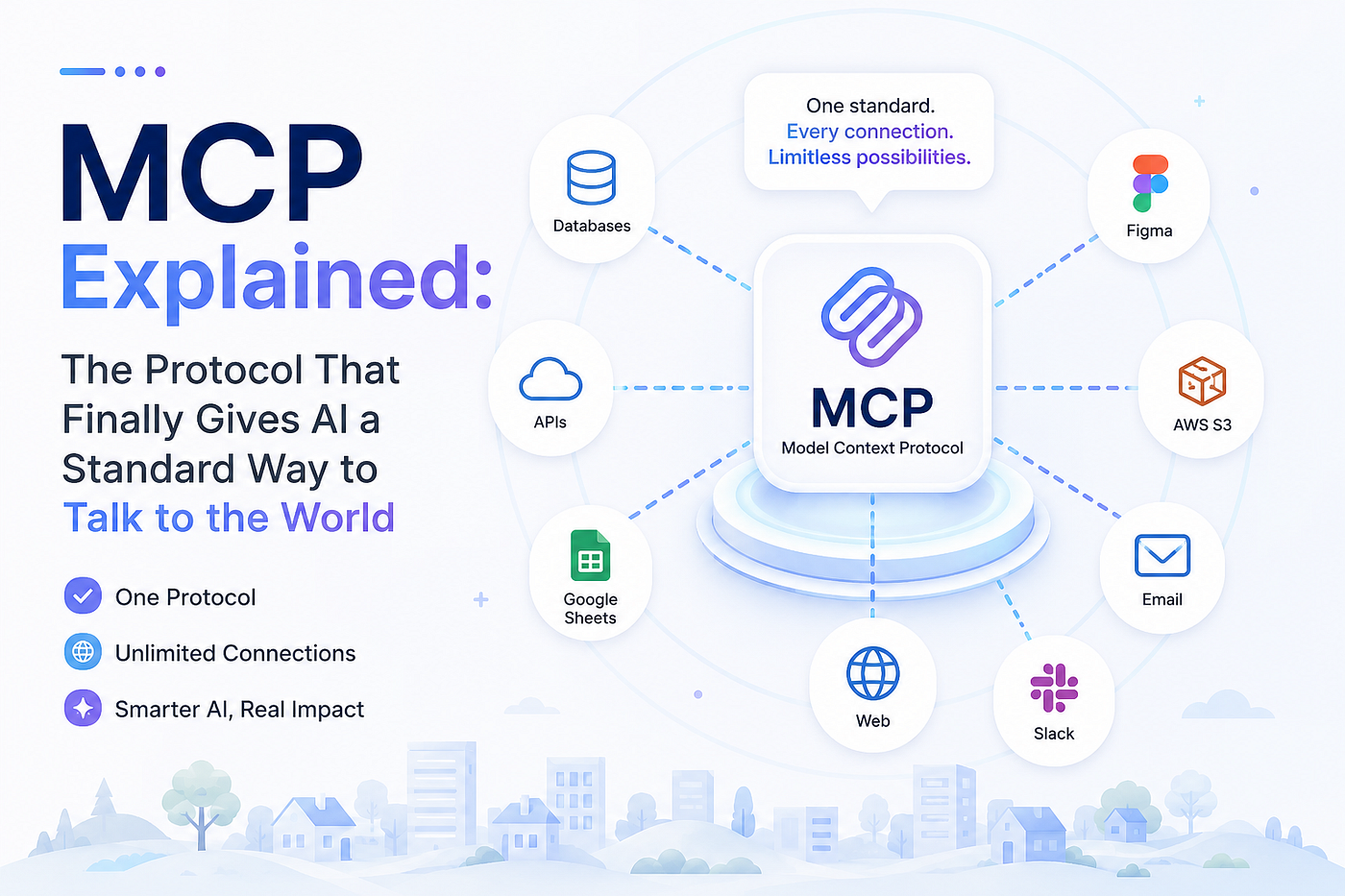
Source: Image by Sanjana Dubey.
There is a moment every developer hits when building AI-powered products. You have a capable model. You have useful data sitting in a database, a file system, or an API somewhere. And then you realize: there is no clean, standard way to connect the two.
So, you write glue code. A custom adapter here, a brittle wrapper there. It works, until you want to switch models. Or add another data source. Or onboard a teammate who has to reverse engineer your entire plumbing layer from scratch.
This is the problem Anthropic set out to solve when they released the Model Context Protocol in November 2024. By mid 2026, it has crossed from niche developer experiment to mainstream agent infrastructure, with 97 million monthly SDK downloads and close to 10,000 active public servers in the official registry. The developer community latched onto it fast, for very good reason.
The World Before MCP
Imagine you are building a product where users can ask questions about your company’s data in plain English. Simple idea. The reality? Painful.
You need to parse what the user asked, translate it into a database query, run the query, feed the results back to the model, then format the response. Now multiply that by every tool you want your AI to touch: a calendar, a GitHub repo, a Slack workspace. Each one is a completely custom integration. Different API shapes. Different auth flows. Different error formats.
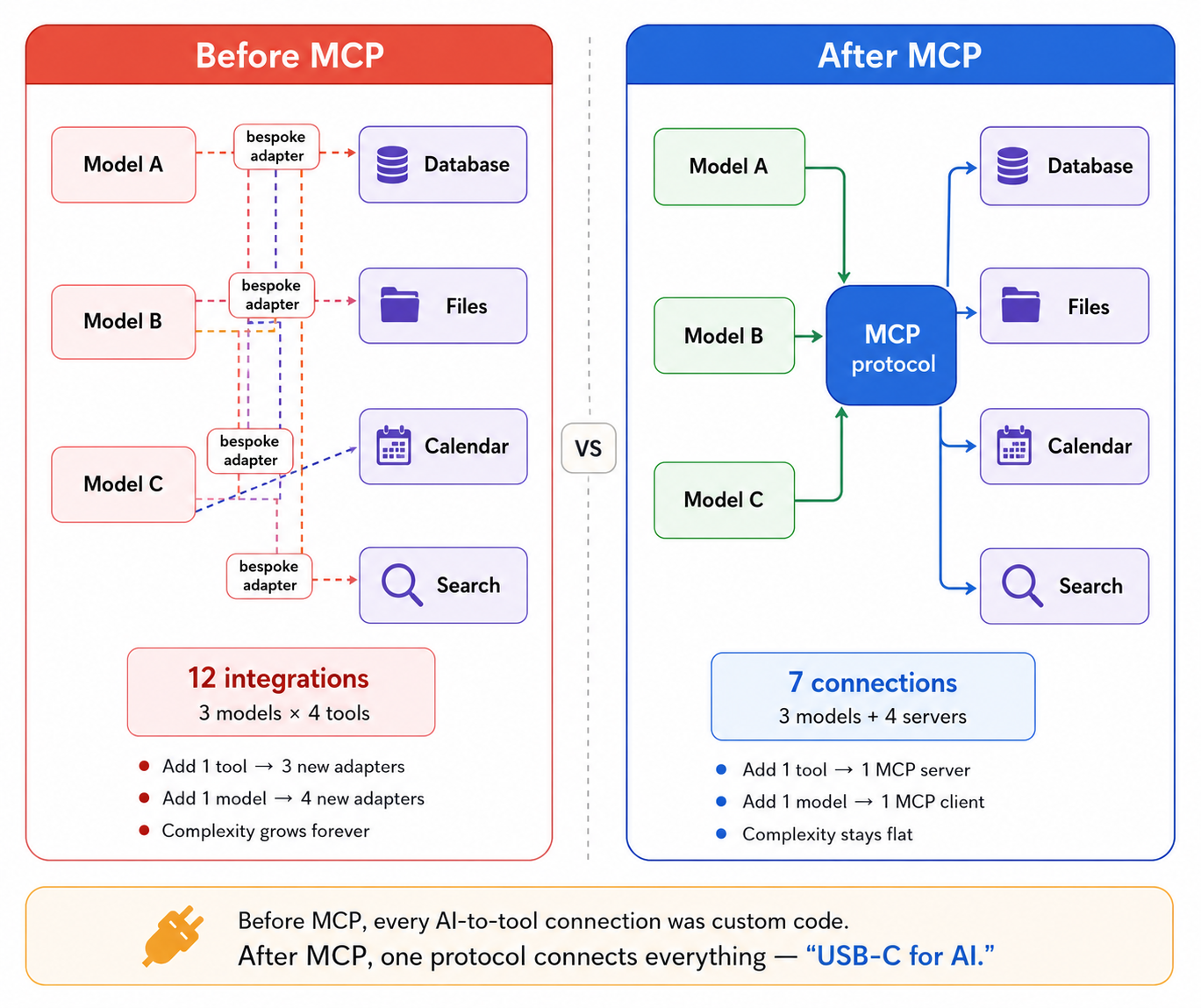
The result is what engineers quietly call “spaghetti integration.” You end up with an N × M problem, where N is the number of models and M is the number of tools. Every combination needs its own code. Add one model, rewrite for every tool. Add one tool, update every model integration. The complexity compounds in every direction.
Source: Image by Sanjana Dubey.
What MCP Actually Is
MCP stands for Model Context Protocol. It is an open standard, built on JSON-RPC 2.0, that defines a universal language for AI models to communicate with external tools and data sources. It turns the N×M problem into N+M. Build a server once, and any compliant client can use it.
The analogy that stuck is USB-C. Before USB-C, every device had its own charging port. MacBook, Android phone, camera, headphones, each needing a different cable. USB-C did not reinvent electricity. It just standardized the port. Now one cable handles all of it.
MCP is that cable for AI.
With MCP in place, any model that speaks the protocol can connect to any tool that exposes the protocol. You write the server once. Every MCP-compatible model just works with it.
What made this especially significant in 2026 is that Anthropic did not keep it to themselves. In December 2025, Anthropic donated MCP to the Agentic AI Foundation, a directed fund under the Linux Foundation, co-founded by Anthropic, Block, and OpenAI. This governance transfer signalled that MCP was no longer Anthropic’s protocol.
OpenAI’s CEO publicly endorsed MCP and announced official support in OpenAI’s agents SDK and ChatGPT. Days later, Google DeepMind confirmed their Gemini models would support MCP for tool use as well. By 2026, MCP had emerged as the de facto standard for connecting AI models to external tools, data sources, and services.
The Architecture: Three Moving Parts

Source: Image by Sanjana Dubey.
The Host is your application. Claude Desktop, a VS Code extension, your custom-built internal chatbot. It is the environment the user actually interacts with.
The MCP Client lives inside the host. It is responsible for maintaining connections to one or more MCP servers and routing messages between the model and those servers. When the model decides it needs to call a tool, the client is what handles that routing.
The MCP Server is where the actual capability lives. Each server wraps a tool or data source and exposes it through a standard interface. A server can expose three types of things:
Tools are callable functions. Think run_sql_query, search_web, send_email. The model calls these when it needs to take an action or fetch data.
Resources are readable data. Files, database rows, documents. The model can pull these into its context window.
Prompts are reusable prompt templates the server can expose to the host.
Prompts are reusable prompt templates the server can expose to the host.
MCP messages are encoded using JSON-RPC 2.0. Communication can take place over two transport mechanisms: stdio, which is used when the MCP server runs as a local process on the same machine as the client, and Streamable HTTP, which is designed for remote servers and cloud deployments. Streamable HTTP uses standard HTTP requests and can optionally leverage Server-Sent Events (SSE) for streaming responses and server-to-client notifications. This flexibility allows the same MCP protocol to work seamlessly across local development environments and production-scale systems
How a Request Actually Flows
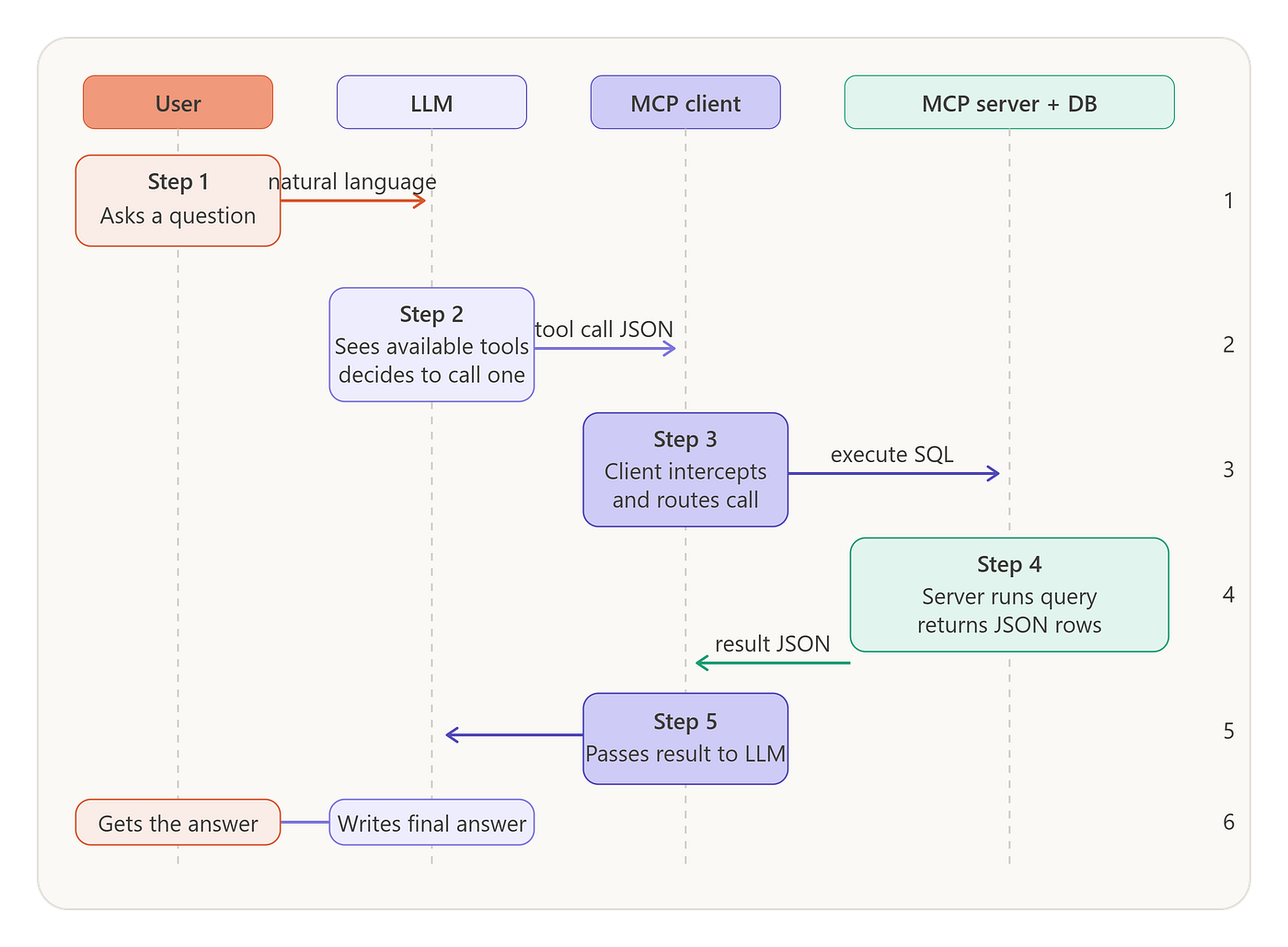
Here is what happens from the moment a user types a question to when they get their answer.
Source: Image by Sanjana Dubey.
- The user asks: “How many orders did we get last week?”
- The model sees the question along with the list of available tools, which were fetched from the MCP server at startup.
- The model decides it needs the
query_databasetool and outputs a structured tool call. - The MCP client intercepts that call and routes it to the correct server.
- The server executes the query and returns the result as JSON.
- The model reads the result and writes a clean natural language answer back to the user.
The model never touches the database directly. It never needs to know the connection string in advance. The MCP server handles all of that.
Real World Problem: Natural Language Querying Over a PostgreSQL Database
Enough theory. Let us build something real.
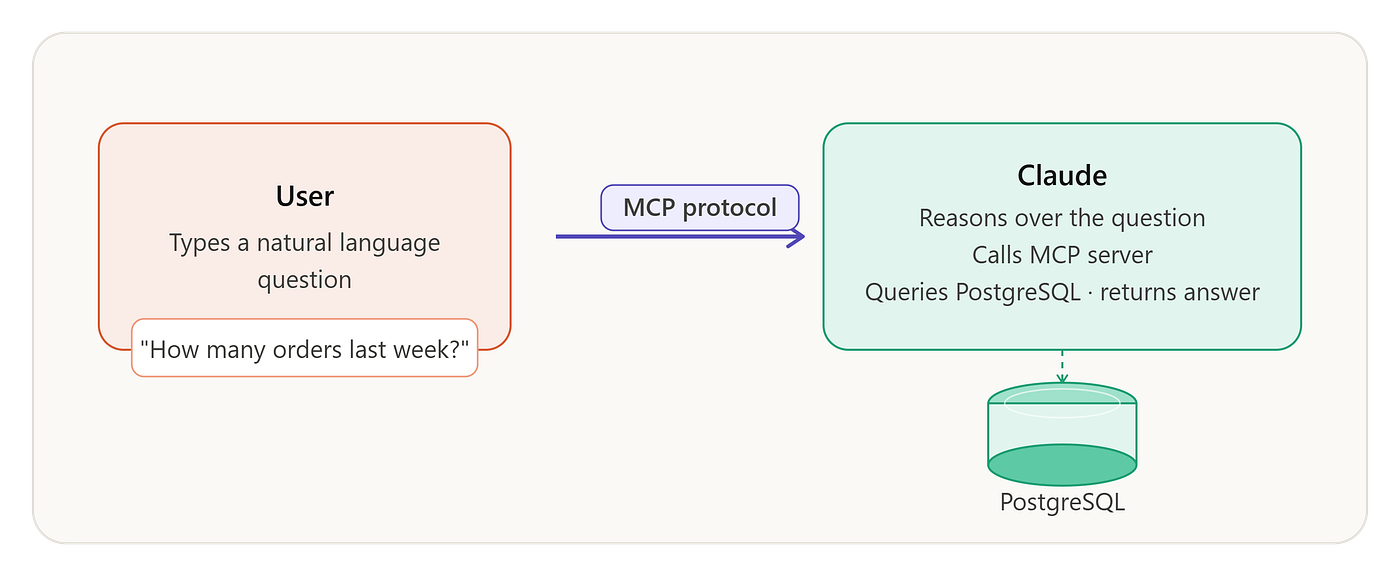
The problem: Your team has a PostgreSQL database full of order data. Non-technical teammates keep coming to you for reports. You want to give them a chat interface where they can ask questions in plain English and get live answers back without writing a single line of SQL.
What we will build: An MCP server that wraps your PostgreSQL database and exposes a query_database tool, connected to Claude, so anyone on the team can ask natural language questions and get real data back.
Source: Image by Sanjana Dubey.
Step 1: Set Up the Project
mkdir nl-db-assistant
cd nl-db-assistant
npm init -y
npm install @modelcontextprotocol/sdk pg dotenv zod
What is happening here: @modelcontextprotocol/sdk is Anthropic's official JavaScript and TypeScript SDK for building MCP servers. pg is the standard Node.js PostgreSQL client. dotenv keeps your database credentials out of the source code. zod is for runtime schema validation, which MCP uses to generate the JSON schema the model reads to understand how to call your tool.
Step 2: Create Your Environment File
Create a .env file at the project root:
DATABASE_URL=postgresql://your_user:your_password@localhost:5432/your_databaseAdd .env to your .gitignore immediately. Never commit credentials.
Step 3: Initialize the Server
Create server.js:
import { McpServer } from "@modelcontextprotocol/sdk/server/mcp.js";
import { StdioServerTransport } from "@modelcontextprotocol/sdk/server/stdio.js";
import { z } from "zod";
import pg from "pg";
import dotenv from "dotenv";

dotenv.config();
// Set up the PostgreSQL connection pool
const pool = new pg.Pool({
  connectionString: process.env.DATABASE_URL,
});
// Create the MCP server instance
const server = new McpServer({
  name: "postgres-assistant",
  version: "1.0.0",
});
What is happening here: We create an MCP server and give it a name and version. The server advertises this identity when a client connects during the capability negotiation handshake. We also set up a PostgreSQL connection pool that will be reused across every query, which is far more efficient than opening a fresh connection each time.
Step 4: Expose the Database Schema as a Resource
Before the model can write useful queries, it needs to know what tables and columns exist. We expose the live schema as a readable MCP resource so the model can pull it into context.
server.resource(
  "database-schema",
  "schema://main",
  async (uri) => {
    const result = await pool.query(`
      SELECT
        table_name,
        column_name,
        data_type
      FROM information_schema.columns
      WHERE table_schema = 'public'
      ORDER BY table_name, ordinal_position
    `);

    const schema = result.rows.reduce((acc, row) => {
      if (!acc[row.table_name]) acc[row.table_name] = [];
      acc[row.table_name].push(`${row.column_name} (${row.data_type})`);
      return acc;
    }, {});
    const schemaText = Object.entries(schema)
      .map(([table, cols]) => `${table}:\n  ${cols.join("\n  ")}`)
      .join("\n\n");
    return {
      contents: [{
        uri: uri.href,
        text: schemaText,
      }],
    };
  }
);
What is happening here: information_schema.columns is a built-in PostgreSQL view that describes every table and column in your database. We query it, reshape the results into a readable text format, and return it as an MCP resource. The model will read this before deciding how to write a query, giving it the full schema context it needs to produce valid SQL without guessing.
Step 5: Register the Query Tool
This is the core of the server. The tool the model will call to actually run SQL against your database.
server.tool(
  "query_database",
  "Run a read-only SQL query against the PostgreSQL database. Use this to answer questions about data, counts, trends, or summaries.",
  {
    sql: z.string().describe(
      "A valid PostgreSQL SELECT query. Only SELECT statements are allowed."
    ),
  },
  async ({ sql }) => {
    // Safety gate: only allow SELECT statements
    const trimmed = sql.trim().toUpperCase();
    if (!trimmed.startsWith("SELECT")) {
      return {
        content: [{
          type: "text",
          text: "Error: only SELECT queries are permitted through this interface.",
        }],
        isError: true,
      };
    }
    try {
      const result = await pool.query(sql);
      const output = JSON.stringify(result.rows, null, 2);
      return {
        content: [{
          type: "text",
          text: `Query returned ${result.rowCount} row(s):\n\n${output}`,
        }],
      };
    } catch (err) {
      return {
        content: [{
          type: "text",
          text: `Query failed: ${err.message}`,
        }],
        isError: true,
      };
    }
  }
);
What is happening here: The second argument, the description string, is critically important. This is what the model reads to decide when and how to call this tool. Write it as if you are explaining the tool to a smart intern who has never seen your database. The Zod schema on the sql parameter gets automatically converted into a JSON schema that the model sees, so it knows exactly what shape of argument to pass. The SELECT-only guard at the top prevents any write operation from sneaking through, intentionally or otherwise.
Step 6: Start the Server on stdio
const transport = new StdioServerTransport();
await server.connect(transport);
console.error("PostgreSQL MCP server is running");
What is happening here: We start the server using stdio as the transport layer. This means the MCP client will launch this script as a child process and communicate with it over standard input and output. It is the simplest and most reliable transport for local development. Note that we use console.error for our log message so it does not contaminate the stdout channel that MCP uses for protocol messages.
Step 7: Register the Server with Claude Desktop
Open your Claude Desktop configuration file.
On macOS:
~/Library/Application Support/Claude/claude_desktop_config.jsonOn Windows:
%APPDATA%\Claude\claude_desktop_config.jsonAdd your server entry:
{
  "mcpServers": {
    "postgres-assistant": {
      "command": "node",
      "args": ["/absolute/path/to/nl-db-assistant/server.js"]
    }
  }
}
Restart Claude Desktop. You will see a small tools icon in the interface confirming MCP servers are connected and ready.
Step 8: Ask It Questions
Open Claude Desktop and try these:
“How many orders were placed in the last 7 days?”
“Which product category had the highest revenue this month?”
“Show me the top 5 customers by total order value.”
Claude will read your live schema resource, write the appropriate SQL, call the query_database tool, receive the results, and translate them into a clean natural language answer. Your non-technical teammates never see a query. They just ask a question and get an answer.
What You Just Built
In about 80 lines of JavaScript you now have an MCP server that exposes your live PostgreSQL schema to any connected model, translates natural language questions into SQL safely, enforces read-only access at the protocol level, and returns structured results the model can interpret and summarize.
You wrote this once. Every MCP-compatible model, whether that is Claude today or something else tomorrow, can use it without you changing a single line of server code. That is the compounding value of a shared protocol.
Where MCP Stands in 2026
The numbers tell the story clearly. MCP went from 100,000 monthly SDK downloads at launch to 97 million by March 2026, a 970x increase in 18 months. For context, the React npm package took approximately 3 years to reach 100 million monthly downloads.
Major deployments are running at Block, Bloomberg, Amazon, and hundreds of Fortune 500 companies. Pinterest published details of their production MCP ecosystem in April 2026, running domain-specific servers for Presto, Spark, and Airflow with human-in-the-loop approval for sensitive operations. The system handles approximately 66,000 monthly tool invocations across 844 active users, saving an estimated 7,000 engineering hours per month.
On the official server ecosystem side, Slack, GitHub, Google, Salesforce, Stripe, HubSpot, Shopify, Notion, Linear, Sentry, Figma, Webflow, Cloudflare, and Postman have all built official or community-maintained MCP servers.
The 2026 roadmap is focused on making MCP enterprise-ready. The key priorities are enterprise authentication with OAuth 2.1 and enterprise identity provider integration, multi-agent coordination so one agent can call another as if it were a tool server, and a curated verified server registry with security ratings.
Frequently Asked Questions
Is MCP just function calling with extra steps?
No. They operate at different layers. Function calling is the AI model’s ability to decide to invoke a tool. MCP is the protocol that connects the model to the tool. They are complementary. Function calling answers “should I call a tool?” MCP answers “how do I reach the tool and talk to it?” Most modern setups use both.
Can I use MCP with models other than Claude?
Yes, and this is one of its strongest properties. OpenAI, Google DeepMind, Microsoft, and thousands of development teams have adopted MCP. Any model with an MCP-compatible client can talk to any MCP server, regardless of who built either one.
Is MCP production-ready in 2026?
For most use cases, yes. Major deployments are running at Block, Bloomberg, Amazon, and hundreds of Fortune 500 companies. That said, for latency-critical applications like real-time trading systems or sub-100ms response requirements, the abstraction cost matters and direct API connections may outperform MCP-mediated equivalents.
Is MCP secure enough for enterprise use?
It is getting there. The March 2025 spec update introduced a comprehensive OAuth 2.1-based authorization framework, upgrading MCP’s security model for production use. The 2026 roadmap is focused on SAML and OIDC integration for enterprise identity providers like Okta and Azure AD. For highly regulated industries like financial services or healthcare, you will still need additional compliance layers on top for now.
Who governs MCP? Is there a risk Anthropic changes direction?
In December 2025, Anthropic donated MCP to the Agentic AI Foundation under the Linux Foundation. This made it vendor-neutral, community-governed shared infrastructure, in the same category as HTTP or TCP/IP. No single company can unilaterally change direction.
What is the difference between an MCP tool and an MCP resource?
Tools are for actions the model wants to take, running a query, sending a message, creating a file. Resources are for data the model wants to read passively, a file, a database schema, a document. The distinction matters because resources are pulled into context, while tools are called on demand mid-conversation.
Can one MCP server connect to multiple databases or services?
Yes. A single server can expose as many tools and resources as makes sense. A common pattern is a “data platform” server that exposes read access across multiple databases, with each one as a separate tool or resource.
References
- Anthropic. Introducing the Model Context Protocol. November 25, 2024. anthropic.com
- MCP Official Blog. The 2026 MCP Roadmap. David Soria Parra, March 9, 2026. blog.modelcontextprotocol.io
- WorkOS. Everything Your Team Needs to Know About MCP in 2026. March 26, 2026. workos.com
- Digital Applied. MCP Adoption Statistics 2026. May 2026. digitalapplied.com
- ChatForest. The MCP Ecosystem in 2026: How the Model Context Protocol Became the Universal Standard for AI Tool Integration. April 2, 2026. chatforest.com
- The New Stack. MCP’s Biggest Growing Pains for Production Use Will Soon Be Solved. March 14, 2026. thenewstack.io
- Advisable. The MCP Revolution: What Model Context Protocol Means for SaaS Products and Startups in 2026. April 6, 2026. advisable.com
- MCP Official Documentation. Model Context Protocol Specification. modelcontextprotocol.io
Found this useful? Follow for more deep dives into AI infrastructure and developer tooling. Have questions about your specific MCP setup? Drop them in the comments.
메타데이터
- post_id
- abf545ae9fcb
- slug
- mcp-explained-the-protocol-that-finally-gives-ai-a-standard-way-to-talk-to-the-world-abf545ae9fcb
- url
- https://medium.com/@dubeysanjana23/mcp-explained-the-protocol-that-finally-gives-ai-a-standard-way-to-talk-to-the-world-abf545ae9fcb
- canonical_url
- https://medium.com/@dubeysanjana23/mcp-explained-the-protocol-that-finally-gives-ai-a-standard-way-to-talk-to-the-world-abf545ae9fcb
- author_url
- https://medium.com/@dubeysanjana23
- status
- ok
- fetched_at
- 2026-07-26 04:29:58