🔐 This CLI Tool Solved My AWS SSO Credentials Nightmare (DEPRECATED)
Update (June 2026): This tool has evolved a lot and is now awssesh — simpler, faster, npm-installable. 👉 Read the current version here.
🔐 This CLI Tool Solved My AWS SSO Credentials Nightmare (DEPRECATED)
Update (June 2026): This tool has evolved a lot and is now awssesh — simpler, faster, npm-installable. 👉 Read the current version here.
Every day, same story. 😤 Tokens expire. Deploys break at the worst possible time. I’m running aws sso login five times a day across 10+ AWS accounts, juggling browser tabs and verification codes — all while trying to actually get work done.
I couldn’t find a tool that handled this properly. So I built one. 🛠️

😩 The Daily Pain
If you manage multiple AWS accounts through SSO, you already know this pain intimately:
🔁 Open terminal. Run a command. Open browser. Enter code. Wait. Repeat. ❓ No idea which profiles are still valid and which expired an hour ago. 💥 A deploy breaks silently because a token expired mid-way. 🚫 No dashboard. No bulk operations. Just one profile at a time, manually.
The AWS CLI gives you aws sso login — profile my-profile. One profile. One at a time. Every. Single. Time. ⏳
After months of this frustration, I decided to build the tool I always wished existed — and that’s how SSOmatic was born. 🚀
⚡ What SSOmatic Does
SSOmatic is a single CLI tool that auto-discovers every SSO profile in your ~/.aws/config and gives you a live status dashboard — instantly. No configuration files. No setup steps. Just run it and see everything at a glance.
On first launch, it scans your config, finds all your profiles — including sso-session blocks — and shows you exactly what’s valid, what’s expired, and what needs attention. 🟢 Green dot means you’re good. 🔴 Red dot means it’s time to refresh. Simple as that.
🔄 Bulk Refresh Changed Everything
This is the feature that genuinely saved my sanity. Select the profiles you want, hit Enter, and SSOmatic handles the entire SSO device auth flow for each one — token polling, caching, credential writing. You just approve in the browser. That’s it. ✅
I also added a favorites system — so your most-used profiles are always pre-selected. One keystroke to refresh everything you need for the day. ⭐
👻 The Daemon That Runs in the Background
This is the real game-changer. Set a refresh interval — 15 minutes, 30 minutes, whatever fits your workflow — pick your profiles, and SSOmatic silently keeps them alive in the background. It refreshes tokens before they expire and sends desktop notifications when something needs your manual attention. 🔔
No more mid-deploy surprises. No more “which profile expired?” guessing games. Just peace of mind. 😌
🌐 Press W, Get a Web Dashboard
This is the feature I’m most proud of. While building the CLI, I realized that sometimes I just want a browser tab I can glance at without switching context. So I embedded a web server directly into the CLI — no extra process, no separate install.
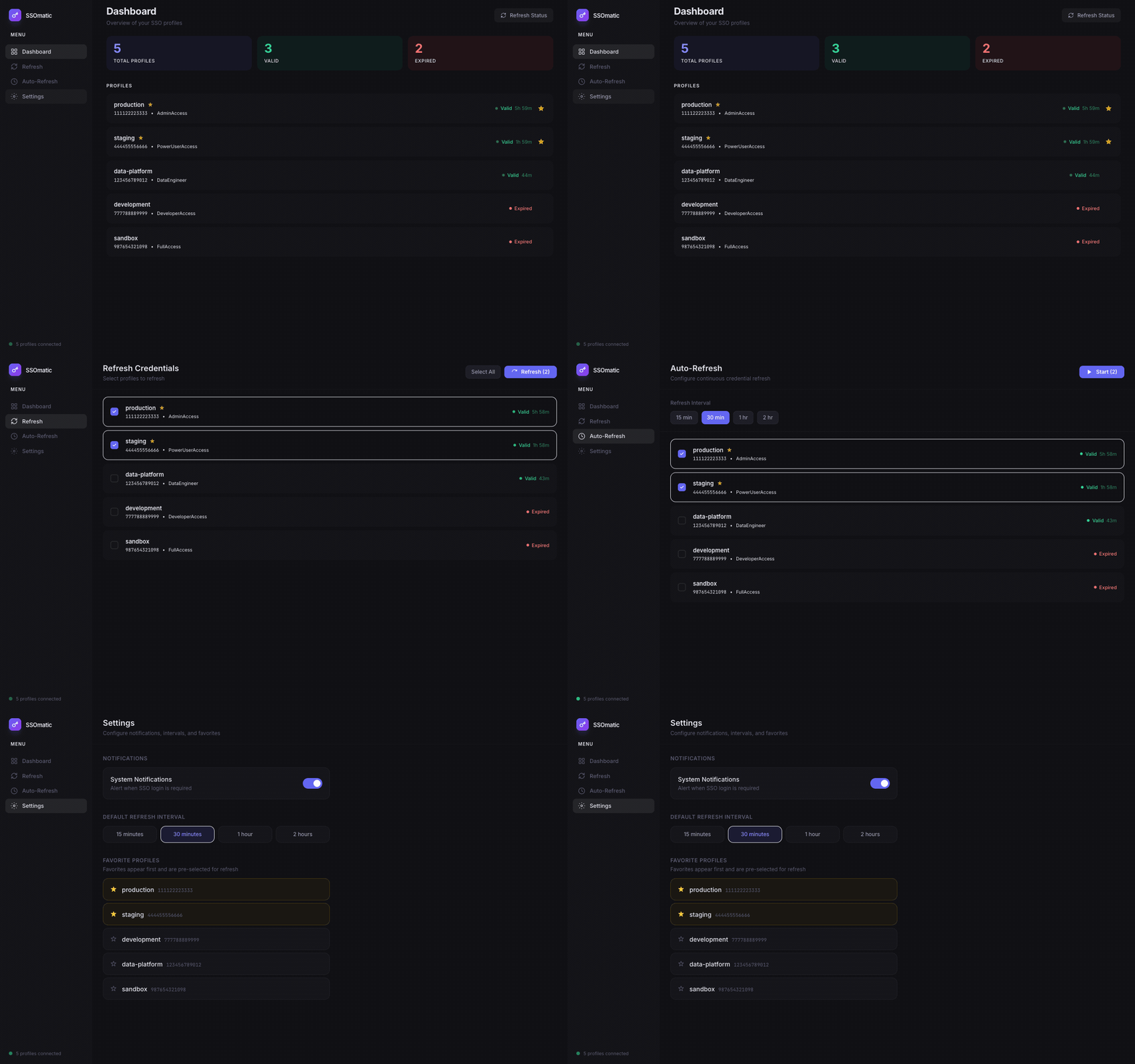
Press w in the terminal. A sleek dark-mode web dashboard spins up on localhost instantly. Same data, same profiles, same live status — just beautifully rendered in React with Tailwind. Press w again and the server stops. 🎨
One binary. Two interfaces. Your preference is remembered too — next time you launch SSOmatic, the web server starts automatically if you had it on before. 💡
🛠️ The Technical Side
For those who want to peek under the hood — here’s the stack:
⚡ Bun as the runtime — blazing-fast startup and single binary compilation. 🖥️ React + Ink for the terminal UI — yes, actual React, in the terminal. 🌐 React + Vite + Tailwind for the web dashboard. 💪 TypeScript everywhere. 🔗 The web server is a Bun HTTP server with a simple RPC bridge to the same credential logic the CLI uses.
The whole project is a flat, single-package structure. No monorepo madness. No workspace complexity. One entry point, one build command. Clean and simple. 🧹
🌍 It’s Open Source
I built SSOmatic to scratch my own itch — but if you’re dealing with the same AWS SSO pain, I’d love for you to give it a try. It’s free, open source, and actively maintained.
💻 Install via Homebrew (macOS / Linux):
brew install tux86/tap/ssomaticGitHub: https://github.com/tux86/ssomatic
Install it, fire up bun run start, and let me know what you think. Issues, feedback, and PRs are all very welcome — I read everything. 🙌
If you work with AWS SSO across multiple accounts and this resonates with you, share it with your team. Chances are they’re suffering through the exact same manual refresh cycle — and they’ll thank you for it. 💬
#AWS #DevTools #OpenSource #CLI #TypeScript #Bun #CloudEngineering #DevOps
메타데이터
- post_id
- b89b03bed097
- slug
- this-cli-tool-solved-my-aws-sso-credentials-nightmare-b89b03bed097
- url
- https://medium.com/@walid.karray/this-cli-tool-solved-my-aws-sso-credentials-nightmare-b89b03bed097
- canonical_url
- https://medium.com/@walid.karray/this-cli-tool-solved-my-aws-sso-credentials-nightmare-b89b03bed097
- author_url
- https://medium.com/@walid.karray
- status
- ok
- fetched_at
- 2026-06-28 04:42:08



