Windows Server 2025 強制 LDAP 安全性簽章 Signing 導致 Bind 失敗
最近準備將 Domain Controller 升級到 Windows Server 2025,在升級測試過程中發現,原本 DLP 廠商設定的 LDAP 同步機制開始出現錯誤,無法正常運作。不過如果將連線目標改回舊的 Windows Server 2016…
Windows Server 2025 強制 LDAP 安全性簽章 Signing 導致 Bind 失敗
最近準備將 Domain Controller 升級到 Windows Server 2025,在升級測試過程中發現,原本 DLP 廠商設定的 LDAP 同步機制開始出現錯誤,無法正常運作。不過如果將連線目標改回舊的 Windows Server 2016 網域控制器,則又可以正常執行。
我們使用 ldapsearch 來測試看看
ldapsearch -x -H ldap://your_domain_controller_ip \
-D "ivan_cheng@your_domain.com.tw" \
-W \
-b "DC=your_domain,DC=com,DC=tw" "(objectClass=user)"
錯誤訊息如下:
ldap_bind: Strong(er) authentication required (8) additional info: 00002028: LdapErr: DSID-0C09035C, comment: The server requires binds to turn on integrity checking if SSL\TLS are not already active on the connection, data 0, v65f4
這個錯誤其實是 Windows Server 2025 預設啟用 LDAP 簽章,並不是帳號密碼錯誤。代表 DC 要求 LDAP 連線必須具備完整性保護 (LDAP Signing) 或 TLS 加密。而 ldapsearch 是使用一般 LDAP (389/TCP) 明文連線,因此被拒絕。
確認 AD 設定
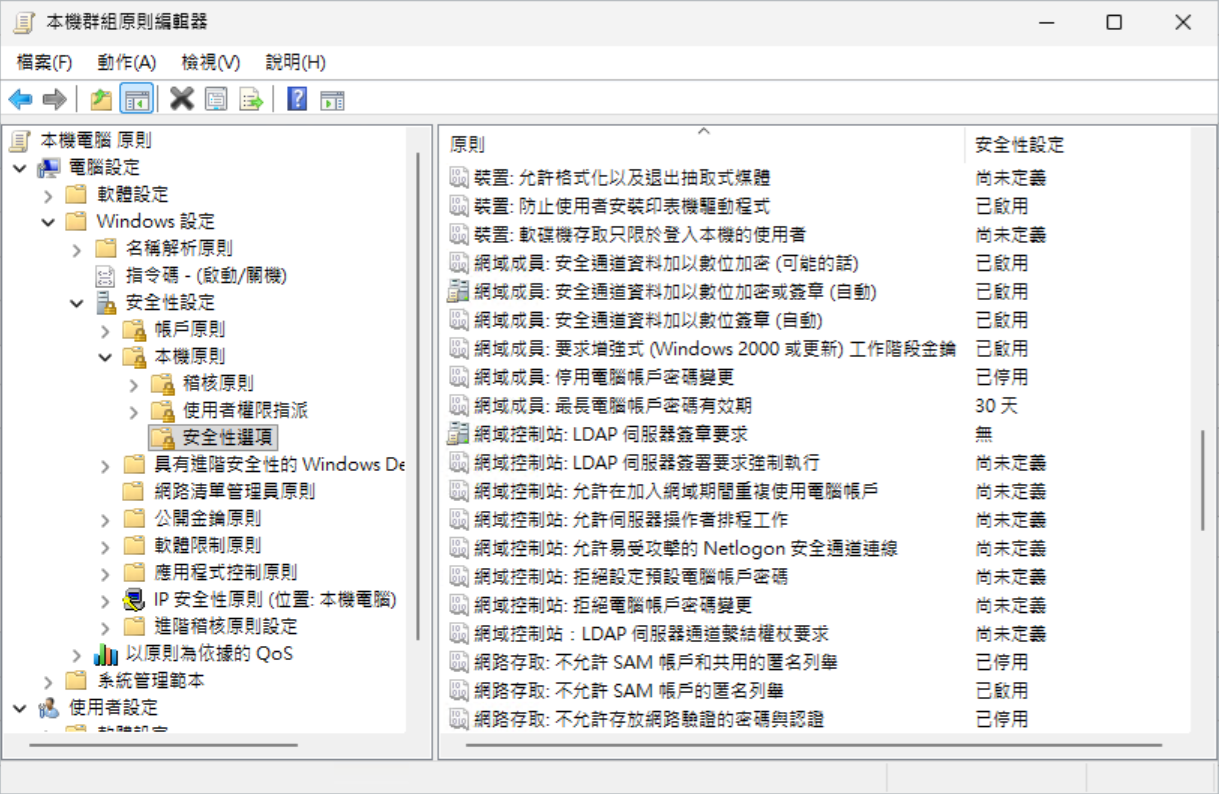
在 DC 執行 gpedit.msc,前往本機電腦 > 電腦設定 > Windows 設定 > 安全性設定 > 本機原則 > 安全性選項。
- 網域控制站:LDAP 伺服器簽章要求:無
- 網域控制站:LDAP 伺服器簽署要求強制執行:尚未定義
使用 PowerShell 直接在 DC 查詢 LDAPServerIntegrity 為 1
- 1 代表 None
- 2 代表 Require Signing
Get-ItemProperty `
"HKLM:\SYSTEM\CurrentControlSet\Services\NTDS\Parameters" `
LDAPServerIntegrity
先嘗試停用 LDAP 伺服器簽署要求強制執行
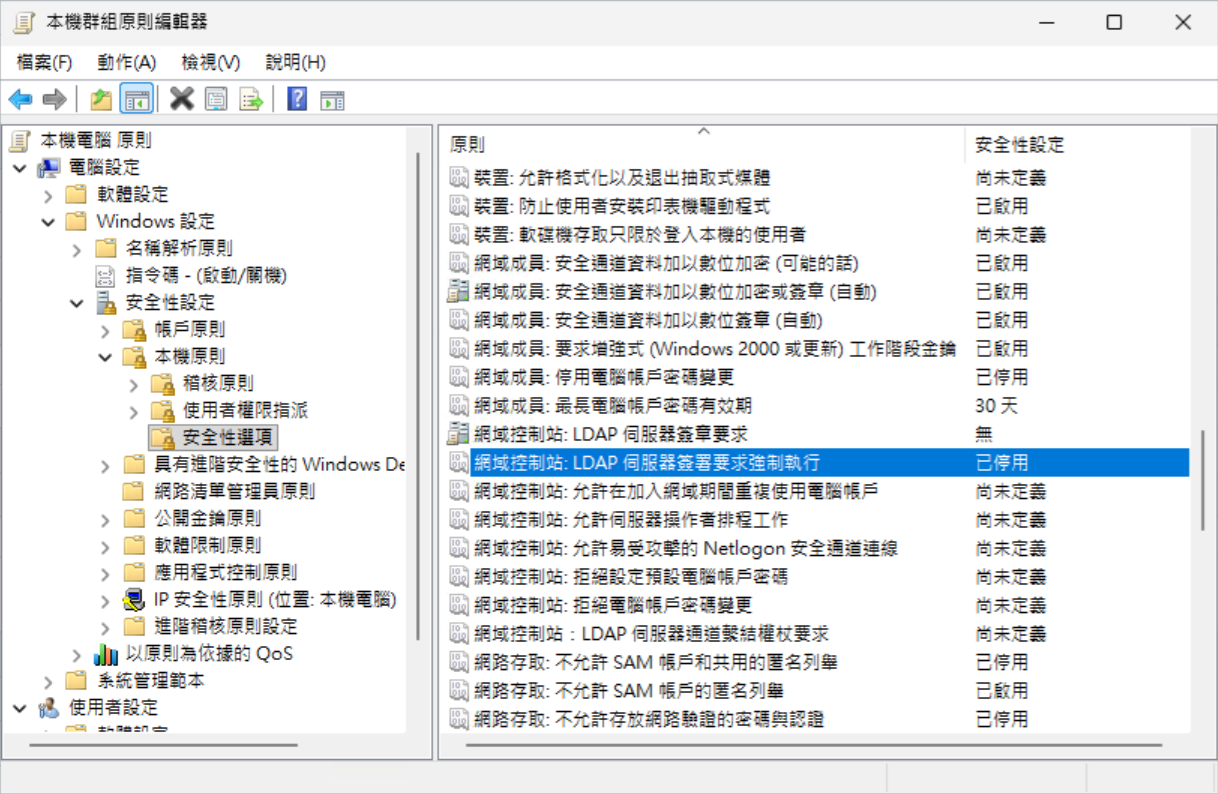
立即同步 GPO
gpupdate /force再次進行 LDAP 同步就正常了,若要啟用 LDAP Signing 可以參考下列文章。
今天的分享就到這邊,感謝收看。
參考文章
메타데이터
- post_id
- bdbcb84db2ed
- slug
- windows-server-2025-強制-ldap-安全性簽章-signing-導致-bind-失敗-bdbcb84db2ed
- url
- https://medium.com/@jieshiun/windows-server-2025-%E5%BC%B7%E5%88%B6-ldap-%E5%AE%89%E5%85%A8%E6%80%A7%E7%B0%BD%E7%AB%A0-signing-%E5%B0%8E%E8%87%B4-bind-%E5%A4%B1%E6%95%97-bdbcb84db2ed
- canonical_url
- https://medium.com/@jieshiun/windows-server-2025-%E5%BC%B7%E5%88%B6-ldap-%E5%AE%89%E5%85%A8%E6%80%A7%E7%B0%BD%E7%AB%A0-signing-%E5%B0%8E%E8%87%B4-bind-%E5%A4%B1%E6%95%97-bdbcb84db2ed
- author_url
- https://medium.com/@jieshiun
- status
- ok
- fetched_at
- 2026-06-18 07:02:39