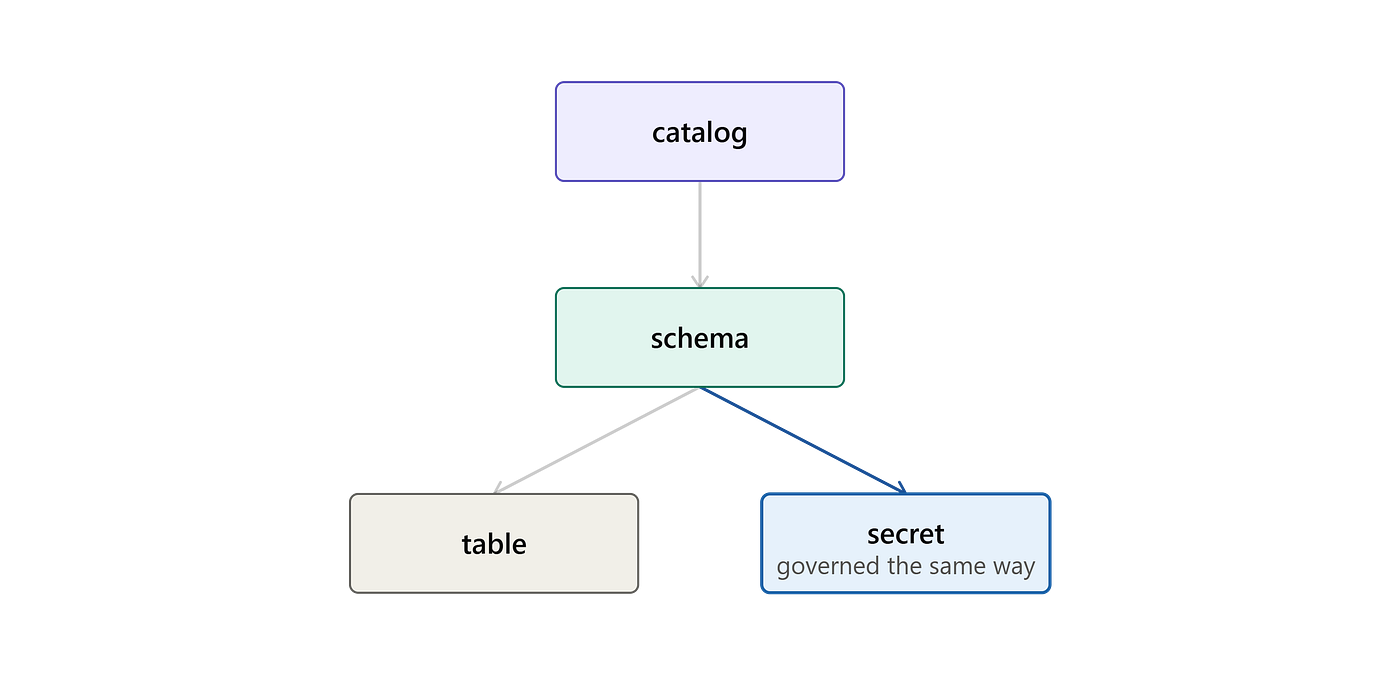
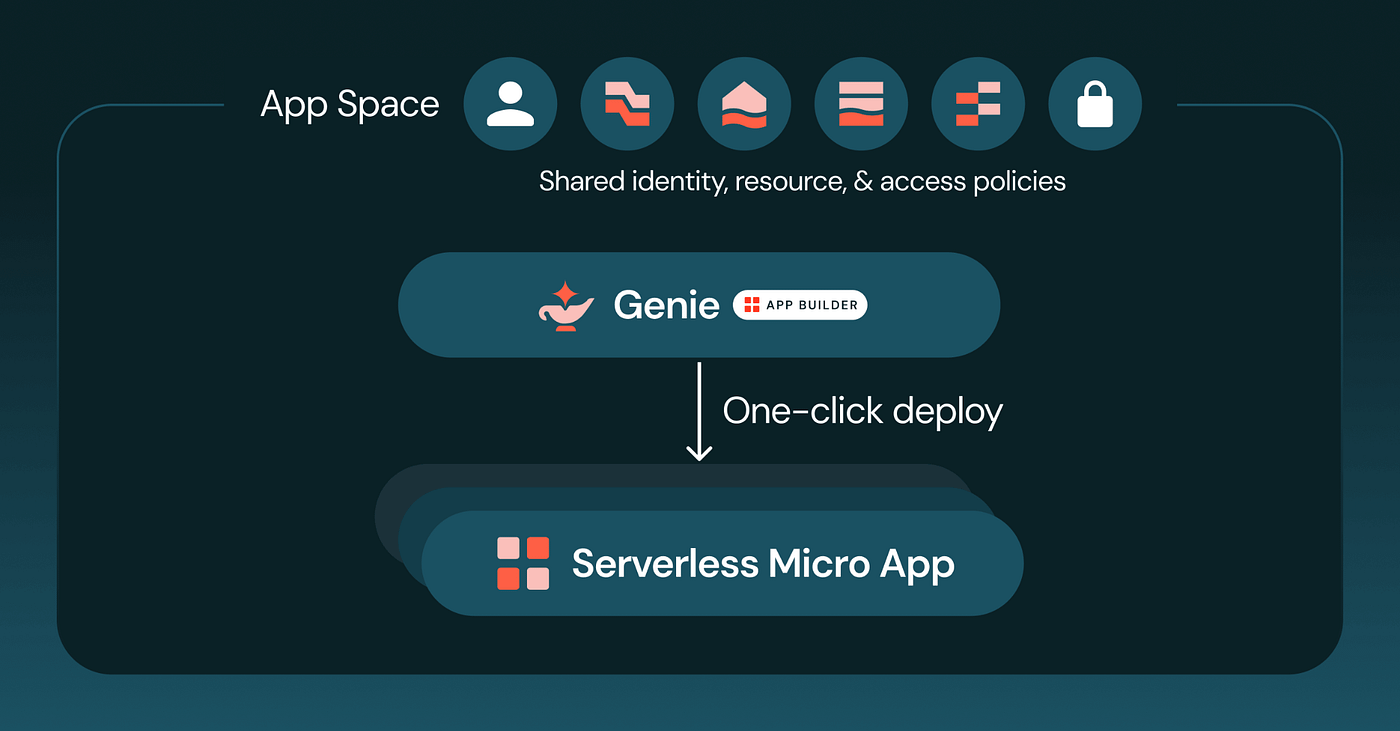
Lakebase CDF: The Simplest Way to Stream Postgres Changes into Your Lakehouse
Databricks Native change data capture from Postgres into Delta — no connectors, no staging pipelines, no operational overhead.
Lakebase CDF: The Simplest Way to Stream Postgres Changes into Your Lakehouse
Databricks Native change data capture from Postgres into Delta — no connectors, no staging pipelines, no operational overhead.
If you have worked with operational databases and tried to capture cdc and keep target in sync with the source- database, you know how complicated it gets. You configure Debezium, manage connectors, debug WAL replication lag, build a staging layer, wire a second pipeline to move data from that layer into target table, and then monitor all of it indefinitely. Every schema change is a risk. Every new table means more work. Databricks has introduced Lakebase Change Data Feed (CDF), currently in Public Preview, to simplify this entire process.
Lakebase CDF relies on the wal2delta Postgres extension, which tails the Write-Ahead Log and flushes captured changes directly into Unity Catalog-managed Delta tables every ~15 seconds. No external connector, no staging volume, no second pipeline. Your operational data becomes a first-class Bronze layer the moment a change happens — ready for downstream pipelines, models, and applications without any additional work.
This article covers how CDF works, how to set it up, and — most importantly — how to keep your pipelines stable when schemas evolve, which is where most teams run into trouble.
How it works
At its core, Lakebase CDF consists of three primary components: Lakebase PostgreSQL, wal2delta, and Unity Catalog Delta tables. Together, these components provide a fully managed mechanism for capturing row-level database changes and making them available in Delta Lake format.
When data is inserted, updated, or deleted in a Lakebase PostgreSQL table, the change is first recorded in PostgreSQL’s Write-Ahead Log (WAL) — the sequential change record Postgres maintains internally.
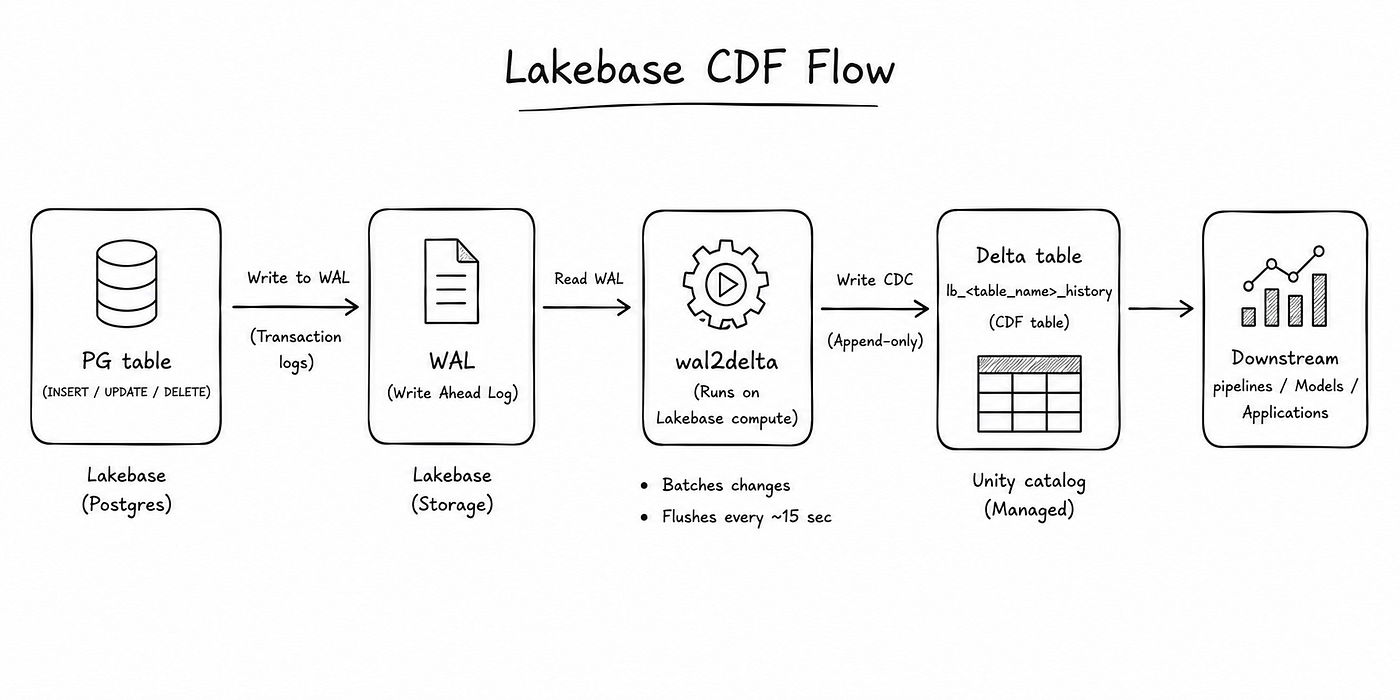
Lakebase CDF Flow
The wal2delta extension reads these change events from the Postgres Write-Ahead Log and writes them as rows into Delta history tables managed by Unity Catalog — every 15 seconds, with no infrastructure to manage.
Each source table gets its own history table, named lb_<table_name>_history. Alongside your original columns, every row includes a set of metadata columns added by CDF:
_pg_change_type— the operation that produced the row (insert, update, delete)_pg_lsn— the Log Sequence Number from the WAL, used to track replication progress_pg_xid— the Postgres transaction ID_timestamp— when the change was committed in Postgres_sort_by— a monotonically increasing value used for ordering .
Databricks manages the entire sync automatically. You configure it once at the schema level and every qualifying table is tracked automatically — including ones added later.
These tables are append-only. Every change — insert, update, delete — adds a new row. Nothing is ever modified in place.
Lakebase CDF vs Lakehouse Sync
Databricks already offered Lakehouse Sync for syncing Postgres changes into Delta. CDF is a meaningful step forward:
- Lakehouse Sync requires tables to be registered individually at pipeline creation time. To add a new table, you have to recreate the entire pipeline from scratch.
- Lakehouse Sync runs two separate pipelines internally — one writes CDC events to a Volume, a second syncs from that Volume into Delta streaming tables. That doubles your monitoring surface and the number of things that can fail.
- To enable Lakehouse Sync, the database must first have a corresponding
lakebase-postgrescatalog created in Unity Catalog before sync can be configured. - Lakebase CDF is enabled on an entire schema at once. Within that schema, every table satisfying two conditions —
REPLICA IDENTITY FULLenabled and a non-zero row count — is automatically included in the sync cycle. Tables added to the schema after CDF is enabled are picked up immediately once those conditions are met. - CDF tables are ready to use as Bronze directly. There is no staging layer between the source and your lakehouse.
Setting it up
1. Create your schema inside the right database
CDF can only be enabled on schemas that live inside the databricks_postgres default database in a Lakebase branch. Schemas outside this database are not eligible.
-- create this schema within databricks_postgres db
CREATE SCHEMA sch_ecommerce;
CREATE TABLE sch_ecommerce.products (
id SERIAL PRIMARY KEY,
name VARCHAR(200) NOT NULL,
price DECIMAL(10,2) NOT NULL,
category VARCHAR(50)
);2. Enable REPLICA IDENTITY FULL
Each table must have REPLICA IDENTITY FULL so that all column values — not just the primary key — are captured in WAL records.
ALTER TABLE sch_ecommerce.products REPLICA IDENTITY FULL;Tables that do not have this setting are skipped. Tables with the setting but zero rows are also excluded — they get picked up automatically once data is inserted.
You can confirm which tables are included in the sync at any time by querying the wal2delta.tables view directly on your databricks_postgres database:
SELECT * FROM wal2delta.tables;3. Enable CDF from the Lakebase UI
To enable CDF for Lakebase , Navigate to Lakebase tab → Lakebase CDF → click Start. Select the database (databricks_postgres) and the schema, then choose your Unity Catalog destination.
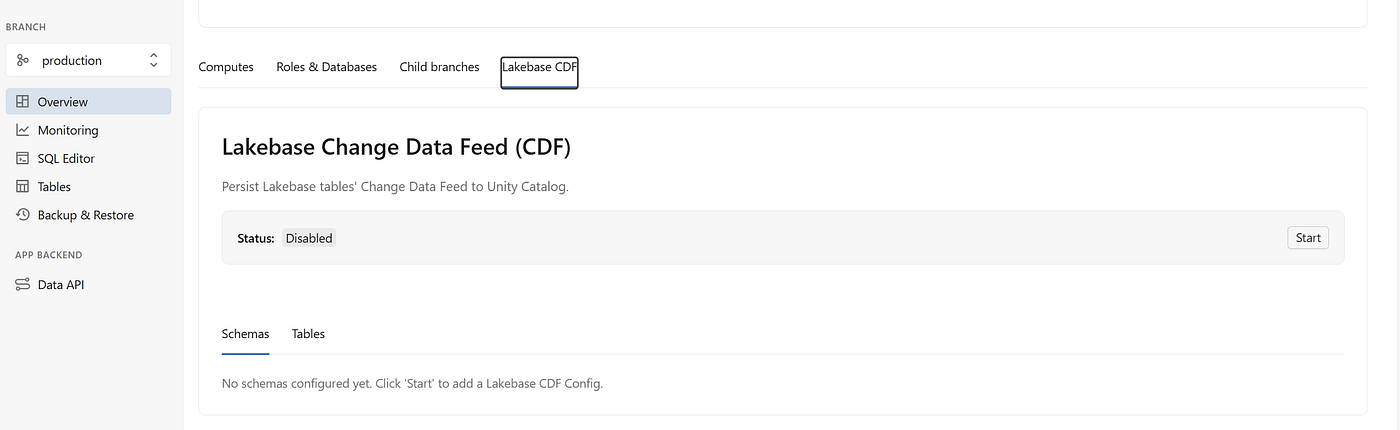
Lakebase Overview Tab
The UI shows a preview of which tables will be included and their sync status before you confirm.
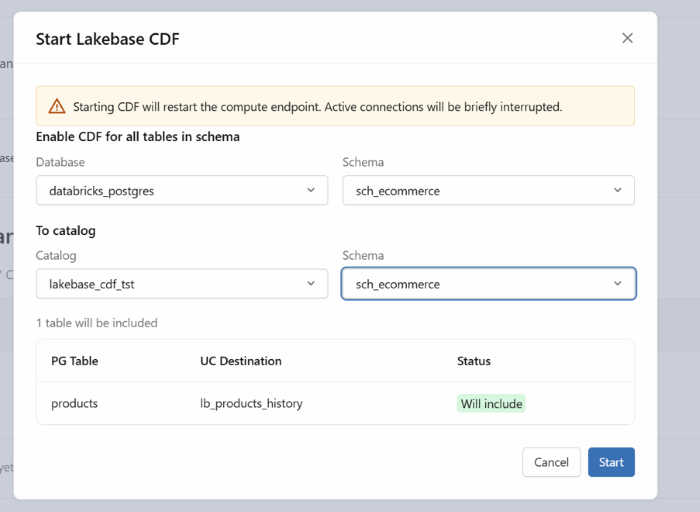
Lakebase CDF
Once enabled, the Tables view shows each source table, its destination Delta table (lb_<table_name>_history), status, last committed LSN, and the time of last update.
All qualifying tables (REPLICA IDENTITY FULL + row count > 0) are automatically included and synced every 15 seconds.
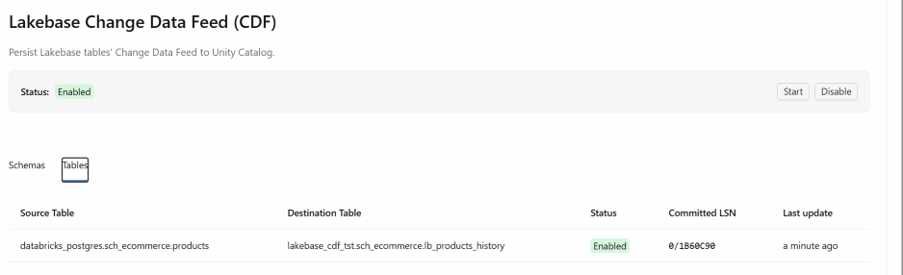
CDF Tables
Understanding change events
Every row written to a CDF history table includes a _pg_change_type column that tells you exactly what produced it:
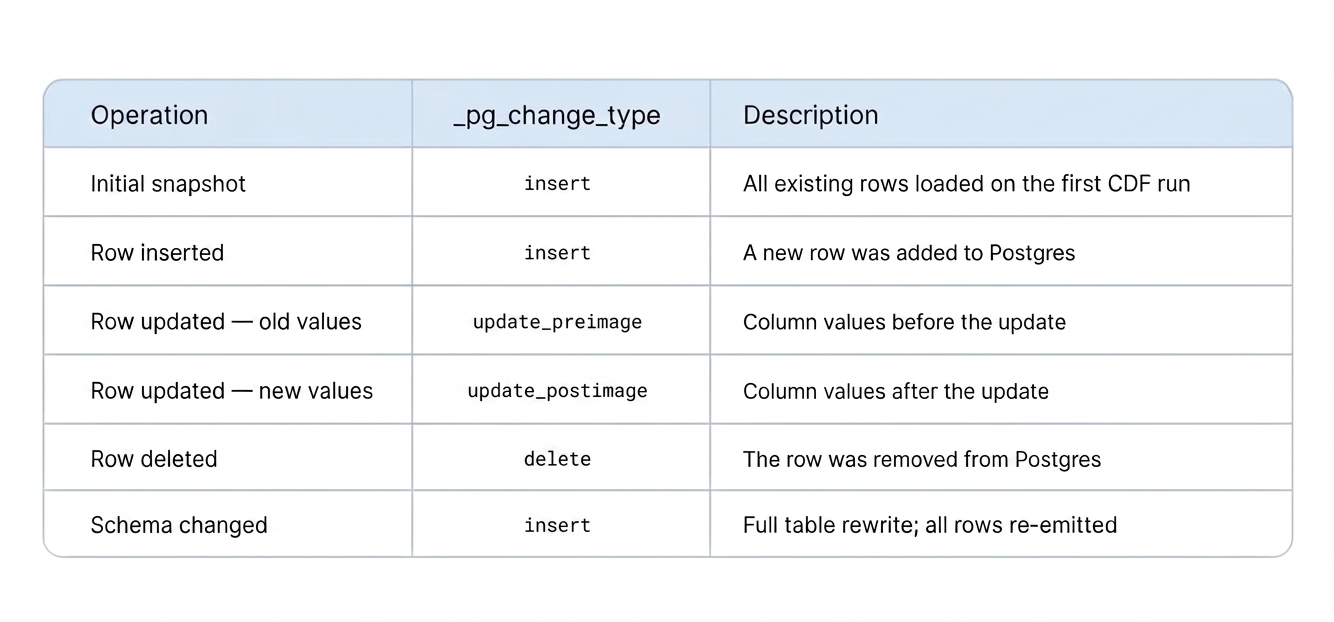
Understanding _pg_change_type
Updates produce two rows: a update_preimage with the old state and a update_postimage with the new state. When building Silver tables, you filter out the preimage and work only with the after-state.
*Schema changes cause a full rewrite:* If a column is added, dropped, or its type changes, the entire CDF history table is rebuilt from scratch. Every row comes back as
insert. Streaming pipelines that treat the CDF table as an append-only source will break. The workaround section below solves this.
Building the Medallion Architecture on CDF
Lakebase CDF tables are your Bronze layer. You can build Silver and Gold on top using DLT Streaming Tables with Auto CDC, or Databricks Materialized Views. The Bronze tables remain the source of truth — preserving the complete operation history.
To build a Silver table reflecting current state, filter out update_preimage rows first — these carry the before-state of each update — then use create_auto_cdc_flow to upsert the remaining rows by primary key and apply deletes.
from pyspark import pipelines as dp
from pyspark.sql.functions import expr

# Filter view - keep only the after-state of updates, inserts, and deletes
@dp.temporary_view()
def bronze_products_filtered():
    """Exclude preimage rows - these represent the old state before an update."""
    return (
        spark.readStream
            .table("lakebase_cdf_tst.sch_ecommerce.lb_products_history")
            .filter("_pg_change_type != 'update_preimage'")
    )
# Silver: current-state table built by applying CDC
dp.create_streaming_table(name="silver_products")
dp.create_auto_cdc_flow(
    target             = "silver_products",
    source             = "bronze_products_filtered",
    keys               = ["id"],
    sequence_by        = "_sort_by",
    apply_as_deletes   = expr("_pg_change_type = 'delete'"),
    except_column_list = [
        "_pg_change_type", "_pg_lsn", "_pg_xid", "_timestamp", "_sort_by"
    ],
)
Handling Schema Changes Without Breaking Pipelines
This is where most implementations fall apart.
When a column is added, removed, or retyped, Lakebase rebuilds the entire CDF history table. Every row re-appears as insert. A streaming pipeline reading the CDF table directly will throw an error because the source is no longer append-only from its perspective.
The solution is a durable intermediate table that sits between the raw CDF table and your downstream pipelines. You control this table. CDF records are written into it using _sort_by as a watermark — always appending only what is new. This table becomes your stable Bronze source. Schema rewrites in the CDF layer become invisible to everything downstream.
Detecting Schema Drift Early
Before each load, compare the live CDF table schema against your durable table. This surfaces changes before they reach your pipelines, giving you time to alert your team, update downstream schemas, or log to an audit table:
lb_schema   = spark.table("lakebase_cdf_tst.`sch_ecommerce`.lb_products_history").schema
temp_schema = spark.table("lakebase_cdf_tst.`sch_ecommerce`.temp_lb_products_history").schema
lb_fields = set(f.name for f in lb_schema)
temp_fields = set(f.name for f in temp_schema)
added = lb_fields - temp_fields
removed = temp_fields - lb_fields
# Check for type changes on columns that exist in both
for field in lb_fields & temp_fields:
if lb_schema[field].dataType != temp_schema[field].dataType:
print(f"Type change detected: {field} - "
f"{temp_schema[field].dataType} → {lb_schema[field].dataType}")
if added or removed:
print(f"Columns added: {added}")
print(f"Columns removed: {removed}")
else:
print("No schema changes detected")Watermark-Based Incremental Load
Rather than re-reading the full history table each time, filter to rows where _sort_by exceeds your last known watermark and append the delta to the durable table.This table becomes source.
*Two guarantees this pattern gives you:
- No duplicates. Records already appended to the durable table are never re-fetched, even after a full CDF rewrite.
- No gaps. Because
_sort_byis WAL-derived and monotonically increasing, every new record lands exactly once in the correct order.*
#Read cdf table
df = spark.table("lakebase_cdf_tst.`sch_ecommerce`.lb_products_history")

# Load only what is new since the last run
filtered_df = df.filter(df["_sort_by"] > max_sort_by) if max_sort_by else df
# Advance the watermark
max_sort_by = filtered_df.agg({"_sort_by": "max"}).collect()[0][0]

# Append to the durable table
try:
    filtered_df.write.mode("append").saveAsTable(
        "lakebase_cdf_tst.`sch_ecommerce`.temp_lb_products_history"
    )
except Exception as e:
    print(f"Error: {e}")
Projecting Against an Explicit Schema
To prevent schema drift from flowing into downstream pipelines, define the schema you expect and select against it. Dropped columns get substituted with null; added columns can be included or excluded based on your pipeline's needs:
from pyspark.sql.functions import col, lit
from pyspark.sql.types import (
    StructType, StructField, StringType, LongType,
    IntegerType, TimestampType, DecimalType
)

# Store this in a YAML file and load at runtime - easier to version and review
defined_schema = StructType([
    StructField('_pg_change_type', StringType(),      False),
    StructField('_pg_lsn',         LongType(),        False),
    StructField('_pg_xid',         IntegerType(),     False),
    StructField('_timestamp',      TimestampType(),   False),
    StructField('_sort_by',        LongType(),        False),
    StructField('id',              IntegerType(),     False),
    StructField('name',            StringType(),      False),
    StructField('price',           DecimalType(10,2), True),
    StructField('category',        StringType(),      True),
])
df = spark.read.table("lakebase_cdf_tst.`sch_ecommerce`.lb_products_history")
df_columns = set(df.columns)
select_expr = [
    col(f.name).cast(str(f.dataType)) if f.name in df_columns
    else lit(None).cast(str(f.dataType)).alias(f.name)
    for f in defined_schema
]
df = df.select(select_expr)
Reading from the Durable Table in Your Bronze Pipeline
Once your durable table is in place, point all Bronze pipelines at it instead of the raw CDF table:
@dp.temporary_view()
def bronze_products_filtered():
    """Read from the durable history table — resilient to CDF schema rewrites."""
    return (
        spark.readStream
            .table("temp_lb_products_history")
            .filter("_pg_change_type != 'update_preimage'")
    )
From here, your Silver and Gold layers build on a stable source that survives schema changes, CDF table rewrites, and sync interruptions without data loss.
Note on timestamps: The cdf table _timestamp column is of type timestamp_ntz. To enable support for
*TIMESTAMP_NTZcolumns on target tables, support for the feature must be explicitly enabled for the existing table:ALTER TABLE temp_lb_products_history SET TBLPROPERTIES ('delta.feature.timestampNtz' = 'supported')*
What You Can Build With It
- Audit trails —For audit trails, CDF is a natural fit — every insert, update, and delete is captured and retained as an immutable record. The catch is that a schema change triggers a full table rewrite, taking that history with it. The watermark-based incremental load pattern as described above protects against this by accumulating changes in a durable table that survives rewrites.
- Incremental pipelines — Use the Bronze history tables to power efficient Silver and Gold layers without full table scans.
- Near-real-time analytics — With changes landing every 15 seconds, dashboards and ML feature stores can stay current with minimal latency.
Operational Notes
A few things worth knowing before you rely on this :
- Disabling sync is lossy. If you turn CDF off, changes that occur while it is disabled are not captured. To recover a full history, you must delete the schema configuration and reconfigure from scratch — this triggers a full resync where every row loads with
_pg_change_type = 'insert'. - One schema maps to one UC destination. A Postgres schema can only be synced to a single Unity Catalog schema.
- No per-table exclusion option. The only way to prevent a table from being included in CDF is to not set
REPLICA IDENTITY FULLon it. - Table name conflicts get numeric suffixes. If two Postgres schemas targeting the same UC schema share a table name, the second one is named
lb_<table>_history_1. - Empty tables are deferred. A table with zero rows and replica identity enabled is skipped at configuration time but picked up automatically once a row is inserted.
Wrapping Up
Lakebase CDF takes what used to require a connector framework, a staging layer, and two pipelines to maintain, and reduces it to a schema-level toggle. The CDF history tables land directly in Unity Catalog, ready to use as Bronze without any additional infrastructure.
The one area that requires deliberate design is schema evolution. With the durable intermediate table pattern — watermark-based incremental load, explicit schema projection, and a stable source for downstream pipelines — you can build a CDC architecture that handles column changes gracefully and preserves complete history without data loss.
메타데이터
- post_id
- e2fa48e4dfd5
- slug
- lakebase-cdf-the-simplest-way-to-stream-postgres-changes-into-your-lakehouse-e2fa48e4dfd5
- url
- https://medium.com/towards-data-engineering/lakebase-cdf-the-simplest-way-to-stream-postgres-changes-into-your-lakehouse-e2fa48e4dfd5
- canonical_url
- https://medium.com/towards-data-engineering/lakebase-cdf-the-simplest-way-to-stream-postgres-changes-into-your-lakehouse-e2fa48e4dfd5
- author_url
- https://medium.com/@IshwaryaModika
- status
- ok
- fetched_at
- 2026-07-15 02:34:55