The Civil War: CommonJS vs. ESM
This has been a hot topic for debate for a while now. I think it’s time for us to settle the debate and choose the one which is best suited…
The Civil War: CommonJS vs. ESM
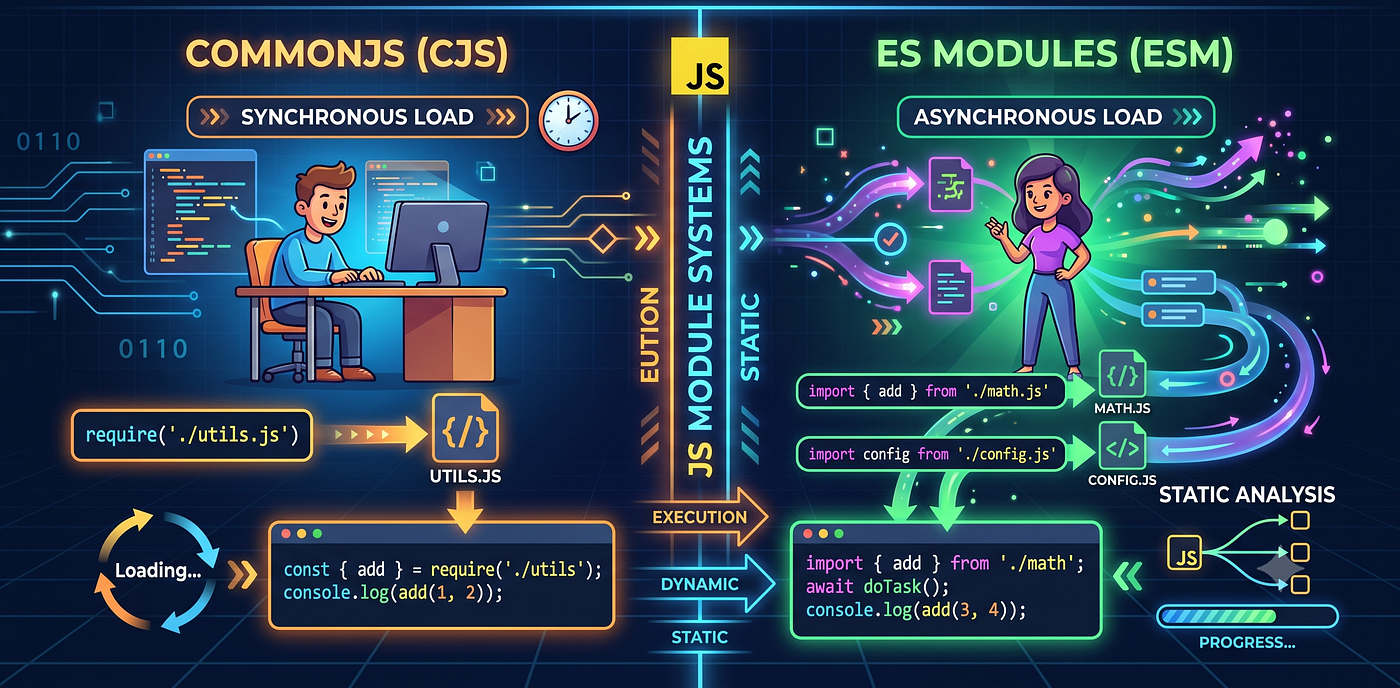
Image generated using AI
This has been a hot topic for debate for a while now. I think it’s time for us to settle the debate and choose the one which is best suited for sustainability.
Node.js strictly enforces that synchronous require() cannot load modern ECMAScript Modules (ESM).
Here is the civil war between CommonJS and ES Modules, and why trying to mix them is not a very brilliant idea.
Imagine you are working on a standard Express API that you’ve been building for a while. It’s solid, it’s stable, and it uses the same trusted boilerplate syntax we’ve all used for a decade:
const express = require('express');
const app = express();
Then, you decide to install a popular utility library to format dates or handle files. You run npm install, add const someLib = require('some-lib') to the top of your file, save, and start your local server.
And then, your terminal pops up:
Error [ERR_REQUIRE_ESM]: require() of ES Module ... not supported.You look at the library’s documentation and realize they have recently released a major version that went “ESM-Only.”
To fix this, we have to look under the hood and understand what these two module systems are doing, and why they don’t blend with each other.
What Is CommonJS (CJS)?
Back in 2009, when Node.js was created to run JavaScript on servers, outside the browsers, the language had a massive flaw: it had no built-in system for sharing code between files.
So, the Node team created CommonJS (CJS), which gave us module.exports and require().
CommonJS was built specifically for servers. When you run require('./database.js'), Node reads the file directly from your computer's drive, executes it, and hands you the exported value(s).
Because loading a local file from a hard drive takes mere microseconds, CommonJS is fully synchronous. It blocks execution until the file is loaded, making it simple to write and run line-by-line.
What Is ES Modules (ESM)?
Years later, the official committee that designs JavaScript finally released a global standard: ES Modules (ESM), introducing import and export.
But browser environments are totally different from Node server environments. If a web browser had to synchronously load twenty different JavaScript files over a slow network, the entire page would freeze up while waiting.
Because of this, ESM was designed to be fundamentally asynchronous.
Instead of executing code line-by-line instantly, ESM works in distinct phases. It parses your files, looks at all your import statements, builds a giant dependency tree, allocates memory, and then runs the code. So, all of this takes time which in case of require(), is not allowed.
Because it needs to map your entire application's structure beforehand, ESM is statically analyzed. You cannot wrap a standard import statement inside an if block.
Why They Don’t Blend With Each Other
Now you can see why these two systems constantly fight:
Because CommonJS is synchronous, it runs code sequentially at runtime. If you try to require('esm-only-package'), CommonJS expects that module immediately. But the ES Module needs to go through its asynchronous parsing and compilation phase first.
CommonJS cannot pause its execution to wait for an asynchronous ESM module to resolve. It just wasn’t built to do that, and that is why Node instantly crashes.
If you have come till here, a big thanks and do check out Part 2 where we will tackle the infamous __dirname trap and look at the cleanest ways to migrate from CommonJS to ESM.
Check out my other tech-articles as well! Take Care!
메타데이터
- post_id
- f00fc22af7c1
- slug
- the-civil-war-commonjs-vs-esm-f00fc22af7c1
- url
- https://blog.stackademic.com/the-civil-war-commonjs-vs-esm-f00fc22af7c1
- canonical_url
- https://blog.stackademic.com/the-civil-war-commonjs-vs-esm-f00fc22af7c1
- author_url
- https://medium.com/@kumarshreyash139
- status
- ok
- fetched_at
- 2026-07-18 01:24:29