Plug into Salesforce Pub/Sub — Right from WSO2 Integrator: MI
Let’s easily publish events to Salesforce over gRPC and modernize integrations for a faster, more connected world.
Plug into Salesforce Pub/Sub — Right from WSO2 Integrator: MI
Let’s easily publish events to Salesforce over gRPC and modernize integrations for a faster, more connected world.
What is the Salesforce Pub/Sub API?
In today’s event-driven world, real-time data integration isn’t just a luxury — it’s a necessity for modern business systems. Traditionally, Salesforce’s REST and SOAP APIs have been the go-to solutions for performing CRUD operations and supporting synchronous workflows. However, the Salesforce Pub/Sub API marks a pivotal evolution by embracing asynchronous, event-based communication.
Unlike REST APIs that rely on polling or scheduled jobs to stay updated, the Pub/Sub API enables clients to publish and subscribe to events, receiving data the moment changes happen. This dramatically reduces API call volume and system overhead while fostering a more scalable, reactive architecture.
Whether you’re publishing critical order updates, syncing customer activities, or driving automated workflows across platforms, the Pub/Sub API’s low-latency, push-based model unlocks new opportunities for speed, efficiency, and real-time responsiveness.
The Salesforce Pub/Sub Connector builds on this power by providing a streamlined way to publish events to Salesforce over gRPC, helping you modernize your integrations and stay ahead in an increasingly connected ecosystem.
MI: Salesforce Pub/Sub Connector
The Salesforce Pub/Sub Connector allows WSO2 Micro Integrator [MI] to communicate directly with Salesforce’s gRPC-based Pub/Sub API, without you needing to handle any low-level details.
With this connector, you can:
- Publish Platform Event records to any topic:
- Look up topic metadata using
getTopic - Retrieve the corresponding JSON schema with
getSchema, so your flows can confidently validate or transform events
By taking care of authentication and protocol complexities behind the scenes, the connector fits into your integration projects just like any other MI connector, making real-time event streaming to Salesforce simple and seamless.
Now, let’s take a look at how you can use the Salesforce Pub/Sub Connector.
Use case:
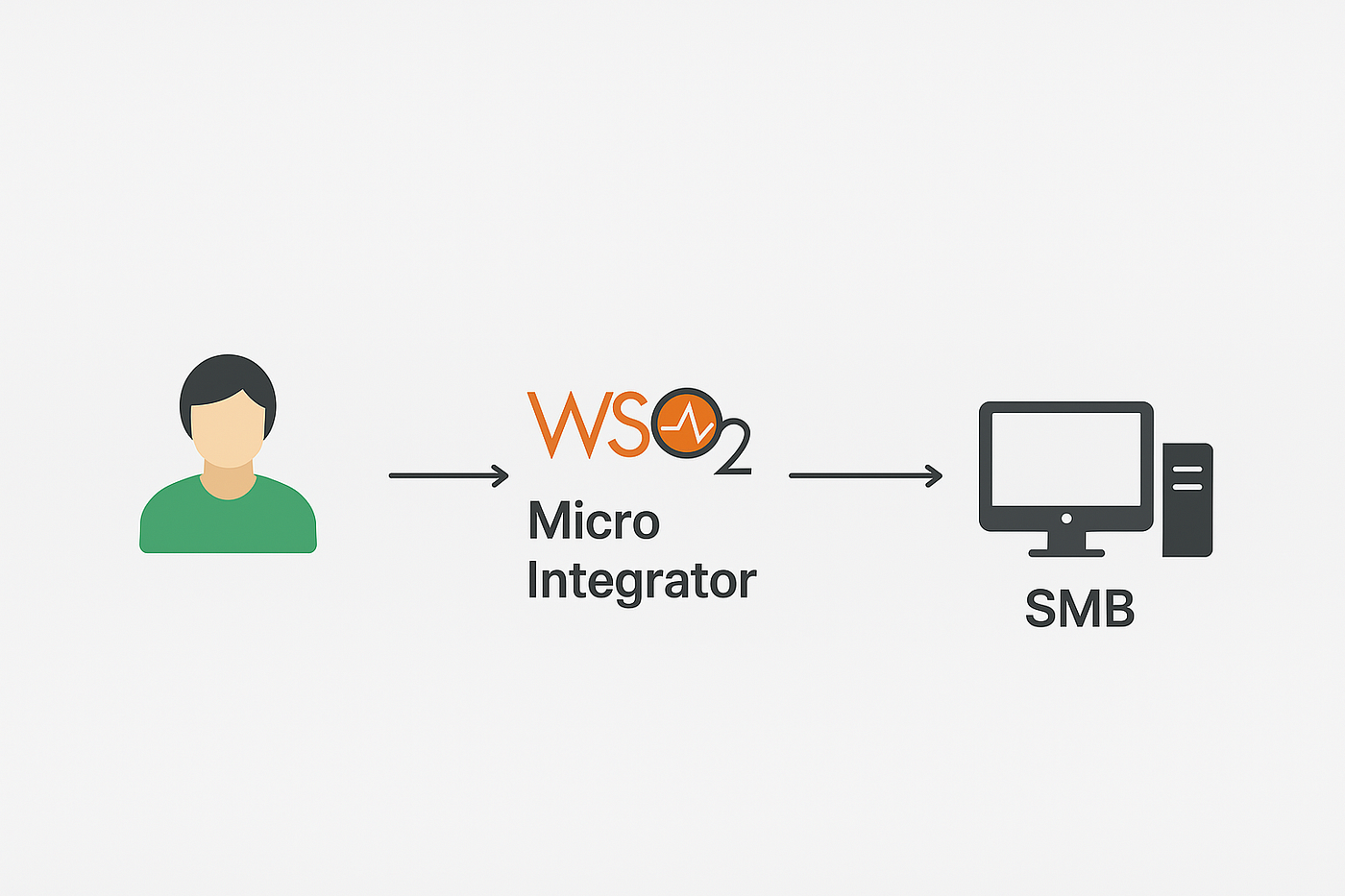
This example explains how to use the Salesforce client to connect with the Salesforce instance and perform the following operations by publishing the event to the already defined event in the Salesforce instance.
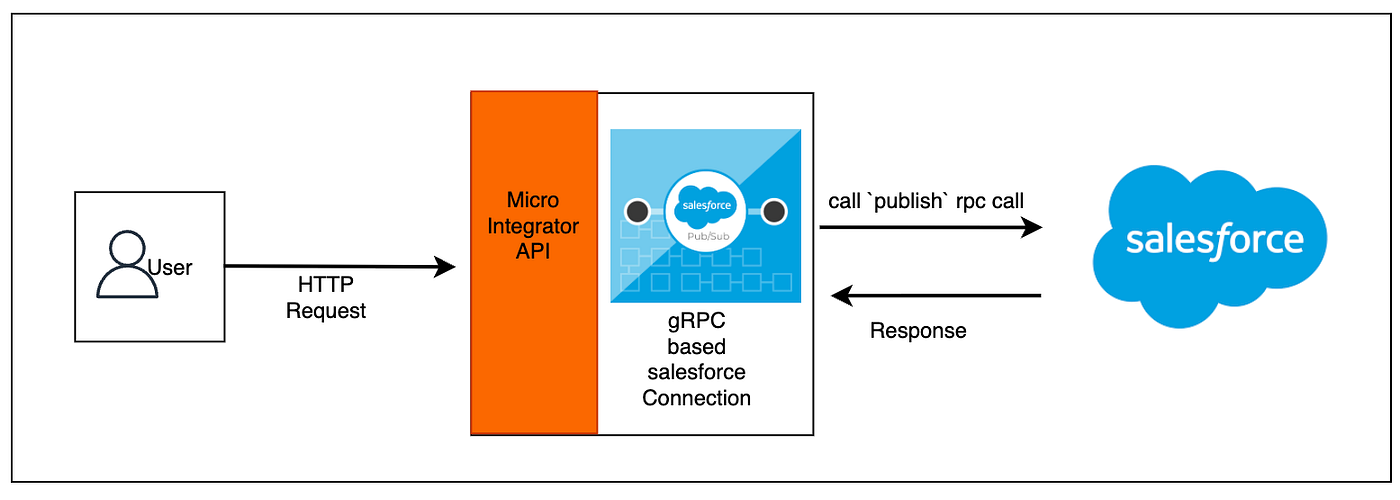
Figure 1: Use case scenario
Step 01: Define A Platform Event in Salesforce
In** Salesforce, go to Setup, search for Platform Events**, and click New Platform Event to create the Order Event (with the description “Example event for the Pub/Sub API client”).
Save the event and add the following custom fields:
- Order_Number__c (Text, 18 characters)
- City__c (Text, 50 characters)
- Amount__c (Number, 16 digits, 2 decimal places)
Step 02: Add the Salesforce Pub/Sub connector to your WSO2 Micro Integrator project.
In MI, create a new project and add the Salesforce Pub/Sub connector to the project.
- Create a new project in WSO2 Micro Integrator (MI).
- Download the Salesforce Pub/Sub connector from the WSO2 Connector Store or add the connector to your project by navigating to the “Connections” section in the mediator palette and selecting “Add New Connection”, searching for the Salesforce Pub/Sub connector from the list and clicking “Add”.
Step 03: Configure the Salesforce Pub/Sub connector.
- Create a Salesforce Pub/Sub connection by clicking on the “Add New Connection” button in the connector configuration window.
- Enter the connection details, including the server URL, port, and enable TLS option.
- Select the basic authentication option and fill in these details (username, password, and security token).
- Click “Add” to create the connection.
(See Figure 2: Connection Creation Form)
Figure 2: Connection Creation Form
Step 04: Create a new sequence and add the Salesforce Pub/Sub connection to the sequence.
- Create a new sequence and add the Salesforce Pub/Sub connector.
- When prompted, select the operation you want, for example, Publish — and fill in the input details.
(See Figure 3: Project UI for selecting the RPC calls and Figure 4: Form for the Publish RPC call.)
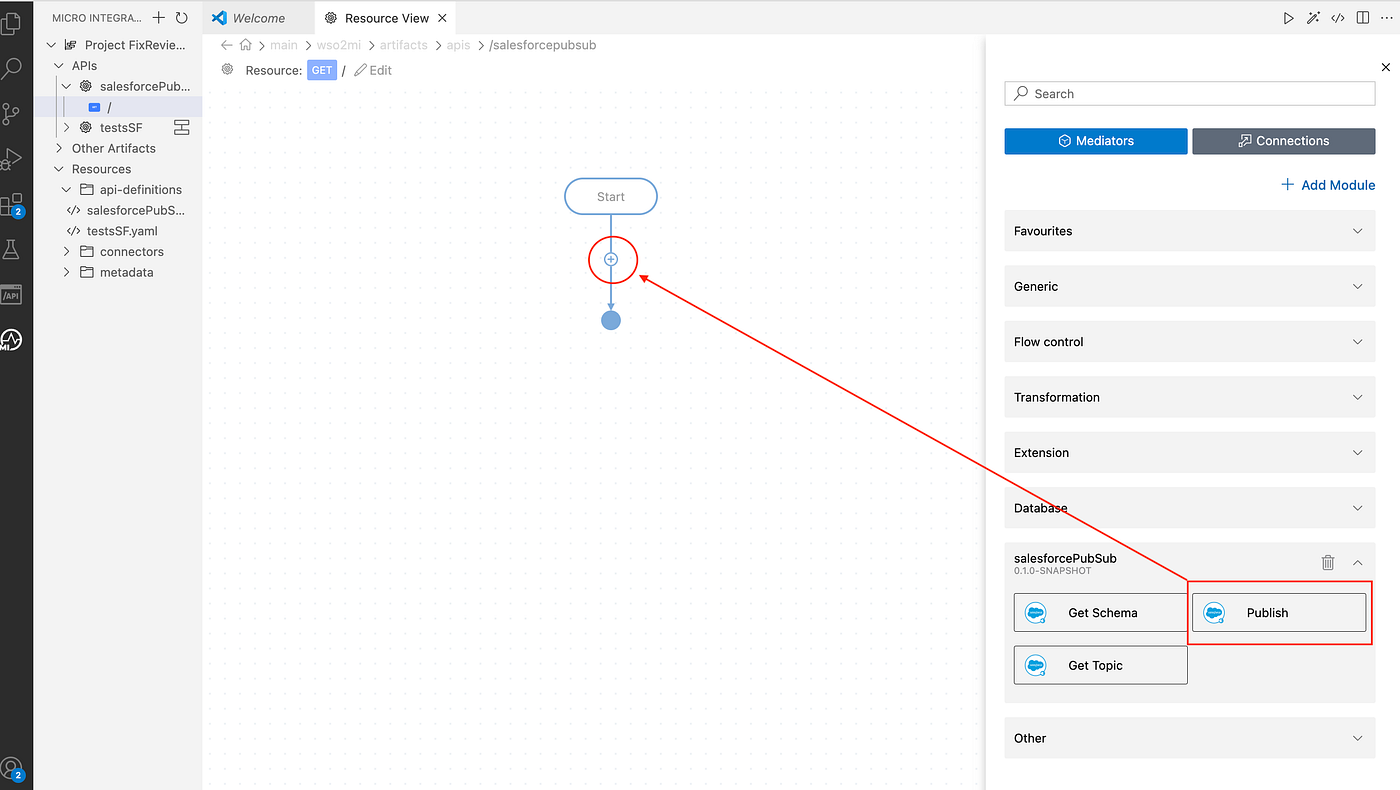
Figure 3: Project UI for selecting the rpc calls
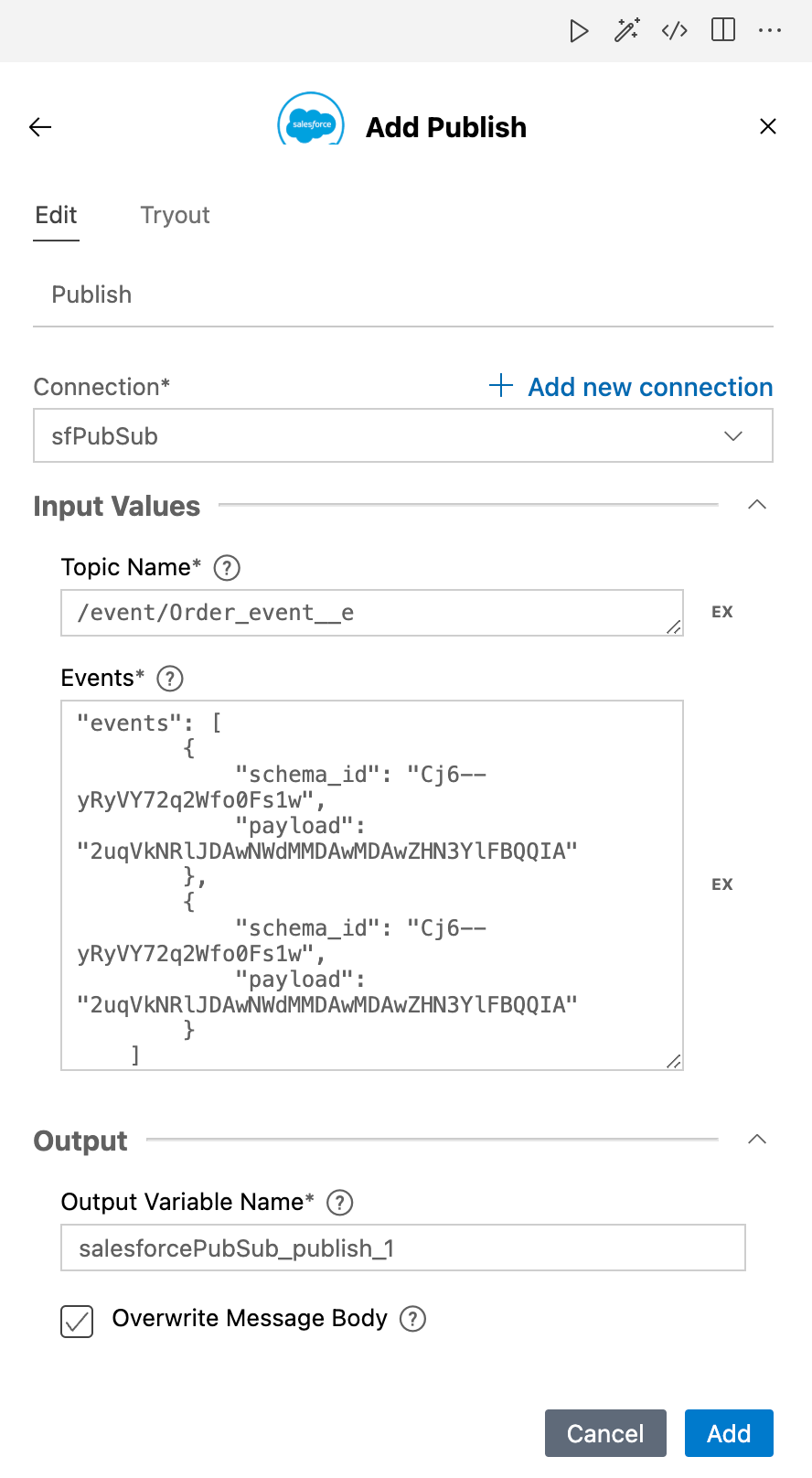
Figure 4: Form for the publish rpc call
You can also add other operations like getTopic or getSchema to your sequence. (See Figure 5: Integration Sequence Using Salesforce Pub/Sub Connector.)
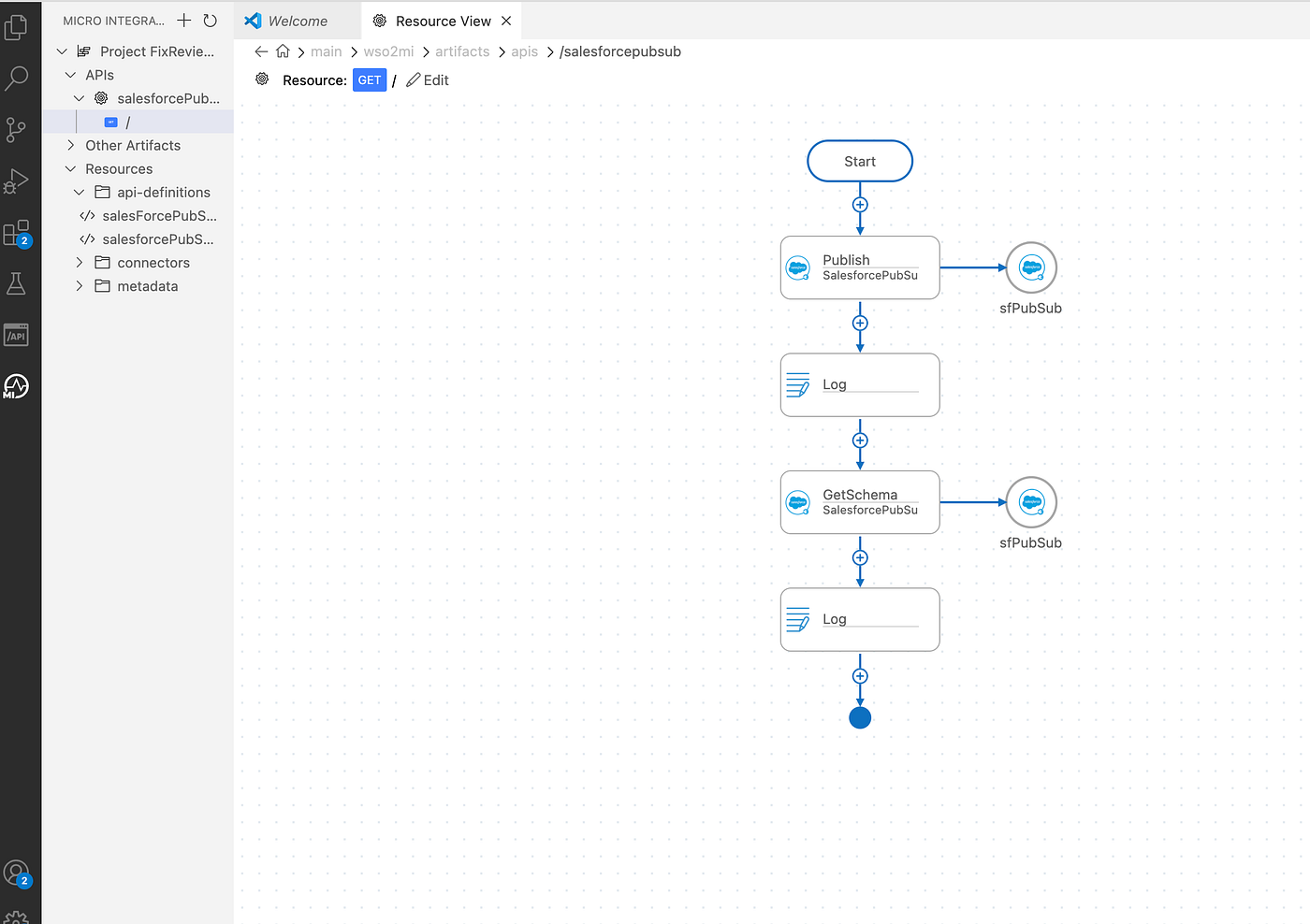
Figure 5 : Integration Sequence Using Salesforce Pub/Sub Connector
Running the integration
Now you can execute the sample integration app using the run option in VS Code, and you will see a similar output in the console.
[2025-05-09 14:20:16,005]  INFO {LogMediator} - {api:sfpubsub GET /sfpubsub/} _CADE3qaegX3ECEW0rlbYA, body = {"rpc_id":"d1bd2fb8-8a70-4054-9ed1-1b03c18b3f4d","schema_id":"_CADE3qaegX3ECEW0rlbYA","results":[{"replayId_":{"bytes":[0,0,0,0,0,0,-109,-117,0,0],"hash":0},"correlationKey_":"a8e7bf9a-303e-4bce-98c3-d8fa15f0d70a","memoizedIsInitialized":-1,"unknownFields":{"fields":{}},"memoizedSize":-1,"memoizedHashCode":0},{"replayId_":{"bytes":[0,0,0,0,0,0,-109,-116,0,0],"hash":0},"correlationKey_":"808dbeea-eae6-4043-bf68-f64fdfb4915d","memoizedIsInitialized":-1,"unknownFields":{"fields":{}},"memoizedSize":-1,"memoizedHashCode":0}]}
[2025-05-09 14:20:17,328]  INFO {LogMediator} - {api:sfpubsub GET /sfpubsub/} test: 1930d11b-bce5-4cd4-93b0-4dc5b082f553, schema = {"rpc_id":"1930d11b-bce5-4cd4-93b0-4dc5b082f553","schema_json":"{\"type\":\"record\",\"name\":\"Order_Event__e\",\"namespace\":\"com.sforce.eventbus\",\"fields\":[{\"name\":\"CreatedDate\",\"type\":\"long\",\"doc\":\"CreatedDate:DateTime\"},{\"name\":\"CreatedById\",\"type\":\"string\",\"doc\":\"CreatedBy:EntityId\"},{\"name\":\"Order_Number__c\",\"type\":[\"null\",\"string\"],\"doc\":\"Data:Text:00NgL00000vXMFS\",\"default\":null},{\"name\":\"City__c\",\"type\":[\"null\",\"string\"],\"doc\":\"Data:Text:00NgL00000vXNGM\",\"default\":null},{\"name\":\"Amount__c\",\"type\":[\"null\",\"double\"],\"doc\":\"Data:Double:00NgL00000vXNVG\",\"default\":null}]}","schema_id":"_CADE3qaegX3ECEW0rlbYA"}
This confirms your events are being published and schemas retrieved successfully.
Want to unlock more?
If you’re curious about unlocking real-time magic with the Salesforce Pub/Sub Connector, our documentation is the perfect place to start. Inside, you’ll find step-by-step guides, hands-on examples, and practical tips to help you confidently bring event-driven power into your integrations.
Whether you’re aiming to streamline processes, react instantly to business events, or build smarter, more connected experiences, we’re excited to be part of your journey. Dive in, explore, and let’s shape the future of your integrations together.
I’ll be bringing you our next article soon, where we’ll explore the Salesforce Pub/Sub Inbound Endpoint — diving into how it helps you subscribe to Salesforce events and build truly reactive integrations.
Stay tuned! Happy Reading!
References:
[[1] The WSO2 MI Saleceforce Pub/Sub connector :](https://mi.docs.wso2.com/en/latest/reference/connectors/salesforce-pubsub-connector/sf-pubsub-overview/)
[2] The Saleceforce Pub/Sub API : https://developer.salesforce.com/docs/platform/pub-sub-api/overview
메타데이터
- post_id
- 003f9a59c19e
- slug
- plug-into-salesforce-pub-sub-right-from-wso2-integrator-mi-003f9a59c19e
- url
- https://medium.com/think-integration/plug-into-salesforce-pub-sub-right-from-wso2-integrator-mi-003f9a59c19e
- canonical_url
- https://medium.com/think-integration/plug-into-salesforce-pub-sub-right-from-wso2-integrator-mi-003f9a59c19e
- author_url
- https://medium.com/@lnash94
- status
- ok
- fetched_at
- 2026-06-14 17:09:17