Required Network Ports for Veeam Backup & Replication with Hyper-V (Inbound & Outbound Traffic)
By Gaurav Tevathiya Principal AI/ML, Cloud & Data Architect
Wiki topics:
🏛️ · Architecture
Required Network Ports for Veeam Backup & Replication with Hyper-V (Inbound & Outbound Traffic)
By Gaurav Tevathiya Principal AI/ML, Cloud & Data Architect
When deploying Veeam Backup & Replication with Microsoft Hyper-V, proper network configuration is critical to ensure seamless backup and restore operations.
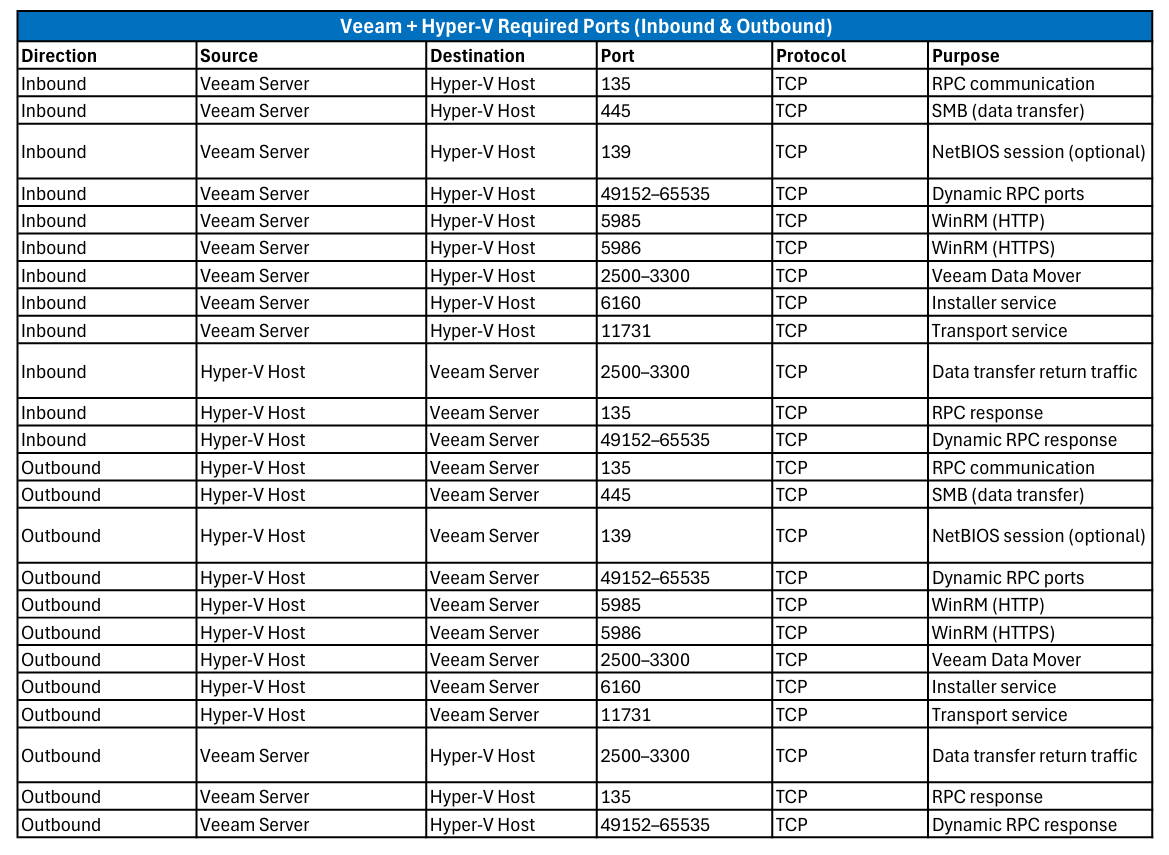
One of the most common reasons for backup failures or performance issues is incorrect firewall configuration. This blog provides a complete list of required ports along with direction, purpose, and best practices.
Why Port Configuration is Important
Veeam uses multiple services such as:
- RPC (Remote Procedure Calls)
- SMB (File transfer)
- WinRM (Remote management)
- Data Mover service
If these ports are blocked or partially configured:
- Backup jobs may fail
- VM processing may hang
- Performance may degrade significantly
Complete Port Requirements (Inbound & Outbound)
Test Connectivity
Use PowerShell:
Test-NetConnection <Hyper-V-IP> -Port 5985
Test-NetConnection <Hyper-V-IP> -Port 445
메타데이터
- post_id
- 004c8169f4e6
- slug
- veeam-hyper-v-required-ports-inbound-outbound-complete-guide-004c8169f4e6
- url
- https://medium.com/@gauravtevathiya/veeam-hyper-v-required-ports-inbound-outbound-complete-guide-004c8169f4e6
- canonical_url
- https://medium.com/@gauravtevathiya/veeam-hyper-v-required-ports-inbound-outbound-complete-guide-004c8169f4e6
- author_url
- https://medium.com/@gauravtevathiya
- status
- ok
- fetched_at
- 2026-07-11 10:24:22




