Building a Clean Auth System with Node.js, TypeScript, and MongoDB
Here’s the thing, spinning up a Node.js server is easy. The part that actually trips people up is auth. Getting signUp, signIn, and signOut…
Building a Clean Auth System with Node.js, TypeScript, and MongoDB
Here’s the thing, spinning up a Node.js server is easy. The part that actually trips people up is auth. Getting signUp, signIn, and signOut working cleanly, with hashed passwords, JWT tokens, and a structure that doesn’t turn into a mess after two weeks, that’s where most projects go wrong.
That’s what this guide is about. We’ll build a clean auth backend using Node.js, Express, TypeScript, and MongoDB, structured in a way that actually makes sense.
Project Setup
Assume a structure like this:
server/
└── src/
    ├── config/
    ├── controllers/
    ├── middlewares/
    ├── models/
    ├── routes/
    └── index.ts
├── .env
├── package.json
└── tsconfig.json
Each folder has one job. Config handles setup, controllers handle request logic, models define your data, routes connect endpoints to controllers, and middlewares handle the stuff that runs in between.
Step 1: Install Dependencies
Navigate to your server folder:
cd serverInstall dependencies:
npm install express mongoose bcryptjs jsonwebtoken dotenv
npm install -D typescript tsx @types/express @types/node @types/bcryptjs @types/jsonwebtoken
Step 2: Configure TypeScript
Run:
npx tsc --initReplace the contents of tsconfig.json with this:
{
  "compilerOptions": {
    "rootDir": "./src",
    "outDir": "./dist",
    "module": "nodenext",
    "target": "esnext",
    "types": ["node"],
    "sourceMap": true,
    "declaration": true,
    "declarationMap": true,
    "noUncheckedIndexedAccess": true,
    "exactOptionalPropertyTypes": true,
    "strict": true,
    "verbatimModuleSyntax": true,
    "isolatedModules": true,
    "noUncheckedSideEffectImports": true,
    "moduleDetection": "force",
    "skipLibCheck": true
  }
}
Step 3: Add Scripts
Update your package.json. Make sure "type": "module" is in there:
{
  "type": "module",
  "scripts": {
    "dev": "tsx src/index.ts",
    "build": "tsc",
    "start": "node dist/index.js"
  }
}
npm run dev is what you'll use while building.
npm run build compiles TypeScript to JavaScript when you're ready to deploy.
Step 4: Set Up Your Environment Variables
Create a .env file:
PORT=5000
MONGO_URI=your_mongodb_connection_string
JWT_SECRET=your_secret_key
Never hardcode these values. They should always live in .env.
Now create src/config/env.ts:
import dotenv from "dotenv";
dotenv.config();
const getEnv = (key: string): string => {
  const value = process.env[key];
  if (!value) {
    throw new Error(`Missing environment variable: ${key}`);
  }
  return value;
};
export const PORT = getEnv("PORT");
export const MONGO_URI = getEnv("MONGO_URI");
export const JWT_SECRET = getEnv("JWT_SECRET");
Step 5: Connect to MongoDB
Create src/config/db.ts:
import mongoose from "mongoose";
import { MONGO_URI } from "./env.js";
const connectDB = async () => {
  try {
    await mongoose.connect(MONGO_URI);
    console.log("MongoDB connected");
  } catch (error) {
    console.error("MongoDB connection failed:", error);
    process.exit(1);
  }
};
export default connectDB;
Step 6: The User Model
Create src/models/user.model.ts:
import mongoose, { Schema } from "mongoose";
const userSchema = new Schema(
  {
    name: {
      type: String,
      required: true,
      trim: true,
    },
    email: {
      type: String,
      required: true,
      unique: true,
      lowercase: true,
      trim: true,
    },
    password: {
      type: String,
      required: true,
      select: false,
    },
  },
  { timestamps: true }
);
export default mongoose.model("User", userSchema);
The select: false on password is important. It means the password field won't be returned in queries unless you explicitly ask for it.
Step 7: The Auth Controller
Create src/controllers/auth.controller.ts:
import { type Request, type Response, type NextFunction } from "express";
import bcrypt from "bcryptjs";
import jwt from "jsonwebtoken";
import User from "../models/user.model.js";
import { JWT_SECRET } from "../config/env.js";

export const signUp = async (req: Request, res: Response, next: NextFunction) => {
  try {
    const { name, email, password } = req.body;
    if (!name || !email || !password) {
      return res.status(400).json({ success: false, message: "All fields are required" });
    }
    const existingUser = await User.findOne({ email });
    if (existingUser) {
      return res.status(409).json({ success: false, message: "Email already in use" });
    }
    const hashedPassword = await bcrypt.hash(password, 10);
    const user = await User.create({ name, email, password: hashedPassword });
    const token = jwt.sign({ userId: user._id }, JWT_SECRET, {
      expiresIn: 60 * 60 * 24 * 7, // 7 days
    });
    res.status(201).json({
      success: true,
      message: "User created successfully",
      data: { token, user: { _id: user._id, name: user.name, email: user.email } },
    });
  } catch (error) {
    next(error);
  }
};
export const signIn = async (req: Request, res: Response, next: NextFunction) => {
  try {
    const { email, password } = req.body;
    if (!email || !password) {
      return res.status(400).json({ success: false, message: "All fields are required" });
    }
    const user = await User.findOne({ email }).select("+password");
    if (!user) {
      return res.status(401).json({ success: false, message: "Invalid credentials" });
    }
    const isMatch = await bcrypt.compare(password, user.password);
    if (!isMatch) {
      return res.status(401).json({ success: false, message: "Invalid credentials" });
    }
    const token = jwt.sign({ userId: user._id }, JWT_SECRET, {
      expiresIn: 60 * 60 * 24 * 7, // 7 days
    });
    res.status(200).json({
      success: true,
      message: "Signed in successfully",
      data: { token, user: { _id: user._id, name: user.name, email: user.email } },
    });
  } catch (error) {
    next(error);
  }
};
export const signOut = async (_req: Request, res: Response) => {
  res.status(200).json({ success: true, message: "Signed out successfully" });
};
Step 8: The Auth Routes
Create src/routes/auth.routes.ts:
import { Router } from "express";
import { signUp, signIn, signOut } from "../controllers/auth.controller.js";
const router = Router();
router.post("/signup", signUp);
router.post("/signin", signIn);
router.post("/signout", signOut);
export default router;
Step 9: Wire Everything Together
Create src/index.ts:
import express from "express";
import connectDB from "./config/db.js";
import authRoutes from "./routes/auth.routes.js";
import { PORT } from "./config/env.js";
connectDB();
const app = express();
app.use(express.json());
app.use("/auth", authRoutes);
app.listen(PORT, () => console.log(`Server running on port ${PORT}`));
Running the Project
Start the dev server:
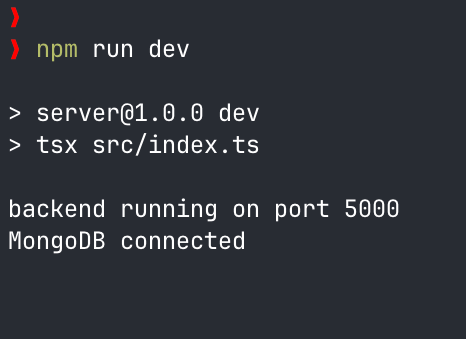
npm run devYou should see:
MongoDB connected
Server running on port 5000
Your endpoints are now live:
- POST /auth/signup
- POST /auth/signin
- POST /auth/signout
What You End Up With
Once this is all wired up, you’ve got a working auth system with hashed passwords, JWT tokens, validated environment variables, and a structure that’s easy to build on. Adding protected routes, refresh tokens, or password reset later is straightforward because the foundation is already organized.
Why ESM Over CommonJS
CommonJS was fine for a long time. But it was never part of the JavaScript standard, it was just what Node.js came up with before ES modules existed.
ES modules are the standard. They’re what browsers use, what modern libraries are shipping, and what Node.js has been pushing toward for years.
Choosing module: "nodenext" means you're writing code that aligns with where the ecosystem actually is, not where it was five years ago.
Wrapping Up
Yeah, there’s a bit of setup involved. But every piece has a reason. The env.ts file means your app knows exactly what it needs before it even starts. The folder structure keeps things from getting tangled. The model protects sensitive data by default. The controller handles each auth case cleanly. And ESM means you’re building on a foundation that actually matches modern JavaScript.
That’s the kind of backend that’s easy to work with as it grows.
메타데이터
- post_id
- 0097ed111ef0
- slug
- building-a-clean-auth-system-with-node-js-typescript-and-mongodb-0097ed111ef0
- url
- https://medium.com/@osmancoder18/building-a-clean-auth-system-with-node-js-typescript-and-mongodb-0097ed111ef0
- canonical_url
- https://medium.com/@osmancoder18/building-a-clean-auth-system-with-node-js-typescript-and-mongodb-0097ed111ef0
- author_url
- https://medium.com/@osmancoder18
- status
- ok
- fetched_at
- 2026-06-09 15:37:30




