The Adventure of Zephyr: Episode 02: Building a Docker Container for Zephyr Development
Getting the environment working on my own machine felt like a real win. But I sat back and looked at everything I had done, the manual…
The Adventure of Zephyr: Episode 02: Building a Docker Container for Zephyr Development
Getting the environment working on my own machine felt like a real win. But I sat back and looked at everything I had done, the manual steps, the workarounds, the packages I had to hunt down one by one, and I thought about what it would take for someone else on the team to reproduce all of it. The honest answer was: too much. A virtual machine is fine for one person. It is a burden the moment you need to share it. A Dockerfile, on the other hand, is just a text file. You check it in, and anyone who pulls it gets the same environment you spent days fighting for. That reasoning was simple enough, so I decided to containerize the whole thing.
I had used Docker plenty of times before, mostly for backend services and build pipelines where the container never needed to touch any physical hardware. This was different. For the first time, I needed Docker to talk directly to a USB device, and that one change turned everything I thought I knew about containers upside down. The early attempts were genuinely frustrating. The container came up clean, the tools were all there, and the board was plugged in, but as far as the container was concerned, it might as well not have existed.
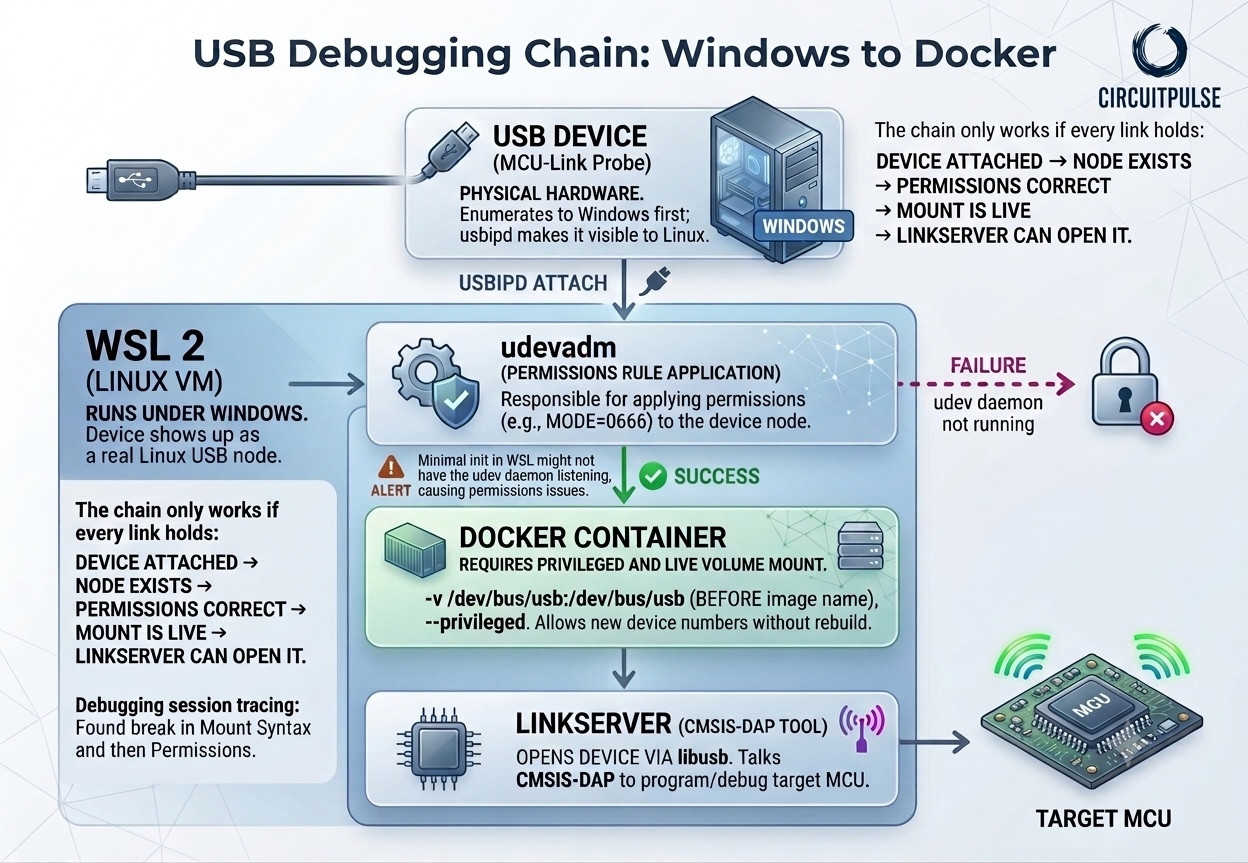
The breakthrough came from stepping back and actually understanding the chain of relationships at play, rather than just trying random flags until something worked. When you are running Docker on Windows with WSL2, a USB device does not simply appear in the Linux environment on its own. The device enumerates to Windows first. From there, a tool called usbipd hands it over to WSL2, where it shows up as a real Linux USB node. At that point, a utility called udevadm is responsible for applying the correct permissions to that node, for example setting the mode to 666 so that non-root processes can actually open it. Only then can Docker mount it into a container, and only then can a tool like Linkserver or JLink use libusb to reach the hardware and speak CMSIS-DAP to the target MCU.
Once the container was working reliably, I turned to the question of which IDE to use inside it. VS Code felt like the natural answer. I know it well, it runs fine in a containerized setup, and there is a Zephyr extension available for it. I installed the extension, opened a project, and almost immediately felt uncomfortable. The plugin had opinions. It wanted to manage things in the background, configure paths quietly, make choices on my behalf without being asked. That might be convenient for some people, but it is not how I like to work. I want to understand what my tools are doing. I want to make the decisions. So I uninstalled it and went looking for something else.
CLion turned out to be the answer I was not expecting. It has native support for Zephyr built in, and it treats the project’s own build configuration as the source of truth rather than trying to layer its own assumptions on top. No magic, no hidden steps. I could see exactly what was happening at every stage, which after everything I had been through to get this far felt like a genuine relief.
The real test came when I started putting boards in front of it. I ran through four of them: the NXP FRDM-MCX153, the Nordic Thingy53, the STM32F411, and the ESP32S2. For anything connected via JLink, CLion handled it beautifully. The debug sessions were clean, the breakpoints worked, the variable inspection was reliable. Other debug toolchains were a different story. Some things did not work the way I expected, and a few things did not work at all. That is not a CLion problem so much as a reflection of how varied the embedded toolchain ecosystem is, but it is worth knowing going in.
With enough testing done to understand the limits, I pulled everything together into a single Dockerfile. All the dependencies, the SDK paths, the udev rules, the right flags for USB passthrough, everything that had taken me so long to assemble by hand, captured in one file that anyone can build from. I pushed it to GitHub, and for the first time in this whole process, felt like I had something I could actually hand to another person and trust them to use.
If you love my story, you could buy me a coffee via the QR code below. Thanks very much for your support.

메타데이터
- post_id
- 00a2809eb23e
- slug
- the-adventure-of-zephyr-episode-02-building-a-docker-container-for-zephyr-development-00a2809eb23e
- url
- https://medium.com/@tc_72863/the-adventure-of-zephyr-episode-02-building-a-docker-container-for-zephyr-development-00a2809eb23e
- canonical_url
- https://medium.com/@tc_72863/the-adventure-of-zephyr-episode-02-building-a-docker-container-for-zephyr-development-00a2809eb23e
- author_url
- https://medium.com/@tc_72863
- status
- ok
- fetched_at
- 2026-07-16 01:26:26