Why Enterprises Choose LoopBack 4: The Complete Guide to Mastering a Modern API Framework
APIs are the lifeblood of modern digital enterprises. Whether you’re building fintech apps, managing multi-channel payments, or exposing…
Why Enterprises Choose LoopBack 4: The Complete Guide to Mastering a Modern API Framework
APIs are the lifeblood of modern digital enterprises. Whether you’re building fintech apps, managing multi-channel payments, or exposing internal services securely — you need a reliable, scalable, and extensible API framework. That’s where LoopBack 4 shines.
Built on top of Express.js, but structured for large-scale TypeScript applications, LoopBack 4 has quietly become one of the most powerful frameworks for building enterprise-grade APIs.
In this guide, we’ll explore:
- ✅ Why enterprises adopt LoopBack 4
- 🧠 What it offers (features & architecture)
- ⚙️ How to get started (and master it)
- 📦 When to use LoopBack over alternatives
- 🧭 Advanced integrations (REST, gRPC, SOAP)
- 📚 Best practices for production
🚀 Why Enterprises Choose LoopBack 4
1. Strongly-Typed APIs with TypeScript
Enterprise apps benefit from predictable contracts, refactor-friendly code, and clear developer intent. LoopBack 4 is TypeScript-first, giving you:
- Type-safe models
- IDE autocompletion
- Compile-time error catching
2. OpenAPI-Driven Development
Every endpoint in LoopBack is OpenAPI-compliant by default. Swagger UI (/explorer) is automatically generated, which simplifies:
- API documentation
- SDK generation
- Third-party integrations
3. Scalable Architecture
Its modular, dependency-injection-driven design makes it highly suitable for complex microservice ecosystems. Teams can cleanly separate:
- Models
- Repositories
- Controllers
- Services
- Observers & interceptors
4. Database-agnostic
Connect to SQL (PostgreSQL, MySQL, Oracle), NoSQL (MongoDB), or even legacy systems via SOAP/gRPC/REST connectors.
5. Enterprise Standards
- Extensible authentication/authorization (OAuth2, JWT, etc.)
- RBAC and ACL support
- Easy testing and mocking
- Clean CI/CD integration
🧠 What LoopBack 4 Is (and Isn’t)
What it is:
- A Node.js framework for building REST/gRPC/SOAP APIs
- TypeScript-based and modular
- OpenAPI-native
- Suitable for monoliths and microservices
What it isn’t:
- A front-end framework
- A low-code solution
- A direct competitor to GraphQL (though can integrate with it)
⚙️ How to Get Started
✅ Prerequisites
npm install -g @loopback/cli typescript➤ Create a new app
lb4 appChoose:
- REST API
- Typescript
- Prettier/ESLint (optional)
➤ Run it
cd your-app
npm start
Access: [http://localhost:3000/explorer](http://localhost:3000/explorer)
🏗️ Key Concepts You Must Understand
1. Model
Represents the data structure. Like a schema.
@model()
export class Product extends Entity {
  @property({type: 'number', id: true})
  id: number;

  @property({type: 'string'})
  name: string;
}
2. Repository
Handles data access (like ORM).
export class ProductRepository extends DefaultCrudRepository<
  Product,
  typeof Product.prototype.id
> {
  constructor(@inject('datasources.db') dataSource: DbDataSource) {
    super(Product, dataSource);
  }
}
3. Controller
Exposes REST endpoints.
export class ProductController {
  constructor(@repository(ProductRepository) public productRepo: ProductRepository) {}

  @get('/products')
  async find(): Promise<Product[]> {
    return this.productRepo.find();
  }
}
4. Service
Handles external integrations (REST, SOAP, gRPC, etc.)
Integrating External Systems
📡 REST
Call any external REST API using axios or fetch in a @service() provider.
📞 gRPC
Use @grpc/grpc-js and proto-loader to consume gRPC services.
🧼 SOAP
Use strong-soap to connect with legacy enterprise WSDL systems.
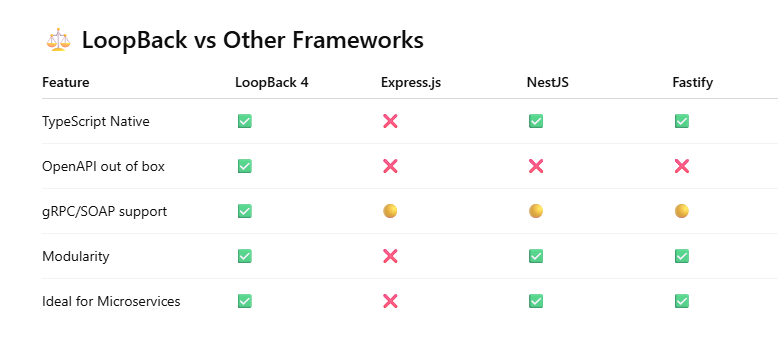
⏰ When to Use LoopBack 4
✅ You are:
- Building APIs for multi-system integration
- Creating B2B or fintech platforms
- Needing strong typing and OpenAPI specs
- Migrating from legacy systems (SOAP, SQL, etc.)
- Managing large teams needing clear separation of concerns
❌ You should avoid if:
- You need a rapid prototype with minimal boilerplate
- You don’t want to use TypeScript
- You prefer opinionated batteries-included frameworks like NestJS
🔧 Production Best Practices
- Use JWT with Passport or OAuth2 for security
- Implement middleware and interceptors for logging/tracing
- Use rate limiting and caching for scalability
- Split services into multiple LB4 apps or packages in a mono-repo
- Add tests using
@loopback/testlab
📚 Learning Resources
- LoopBack Docs
- LoopBack Examples
- StrongLoop Blog
- OpenAPI Spec
LoopBack 4 is not just another Node.js framework — it’s a powerful engine for building enterprise-grade, contract-first APIs that are scalable, testable, and secure.
With its extensible core, seamless OpenAPI support, and modern TypeScript-first architecture, it’s the ideal backend for startups and enterprises alike — especially those in fintech, logistics, healthtech, or multi-tenant SaaS.
REST Connector Example (Calling External REST API)
Suppose you want to call a public API like JSONPlaceholder.
 Install REST Connector
npm install @loopback/rest
➤ Define a Service Interface
src/services/post.service.ts:
export interface Post {
  userId: number;
  id: number;
  title: string;
  body: string;
}

export interface JsonPlaceholderService {
  getPosts(): Promise<Post[]>;
}
➤ Create the Service Implementation
src/services/json-placeholder.service.ts:
import {injectable, BindingScope} from '@loopback/core';
import axios from 'axios';

@injectable({scope: BindingScope.TRANSIENT})
export class JsonPlaceholderService {
  async getPosts() {
    const res = await axios.get('https://jsonplaceholder.typicode.com/posts');
    return res.data;
  }
}
➤ Use in Controller
import {JsonPlaceholderService} from '../services';
import {get} from '@loopback/rest';

export class PostController {
  constructor(
    @service(JsonPlaceholderService)
    private postService: JsonPlaceholderService,
  ) {}

  @get('/posts')
  async find() {
    return this.postService.getPosts();
  }
}
🔗 2. gRPC Connector Example
LoopBack 4 doesn’t include a built-in gRPC connector but allows integration using the @grpc/grpc-js package.
➤ Install gRPC Packages
npm install @grpc/grpc-js @grpc/proto-loader➤ Create a gRPC Client Provider
Suppose your .proto file defines a Greeter service.
src/grpc-clients/greeter-client.ts:
import * as grpc from '@grpc/grpc-js';
import * as protoLoader from '@grpc/proto-loader';
import {injectable} from '@loopback/core';
import path from 'path';

const PROTO_PATH = path.resolve(__dirname, './greeter.proto');

@injectable()
export class GrpcGreeterClient {
  private client: any;

  constructor() {
    const packageDef = protoLoader.loadSync(PROTO_PATH, {
      keepCase: true,
      longs: String,
      enums: String,
      defaults: true,
      oneofs: true,
    });

    const proto = grpc.loadPackageDefinition(packageDef) as any;
    this.client = new proto.greeter.Greeter('localhost:50051', grpc.credentials.createInsecure());
  }

  sayHello(name: string): Promise<any> {
    return new Promise((resolve, reject) => {
      this.client.SayHello({name}, (err: any, response: any) => {
        if (err) reject(err);
        else resolve(response);
      });
    });
  }
}
➤ Use in Controller
@get('/greet')
async greet(): Promise<string> {
  const response = await this.grpcGreeterClient.sayHello('LoopBack');
  return response.message;
}
🧼 3. SOAP Connector Example
Use the strong-soap package.
➤ Install SOAP Package
npm install strong-soap➤ SOAP Service Provider
import {injectable} from '@loopback/core';
import {soap} from 'strong-soap';

@injectable()
export class SoapClientService {
  async callSoapService() {
    const url = 'http://www.dneonline.com/calculator.asmx?WSDL';
    const args = {intA: 5, intB: 3};

    return new Promise((resolve, reject) => {
      soap.createClient(url, {}, (err: any, client: any) => {
        if (err) return reject(err);
        client.Add(args, (err: any, result: any) => {
          if (err) reject(err);
          else resolve(result);
        });
      });
    });
  }
}
➤ Use in Controller
@get('/soap-add')
async soapAdd(): Promise<any> {
  return this.soapClientService.callSoapService();
}
메타데이터
- post_id
- 00a66e577ee7
- slug
- why-enterprises-choose-loopback-4-the-complete-guide-to-mastering-a-modern-api-framework-00a66e577ee7
- url
- https://medium.com/@new2026/why-enterprises-choose-loopback-4-the-complete-guide-to-mastering-a-modern-api-framework-00a66e577ee7
- canonical_url
- https://medium.com/@new2026/why-enterprises-choose-loopback-4-the-complete-guide-to-mastering-a-modern-api-framework-00a66e577ee7
- author_url
- https://medium.com/@new2026
- status
- ok
- fetched_at
- 2026-06-09 15:37:30