Running DBT Natively on Snowflake
dbt has become the default way to transform data with SQL. The usual question is where you run it:
Running DBT Natively on Snowflake
Photo by Conny Schneider on Unsplash
dbt has become the default way to transform data with SQL. The usual question is where you run it:
- dbt Core on your laptop.
- dbt Cloud as a managed service.
- Natively inside Snowflake, as a first-class
DBT PROJECTobject (more recent).
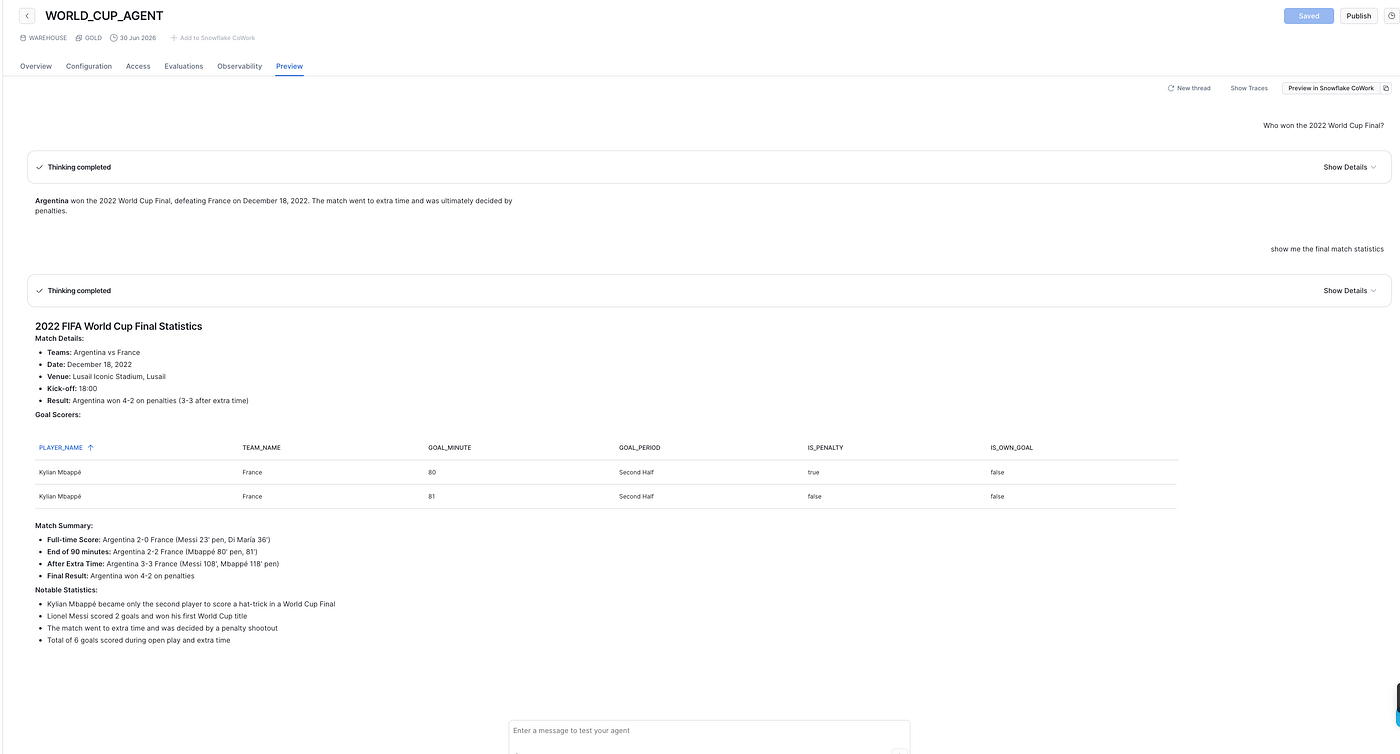
In this walkthrough I cover the deploying a dbt project as a Snowflake DBT PROJECT object and running it with Snowflake Workspaces, tasks, and the Snowflake CLI. We would be working on FIFA World Cup analytics project which involve; raw JSON lands in a Bronze layer, dbt builds Silver views and Gold tables, and a Cortex Agent answers questions on top.
Why Run dbt Inside Snowflake?
dbt Core is open source and free. What you pay for is everything around it: orchestration, scheduling, observability, CI/CD, documentation hosting, and the seats for the people who run it. That is the gap dbt Cloud fills, and it is also the gap Snowflake now fills natively.
When you deploy a dbt project as a Snowflake DBT PROJECT object, you get:
- Built-in scheduling through Snowflake tasks, no separate orchestrator.
- Observability run history, logs, and a model DAG rendered directly in Snowsight.
- Versioning every deploy creates an immutable version you can roll back to.
- A Git-connected web IDE (Workspaces) to edit, run, and test without a local setup.
- CI/CD via the Snowflake CLI (snow dbt deploy/ snow dbt execute).
The data never leaves Snowflake, and the runtime is managed you pin a dbt Core version and Snowflake runs it for you.
The Cost Comparison
This is the part people actually want quantified, so let me be precise about the model rather than quote numbers that drift.
With dbt Cloud, you pay on two axes:
-
Per-seat licensing: The Developer tier is free for a single developer. Team and Enterprise tiers are billed per developer seat, per month, plus consumption-based run pricing on higher tiers. As your team grows, this scales linearly with headcount.
-
Snowflake compute anyway dbt Cloud still issues the SQL, your Snowflake warehouse runs every
dbt run, so you pay Snowflake credits on top of the dbt Cloud subscription.
With dbt projects on Snowflake, you pay on one axis:
- Snowflake compute only Executing a dbt project object uses a virtual warehouse and incurs standard compute costs. There are no additional licensing or per-user fees. (See dbt Projects on Snowflake cost).
When does dbt Cloud still make sense? If you need its specific features; the hosted Semantic Layer, cross-warehouse projects, or its particular CI/CD and governance UX, those are reasons that have nothing to do with cost. If your stack is Snowflake-only and you mainly need scheduling, lineage, and docs, running natively is hard to beat on price.
When you deploy from a Workspace, Snowflake copies your workspace files into a new version of a **DBT PROJECT** object in a target database and schema. Once a version exists, treat it as read-only code; to change it, you deploy a new version.
For the full conceptual model, see Understanding dbt project objects.
Prerequisites
- A Snowflake account, with a role that has the necessary privileges to create
**DBT PROJECT** objects (I useACCOUNTADMINfor setup). - A database, schema, and warehouse for dbt to build into.
- A valid dbt project (dbt_project.yml, profiles.yml, models/), either in a Snowflake Workspace or a connected Git repository.
For this project the dbt code lives in the warehouse/ directory of the **snowflake-worldcup** repo.
The Project
The dbt project follows a Bronze → Silver → Gold layout. Bronze is the raw JSON ingested from GitHub; dbt owns Silver and Gold.
# dbt_project.yml
name: warehouse
version: 1.0.0
config-version: 2
profile: warehouse
model-paths:
  - models
analysis-paths:
  - analyses
test-paths:
  - tests
seed-paths:
  - seeds
macro-paths:
  - macros
snapshot-paths:
  - snapshots

models:
  warehouse:
    silver:
      +materialized: view
      +schema: SILVER
    gold:
      +materialized: table
      +schema: GOLD
One detail worth calling out: by default dbt prefixes custom schema names (you would get PUBLIC_SILVER instead of SILVER). To get clean SILVER and GOLD schemas I override the built-in macro:
- macros/generate_schema_name.sql
-- Custom schema macro to use exact schema names for Silver/Gold layers
{% macro generate_schema_name(custom_schema_name, node) -%}
    {%- if custom_schema_name is none -%}
        {{ target.schema }}
    {%- else -%}
        {{ custom_schema_name | trim }}
    {%- endif -%}
{%- endmacro %}
This is the supported way to control where models land. See schema customization.
Step 1: Open the Project in a Workspace
In Snowsight, go to:
Projects -> WorkspacesOpen the Git-connected workspace that holds your dbt project (here, snowflake-worldcup). The workspace gives you a file tree, an editor, and the ability to run dbt commands against your warehouse before you deploy anything.
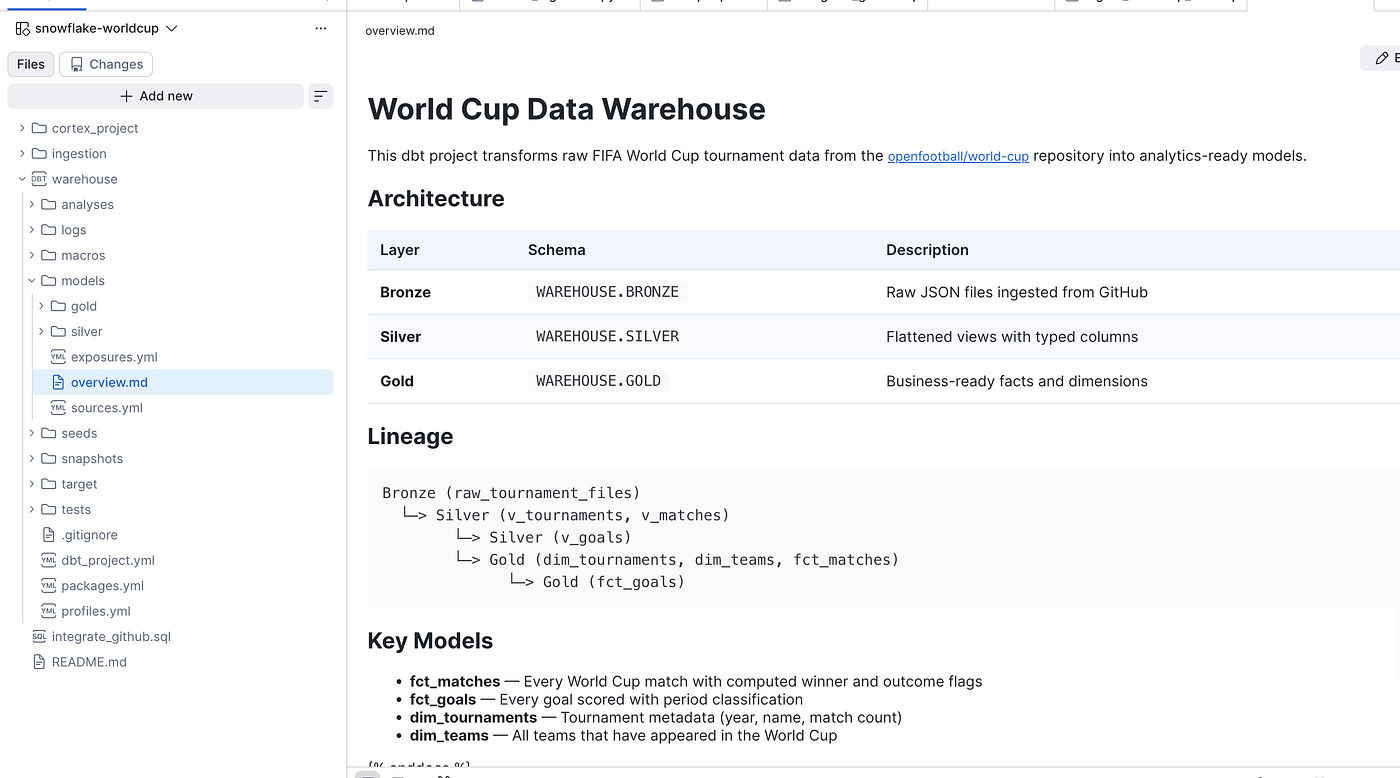
dbt project files in a Snowflake Workspace
Step 2: Install Dependencies: dbt deps
If your packages.yml lists packages, populate the dbt_packages folder with **dbt deps**inside the workspace before deploying.
This project currently runs no remote packages, the only one is commented out:
# packages.yml
# packages:
# - package: Snowflake-Labs/dbt_semantic_view
# version: 1.0.3
If you do enable it, dbt deps needs to reach the dbt package hub and GitHub, which means an external access integration:
CREATE OR REPLACE NETWORK RULE my_dbt_network_rule
MODE = EGRESS
TYPE = HOST_PORT
VALUE_LIST = ('hub.getdbt.com', 'codeload.github.com');

CREATE OR REPLACE EXTERNAL ACCESS INTEGRATION my_dbt_ext_access
ALLOWED_NETWORK_RULES = (my_dbt_network_rule)
ENABLED = TRUE;
Then run dbt deps in the workspace, or attach the integration to the project object so Snowflake runs dbt deps automatically at compile time. Local-only dependencies don’t need external access; a mix of local and remote does. Details: dbt dependencies and external network access.
Step 3: Deploy the DBT PROJECT Object
From the workspace editor, select Connect -> Deploy dbt project, then choose the target database and schema, name the project, and optionally set a default target and an external access integration.
Snowsight shows the SQL it runs. For my project it looks like this:
CREATE OR REPLACE DBT PROJECT WAREHOUSE.GOLD.WORLDCUP
  FROM 'snow://workspace/USER$<USER>.PUBLIC."snowflake-worldcup"/versions/live/warehouse/'
  DBT_VERSION = '1.10.15'
  DEFAULT_TARGET = 'dev'
  EXTERNAL_ACCESS_INTEGRATIONS = ();
A few things to note:
- The
FROMclause points at a workspace version, not raw files — Snowflake snapshots them. DBT_VERSIONpins the managed dbt Core runtime (see supported dbt Core versions).DEFAULT_TARGETchooses theprofiles.ymloutput used for compilation; it can be overridden at execution with--target.EXTERNAL_ACCESS_INTEGRATIONS = ()is an empty array, fine when you have no remote packages.- Run
SELECT SYSTEM$SUPPORTED_DBT_VERSIONS()to see all available versions of dbt
Each redeploy increments the version. Versions live under snow://dbt/<db>.<schema>.<project>/versions/... and are immutable.
Step 4: Execute the Project
You don’t run everything below you pick the dbt operation you need. In the workspace, the Select Operation dropdown lists the supported commands: deps, seed, compile, run, test, build, retry, parse, docs generate, list, show, snapshot, and run-operation.

In SQL, the same thing is EXECUTE DBT PROJECT, where the string after ARGS is the dbt command you chose:
-- Build models AND run their tests in one pass (the usual choice)
EXECUTE DBT PROJECT WAREHOUSE.GOLD.WORLDCUP ARGS = 'build';
A few common alternatives, depending on what you need:
-- Build models only, no tests
EXECUTE DBT PROJECT WAREHOUSE.GOLD.WORLDCUP ARGS = 'run';
-- Run tests only
EXECUTE DBT PROJECT WAREHOUSE.GOLD.WORLDCUP ARGS = 'test';
-- Build just one layer, overriding the target
EXECUTE DBT PROJECT WAREHOUSE.GOLD.WORLDCUP ARGS = 'run --select silver --target dev';
For most pipelines build is all you need, it runs models and tests together. This is the command you schedule and orchestrate. Only a subset of dbt commands is supported , see supported commands and EXECUTE DBT PROJECT.
Step 5: Schedule with a Task
To run the models on a schedule, wrap the execution in a Snowflake task:
CREATE OR REPLACE TASK WAREHOUSE.GOLD.BUILD_WORLDCUP_MODELS
  WAREHOUSE = COMPUTE_WH
  SCHEDULE = '360 MINUTE'
  COMMENT = 'Rebuilds World Cup dbt models every 6 hours'
AS
  EXECUTE DBT PROJECT WAREHOUSE.GOLD.WORLDCUP ARGS = 'build';

-- Tasks are created suspended
ALTER TASK WAREHOUSE.GOLD.BUILD_WORLDCUP_MODELS RESUME;
This pairs naturally with the ingestion task from the GitHub JSON, then rebuild the models. More options in schedule project execution.
Step 6: Monitor the DAG and Run History
Once deployed, Snowsight renders the model lineage and run history for the project object. For this project that is the full Bronze → Silver → Gold graph: raw_tournament_files feeds v_tournaments / v_matches / v_goals, which build the dim_*, fct_*, and agg_* marts.

DAG
You get this observability without standing up anything extra. See monitoring and observability.
CI/CD with the Snowflake CLI
For pipelines outside the UI, the Snowflake CLI mirrors the deploy/execute flow:
# Deploy a new version (optionally install local deps)
snow dbt deploy WORLDCUP --install-local-deps

# Execute it
snow dbt execute WORLDCUP run
snow dbt deploy is the CI equivalent of the workspace Deploy button, it is useful when you run dbt deps in a GitHub Actions build step and ship the whole project. See the Snowflake CLI dbt commands, dbt projects with the CLI, and CI/CD integration.
Note:
- Versions are immutable. Running
dbt depsagainst a deployed object does nothing to its files, it only verifies external access. To change dependencies or code, deploy a new version. - Custom schema names need the macro. Without overriding
generate_schema_name, dbt prefixes your schema, soSILVERbecomes<target>_SILVER. - dbt Fusion runs
dbt depsimplicitly. If you use the Fusion engine andpackages.ymllists packages with nodbt_packagesfolder, Fusion auto-runsdbt depsduringcompile/run. Without an external access integration that fails with a network error, rundbt depsmanually first, or attach the integration. - Reusing another dbt project? Copy it inside yours. dbt lets you use one project as a package (a “local dependency”) so you can share models and macros. Normally you’d point at it wherever it lives on disk, e.g. a sibling folder:
local: ../some_other_project. Snowflake doesn't allow that .A deployed project is a self-contained snapshot, so it can't reach files outside its own folder. The fix is to copy the other project into yours (for example underlocal_packages/) and reference it by that inside path:local: local_packages/some_other_project. Everything then deploys together as one unit.
References
- dbt Projects on Snowflake overview: https://docs.snowflake.com/en/user-guide/data-engineering/dbt-projects-on-snowflake
- Cost: https://docs.snowflake.com/en/user-guide/data-engineering/dbt-projects-on-snowflake-cost
- Workspaces: https://docs.snowflake.com/en/user-guide/ui-snowsight/workspaces
- CREATE DBT PROJECT: https://docs.snowflake.com/en/sql-reference/sql/create-dbt-project
- EXECUTE DBT PROJECT: https://docs.snowflake.com/en/sql-reference/sql/execute-dbt-project
- ALTER DBT PROJECT: https://docs.snowflake.com/en/sql-reference/sql/alter-dbt-project
- Snowflake CLI dbt commands: https://docs.snowflake.com/en/developer-guide/snowflake-cli/command-reference/dbt-commands/overview
- dbt projects with the CLI: https://docs.snowflake.com/en/developer-guide/snowflake-cli/data-pipelines/dbt-projects
- CI/CD data pipelines: https://docs.snowflake.com/en/developer-guide/snowflake-cli/data-pipelines/data-pipelines
- Dependencies: https://docs.snowflake.com/en/user-guide/data-engineering/dbt-projects-on-snowflake-dependencies
- External network access: https://docs.snowflake.com/en/developer-guide/external-network-access/creating-using-external-network-access
- dbt Core: https://github.com/dbt-labs/dbt-core
메타데이터
- post_id
- 00bfb3a8f5f8
- slug
- running-dbt-natively-on-snowflake-00bfb3a8f5f8
- url
- https://medium.com/snowflake/running-dbt-natively-on-snowflake-00bfb3a8f5f8
- canonical_url
- https://medium.com/snowflake/running-dbt-natively-on-snowflake-00bfb3a8f5f8
- author_url
- https://medium.com/@h_bushroh
- status
- ok
- fetched_at
- 2026-07-15 10:05:06