Managing large HTTP responses in Mule
The problem
Managing large HTTP responses in Mule
The problem
Many Mule 4 applications consume external APIs where the response size is unknown until runtime. A missing filter, an unexpected query parameter, or a backend defect can easily result in responses that grow to hundreds of megabytes. Without proper safeguards, this can lead to excessive memory consumption and, in the worst cases, application instability or crashes due to OutOfMemory errors.
The solution you might expect
You may assume that the HTTP Request connector provides a configuration option to reject responses larger than a specific size. Surprisingly, it doesn’t. There is no maxResponseSize attribute or similar mechanism that allows you to stop processing a response based on its size.
The tricks
Although Mule does not expose a native response size limit for the HTTP Request connector, there are several patterns you can use to control or mitigate the impact of large payloads. Each approach has different trade-offs in terms of complexity, performance, and reliability.
Option 1: Rely entirely on streaming
One approach is to ensure the application is fully streaming end-to-end. In theory, this allows you to handle arbitrarily large payloads without loading them into memory. However, in practice, this is not always feasible. Many components in a Mule flow force materialization of the payload (for example, transformations, logging, DataWeave operations, or connectors that require the full body). This makes “pure streaming” difficult to guarantee across real-world integrations.
Option 2: Persist the response to disk
Another option is to store the HTTP response in a file on the Mule worker’s internal disk and evaluate its size afterwards. This avoids memory pressure and gives you full control over the payload. However, writing to the worker’s internal storage is generally considered a bad practice in modern cloud deployments (like CloudHub), as local disk space is limited and ephemeral. Furthermore, it introduces additional I/O overhead, requires cleanup logic, and can become complex in high-throughput scenarios or clustered deployments. It essentially shifts the problem from memory management to disk management.
Option 3: Use compressed responses (gzip)
Requesting compressed payloads can significantly reduce the amount of data transferred over the network. In some cases, you can leverage MuleSoft’s Compression module to inspect the compressed archive’s size before fully extracting it. However, this is not always reliable as a size-control mechanism, since the final uncompressed payload may still be unmanageably large. Additionally, not all APIs support compression consistently, and the decompression process itself can still cause memory pressure.
Option 4: Use a repeatable in-memory stream with a buffer limit (recommended)
A more practical and elegant solution is to configure the HTTP Request response as a repeatable in-memory stream with a defined maximum buffer size. This leverages Mule’s streaming infrastructure instead of the HTTP connector itself.
With this approach, the response remains streamed by default, but Mule will start buffering data as soon as downstream components require full access to the payload. If the configured maxBufferSize is exceeded, Mule fails fast, preventing uncontrolled memory consumption.
This is the approach used in the rest of this article, as it provides a good balance between simplicity, control, and predictable behavior without introducing external storage or additional infrastructure dependencies.
A practical example
The following flow demonstrates how to configure a repeatable-in-memory-stream with a maxBufferSize of 10 MB. Responses smaller than the configured limit are processed normally, while larger responses fail fast once Mule exceeds the buffer threshold during payload consumption.

A simple API for testing
To make the examples reproducible, I created a small HTTP service in Python (using the FastAPI framework) that generates JSON responses of arbitrary sizes.
The service exposes a single endpoint that accepts the desired response size (in MB) as a query parameter:
from fastapi import FastAPI, Query
from fastapi.responses import Response

app = FastAPI(title="Largefile API")

@app.get("/largefile")
def largefile(size: int = Query(..., ge=1, le=600)) -> Response:
    payload = build_payload(size)
    return Response(
        content=payload,
        media_type="application/json"
    )
The build_payload() function generates a JSON array whose size closely matches the requested number of megabytes. This makes it easy to test different scenarios by simply changing the size parameter:
GET /largefile?size=5
GET /largefile?size=10
GET /largefile?size=20
GET /largefile?size=100
This lightweight service allowed me to reproduce the behavior consistently while testing the different buffering strategies described in this article.
HTTP Request configuration
First, we configure the HTTP Request connector in our Mule 4 application with streaming enabled:
<http:request-config name="HTTP_Request_configuration">
    <http:request-connection host="localhost" port="8443" streamResponse="true"/>
</http:request-config>
The important part here is streamResponse="true", which ensures the payload is handled as a stream instead of being fully loaded into memory upfront. Keep in mind that, by default, the streamResponse attribute is set to false.
Flow with controlled buffering
Now we introduce the key trick: limiting how much of that stream Mule is allowed to buffer.
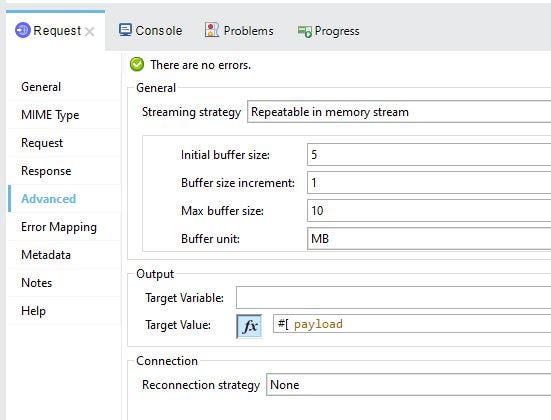
<http:request method="GET"
              config-ref="HTTP_Request_configuration"
              path='#["/largefile?size=" ++ (attributes.queryParams.size default 1)]'>

    <repeatable-in-memory-stream
        initialBufferSize="5"
        bufferSizeIncrement="1"
        maxBufferSize="10"
        bufferUnit="MB"/>
</http:request>
This configuration is where the protection actually happens:
- Mule starts streaming the response as usual
- As downstream components read the payload, Mule begins buffering it in memory
- The buffer grows dynamically up to 10 MB
- If the payload exceeds this threshold, Mule throws an exception immediately
Simulating the behavior in the flow
To observe this buffering limit in action, we need to introduce a component that actively forces the materialization of the stream:
<ee:transform>
    <ee:set-payload><![CDATA[%dw 2.0
output application/json
---
payload
]]></ee:set-payload>
</ee:transform>
This transformation forces Mule to fully read the stream, triggering the buffering mechanism. This is typically where large payloads would cause memory issues in real scenarios.
Handling oversized responses gracefully
We wrap the processing logic in a try block to capture failures caused by exceeding the buffer limit:
<try>
    <!-- transformation logic here -->

    <error-handler>
        <on-error-continue>
            <ee:transform>
                <ee:set-payload><![CDATA[%dw 2.0
output application/json
---
"Message too large"
]]></ee:set-payload>
            </ee:transform>
        </on-error-continue>
    </error-handler>
</try>
This ensures the flow fails gracefully instead of propagating a raw streaming exception.
What is happening internally?
The HTTP Request operation returns a stream instead of immediately loading the entire response into memory. As long as the payload remains a stream, the response size is not an issue. However, when a component such as a Transform Message attempts to read the complete payload, Mule starts buffering the data. If the configured maximum buffer size is exceeded, the operation fails with an exception, preventing additional memory from being allocated.

Limitations
When the maxBufferSize is exceeded, Mule fails fast and throws an exception. Because the stream is abruptly closed, the underlying TCP connection to the remote server is typically dropped. This means the technique does stop the remote server from sending the rest of the payload, thereby saving network bandwidth. However, it is important to remember that the primary goal of this configuration is memory protection for your Mule application, not network traffic management.
Wrapping up
Mule 4’s streaming capabilities are powerful, but they require a safety net when dealing with unpredictable external APIs — such as legacy systems, unpaginated endpoints, or accidental large file downloads. By setting a hard limit on your in-memory buffer, you ensure your integration fails fast and gracefully, protecting your application from sudden OutOfMemory crashes and keeping your overall architecture stable.
메타데이터
- post_id
- 00ebc82fbe2e
- slug
- managing-large-http-responses-in-mule-00ebc82fbe2e
- url
- https://medium.com/another-integration-blog/managing-large-http-responses-in-mule-00ebc82fbe2e
- canonical_url
- https://medium.com/another-integration-blog/managing-large-http-responses-in-mule-00ebc82fbe2e
- author_url
- https://medium.com/@jrhuerga
- status
- ok
- fetched_at
- 2026-07-17 04:06:05