What are compiled and interpreted languages?
So we have our simple program, hello.c starting its lifecycle as a high-level program. High-level, because it is written in a…
What are compiled and interpreted languages?
So we have our simple program, hello.c starting its lifecycle as a high-level program. High-level, because it is written in a human-readable language. This has been discussed in detail in our previous article of our “Computify with me…” series. If you’re here purely to learn about the definition and meanings of these phrases, no worries. That is exactly what the article is about. Let’s kick off.
Photo by Patrick Martin on Unsplash
A program when written in a high-level language is not all it needs for the machine to understand and execute it. In fact, the machine won’t understand any of such a language as it uses numbers in its machine code of bits and bytes. This program has to be translated by other programs to a sequence of low-level machine language instructions. These instructions are packaged as an executable object program and stored as a binary file. A binary file, in simple terms, is one whose content is not exclusively readable text. They contain bytes that do not map to standard language characters and are designed to be read by other programs, not humans (they are not like, ABCD, #$, which are standard language characters). The contrast of a binary file is our hello.c program written purely in text that can be mapped to a standard such as ASCII, UTF-8, and these are known as text files. More on binary and text files is discussed here.
I’ll write out the code in our simple hello.c file, and to drive the point home, I’ll add an image showing how the code is mapped with ASCII to numbers.
1 #include <stdio.h>
2
3 int main()
4 {
5 printf("hello, world\n");
6 return 0;
7 }
The ASCII interpretation map, where each character is translated to a number of its identity;
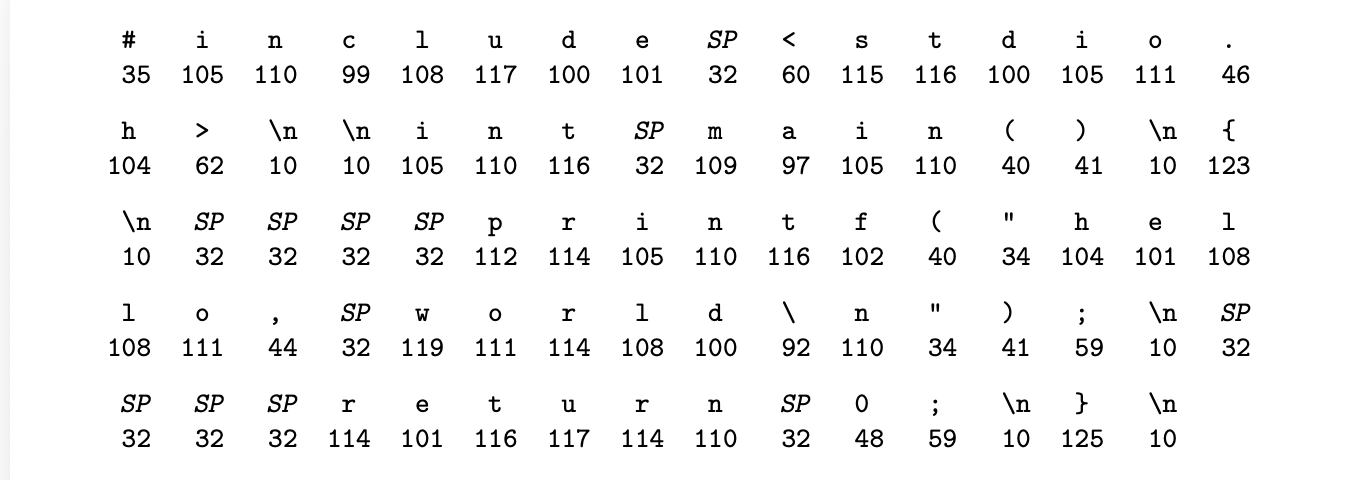
It has been established that there is a need to translate this program to a binary file. Which binary file will be instructions to the machine that run the program. But what handles this translation via many other programs? Some sort of pipeline happens here and something must be orchestrating it, right?
On UNIX system, this translation is performed by the GCC compiler driver. There are other compiler drivers such as Clang, ICC, but it is all the same job they’re handling. GCC handles this translation in 4 phases; pre-processing, compilation, assembly, and linking, in that order. To understand the definitions and differences between compiled and interpreted languages, it is important to break down these phases.
- Pre-processing The preprocessor (cpp) modifies the original C program according to directives that begin with the ‘#’ character. For example, the #include <stdio.h> command in line 1 of hello.c tells the preprocessor to read the contents of the system header file stdio.h and insert it directly into the program text. The result is another C program, typically with the .i suffix. So at this point, we have a program file called hello.i
- Compilation The compiler (cc1) translates the text file hello.i into the text file hello.s, which contains an assembly-language program. This is to prepare it for the assembly phase. In the hello.s program, the definition of the function main would look like: 1 main: 2 subq $8, %rsp 3 movl $.LC0, %edi 4 call puts 5 movl $0, %eax 6 addq $8, %rsp 7 ret Each of lines 2–7 in this definition describes one low-level machine-language instruction in a textual form. It is a language that is human-readable but does not really make sense to the reader. You would call it the readable version of machine instructions, a hybrid of sorts. The instructions above from line 2 through 7 tell the machine to; Allocate 8 bytes on the stack, then load string pointer into register, then call the puts function, then set return value to 0, then deallocate stack space, and return from function.
- Assembly Next is our assembly phase. Here, the assembler (as) translates the file hello.s (which has our instructions in assembly language) into machine language instructions, packages it into a form known as a relocatable object program, and stores it as an object file, hello.o. This is a binary file with binary instructions that the machine actually understands. A relocatable object program is just one that doesn’t know its memory addresses yet, which is handled by our linking phase.
- Linking The linker takes multiple object files and combines them into one executable. At some point in our program, we call the ‘printf’ function. This printf function is part of the standard C library and resides in a separate pre-compiled object file, printf.o. This file has to be merged with our hello.o. If there was another ‘inbuilt’ C function called, it would also have to be merged with all the other files. The linker does this merging and updates the memory addresses so everything points to the right place to make the final executable, hello. This one is with no suffix 😀.
And that’s how we move from our high-level program hello.c to an executable hello that is instructions in a low-level machine language to run our program. This is the process of all compiler drivers in C, C++, Go, Rust, Swift, Fortran, Pascal. These languages as known as compiled languages. They compile source code to machine code before execution.
So what do interpreted languages do? Unlike compiled languages, interpreted languages translate and execute code at runtime. This means every time you run the program, it handles this translation each time. Complied languages compile once and running the program does not repeat the compilation process. Interpreted languages have a Interpret-On-The-Fly kind of approach. They almost go through the same process, except for some that are skipped. I’ll explain.
What could be the equivalent of preprocessing in say, Python or JS (JavaScript) is the import statements. These are still resolved at runtime, so there is no active pre-processing to say. Most of the work is handled in the compilation phase for interpreted languages with compilers directly compiling to machine code. In the case of JS, you might have come across the words V8 engine JIT (Just-In-Time) compiler which compiles to machine code. In Python’s case a compiler converts this high-level language to bytecode. Since we can see this process is handled by these efficient engines, the assembly step is not necessary for interpreted languages. The linking phase is one of the same as the ‘pre-processing’ with modules from your import statements being resolved at runtime here, the module system looks for the module from your files, and combines the code from the module with your code. This is why you might encounter the error “Cannot resolve module:…” if you have not installed the module in your files. Note that all this happens at runtime, hence some of the traditional processes from the compiled languages overlap in function as explained above. And this is the major difference between these languages.
It is for this difference that compiled languages are the go-to for performance-critical systems. Since they compile once and can be run many times after that, they are much faster, as you don’t have to pay the performance cost each time you run the program. Hence, you’ll find compiled languages used in creating Operating Systems, databases, game engines, web servers, and so on, while interpreted languages are favored for web applications, backend services, scripting, data science, e.t.c.
You will also find some languages that are hybrids of these 2 systems in that they support both versions. Languages such as Java, which compiles to bytecode, but the compilation still happens before execution. The JVM (Java Virtual Machine) then interprets or JIT-compiles the bytecode. C# also compiles to intermediate bytecode first, then runs on the .NET runtime. Kotlin compiles to bytecode that runs on the JVM, similar to Java.
And there we have it. There are other causes for preferring one of these types of languages over another, but they will be discussed at a later stage. This, however, is good coverage for an introduction to these languages.
Catch you for the next article.
메타데이터
- post_id
- 00fbfce00c51
- slug
- what-are-compiled-and-interpreted-languages-00fbfce00c51
- url
- https://medium.com/@aineleslie/what-are-compiled-and-interpreted-languages-00fbfce00c51
- canonical_url
- https://medium.com/@aineleslie/what-are-compiled-and-interpreted-languages-00fbfce00c51
- author_url
- https://medium.com/@aineleslie
- status
- ok
- fetched_at
- 2026-06-15 20:49:13




