Microsoft Flight Simulator — Experiences and Reflections, Applied Learning Aerospace Engineering…
This article was written as part of Concordia International School Shanghai’s Applied Learning Aerospace Engineering course (2026) taught…
Microsoft Flight Simulator — Experiences and Reflections, Applied Learning Aerospace Engineering 2026
This article was written as part of Concordia International School Shanghai’s Applied Learning Aerospace Engineering course (2026) taught by the one and only Dr. Peter Tong, where we explore in-depth topics and engage in hands-on experience including but not limited to designing our own model aircrafts and constructing airfoils. To learn more, please check out our AeroAcademic publication.
As part of our coursework, we were expected to learn the basics of flying a plane — that is, basic flight controls, taking off, landing, and so on — using our school’s in-house flight simulator setups.
To those of you who aren’t familiar with Microsoft Flight Simulator, it is essentially a simulation that allows you to pilot aircraft ranging from Cessnas to Helicopters with vividly realistic graphics, controls, weather conditions, and complexity. Produced by Microsoft, the franchise has been continuously pumping out increasingly advanced versions every couple of years.
Our school’s PCs ran two versions — MSFS 2020 and 2024 respectively, as seen below in Figures 1 and 2. Personally, I preferred 2020 a lot more since 2024 required an online connection and was often throttled severely.
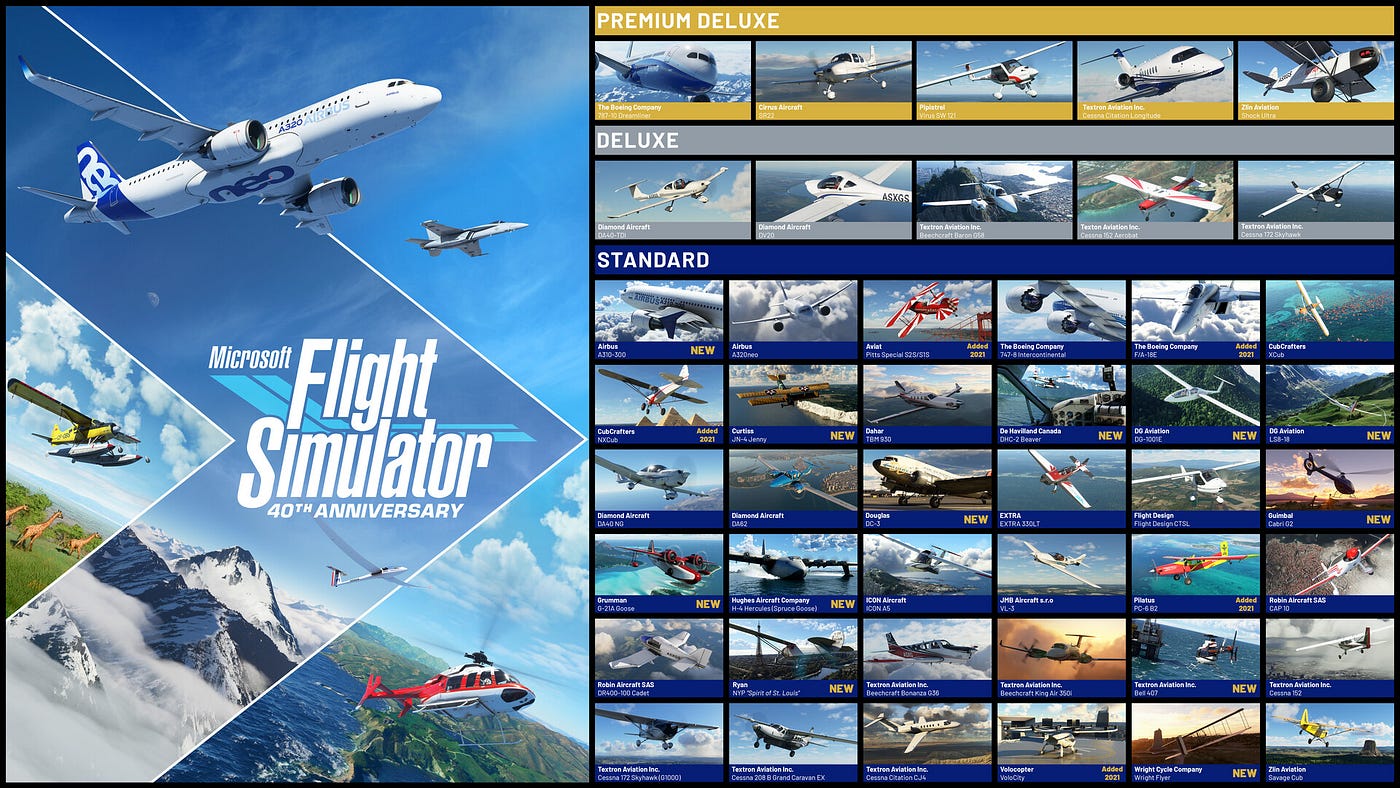

Left — Fig. 1: MSFS 2020. Right — Fig. 2: MSFS 2024.
However, both systems are excellent and very approachable for beginners due to the tutorial “Flight School” system, as seen below in Figure 2, which is essentially a series of digitally guided lessons on different controls and skills needed for someone to go from being completely clueless about flying a plane to becoming adept at traversing the skies.

Fig. 3: MSFS Flight School System.
We were expected to master the very basics using this system and were assessed on the first two categories of lessons: basic handling skills such as trimming, power settings, and rudder usage and more complex skills, namely takeoff, landing, and their respective components. As someone who had only watched from afar in the past as some of my acquainted upperclassmen tinkered with the system, I was excited to get an opportunity to finally try out the system.
Experiences
The first module was relatively simple and taught us the basic functions of the flight simulator. Thankfully, our school’s system was advanced enough to possess realistic yokes, pedals, and power control systems, as depicted in Figure 4. The module set up the groundwork for our future lesson by teaching us how to look around, use the camera, hide the yoke, adjust instruments, etc.

Fig. 4: Our School’s MSFS Setup.
The next modules focused on the actual, hands-on applications of the different components we learned about in the first module. We were placed in the air and told to interact with the primary control surfaces of the aircraft — ailerons, elevators, and rudders – before being placed in a familiarisation flight and then subsequently confronted with the essential concepts of controlling pitch, roll and power.
After this, there were two combined modules that synthesised the lessons we learned in the past 6 lessons into challenges. First of all, there was the straight and level flight lesson, where we had to practice flying completely straight by making coordinated adjustments to yoke and throttle. Then, there was the overall attitude test, where we had to perform a variety of manouvers such as pitching up while turning up that assessed our proficiency with all of the skills we had learned so far. This is a good time to mention that the flight simulator tutorial system possessed a built-in, automated assessment rubric as well that provided you with a basic breakdown of how well you did at each sub-task as well as a cumulative letter grade, as seen in Figure 5.

Fig. 5: Image of MSFS Letter Grades.
The next half of our coursework, however, was much more difficult, as it involved taking off and landing, two extremely difficult tasks that represented a shift from isolated skill practice to something much closer to actual flying. The take-off and landing lessons involved the simultaneous application of all of the skills we had learned in the past, as even a small mistake in alignment, speed, or attitude could potentially derail an attempt.
The first two lessons involved take-off procedures and taxi procedures, both of which synthesised careful rudder input with precise throttle adjustment. For take-off specifically, rotation, climb, pitch, and power all had to be managed simultaneously, testing both coordination and familiarity with all control surfaces and instruments.
Landing, however, was where our class as a whole faced a bottleneck. Not only were we assessed on constant runway alignment, but also much more complex skills like power management, descent rate, and most difficult of all, flaring. The combination of judgement, timing, and coordination made me deeply appreciate the difficulty and rigidity of real-world pilots; whereas a fluke in flare timing might force me to simply restart a lesson, it could potentially translate to a lethal experience in an actual flight environment. After trying for a long time, however, many of us continued to make little-to-no progress in the lessons and were stuck at Bs. Therefore, my friends and I decided to break down the lessons scientifically and design specific procedures that would create fail-safe paths to As on the modules. We even continued our discussions outside of class – as seen in Figure 6– and, when together, would take turns analysing our mistakes.

Fig. 6: Chat History of Two Curious Individuals.
One specific trick I found that was really helpful was actually observing the different statistics shown on-screen, such as heading and altitude. Since conditions involved in each attempt were virtually identical due to the nature of the simulation, it became possible for us to identify specific patterns and “magic numbers” in elevation or heading angle that would guarantee that the plane would stay aligned to the runway or provide for an indicator of when one was supposed to flare up during landing. Later on, we synthesised these numbers into actual, reproducable trends. The most notable technique was with how we used the rudder as a benchmark for runway alignment, which helped me personally go from being inconsistent at best with alignment to being almost 100% parallel to the runway throughout my better attempts.
Assessment
For this semester’s final assessment, we were instructed to pick two random flight lessons and go through the simulation until we were satisfied with the score. I was personally assessed on the Take-Off and Combined Landing exercises. The most important part of the assessment however was not just showing our mastery of aircraft piloting, but also evidence of our understanding of key concepts and learning process. An image of me during this assessment can be seen below in Figure 7.

Fig. 7: Me During My Flight Assessment.
Despite the significant amount of work I had put into practicing in the past month (even in the middle of AP Season!), I still struggled with consistency at times, particularly with some of the more challenging lessons. My first attempt at landing was overall very optimised. However, I made a significant blunder where I flared too late and too strongly, resulting in a minor bounce when the aircraft landed. During my second (and final) attempt at this exercise, I pitched up a little earlier at a distance of 30 feet from the runway, but to a much gentler extent, which helped me get an A. Many of the tricks and techniques came into play here since this was the lesson I struggled with the most personally as well in the past. A score breakdown of my last attempt can be seen below, in Figure 8.

Fig. 8: Score Breakdown of Landing.
Landing was similar. I struggled a bit with the taxiing process, so iterated that section of the lesson a few times before formally starting that portion of the assessment. The improvement process was quite similar to the rest of the year; constant and rapid reflection along with grueling hard work. Eventually, I began my actual assessment and was able to gain an A, as seen below in Figure 9. I was quite ecstatic after this image was taken – another indicator of my curiousity and genuine enjoyment in the learning process.

Fig. 9: Landing Assessment.
I really liked the iterative process of learning involved in this assessment. It felt less like a test and more like a challenge to be overcome, which I think helped motivate me to improve even after I had already gotten As on mostly every lesson.
Connections and Reflections
The Flight Simulator system overall helped me visualise clear connections between the concepts we interacted with in class and actual, real-world processes. For instance, the basic handling lessons directly reflected principles of aerodynamics by giving the user control over lift, drag, and thrust respectively. It felt like a culmination of our entire learning process, but in a practical, hands-on landscape that differed from a traditional pen-and-paper exam.
The simulator also highlighted the complexity of aircraft systems and procedures. Even in simple training modules with assistive AI, success depended on experience, practice, situational awareness, and the ability to interpret instrument data correctly. In fact, top airlines often use flight simulators (that are albeit more complex and advanced) to train pilots and simulate real–world environments, an example of which can be seen below with Cathay Pacific in Figure 10.

Fig. 10: Cathay Pacific Flight Simulator.
Beyond the field of aerospace however, the built-in assessment rubric provided a humbling and frustrating yet incredibly valuable learning process. While getting low grades on early attempts were frustrating, I was able to persevere and analyse my mistakes and engage in discourse with my peers. The focus on perfection and meticulous detail in not just flight simulator but also all of our projects throughout the year in this class have provided me with increased grit, perseverance, and a newfound appreciation for the process of execution, refinement, and improvement. I am truly blessed to have been given the opportunity to grow and learn through this class both intellectually and holistically. Thank you D.T. as well as all of my classmates for making this year so eventful and full of chances to improve and develop. I really want to thank Andy in particular as well for being a helpful and patient teammate who I could work with to analyse problems and come up with strategies during our frequent, consistent visits to the classroom after school in the month leading up to the assessment. Read his perspective here.
Sources Used
메타데이터
- post_id
- 0129b99a225e
- slug
- microsoft-flight-simulator-experiences-and-reflections-applied-learning-aerospace-engineering-0129b99a225e
- url
- https://medium.com/aeroacademic/microsoft-flight-simulator-experiences-and-reflections-applied-learning-aerospace-engineering-0129b99a225e
- canonical_url
- https://medium.com/aeroacademic/microsoft-flight-simulator-experiences-and-reflections-applied-learning-aerospace-engineering-0129b99a225e
- author_url
- https://medium.com/@longlong2027044
- status
- ok
- fetched_at
- 2026-08-04 12:45:51