Best Bluetooth Tracker 2026: Tested and Compared
If you keep losing your keys, your bag, or your wallet, a good Bluetooth tracker is the cheapest peace of mind you can buy in 2026. After…
Best Bluetooth Tracker 2026: Tested and Compared
If you keep losing your keys, your bag, or your wallet, a good Bluetooth tracker is the cheapest peace of mind you can buy in 2026. After living with five of the most popular ones for the past few weeks — clipping them to keychains, dropping them in luggage, and forgetting them on purpose — here’s the short version: the Apple AirTag is still the easiest pick if you own an iPhone, the Samsung Galaxy SmartTag2 is the best Android-native option, and Chipolo and Pebblebee are the smart cross-platform choices when you want one tracker that plays nice with both phones. Below I break down how they actually compare on range, battery, ecosystem, and the stuff that matters when you’re standing in an airport wondering where your suitcase went.
This isn’t a spec-sheet copy-paste. I care about how these things behave in real life — how fast the “found it” ping shows up, whether the finding network actually finds anything, and which ones are worth the money. Let’s get into it.
How Bluetooth Trackers Actually Work in 2026
A Bluetooth tracker is a small tag — usually the size of a coin or a credit card — that pairs with your phone over Bluetooth. When the tag is nearby, your phone shows you roughly where it is and can make it beep. The clever part is what happens when the tag is far away: it piggybacks on a giant crowd-sourced “finding network” made up of millions of other phones. When any stranger’s phone walks past your lost tag, it quietly reports the location back to you. You never know it happened, and neither do they.
In 2026 there are three big finding networks that matter. Apple’s Find My network uses every iPhone on the planet, which makes it enormous. Google’s Find My Device network does the same thing across Android phones and finally became genuinely useful after a slow start. Samsung runs its own SmartThings Find network on Galaxy devices. The size of the network is the single biggest factor in whether you’ll ever recover a lost item, so the right tracker often comes down to which phone you carry.
A handful of trackers now support both Apple and Google networks, though usually not at the same time — you pick one during setup. That flexibility is why cross-platform brands like Chipolo and Pebblebee have gotten so popular with people who switch phones or live in mixed households.
The Trackers I Tested
I focused on the five that most people are actually choosing in 2026: the Apple AirTag, the Samsung Galaxy SmartTag2, the Tile Pro, the Chipolo ONE Spot, and the Pebblebee Clip. Each one targets a slightly different buyer, and I’ll tell you exactly who each is for.
Apple AirTag — Best for iPhone Users
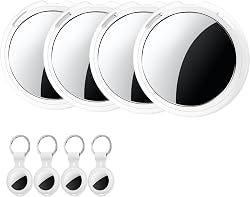
If you own an iPhone, the AirTag is almost impossible to beat. Setup takes about five seconds: hold it near your phone, tap a button, name it, done. The killer feature is Precision Finding. On any iPhone with the Ultra Wideband chip, your screen turns into an arrow that literally points you to the tag and counts down the distance — “12 feet,” “6 feet,” “right here.” No other tracker’s directional finding feels this polished.
The AirTag rides on Apple’s Find My network, which is the largest finding network in the world, so a lost AirTag in any populated area tends to get located fast. The CR2032 battery is user-replaceable and lasts about a year, which I love — nothing worse than a sealed tracker dying for good after twelve months. The downsides are predictable: there’s no keyring hole, so you’ll want a holder, and it does nothing useful on Android. It’s an iPhone accessory through and through. You can see current pricing and the holder bundles on the official Apple AirTag listing.
Samsung Galaxy SmartTag2 — Best for Samsung Phones

The SmartTag2 is the AirTag’s mirror image for the Samsung world. If you carry a Galaxy phone, this is your pick. It has a built-in keyring loop (thank you, Samsung), an IP67 water-and-dust rating, and a genuinely massive battery life — Samsung rates it up to around 500 days in power-saving mode, and in my testing it sips power so slowly you’ll forget it has a battery.
It uses Samsung’s SmartThings Find network, which is large but only spans Galaxy devices, so its real-world finding power depends on how many Samsung phones are around you. Like the AirTag, it supports Ultra Wideband directional finding on compatible Galaxy phones. The catch is the same in reverse: it’s locked to the Samsung ecosystem. If you ever switch to an iPhone or a Pixel, it becomes a paperweight. For details on the network it relies on, Samsung documents the SmartThings Find feature on its support site.
Tile Pro — Best for Loud Ringer and Range
Tile has been doing this longer than anyone, and the Tile Pro is its flagship. Its big advantages are a seriously loud ringer — the loudest of anything I tested, which matters more than you’d think when something’s buried in a couch — and a long Bluetooth range rated around 400 feet. It works identically on iPhone and Android through the Tile app, which makes it a true cross-platform option without forcing you to pick a network.
The trade-offs are real, though. Tile’s own finding network is smaller than Apple’s or Google’s, so out in the wild a lost Tile is less likely to phone home. Some of the best features, like Smart Alerts that warn you when you leave something behind, sit behind a subscription. The replaceable battery lasts about a year. The Tile Pro is the pick if ringer volume and range matter more to you than network size.
Chipolo ONE Spot — Best Cross-Platform Pick
The Chipolo ONE Spot is the clever one. It works with Apple’s Find My network — meaning it shows up right inside the iPhone Find My app alongside your AirTags, no separate app needed — and Chipolo also sells a Google-network version for Android users. So you get AirTag-class network coverage in a tag that has a built-in keyring hole and an extremely loud ringer. For a lot of iPhone users, it’s the AirTag they actually wanted.
Battery is replaceable and lasts about a year. The one thing it lacks versus the AirTag is Ultra Wideband, so there’s no arrow-style Precision Finding — you get a “near/far” signal and the ringer instead. If you can live without the pinpoint arrow, the Chipolo gives you 90% of the AirTag experience with better hardware ergonomics. Chipolo lists the Find My version and the Android version on its product page.
Pebblebee Clip — Best Rechargeable Tracker
The Pebblebee Clip solves the one thing every other tracker on this list gets wrong: the battery. Instead of swapping coin cells, you recharge it over USB, and a single charge lasts months. Over a few years that’s a real money and hassle saver, and it’s better for the environment too. Like Chipolo, it supports either Apple’s Find My or Google’s Find My Device network — you choose at setup — and it has a built-in clip so you don’t need an accessory.
It’s a little larger than an AirTag because of the rechargeable cell, and it skips Ultra Wideband, so finding is network-and-ringer based rather than arrow-based. But if the idea of replacing batteries annoys you, the Pebblebee Clip is the obvious answer. You can check current pricing and the rechargeable specs on the Pebblebee Clip listing.
Range, Battery, and Water Resistance Compared
Here’s the practical summary. For Bluetooth range, the Tile Pro leads at roughly 400 feet, with the others landing in the 200–350 foot territory. In day-to-day use the difference rarely matters, because the finding network does the heavy lifting once an item is truly lost — range only helps when the tag is still in the same building.
For battery, the Samsung SmartTag2 wins among coin-cell trackers with its enormous rated life, the Pebblebee wins overall thanks to recharging, and the AirTag, Tile Pro, and Chipolo all land around a year on a replaceable cell. For water resistance, the AirTag, SmartTag2, and Chipolo carry an IP67 rating (fine for rain and accidental splashes), which is what you want on something clipped to a bag.
If you care about pinpoint, arrow-style directional finding, only the AirTag and the SmartTag2 offer it, and only when paired with an Ultra Wideband phone. Everyone else relies on a loud ringer and a near/far signal, which honestly gets the job done for keys lost inside the house.
Which Bluetooth Tracker Should You Buy?
Buy the Apple AirTag if you own an iPhone and want the smoothest setup plus Precision Finding. Buy the Samsung Galaxy SmartTag2 if you’re in the Galaxy ecosystem and want monster battery life. Buy the Tile Pro if you want the loudest ringer, the longest range, and true cross-platform support in one app. Buy the Chipolo ONE Spot if you want AirTag-network coverage with a built-in keyring and a louder beep. And buy the Pebblebee Clip if you never want to think about batteries again.
If you’re outfitting a car with tech, a tracker pairs naturally with the other gear I’ve covered — I went deep on charging hardware in my guide to the best portable EV charger for 2026, and on roadside backup in my rundown of the best portable jump starters. A tracker tucked into the glovebox or clipped to a spare key is cheap insurance for the stuff you can’t afford to lose on a trip.
Frequently Asked Questions
Do Bluetooth trackers work without my phone nearby? Yes — that’s the whole point of the finding networks. When your tag is out of your own phone’s Bluetooth range, it relies on other people’s phones anonymously detecting it and reporting its location back to you. The more phones on that network, the better your odds of recovery.
Can someone use a tracker to stalk me? The major networks have built anti-stalking protections. Apple and Google jointly developed a cross-platform standard so that an unknown AirTag, Chipolo, or Pebblebee traveling with you will trigger an alert on both iPhone and Android, and the tag will eventually beep on its own. It’s not perfect, but it’s far better than it was a couple of years ago.
How long do the batteries last? Coin-cell trackers like the AirTag, Tile Pro, and Chipolo last roughly a year and use a replaceable CR2032. The Samsung SmartTag2 can stretch much longer in power-saving mode. The Pebblebee is rechargeable over USB and lasts months per charge, so you never buy batteries.
Can one tracker work on both iPhone and Android? Not simultaneously, but Chipolo and Pebblebee let you choose Apple’s or Google’s network at setup, and Tile works through its own app on both platforms. Native trackers like the AirTag (Apple) and SmartTag2 (Samsung) are locked to their own ecosystems.
Is it worth paying for the more expensive trackers? For most people the mid-priced tags hit the sweet spot. Spend up only if you specifically need Ultra Wideband Precision Finding (AirTag, SmartTag2), the loudest possible ringer (Tile Pro), or rechargeable convenience (Pebblebee). The cheapest tag on a network you actually use beats an expensive tag on a network you don’t.
Final Thoughts
The best Bluetooth tracker in 2026 is mostly decided by the phone in your pocket. iPhone users should grab an AirTag or a Chipolo ONE Spot; Samsung users should grab a SmartTag2; and anyone who wants flexibility or hates changing batteries should look hard at Pebblebee or Tile. They all cost about the same as a couple of coffees, and the first time one helps you find a lost bag, it pays for itself instantly. Tag your keys, tag your luggage, and stop the frantic morning searches for good.
메타데이터
- post_id
- 016049296ccf
- slug
- best-bluetooth-tracker-2026-tested-and-compared-016049296ccf
- url
- https://medium.com/@ahsangultvde/best-bluetooth-tracker-2026-tested-and-compared-016049296ccf
- canonical_url
- https://medium.com/@ahsangultvde/best-bluetooth-tracker-2026-tested-and-compared-016049296ccf
- author_url
- https://medium.com/@ahsangultvde
- status
- ok
- fetched_at
- 2026-06-21 07:44:09


