How I Would Design a Scalable Salesforce System? (Step-by-Step Thinking)
Hello Trailblazers,
How I Would Design a Scalable Salesforce System? (Step-by-Step Thinking)
Hello Trailblazers,
One of the most interesting parts of working in Salesforce is not just building features…
👉 It’s designing systems that actually work well over time.
Because building something that works today is easy.
👉 Building something that still works after:
- More users
- More data
- More automation
That’s where real thinking comes in.
The Common Approach
Most people start like this:
“Let’s build the requirement.”
And that works… initially.
But after some time:
- Performance issues
- Difficult maintenance
- Unexpected errors
👉 Start appearing
My Approach Is Slightly Different
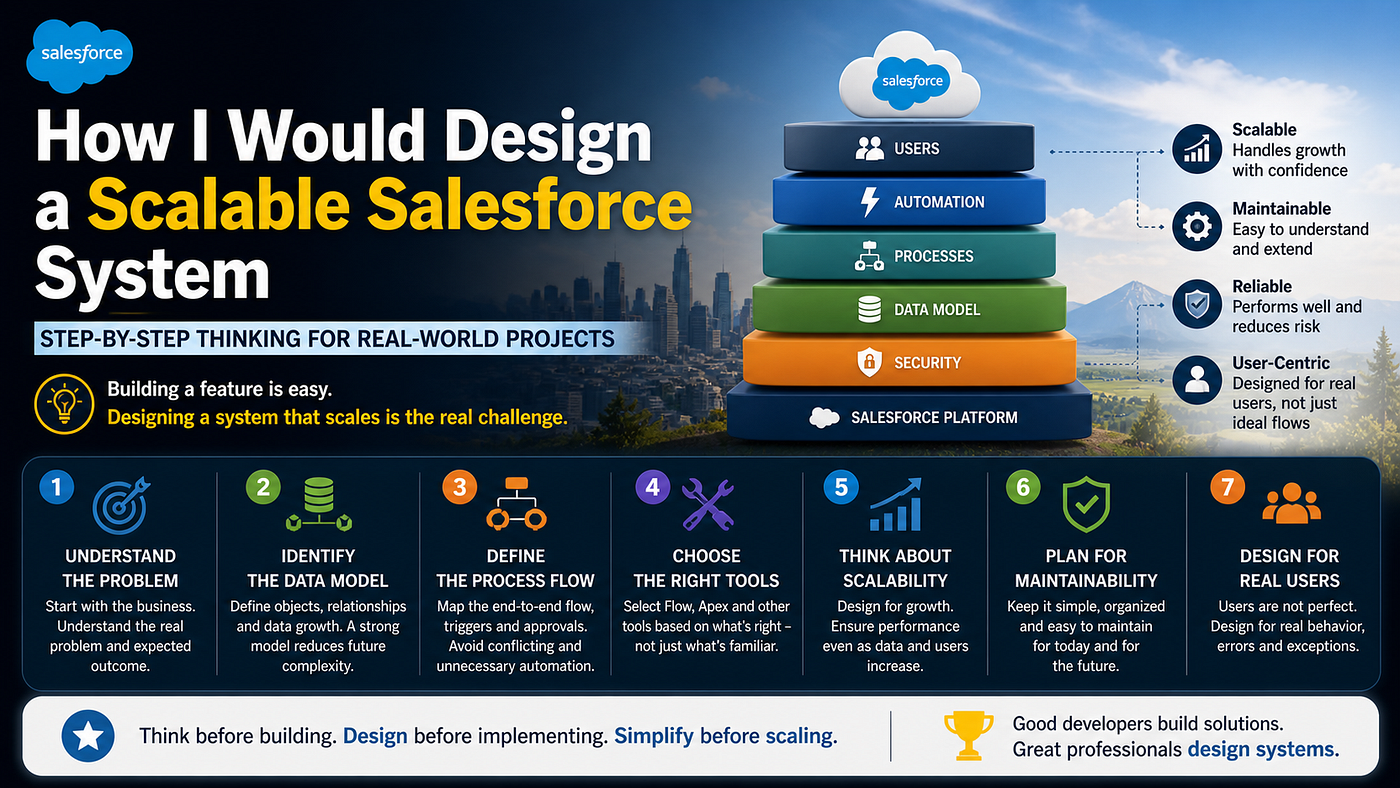
Before writing a single Flow or Apex line, I try to think in layers.
Not tools.
Step 1: Understand the Business Problem
Before thinking about Salesforce:
👉 I ask:
- What is the actual problem?
- What outcome does the business expect?
Because:
👉 A good technical solution for a wrong problem is still wrong
Step 2: Identify the Data Model
Salesforce revolves around data.
So I think:
- What objects are involved?
- How are they related?
- What kind of data growth is expected?
👉 A strong data model reduces future complexity
Step 3: Define the Process Flow
Then I map:
- What happens first?
- What triggers what?
- Where approvals or automation are needed?
👉 This helps avoid:
- Conflicting automations
- Unnecessary triggers
Step 4: Choose the Right Tools
Only now I think about:
- Flow
- Apex
- Validation rules
- Assignment rules
👉 Tool selection comes AFTER clarity
Not before.
Step 5: Think About Scalability
I ask:
- What happens if data increases 10x?
- What happens if more automation is added?
👉 If the system breaks under growth It’s not scalable
Step 6: Plan for Maintainability
A system is not just built once.
👉 It is maintained for years
So I consider:
- Will someone else understand this?
- Is the logic too spread out?
- Can changes be made easily?
Step 7: Design for Real Users
Users don’t follow perfect flows.
They:
- Enter wrong data
- Skip steps
- Use system differently
👉 So I try to design for real behavior, not ideal behavior
A Simple Example
Requirement: “Auto-create tasks and send notifications when a record is updated”
Simple?
Yes.
But design decisions include:
- Where to place automation
- How to avoid duplicate triggers
- How to handle bulk updates
👉 That’s where system thinking matters
One Important Lesson
Earlier, I used to focus on:
“How fast can I build this?”
Now I focus on:
👉 “How well will this work after 6 months?”
That question changes everything.
What I Try to Avoid
❌ Too many disconnected Flows ❌ Logic spread across multiple places ❌ Building without understanding data impact
My Simple Rule
👉 Think before building 👉 Design before implementing 👉 Simplify before scaling
Final Thought
In Salesforce:
👉 Good developers build solutions 👉 Great professionals design systems
How do you approach system design in Salesforce?
Or are you still focusing more on building?
Let me know your thoughts 👇
Let’s grow together 🚀
메타데이터
- post_id
- 0188dd8d391d
- slug
- how-i-would-design-a-scalable-salesforce-system-step-by-step-thinking-0188dd8d391d
- url
- https://medium.com/@amitpropertutorials/how-i-would-design-a-scalable-salesforce-system-step-by-step-thinking-0188dd8d391d
- canonical_url
- https://medium.com/@amitpropertutorials/how-i-would-design-a-scalable-salesforce-system-step-by-step-thinking-0188dd8d391d
- author_url
- https://medium.com/@amitpropertutorials
- status
- ok
- fetched_at
- 2026-06-09 15:37:30