Cross-Account S3 Migration using AWS DataSync (Step-by-Step Guide)
Migrating data across AWS accounts is a common requirement in modern cloud architectures. Whether you’re restructuring environments, separating workloads, or improving security boundaries — AWS DataSync makes S3-to-S3 migration seamless and efficient.
Cross-Account S3 Migration using AWS DataSync (Step-by-Step Guide)
Migrating data across AWS accounts is a common requirement in modern cloud architectures. Whether you’re restructuring environments, separating workloads, or improving security boundaries — AWS DataSync makes S3-to-S3 migration seamless and efficient.
In this guide, we’ll walk through a real-world setup to migrate data from:
👉 Source (Account A) → learning-data-sync-bucket-1
👉 Destination (Account B) → learning-bucket-destination
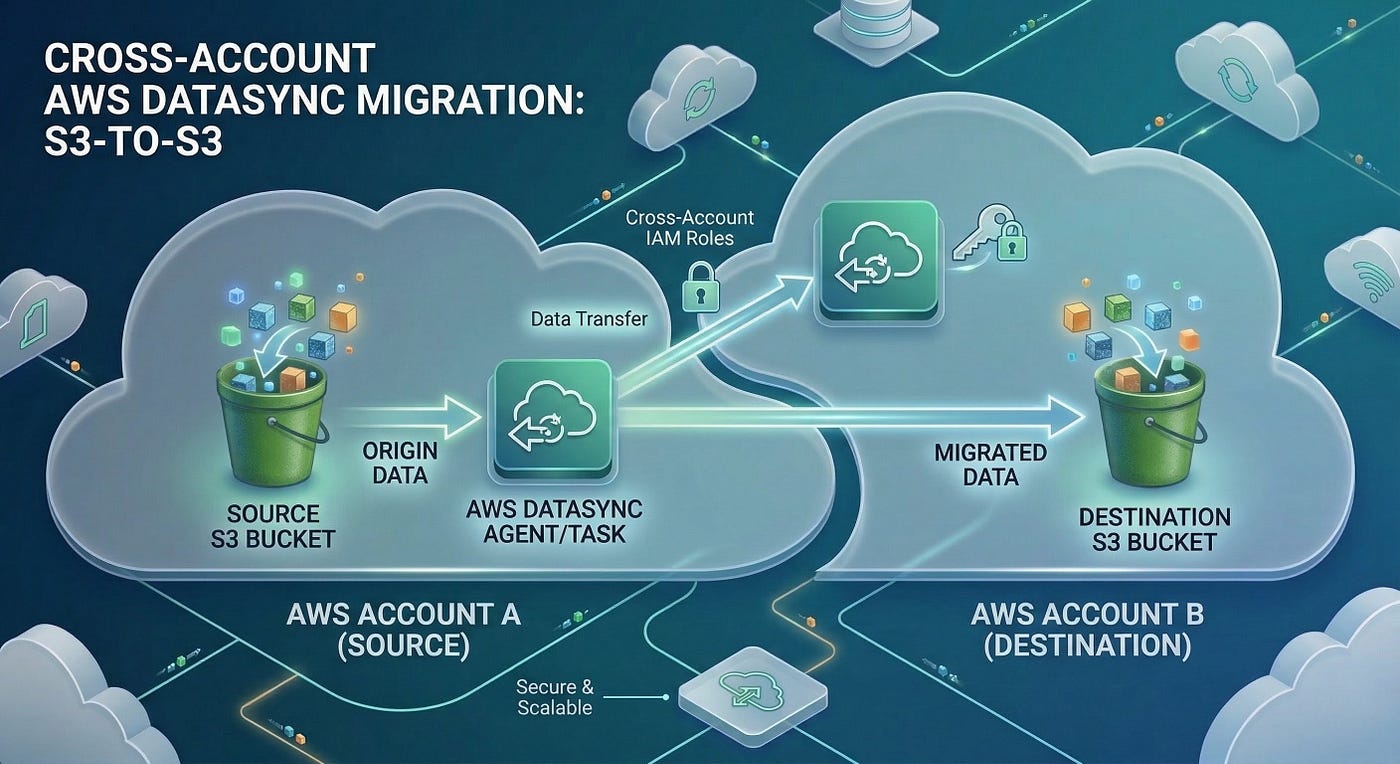
📌 Architecture Overview
- Account A → Hosts source S3 bucket
- Account B → Hosts destination S3 bucket + DataSync
- AWS DataSync → Runs in Account B and pulls data from Account A
🪣 Step 1: Source Bucket Policy (Account A)
Attach this policy to allow cross-account read access:
{
  "Version": "2012-10-17",
  "Statement": [
    {
      "Sid": "CrossAccountDataSyncAccess",
      "Effect": "Allow",
      "Principal": {
        "AWS": "arn:aws:iam::<SRC_ACCOUNT_NUMBER>:role/learning-source-bucket-role"
      },
      "Action": [
        "s3:GetBucketLocation",
        "s3:ListBucket"
      ],
      "Resource": "arn:aws:s3:::learning-data-sync-bucket-1"
    },
    {
      "Sid": "CrossAccountObjectAccess",
      "Effect": "Allow",
      "Principal": {
        "AWS": "arn:aws:iam::<SRC_ACCOUNT_NUMBER>:role/learning-source-bucket-role"
      },
      "Action": [
        "s3:GetObject",
        "s3:GetObjectVersion"
      ],
      "Resource": "arn:aws:s3:::learning-data-sync-bucket-1/*"
    },
    {
      "Sid": "AllowGetObjectTaggingCrossAccount",
      "Effect": "Allow",
      "Principal": {
        "AWS": "arn:aws:iam::<SRC_ACCOUNT_NUMBER>:role/learning-source-bucket-role"
      },
      "Action": "s3:GetObjectTagging",
      "Resource": "arn:aws:s3:::learning-data-sync-bucket-1/*"
    }
  ]
}
This ensures DataSync can read objects from Account A
🪣 Step 2: Destination Bucket Policy (Account B)
Allow write access:
{
  "Version": "2012-10-17",
  "Statement": [
    {
      "Sid": "AllowDataSyncWrite",
      "Effect": "Allow",
      "Principal": {
        "AWS": "arn:aws:iam::<SRC_ACCOUNT_NUMBER>:role/learning-source-bucket-role"
      },
      "Action": [
        "s3:PutObject",
        "s3:AbortMultipartUpload",
        "s3:ListMultipartUploadParts"
      ],
      "Resource": "arn:aws:s3:::learning-bucket-destination/*"
    }
  ]
}
🔐 Step 3: IAM Policies (Account B)
Source + Destination Access Policy
Source Full Access Policy
{
  "Version": "2012-10-17",
  "Statement": [
    {
      "Sid": "SourceAccess",
      "Effect": "Allow",
      "Action": [
        "s3:GetBucketLocation",
        "s3:ListBucket"
      ],
      "Resource": "arn:aws:s3:::learning-data-sync-bucket-1"
    },
    {
      "Sid": "SourceObjectsAccess",
      "Effect": "Allow",
      "Action": [
        "s3:GetObject",
        "s3:GetObjectVersion",
        "s3:GetObjectTagging"
      ],
      "Resource": "arn:aws:s3:::learning-data-sync-bucket-1/*"
    },
    {
      "Sid": "DestinationAccess",
      "Effect": "Allow",
      "Action": [
        "s3:GetBucketLocation",
        "s3:ListBucket",
        "s3:ListBucketMultipartUploads"
      ],
      "Resource": "arn:aws:s3:::learning-bucket-destination"
    },
    {
      "Sid": "DestinationObjectsAccess",
      "Effect": "Allow",
      "Action": [
        "s3:PutObject",
        "s3:AbortMultipartUpload",
        "s3:ListMultipartUploadParts"
      ],
      "Resource": "arn:aws:s3:::learning-bucket-destination/*"
    }
  ]
}
Destination Full Access Policy
{
  "Version": "2012-10-17",
  "Statement": [
    {
      "Sid": "DestinationBucketAccess",
      "Effect": "Allow",
      "Action": [
        "s3:GetBucketLocation",
        "s3:ListBucket",
        "s3:ListBucketMultipartUploads"
      ],
      "Resource": [
        "arn:aws:s3:::learning-bucket-destination"
      ]
    },
    {
      "Sid": "DestinationObjectAccess",
      "Effect": "Allow",
      "Action": [
        "s3:AbortMultipartUpload",
        "s3:DeleteObject",
        "s3:PutObject",
        "s3:PutObjectTagging",
        "s3:GetObject",
        "s3:GetObjectTagging",
        "s3:GetObjectVersion",
        "s3:GetObjectVersionTagging",
        "s3:ListMultipartUploadParts"
      ],
      "Resource": [
        "arn:aws:s3:::learning-bucket-destination/*"
      ]
    }
  ]
}
👤 Step 4: Create IAM Roles
- learning-source-bucket-role → Attach Source Policy
- learning-destination-bucket-role → Attach Destination Policy
🔄 Step 5: Create DataSync Locations (CloudShell)
Source Location
aws datasync create-location-s3 \
--s3-bucket-arn arn:aws:s3:::learning-data-sync-bucket-1 \
--s3-config BucketAccessRoleArn=arn:aws:iam::<SRC_ACCOUNT_NUMBER>:role/learning-source-bucket-role \
--region <your-source-account-region>
📌 Output:
{
  "LocationArn": "arn:aws:datasync:us-east-1:<SRC_ACCOUNT_NUMBER>:location/loc-0abc123456789xyz"
}
Destination Location
aws datasync create-location-s3 \
--s3-bucket-arn arn:aws:s3:::learning-bucket-destination \
--s3-config BucketAccessRoleArn=arn:aws:iam::<SRC_ACCOUNT_NUMBER>:role/learning-destination-bucket-role \
--region <your-destination-account-region>
📌 Output:
{
  "LocationArn": "arn:aws:datasync:us-east-1:<SRC_ACCOUNT_NUMBER>:location/loc-0def987654321xyz"
}
📦 Step 6: Create DataSync Task
aws datasync create-task \
  --source-location-arn <SOURCE_LOCATION_ARN> \
  --destination-location-arn <DEST_LOCATION_ARN> \
  --name "S3-Cross-Account-Migration"
📌 Output:
{
  "TaskArn": "arn:aws:datasync:us-east-1:<SRC_ACCOUNT_NUMBER>:task/task-01d0cd211f3336974"
}
▶️ Step 7: Start Migration
aws datasync start-task-execution \
  --task-arn <TASK_ARN>
📌 Output:
{
  "TaskExecutionArn": "arn:aws:datasync:us-east-1:<SRC_ACCOUNT_NUMBER>:task/task-01d0cd211f3336974/execution/exec-1234567890"
}
🔍 Monitoring
- AWS Console → DataSync → Task Executions
- CloudWatch Logs
- CLI monitoring
✅ Key Takeaways✔ DataSync runs in destination account ✔ Proper IAM + bucket policy setup is critical ✔ Supports large-scale, parallel transfers
🎯 Conclusion
AWS DataSync simplifies cross-account S3 migrations with speed, security, and scalability. With the right IAM roles and policies, you can automate large data transfers effortlessly.
💡 If you found this helpful, feel free to share or connect — more DevOps and AWS content coming soon!
메타데이터
- post_id
- 018c34fd0ca9
- slug
- cross-account-s3-migration-using-aws-datasync-step-by-step-guide-018c34fd0ca9
- url
- https://medium.com/@manisuganthivishnu/cross-account-s3-migration-using-aws-datasync-step-by-step-guide-018c34fd0ca9
- canonical_url
- https://medium.com/@manisuganthivishnu/cross-account-s3-migration-using-aws-datasync-step-by-step-guide-018c34fd0ca9
- author_url
- https://medium.com/@manisuganthivishnu
- status
- ok
- fetched_at
- 2026-06-09 15:37:30




