LightRAG, hands-on: fast graph-RAG with GPT-5 and Qdrant
LightRAG turns your documents into a knowledge graph and answers questions with a dual-level retrieval paradigm — comprehensive like…
LightRAG, hands-on: fast graph-RAG with GPT-5 and Qdrant
LightRAG turns your documents into a knowledge graph and answers questions with a dual-level retrieval paradigm — comprehensive like GraphRAG, but cheaper and faster, with incremental updates instead of full rebuilds. Here are the seven core ideas, then a real end-to-end install wired to OpenAI’s gpt-5-mini, gpt-5.5 and text-embedding-3-small, with a Qdrant vector store.

LightRAG indexes documents into a knowledge graph, then fuses graph structure with vector search to answer queries
LightRAG indexes documents into a knowledge graph, then fuses graph structure with vector search to answer queries
What LightRAG is, in plain words
Retrieval-augmented generation grounds a language model in your own documents so it hallucinates less. That is easy when the answer lives in one passage, and hard when it depends on how several entities relate across many documents. Plain vector RAG returns disconnected chunks and leaves the model to guess how they fit together.
LightRAG keeps the answer grounded but adds structure: during indexing it uses an LLM to pull entities and relationships out of every chunk and assemble them into a single knowledge graph. At query time it reads from that graph on two levels at once — specific entities and broad themes — and fuses the result with a vector search. The published architecture below shows the whole loop: graph-based text indexing on the left, the dual-level retrieval paradigm on the right.

The overall LightRAG architecture. Figure: Guo et al., “LightRAG: Simple and Fast Retrieval-Augmented Generation”, arXiv:2410.05779
The one-sentence version. Build a knowledge graph from your documents during indexing, then answer by retrieving both specific entities and broad topics from that graph — fused with vector search — instead of pulling isolated text chunks.
Graph-based indexing: Recog → Prof → Dedupe
Indexing is three LLM-driven steps per chunk. Recog extracts the entities and the relationships between them. Prof (“profiling”) writes a short index key and a summarizing value for each node and edge, so retrieval is both fast and precise. Dedupe merges identical entities and relations that appear in different chunks, which keeps the graph compact and cheap to operate over.

Recog → Prof → Dedupe turns each chunk into nodes and edges, then merges duplicates into one compact knowledge graph
The payoff is that the graph captures multi-hop structure across the whole corpus, and the key-value profiles give retrieval a precise, vectorizable surface to match against — a better fit than either pure embedding similarity or brute-force community traversal.
Dual-level retrieval & five query modes
At query time LightRAG works on two levels at once. Low-level retrieval targets specific entities and their attributes — perfect for detailed, pointed questions. High-level retrieval targets broad topics and themes that span many entities — perfect for conceptual questions. Extracting both low-level and high-level keys from a single query covers detail and big picture together.

Dual-level retrieval: low-level keys fetch specific entities, high-level keys fetch broad themes, then both merge into one context
Those two levels combine into five mode values you pick per request: local (low-level only), global (high-level only), hybrid (both), naive (plain vector search, no graph), and mix (knowledge graph fused with vector retrieval — the recommended mode, especially with a reranker). Under the hood, LightRAG matches local keywords to candidate entities and global keywords to relations, then expands with the graph's one-hop neighbours for higher-order relatedness.

The five query modes; mix blends graph and vectors and is the recommended default
Why it is cheaper than GraphRAG — and updates without rebuilding
GraphRAG builds community summaries and traverses them with hundreds of API calls and hundreds of thousands of tokens. LightRAG retrieves with a single API call using fewer than a hundred keyword tokens. Indexing costs scale linearly — roughly total_tokens / chunk_size LLM calls — and that is the whole pitch: simple and fast.

Retrieval cost: GraphRAG’s community traversal versus LightRAG’s single keyword-driven call
Updates are just as cheap. New documents go through the same indexing steps, then their nodes and edges merge into the existing graph as a union — no full reprocessing, and old connections stay intact. That is the design behind LightRAG’s incremental pipeline and storage migrations.
Running it: OpenAI GPT-5 + Qdrant
I deployed LightRAG as its API server (which also serves a web UI) wired entirely to cloud APIs, so no GPU is needed. Extraction makes the most LLM calls, so it uses the cost-effective gpt-5-mini; keyword extraction uses the cheapest tier, gpt-5-nano; the final, user-facing answer uses the flagship gpt-5.5. Embeddings use text-embedding-3-small at 1536 dimensions. Vectors live in Qdrant; the key-value store, graph and document status stay in local files.
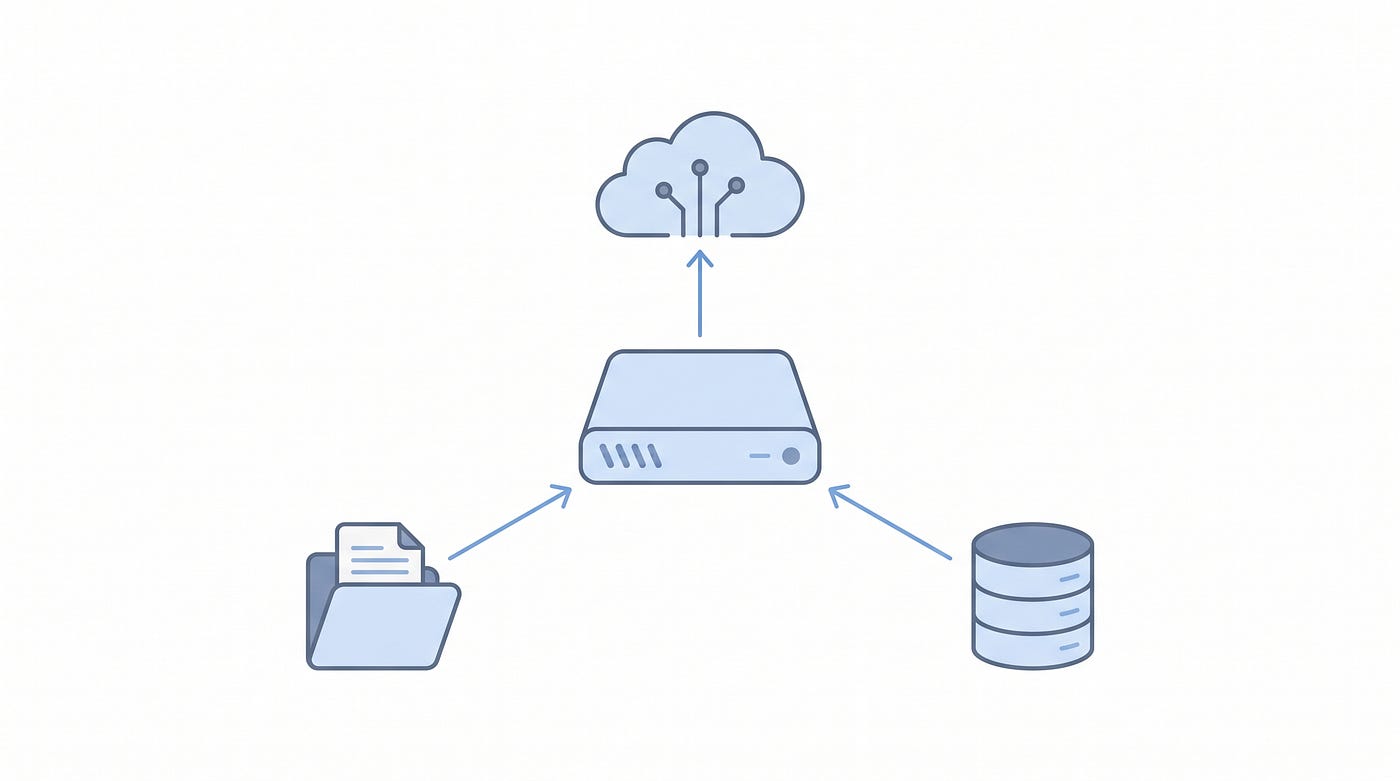
The deployment: an API server talking to OpenAI for the LLMs and embeddings, with Qdrant for vectors and local files for the rest
Installation is six commands:
# 1. Pin tools + create the virtual env (asdf + uv)
asdf local python 3.12.8 && asdf local uv 0.8.8
uv venv .venv --python "$(asdf which python)" && source .venv/bin/activate
# 2. Install LightRAG with the API server + Qdrant client
uv pip install -e ".[api]" "qdrant-client>=1.11.0,<2.0.0"
# 3. Build the WebUI (not shipped pre-built)
( cd lightrag_webui && bun install --frozen-lockfile && bun run build )
# 4. Start the Qdrant vector store
docker start qdrant-demo
# 5. Configure .env  (models, EMBEDDING_DIM=1536, QDRANT_URL, WORKSPACE)
# 6. Launch the server + WebUI on port 9621
lightrag-server
Install complete — lightrag-hku with the OpenAI and Qdrant clients, and no torch/CUDA (API-only)
Using it: Python, then the API
From Python it is four steps, with one rule that trips everyone: you must await rag.initialize_storages() before any insert or query, or you get an AttributeError / KeyError. Insert text (which triggers extraction and embedding), query with a mode like mix, and finalize on exit.
import asyncio
from lightrag import LightRAG, QueryParam
from lightrag.llm.openai import openai_complete_if_cache, openai_embed

async def main():
    rag = LightRAG(
        working_dir="./rag_storage",
        llm_model_func=openai_complete_if_cache,
        embedding_func=openai_embed,
    )
    await rag.initialize_storages()   # REQUIRED before any insert/query
    await rag.ainsert("LightRAG builds a knowledge graph from your docs.")
    answer = await rag.aquery(
        "What does LightRAG build?",
        param=QueryParam(mode="mix"),
    )
    print(answer)
    await rag.finalize_storages()
asyncio.run(main())
Running the server, a quick health check confirms the wiring: the web UI is available, the LLM is gpt-5-mini, the embedding model is text-embedding-3-small, and the vector store is Qdrant — namespaced to its own WORKSPACE so it creates its own collections and leaves any existing ones untouched.

Health check — models, vector storage and workspace all wired, with LightRAG’s collections sitting beside the existing ones
Then a full round-trip: insert a short document, ask a question in mix mode, and the flagship gpt-5.5 writes a grounded answer with a citation back to the source — over retrieval that found 14 entities, 13 relations and the relevant chunk.

End-to-end query in mix mode — a grounded answer from gpt-5.5 with a citation
The knowledge graph it built
The most satisfying part is seeing the graph LightRAG extracts. From a single short document it produced 14 nodes and 13 edges, centred on the LightRAG node and the Dual-Level Retrieval Paradigm node — and the counts match the extraction logs exactly. The built-in web UI renders it interactively, alongside tabs for documents, retrieval and the API.

The knowledge graph in the web UI — 14 nodes, 13 edges, matching the extraction logs
Issues we hit (and the fixes)
Real installs are never perfectly smooth. The sneakiest issue: every query returned “no relevant context found” even though retrieval was clearly succeeding and finding 14 entities. The real error was downstream — gpt-5.5 returned an HTTP 400 because the reasoning-effort value minimal is not supported by that model. Since the setting applies to every role at once, and gpt-5-mini accepts minimal but gpt-5.5 does not, the fix was the tier both share:

Three more gotchas worth knowing before you start
Three more gotchas:
- Model availability. The repo’s default model wasn’t on my key — validate against
/v1/modelsbefore writing config. - The web UI isn’t pre-built. Run the
bun run buildstep, then restart the server so it mounts the assets. - Qdrant was stopped. Start the container, and use a
WORKSPACEname so LightRAG keeps its collections cleanly separated from any existing data.
Verdict
LightRAG hits a genuinely useful sweet spot: the comprehensiveness of a knowledge graph without GraphRAG’s token bill or its full-rebuild updates. The dual-level retrieval is an elegant way to serve both pointed and conceptual questions from one index, and the OpenAI + Qdrant deployment is refreshingly light — no GPU, just API calls and a vector store. The rough edges are operational, not conceptual: validate your model IDs, build the web UI, and mind the cross-model reasoning_effort setting.
Go deeper: Advanced GraphRAG & Knowledge Agents course
If you want to go beyond this LightRAG walkthrough, I’m also building a dedicated YouTube course on advanced GraphRAG and Knowledge Agent concepts. It covers the newer patterns behind graph-based retrieval, agentic workflows, and production-ready RAG design.
Watch the Advanced GraphRAG & Knowledge Agents playlist on YouTube.
[embed]Advanced GraphRAG Course
References
- Full course — my Advanced RAG course on YouTube — the complete, end-to-end treatment of graph-RAG and modern retrieval.
- Paper — Guo, Xia, Yu, Ao, Huang, *LightRAG: Simple and Fast Retrieval-Augmented Generation*, arXiv:2410.05779.
- GitHub —
HKUDS/LightRAG— reference implementation, API server and web UI. - Models: OpenAI
gpt-5-mini,gpt-5-nano,gpt-5.5andtext-embedding-3-small. Vector store: Qdrant. - The overall-architecture figure is reproduced from the LightRAG paper (Guo et al., arXiv:2410.05779). Concept illustrations are static frames from the companion video; remaining illustrations generated with Nano Banana Pro.
메타데이터
- post_id
- 01a63f03e1d2
- slug
- lightrag-hands-on-fast-graph-rag-with-gpt-5-and-qdrant-01a63f03e1d2
- url
- https://medium.com/@omkamal/lightrag-hands-on-fast-graph-rag-with-gpt-5-and-qdrant-01a63f03e1d2
- canonical_url
- https://medium.com/@omkamal/lightrag-hands-on-fast-graph-rag-with-gpt-5-and-qdrant-01a63f03e1d2
- author_url
- https://medium.com/@omkamal
- status
- ok
- fetched_at
- 2026-07-11 12:05:32