AI for Frontend Developers — Day 70
User Preferences & AI Settings Foundation
AI for Frontend Developers — Day 70
AI for Frontend Developers — Week 10 Day 7
User Preferences & AI Settings Foundation
Over the past few weeks, AI Chat Studio has evolved from a simple chat interface into a feature-rich AI application with streaming responses, vision support, voice interactions, file uploads, chat management, and AI tooling. As more features were added, one challenge became clear: users need a centralized place to manage their preferences.
Today I focused on building the foundation for user-specific AI settings and personalization.
🎤 Enhanced Voice AI with Multiple Voice Options
Previously, the browser’s default Speech Synthesis voice was used whenever a user clicked the “Read Aloud” button on an AI response.
While this worked well, different users may prefer different voices depending on language, accent, or personal preference.
To improve the experience, I added support for selecting voices directly from the list provided by the browser’s Speech Synthesis API.
What was implemented?
- Fetched available voices using
speechSynthesis.getVoices() - Displayed available voice options to users
- Allowed users to select their preferred voice
- Applied the selected voice to AI response playback
- Continued supporting browser-native speech synthesis without requiring external TTS services
This makes the voice experience significantly more customizable while keeping implementation lightweight.
⚙️ Built a Dedicated Settings Modal
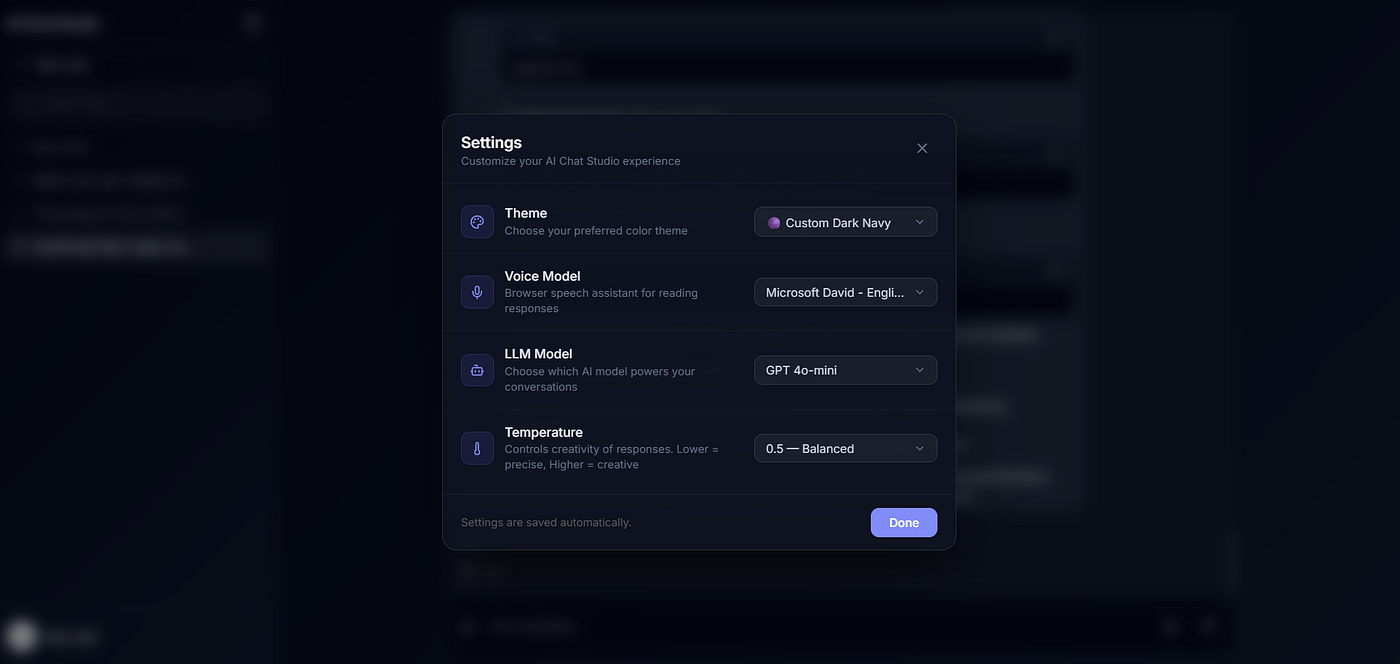
Centralized Settings Modal containing Voice, LLM Model, Temperature, and Theme preferences
As new personalization features were being introduced, it became clear that placing controls throughout the application would eventually create UI clutter.
Initially, I considered creating a dedicated /settings route. However, after evaluating the complexity and user experience, I decided that a centralized Settings Modal was a better fit for the current stage of the application.
The new modal acts as a single location for managing user preferences.
Current Settings Sections
- Theme 🎨
- Voice Model 🎙️
- LLM Model 🤖
- Temperature 🌡️
The modal provides a scalable foundation for future personalization features while keeping the chat interface clean and focused.
🧪 Introduced Experimental AI Configuration Options
Although these settings are not fully functional yet, I added the UI structure and configuration model for future expansion.
🤖 LLM Model
Currently contains a single hardcoded option.
Future versions may support:
- GPT-4o-mini
- GPT-4.1-mini
- Other supported models
🌡️ Temperature
Currently contains a single placeholder value.
In upcoming iterations users will be able to control response creativity.
Examples:
- Lower temperature → more deterministic responses
- Higher temperature → more creative responses
🎨 Theme
Currently contains a single value.
This will eventually support multiple appearance options and user-selected themes.
Adding these placeholders now allows future features to integrate seamlessly without requiring a redesign of the settings experience.
🗄️ Developed User-Specific Settings API
One challenge with storing preferences only in React state is that all settings are lost whenever the page refreshes.
To solve this problem, I designed a dedicated settings architecture that supports user-specific preferences.
Backend Endpoints
GET /api/settings
PUT /api/settings
Stored Settings
{
  "voiceURI": "",
  "theme": "dark",
  "model": "gpt-4o-mini",
  "temperature": 0
}
This architecture provides a centralized source of truth for user preferences and prepares the application for long-term personalization.
Future settings can now be added without introducing separate APIs or storage mechanisms.
🏗️ Why This Matters
Many AI applications focus only on conversations, but production-grade AI systems also need personalization.
By introducing a dedicated settings layer, the application now has a scalable foundation for:
- Voice preferences
- Theme customization
- Model selection
- Temperature controls
- Future AI configuration options
Rather than treating each preference as a separate feature, all user-specific settings can now be managed through a single architecture.
Key Takeaways
✅ Added support for selecting different browser speech synthesis voices
✅ Built a dedicated Settings Modal for managing preferences
✅ Added foundational UI for Theme, LLM Model, and Temperature settings
✅ Designed and implemented user-specific Settings APIs
✅ Established a scalable personalization architecture for future AI features
🔗 Live Demo & Code
👉 Live App: https://ai-chat-app-learning.netlify.app
👉 GitHub Repo: https://github.com/RohitKuwar/ai-chat-app/tree/feature/voice-settings-and-user-preferences
🚀 What’s Next
Today I built the foundation for AI personalization by introducing configurable voice selection, a centralized Settings modal, and user-specific Settings APIs to manage application preferences.
In the upcoming week, I’ll continue expanding this personalization system by integrating support for multiple LLM models, configurable temperature settings, additional application themes, and other advanced user preferences to make the AI experience more customizable and production-ready.
Continue reading: Day 71 — Themes
I’ll be posting here daily as I learn. Let’s grow together and stay ahead in the AI era 🚀
Happy learning ✌️
메타데이터
- post_id
- 01d0ebf475be
- slug
- ai-for-frontend-developers-day-70-01d0ebf475be
- url
- https://medium.com/@rohitkuwar/ai-for-frontend-developers-day-70-01d0ebf475be
- canonical_url
- https://medium.com/@rohitkuwar/ai-for-frontend-developers-day-70-01d0ebf475be
- author_url
- https://medium.com/@rohitkuwar
- status
- ok
- fetched_at
- 2026-07-11 12:36:03






